






FIX SCCM PXE Boot Timeout Issue with Dell Intel 825xxLM Network Adapters
Let’s check the FIX SCCM PXE Boot Timeout Issue with Dell Intel 825xxLM Network Adapters. I have recently noticed through my work colleagues that the PXE boot timeout issue in one office and another is working fine.
I always point the fingers at the network team if there is something similar to this in any customer environment. Most of the scenarios, SCCM settings, Drivers, Task Sequence, etc., will be the same for both the offices apart from the network?
In this particular scenario, we also had the same settings from the SCCM side for both office locations. And also same model devices (Dell Latitude and Precision) work fine in other office locations.
To make this issue more complex, Lenovo and other vendor devices work fine from both office locations! So, how can it be the network issues? How can it be a Dell driver issue? Confusing, isn’t it? Could it be a combination of both?

- FIX: SCCM PXE Error 0x80070490 PXE Boot Failed
- Fix SCCM PXE Issues with C Type Network Adapter Duplicate MACID
SCCM PXE Boot Timeout
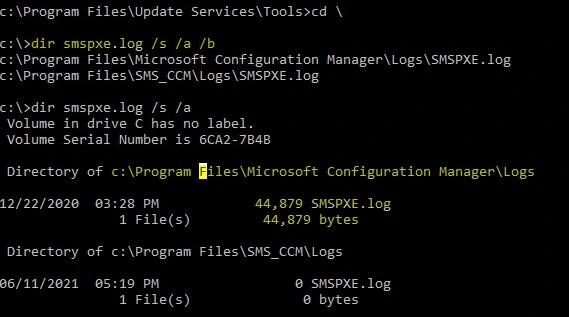
I recommend checking the SMSPXE log if you have any issues with PXE boot timeout or unknown computer support scenarios.
| smspxe.log | Records details about the responses to clients that use PXE boot and information on the expansion of boot images and boot files. The location of the SMSPXE log is the Site Server where the PXE point is installed. |
Drive Letter:\Program Files\SMS_CCM\Logs (PXE enabled remote DP?)
Drive Letter:\Program Files\Microsoft Configuration Manager\Logs (site System Servers – Primary/Secondary?)
More details of Configuration Manager OSD troubleshooting with SMSTS.log -> SCCM OSD Task Sequence Ultimate Guide.
- Fix SCCM PXE Issues with C Type Network Adapter Duplicate MACID
- How to Fix SCCM ConfigMgr PXE WDS OSD Issues and Troubleshooting Guides
- Easily FIX SCCM Task Sequence Unable to find a volume Error Code 0x80070490
SCCM PXE Boot Timeout Issue with Dell Intel 825xxLM Network Adapters
SCCM PXE Boot Timeout Issue seems to be a dell-specific issue with Cisco network switches. So, as I mentioned above, this issue is happening only at one of the office locations because:
- Cisco Switch Configuration
- Dell devices with Intel 825xxLM Network Adapters
This issue is not occurring in a different location because (maybe) the Cisco switch configuration is different in that office location. Dell identified a problem with the Intel 825xxLM Network Adapter, and Cisco switches with Spanning Tree enabled.
As per the Dell KB article, Dell has received reports of this issue occurring with systems equipped with the Intel 825xxLM Network Interface Controller (NIC).
The impacted systems with known SCCM PXE boot Timeout Issues are the systems that are shipped with Intel 825xxLM network adapter by Dell, including the following:
- Latitude E5x20 systems
- Latitude E6x20 systems
- Latitude E5x30 systems
- Latitude E6x30 systems
- Latitude XT3 systems
- OptiPlex 790/990/7010/9010 Systems
- Precision Mobile M4600/M4700/M6600/M6700 systems
- Precision Tx600 Systems
- Precision T1650 Systems
How to FIX SCCM PXE boot Timeout Issues with Dell System
Dell also provided an option to fix this issue. One is to update the BIOS of the impacted Dell Systems. The other option you can implement is disabling the Spanning Tree configuration of Cisco switches.
- Update the BIOS of impacted Dell Systems
- Disable Spanning Tree config of Cisco switches
Take a collective decision whether you want to update the BIOS of the impacted DELL systems or you want to disable the spanning tree configuration of Cisco switches. This decision should be taken as per the change management process of your organization.
Author
Anoop is Microsoft MVP! He is a Device Management Admin with more than 20 years of experience (calculation done in 2021) in IT. He is Blogger, Speaker, and Local User Group HTMD Community leader. His main focus is on Device Management technologies like SCCM 2012, Current Branch, and Intune. He writes about ConfigMgr, Windows 11, Windows 10, Azure AD, Microsoft Intune, Windows 365, AVD, etc.




Discussion