






FIX SCCM SQL-Based Database Replication Failure Between CAS Primary | ConfigMgr
A quick post about FIX SCCM SQL-Based Database Replication. The SQL-based replicated issues are common when you have a Configuration Manager hierarchy with CAS, Primary, or Secondary servers. Let’s check the necessary troubleshooting steps an SCCM admin can perform.
This is another SCCM Database SQL replication error troubleshooting post from the HTMD community. There are several other posts that also help to understand the end-to-end process of SCCM Database replication troubleshooting.
The replication failed for Multiple groups and tried to run the Replication Link Analyzer; the replication Link Analyzer suggested reinit and fixing the issue. Proceeded with the suggested step, and it started reinit for replication Group “Configuration Data.”
The re-initialization of the Configuration Data has been stuck for more than 4-5 hours. On the Primary site, the status is 2; on the CAS, it’s 4 for the replication group “Configuration Data,” and no progress has been made. We attempted to restart SMS_executive on both the CAS and Primary sites, but it didn’t resolve the issue. We also attempted a failover on the primary site SQL Server.

- FIX SCCM SQL Replication Issues Using Replication Link Analyzer
- Troubleshoot and FIX SCCM SQL Backlog Issues using SSMS
- FIX SCCM SQL-Based Database Replication Failure Between CAS Primary
Microsoft Documentation-ConfigMgr DRS Troubleshooting https://support.microsoft
Verify SCCM Replication issue Groups from SCCM SQL DB Queries
If DRS data replication fails from Primary to CAS and vice versa, follow the below steps to fix the issue.
Run “spdiagdrs” to verify if any messages are pending in the outgoing messages queue and to see which DRS replications are failing for global and site.
Below is the query to track the re-initialization status of ‘Configuration Data’ on the CAS and PR1 site CM database.
SELECT * FROM RCM_DrsInitializationTracking WHERE ReplicationGroup = 'Configuration Data' and SiteRequesting = 'PR1' order by CreatedTime descFound both the sites were trying to finish the re-initialization for replication group ‘Configuration Data’ with different replication Request Tracking GUID
On primary Site (PRI): The request tracking GUID ending with E4F with status 2 and the same id was Aborted on the CAS site.
On Central Site (CAS): The request tracking GUID ending with 73C with status 4 and the same ID was Aborted on the PR1 primary site.

Hear one site was sending the process, and the other was not accepted due to the aborted ( the request tracking status 7).
NOTE: It’s not recommended to update/modify the SQL Database directly. If you see an error in SQL, I recommend raising a ticket with MS and getting it fixed. You can also try backing up the SQL DB before running the following modification queries.
Solution 1 – FIX SCCM SQL-Based Database Replication
Aborted the stuck replication Request Tracking GUID on Central Site CAS and Primary Site PR1 CM database using the below query. (Change the request tracking GUID below)
UPDATE CM_DrsInitializationTracking SET InitializationStatus =7 WHERE RequestTrackingGUID = '<<Request Tracking GUID>>'- After running the above query on both the sites, the new process for reinit RG “Configuration Data” started automatically, reinit was completed, and the site became active.
- If initialization did not start automatically, we can use the below SQL command to reinit it manually.
- Run the SQL query below on the Primary or CAS site CM database to initialise the replication group.
EXEC spDrsSendSubscriptionInvalid '<ReceivingSiteCode/Subscriber>', '<SendingSiteCode/Publisher>', '<ReplicationGroupName>'Example:
The replication failed for Configuration data from PRI to CAS.
EXEC spDrsSendSubscriptionInvalid 'PRI', 'CAS', 'Configuration Data'The replication is failed for “Configuration data” from CAS to PRI.
EXEC spDrsSendSubscriptionInvalid 'CAS', 'PRI', 'Configuration Data'Query to check the Initialization status
select InitializationPercent, InitializationStatus, TryCount,* from RCM_DrsInitializationTracking where InitializationStatus not in (6,7)order by CreatedTime desc;Initialization Status
Let’s understand the SCCM Database Replication initialization status.
- 1 is Making a Request
- 2 is Sent BCP file
- 3 is Acknowledgement from CAS Server
- 4 is BCP Finished
- 5 is CAS Prepare CAB file, after a copy of CAS to Primary state changes to
- 6 is Good
- 7 is the Previous attempt is aborted
Solution 2: FIX SCCM SQL-Based Database Replication
If DRS data replication fails from Primary to CAS and vice versa, follow the below steps to fix the issue.
Run spdiagdrs and verify if any messages are pending in the outgoing messages queue and see which DRS replications are failed for global and site.
Run below queries on CAS and Primary DB to see any backlogs.
Select * from DrssendHistory where ProcessedTime is NULL
Select * from RCM_ReplicationLinkStatus where snapshotapplied <>1
select * from sys.transmission_queue order by enqueue_time desc
If you see any transmission backlogs run the below query to clean up backlogs.
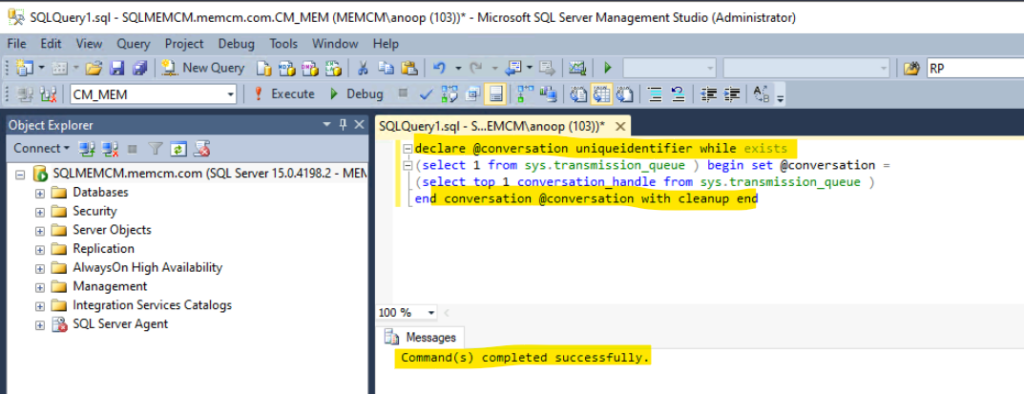
Global data replication Re-initiation
Create a .PUB file in rcm inbox folder on the primary site for failed global data group
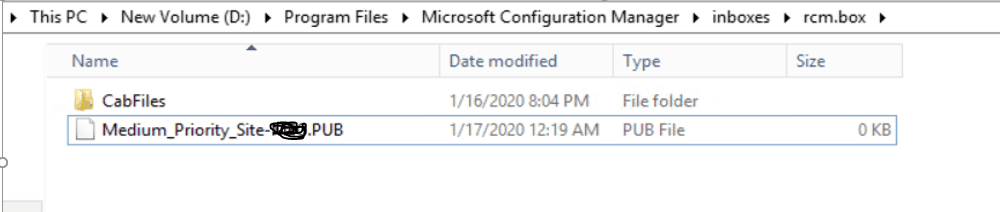
Verify rcmctrl.log for data processing in the primary server
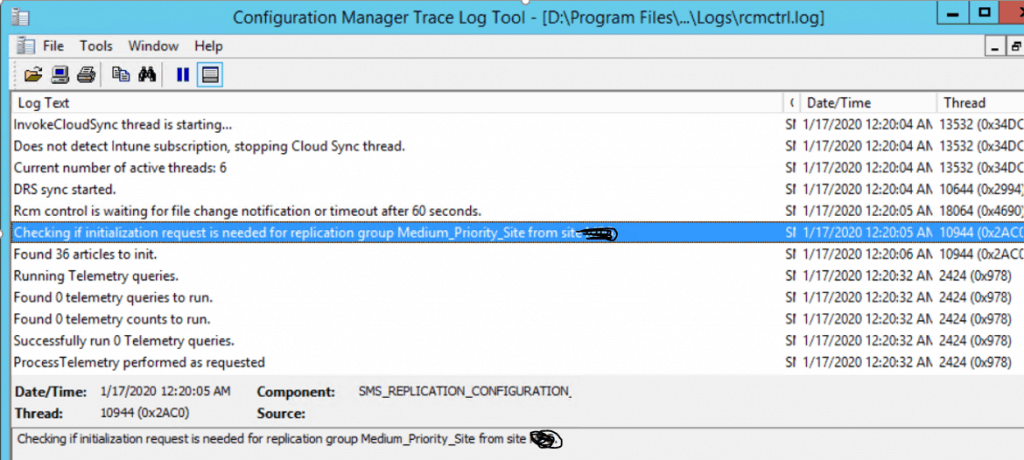
You can check the percentage initialization with the below query.
Select * from RCM_DrsInitializationTracking where InitializationStatus not in (6, 7) order by createdtime desc
Once the existing data group replication has been completed, you can re-initiate other global data groups individually.
NOTE! – Do not re-initiate two data groups at a time; we’ll need to do it one at a time and wait for the first one to be completed
The next step is to re-initiate failed site DRS data from the Primary server one by one.
Site data replication Re-initiation
- Create a .PUB file in the CAS server rcm inbox folder for the failed site data group
Verify rcmctrl.log for data processing in the primary server
You can check the percentage initialization with the below query.
Select * from RCM_DrsInitializationTracking where InitializationStatus not in (6, 7) order by createdtime desc
At 41 percent, you see below folders created on the rcm box
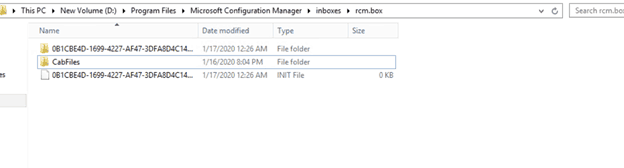
Once data group replication is completed, you can see the message below in rcmctrl.log.
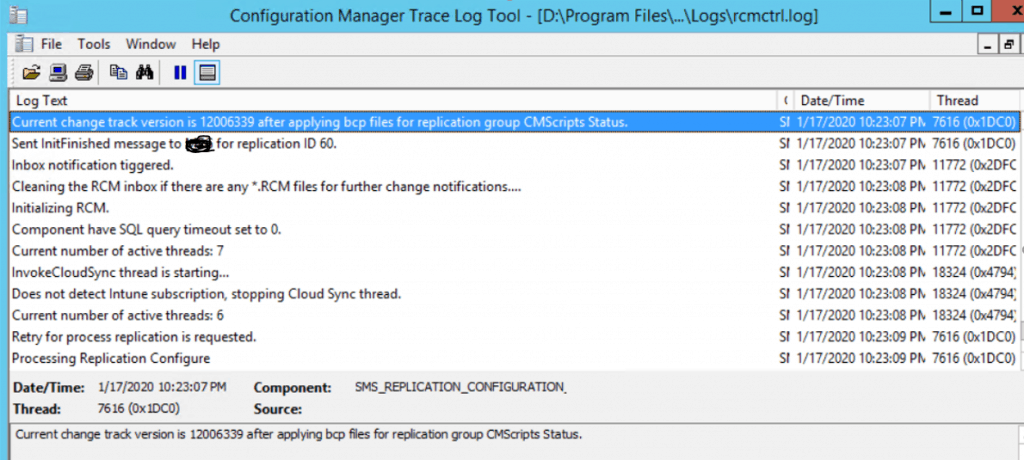
Once the existing data group replication has been completed, you can re-initiate other site data groups one by one.
NOTE! – Do not re-initiate two data groups at a time. We’ll need to do it one at a time and wait for the first one to be completed.
Resources
- SCCM Replication Issue – SQL Replication Troubleshooting Guide
- FIX–SCCM Upgrade Issue – SQL-Based Replication
We are on WhatsApp. To get the latest step-by-step guides and news updates, Join our Channel. Click here –HTMD WhatsApp.
Author
Mohan Kumar is a Technical Architect with over 12 years of experience as a System Center Configuration Manager and hands-on experience in SCCM, SCOM, SCORCH, SCVMM, SCEP, SQL, Azure, Intune, Update Management, etc. The main area of interest is the design and implementation of ConfigMgr, OpsManager, Orchestrator and Azure Infrastructure. He has vast knowledge of On-perm to Azure migration, SCOM to Azure Monitor, Migration On-Perm SQL to Azure SQL Always on setup, Configure serverless Database in Azure, Configure and Fix the ConfigMgr infrastructure related issue & troubleshooting.




Discussion