






FIX Search Result Issues with Shared Mailbox Outlook Desktop App
Let’s discuss how to Fix Search Result Issues with Shared Mailbox Outlook Desktop App. When using Outlook Desktop to search within the current folder of an auto-mapped shared mailbox, users may encounter a problem. The search yields no results or displays results from folders other than the planned one.
If someone has permission to check everything in a shared mailbox and tries to search in just one folder using “Current Folder,” a message might pop up saying, “Showing results from all folders. No results found in the current folder.”
This means that even though they wanted to search only in that specific folder, Outlook Desktop App search is looking everywhere, including other mailboxes. So, it’s not finding anything in the chosen folder but checking around elsewhere.
The situation might be confusing because the search settings are not quite right. They might need to fix some of the search settings to get the results they are looking for in that specific folder. Adjusting these settings should help them find what they are searching for without scanning the different mailboxes.

| Outlook Known Issues |
|---|
| Searching the Current Folder of an auto-mapped shared mailbox in Outlook Desktop returns no results or results from other folders |
- Fix Outlook Desktop Crashes Issue when sending Emails
- FIX Spoofing Vulnerability with Outlook Image Blocking and Read-Only Meeting Body
- FIX Restricted Access to FQDN and IP Hyperlinks Issues in Outlook
- FIX Slow Attachment Saving Issue in the Outlook App
- FIX Outlook unexpectedly prompts Reopen items from your last session Issue
Why are we Experiencing Issues when Searching within a Specific Folder of an Auto-mapped Shared Mailbox in Outlook Desktop?
The problem arises when the search results show nothing or display information from folders other than the planned one. This can disrupt the search experience.
How Can We Fix the Search Settings to Get Accurate Results in the Chosen Folder?
You can quickly fix the search settings to get accurate results in the current folder. Users should make some changes to the search settings. This means adjusting the configurations so that the search specifically targets the intended folder instead of scanning through all the mailboxes.
Issue – Search Result Issues with Shared Mailbox Outlook Desktop App
This article guides you in understanding and solving issues when searching in a shared mailbox folder in Outlook Desktop that’s automatically mapped. If you are facing challenges with the search not working as expected, we have covered you with simple steps to fix it.
Investigation Status from Microsoft
The problem arises due to ongoing changes related to the migration to Microsoft Search, a process currently in progress. Microsoft team is thoroughly investigating the matter to understand the root cause and find a solution.
Workaround – Adding Exchange Account for Shared Mailbox in Outlook
The investigation is ongoing, and the users can implement a workaround to mitigate the problem. The workaround involves configuring the Shared Mailbox as an Exchange Account.
Let’s discuss adding an Exchange Account for Shared Mailbox in Outlook. By following the steps below, you can easily incorporate the Exchange account for the shared mailbox into your Outlook profile as an additional account.
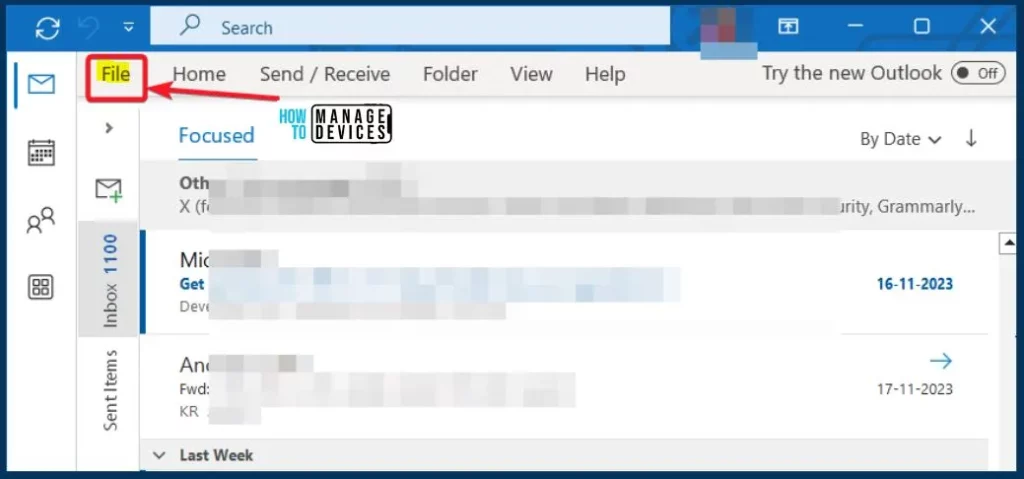
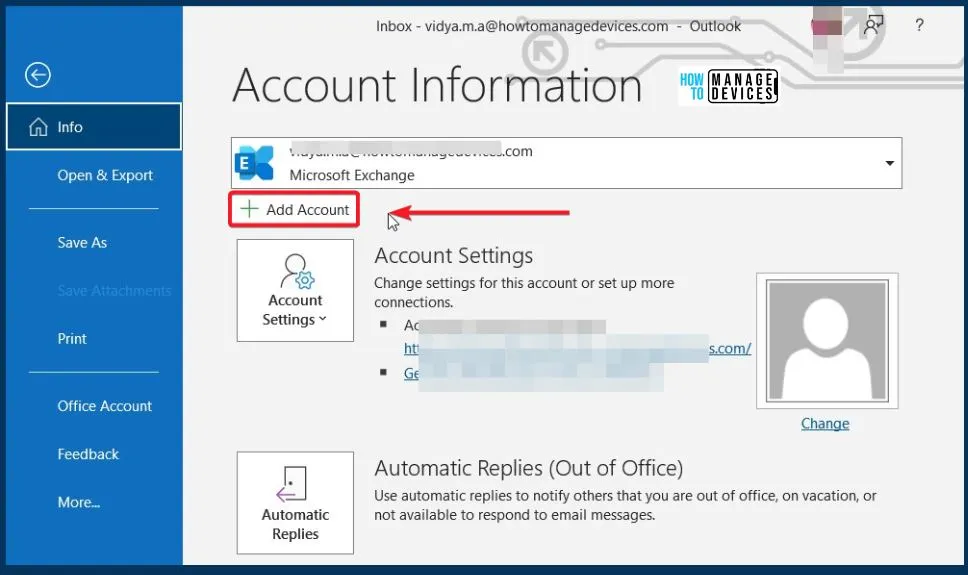
- Open Outlook and go to File > Add Account.
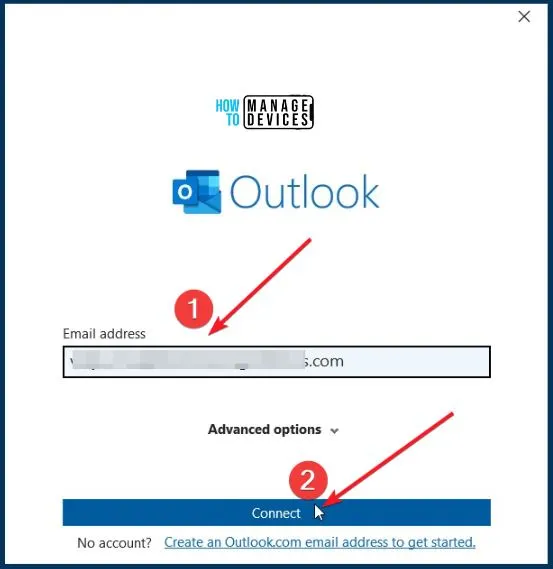
- Enter the Email address associated with the shared mailbox
- And Click the Connect button
- When prompted to sign in, use your email address instead of the shared mailbox email.
- Click Next
- After successful authentication, restart Outlook for the changes to take effect.
Note! – If the sign-in prompt doesn’t allow you to change the email address, choose “Sign in with another account” to open a new sign-in prompt. Enter your email address instead of the shared mailbox email.
We are on WhatsApp. To get the latest step-by-step guides and news updates, Join our Channel. Click here – HTMD WhatsApp.
Author
About the Author – Vidya is a computer enthusiast. She is here to share quick tips and tricks with Windows 11 or Windows 10 users. She loves writing on Windows 11 and related technologies. She is also keen to find solutions and write about day-to-day tech problems.




Discussion