






Windows Backup & Restore Tool – Veeam Agent for Windows
Let us discuss the Windows Backup & Restore Tool—Veeam Agent for Windows. This enterprise-class tool allows you to back up Windows 10 desktops and laptops without paying a license fee.
The Veeam Agent for Microsoft Windows will help you backup and restore Windows workstations and servers. This tool can also be used as a Free Windows 10 Backup Tool and Restore.
Installing and configuring Veeam Agent for MS Windows on your servers allows you to back up and restore your Windows server with Veeam Backup & Replication.
Afterwards, you can organize and manage your backups from a unified console and keep them on a Veeam backup repository.

Table of Contents
License – Veeam Agent for Microsoft Windows
Veeam Agent for Microsoft Windows is a free Windows 10 desktop and laptop tool. However, you must pay the license cost for the backup workstation and Windows servers.
- Free Tool to Backup and Restore Windows 10 & Tool to Create Windows 10 1809 Recovery Media
- Backup Email OneDrive SharePoint Data with Veeam Backup O365 & Recover Email OneDrive SharePoint Data with Veeam Backup O365
To work with a commercial version of Veeam Agent for Microsoft Windows, you must obtain a license and install it on a protected computer.
The following are the license options for the Veeam Agent for Microsoft Windows.
- Free Tool for Windows Desktop and Laptops
- Trial Version with full functionality for 30 days
- License for Windows Workstation
- License for Windows Servers
If you do not install a license, you can only use the product’s free edition.
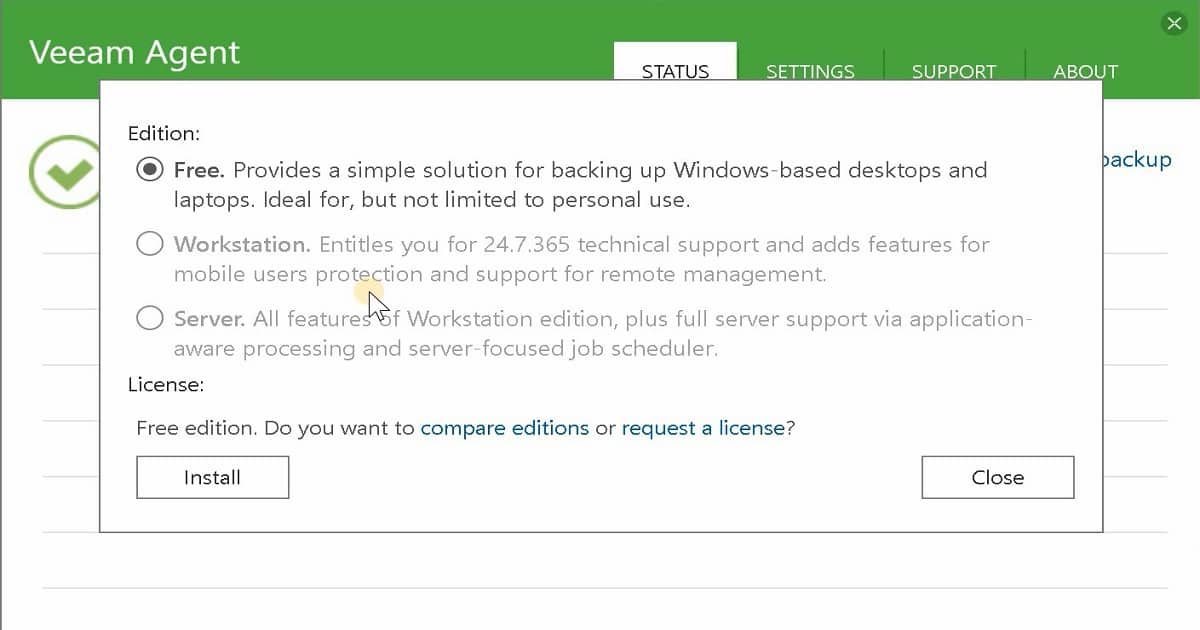
Veeam Agent for Windows – Install License
Launching the Veeam Agent for the first time displays a notification window offering to install a license. You can choose to install the license immediately or postpone this operation.
You can use the product’s free edition until you install a license for the Veeam agent. You need to install the commercial license to back up Windows servers.
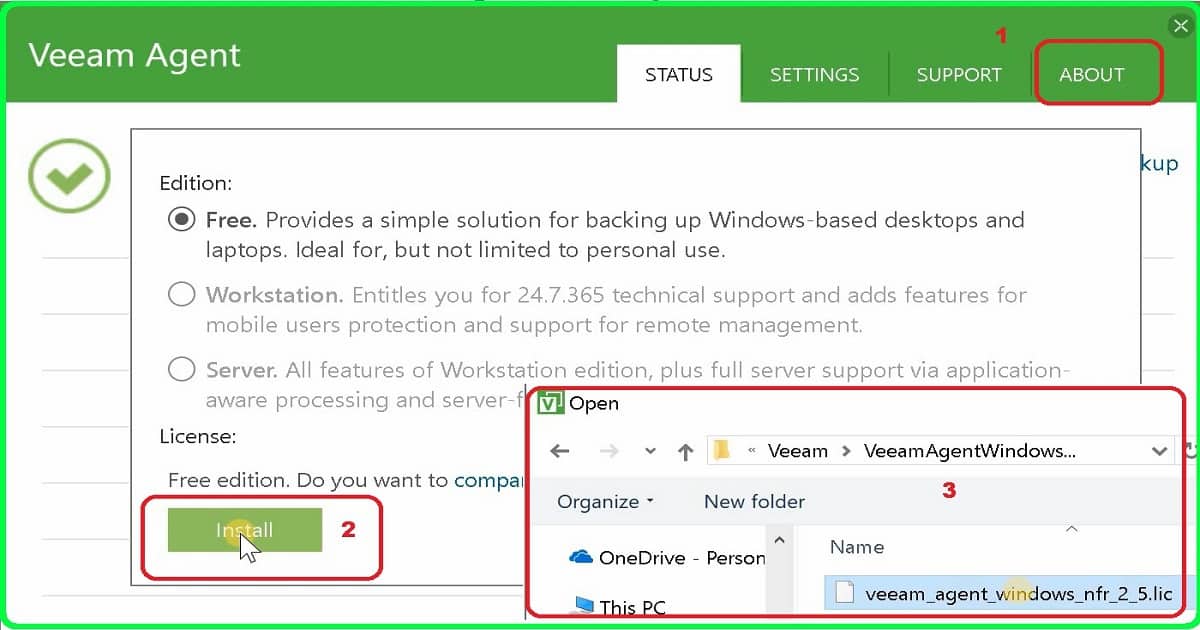
- Launch Veeam Agent
- Click on About
- Click on the Install button
- Browse the license file
- Click on Open
- If the license file is valid, the Workstation & Server options will be enabled for the Veeam agent.
How to Windows 10 Recovery Media
In the following video post, you will see how to install Veeam Agent for Microsoft Windows. Also, recovery media or boot media for Windows 10 1809 should be created. Try out the Free Windows 10 Backup Tool and recovery media.
Free Windows 10 Backup Tool & Restore Tool
Free Tool from Veeam agent to backup and restore Windows 10 devices. How to Backup Windows 10 and How to Restore Windows 10 Files. Try out the free Windows 10 Backup Tool.
Resource
- Veeam Agent for Microsoft Windows License Details – https://helpcenter.veeam.com/docs/agentforwindows/userguide/license_editions.html?
We are on WhatsApp. To get the latest step-by-step guides and news updates, Join our Channel. Click here –HTMD WhatsApp.
Author
Anoop C Nair is Microsoft MVP! He is a Device Management Admin with more than 20 years of experience (calculation done in 2021) in IT. He is a Blogger, Speaker, and Local User Group HTMD Community leader. His primary focus is Device Management technologies like SCCM 2012, Current Branch, and Intune. He writes about ConfigMgr, Windows 11, Windows 10, Azure AD, Microsoft Intune, Windows 365, AVD, etc.



Discussion