






Get macOS PKG App Details with ID Publisher and Last Modified Date using Intune Copilot Explorer
Get macOS PKG App Details with ID Publisher and Last Modified Date using Intune Copilot Explorer. On macOS, applications are shared in two main formats such as DMG and PKG. These are different ways of packaging apps so that users can install them on their computers. Both do the same basic job of getting the app onto your Mac, but the process and purpose behind them are slightly different.
A PKG file contains scripts and instructions for where files should go and what extra steps should happen. PKG files are useful for apps that need system-level changes, drivers, or multiple components installed in different places. Instead of dragging and dropping, you follow an installation wizard, and the PKG handles everything automatically.
A DMG file is like a virtual disk that appears on your desktop when opened. It usually contains the app and sometimes a shortcut to the Applications folder, and installation is as simple as dragging the app into Applications
Getting details about macOS PKG applications is very useful for IT admins and organizations because it gives them control and visibility over how apps are installed and managed. PKG apps perform complex installations, such as placing files in system folders, adding drivers, or running scripts.

Table of Contents
Get macOS PKG App Details with ID Publisher and Last Modified Date using Intune Copilot Explorer
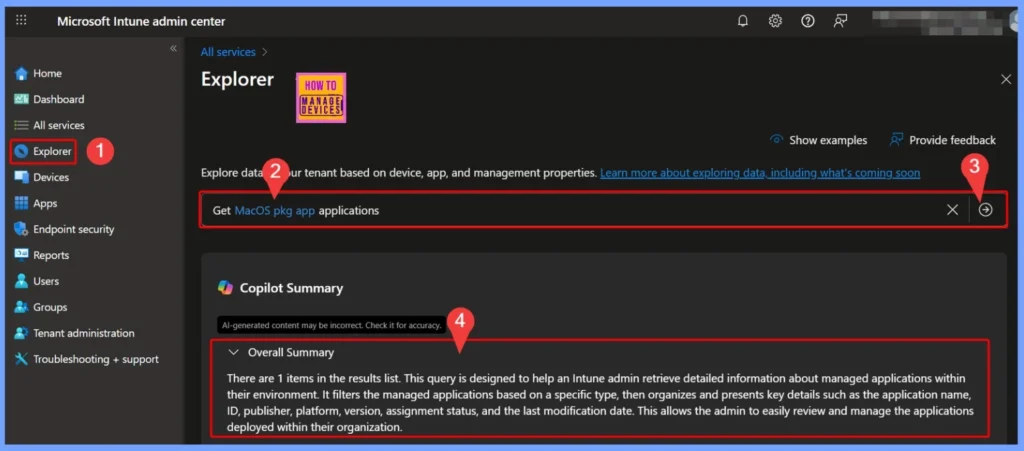
By knowing which PKG apps are installed, IT admins can make sure the right software versions are deployed, confirm that apps are installed correctly, and troubleshoot issues if something goes wrong. Sign in to the Microsoft Intune Admin Center.
- On the left-hand side menu, select Explorer to open the tool.
- In the Explorer tab go and type the query as “Get MacOS Office Suite app applications“
- The Copilot then helps you to check and give the results
- How to use Intune Explorer with Security Copilot to Find Windows and MacOS Device Data across your Tenant
- Fix macOS Error 100001 SSO Error while using Intune
- No Wipe No Reenrollment Needed for MacOS iOS iPad OS Devices Migration to Intune from other MDM Solutions
Ensuring Compliance and Efficient Management of macOS Managed Applications
Reviewing the list of managed applications and their details helps IT admins confirm that all essential apps are properly deployed and kept up to date. This not only maintains compliance but also ensures that users always have access to the tools they need.
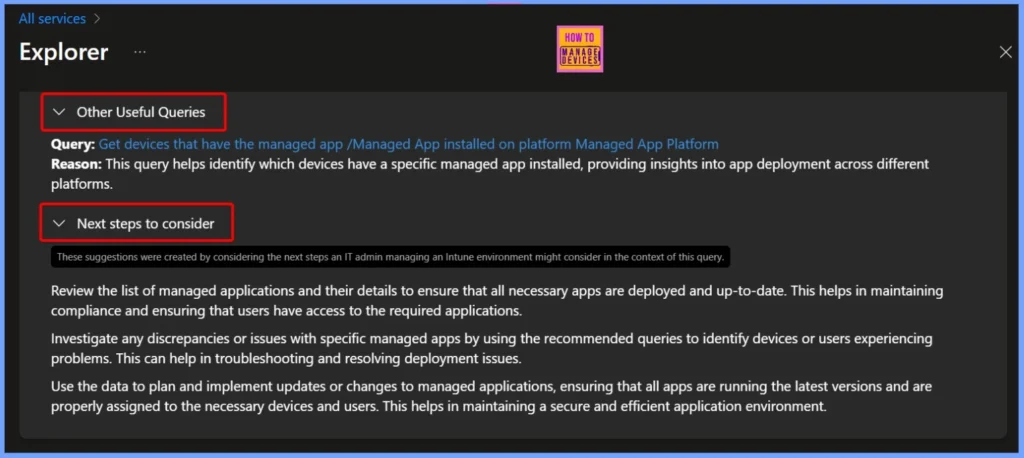
| Other Useful Queries | Next steps to consider |
|---|---|
| Query: Get devices that have the managed app /Managed App installed on platform Managed App Platform Reason: This query helps identify which devices have a specific managed app installed, providing insights into app deployment across different platfor | Review the list of managed applications and their details to ensure that all necessary apps are deployed and up-to-date. This helps in maintaining compliance and ensuring that users have access to the required applications. Investigate any discrepancies or issues with specific managed apps by using the recommended queries to identify devices or users experiencing problems. This can help in troubleshooting and resolving deployment issues. Use the data to plan and implement updates or changes to managed applications, ensuring that all apps are running the latest versions and are properly assigned to the necessary devices and users. This helps in maintaining a secure and efficient application environment. |
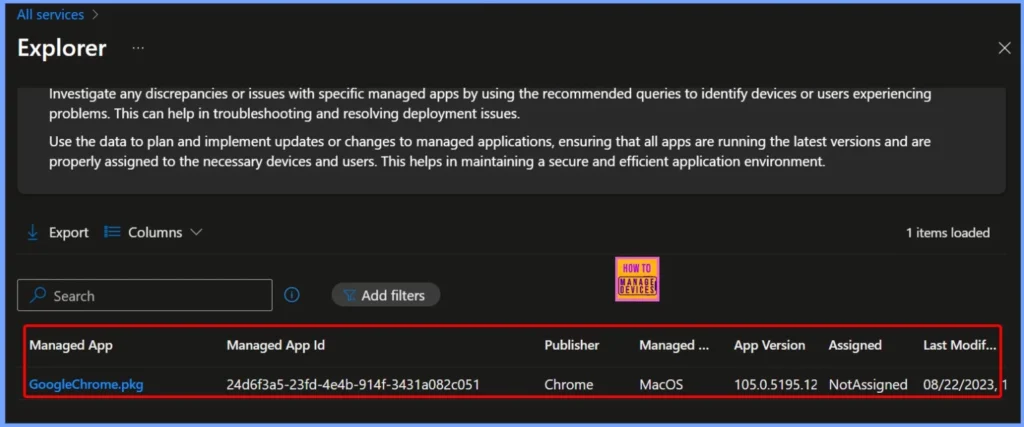
End Result – macOS PKG App Details in Intune
The query result shows the managed application Microsoft 365 Apps for macOS with its unique Managed App ID 3ba563e6-015b-4988-9381-b8082386003b. Published by Microsoft, this PKG-based app is identified for the macOS platform.
| Managed App | Managed App ID | Publisher | Managed App Platform | Assigned | Last Modified Date and Time |
|---|---|---|---|---|---|
| Microsoft 365 Apps for macOS | 3ba563e6-015b-4988-9381-b8082386003b | Microsoft | MacOS | NotAssigned | 05/08/2023, 10:38 AM |
Need Further Assistance or Have Technical Questions?
Join the LinkedIn Page and Telegram group to get the latest step-by-step guides and news updates. Join our Meetup Page to participate in User group meetings. Also, join the WhatsApp Community to get the latest news on Microsoft Technologies. We are there on Reddit as well.
Author
Anoop C Nair has been Microsoft MVP for 10 consecutive years from 2015 onwards. He is a Workplace Solution Architect with more than 22+ years of experience in Workplace technologies. He is a Blogger, Speaker, and Local User Group Community leader. His primary focus is on Device Management technologies like SCCM and Intune. He writes about technologies like Intune, SCCM, Windows, Cloud PC, Windows, Entra, Microsoft Security, Career, etc.


Discussion