






How to Configure Google Gemini Integration Settings using Microsoft Intune
Key Takeaways
- Google Gemini is a multimodal AI model and personal AI assistant.
- You can control Google Gemini integration Settings using Intune.
- Google Gemini serves as both the underlying AI engine and the conversational chatbot interface
- You can jump into the Gemini app or website whenever you need help brainstorming, writing, or figuring things out.
How to Configure Google Gemini Integration Settings using Microsoft Intune! Google Chrome’s Generative AI settings in Intune allow administrators to centrally manage how Chrome’s AI-powered features function across enterprise devices. These settings are especially important in today’s AI-driven era. Once devices are properly enrolled in Microsoft Intune, administrators can seamlessly enforce these policies, ensuring compliance, security, and consistent user experiences across the organisation.
Table of Contents
Table of Contents
Importance of Configuring Chrome GenAI Policy via Intune
Configuring Google Chrome GenAI settings through Intune is important because it provides administrators with centralised control over how AI models are handled on managed devices. Through these policies, IT teams can control whether Chrome downloads and uses local foundational AI models, enable or disable integrations like Gemini, and align browser AI capabilities with organisational compliance requirements.
This ensures compliance with organisational privacy requirements, prevents unnecessary storage consumption, and aligns AI usage with enterprise governance standards. Using Intune to deploy the settings also simplifies management across large environments, allowing consistent enforcement of security and performance policies without manual intervention.
- How to Configure Generative AI Local Foundational Model Settings in MS Edge Browser using M365 Admin Center
- Enable AI Gen Themes in Edge Browser using Microsoft 365 Admin Center Configuration Policy
- New Local AI Agent Security Baseline in MS Intune to Improve OpenClaw Security and Compliance
Disable Google Gemini Integration Settings
You may be able to enable or disable Google Gemini Integration Settings using Microsoft Intune. Configuring them through Intune ensures consistent enforcement, supports compliance, and balances innovation with organisational privacy and performance standards.

- Sign in to the Microsoft Intune admin center.
- Navigate to Devices > Windows > Configuration.
- Click Create, then select New Policy.
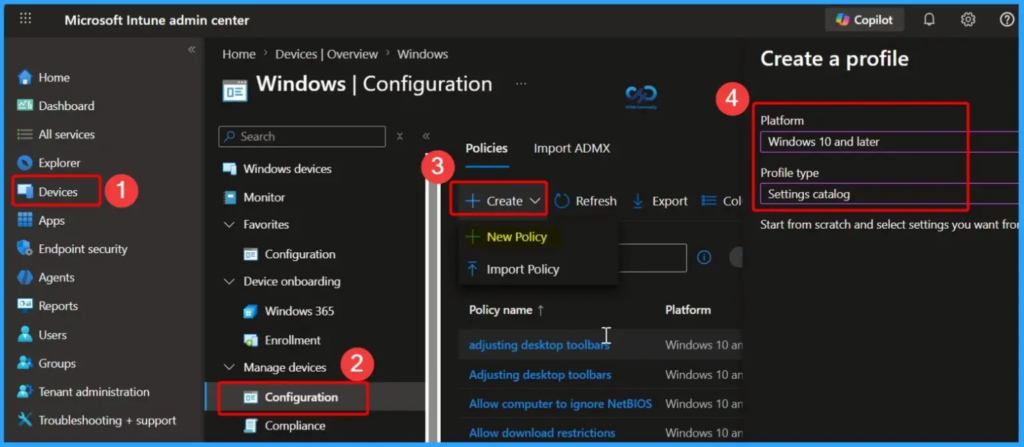
Under Platform, choose Windows 10 and later and under Profile type, select Settings catalog to proceed further. Click on Create to proceed further.
When the Create policy wizard opens, navigate to the Basics tab and configure the required settings. Provide a unique and descriptive name for the policy in the Name field, and optionally add further details in the Description field. Once these entries are complete, select Next to continue with the policy creation process.
| Platform | Profile type |
|---|---|
| Windows 10 and later | Settings catalog |
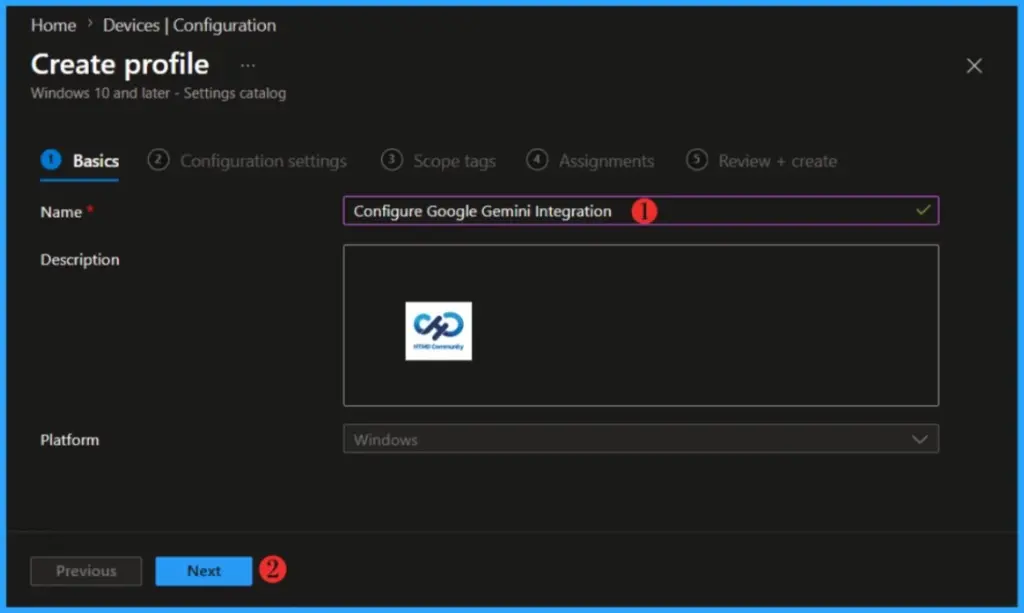
Click Next to proceed further. When you click Next, you will get the Configuration Settings section. In the Configuration Settings section, under Settings Catalog, click Add Settings. In the next tab, type “Gemini Integration” in the search box and click Search. Select Settings for Gemini integration.
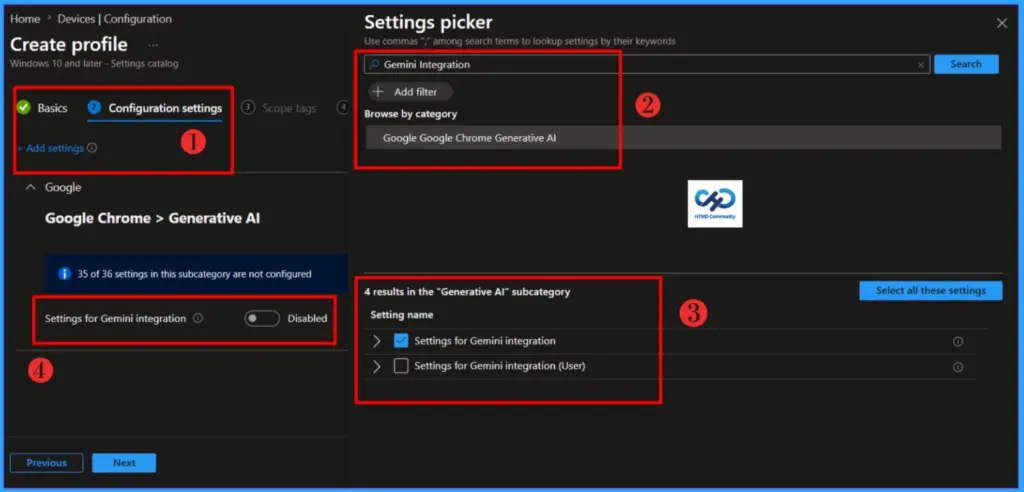
NOTE! Settings for Gemini integration allows Gemini app integrations. 0/unset = Gemini integration will be available for users. 1 = Gemini integration will not be available for users. If the policy is unset, its behavior is determined by the GenAiDefaultSettings policy. For more information, please check the Help Center article https://support.google.com/chrome/a?p=gemini_in_chrome.Enable the Settings for Gemini integration. Once enabled, you will see the option ‘Settings for Gemini integration (Device).’ Toggle the switch and select Do not allow Gemini integrations.
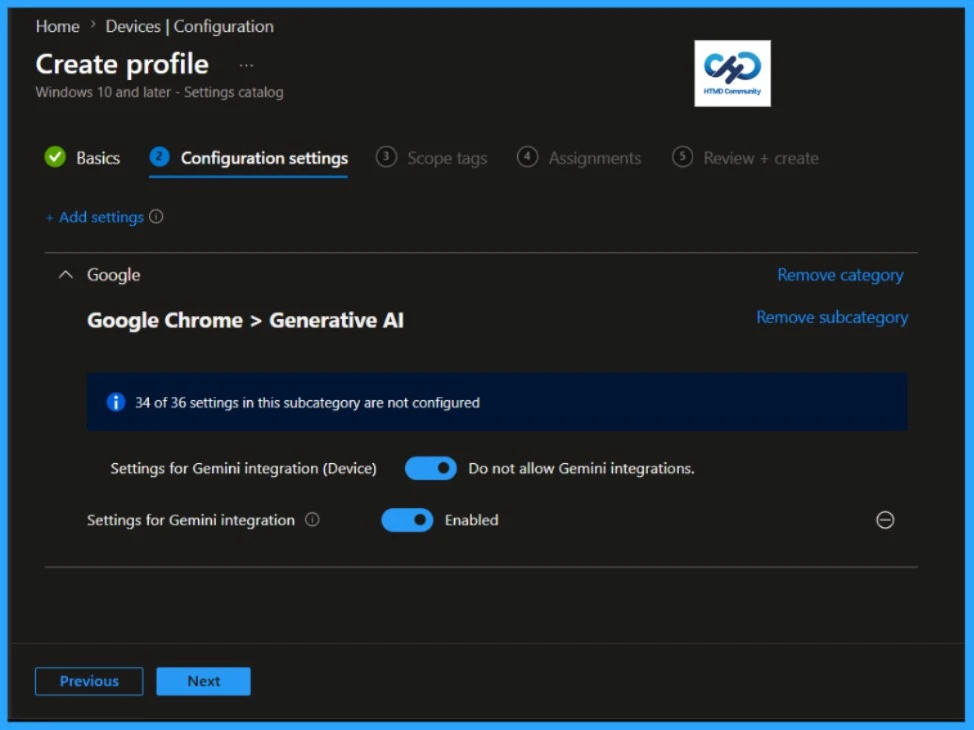
Click Next to display the Scope tags page. Add the Scope tags if you wish, and click Next to assign the policy to computers. I will deploy it to the HTMD Test Group Device Group.
Read more : Intune Scope Tags Implementation Guide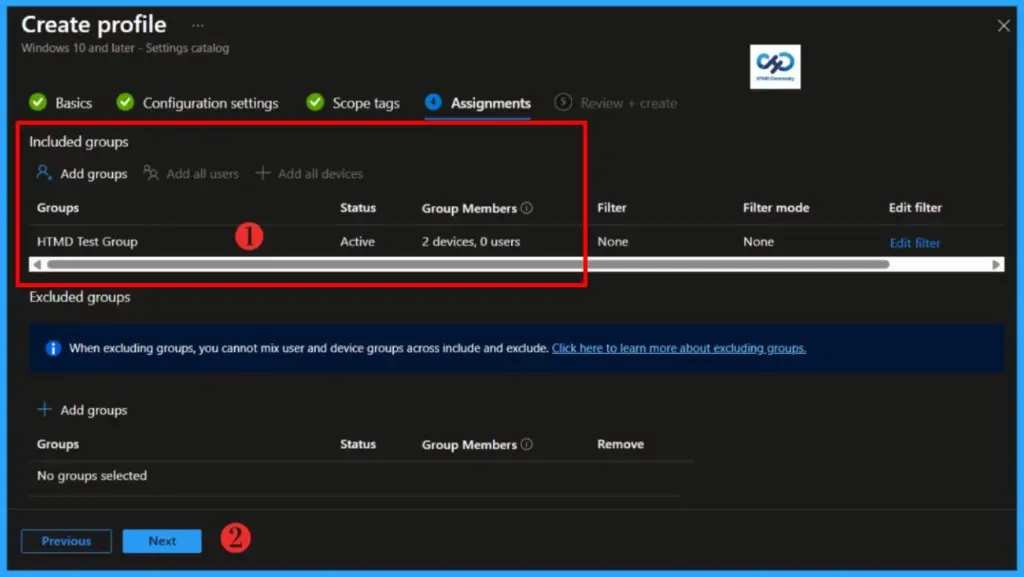
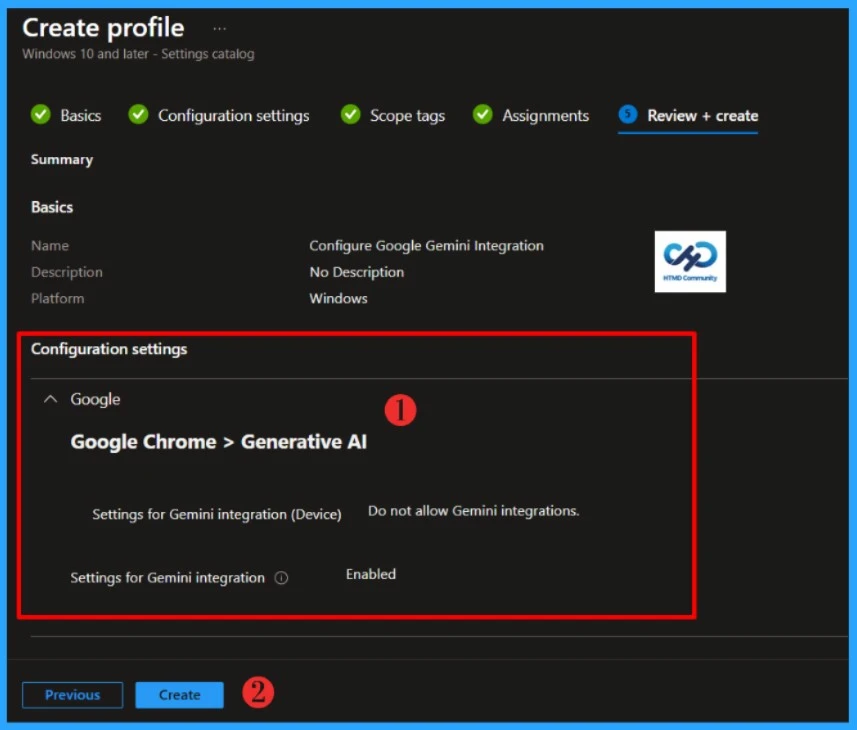
Please take a moment to carefully review all the settings you’ve defined for the Configure Google Gemini Integration Settings policy on the “Review + Create” page. When you’re ready, select “Create” to implement the changes.
- Easily Disable Bluetooth using Intune How to Guide
- How to Allow Adding Non Microsoft Accounts Manually Using Intune Setting Catalog
- How to Allow Importing of Autofill Form Data in Microsoft Edge Via Setting Catalog in Intune
Monitor Configuration Profile Deployment in Microsoft Intune
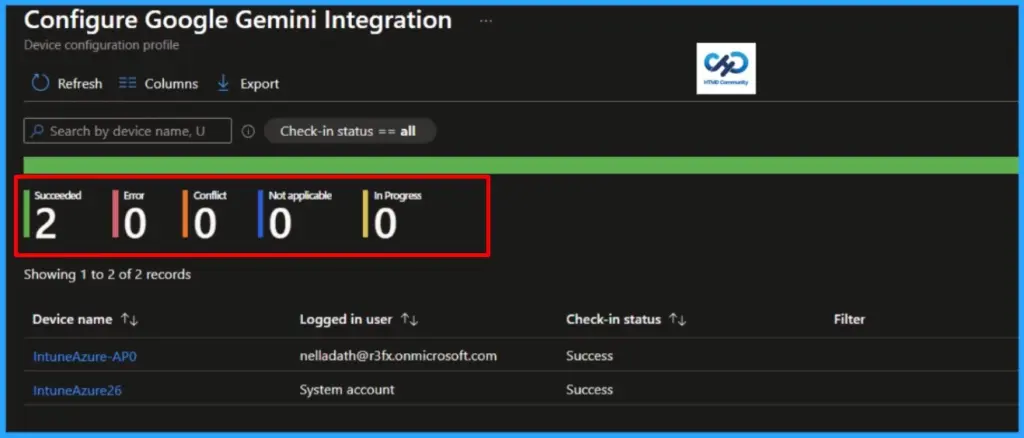
The Configuration Profile is deployed to Microsoft Entra groups. Let’s see how we can monitor the deployment and installation status from the Intune portal. To monitor the Intune policy assignment, follow these steps:
- Navigate to the list of Configuration and select the policy you targeted.
- Check the device and user check-in status from here.
- If you click “View Report,” you can see additional details.
Event Log to Verify Intune Policy Deployment Status
o verify the successful implementation of String or Integer policies on Windows 10 or 11 devices through Intune, you can leverage event IDs 813 and 814. These event IDs provide valuable insights into the application status of the policy as well as the specific value assigned to the policy on those devices.
In the case of this particular policy, the value is String and is linked to the event ID 813. Analyzing these event IDs lets you understand the policy’s application status and corresponding value on the devices in question.
To confirm this, check the Event log path – Applications and Services Logs – Microsoft – Windows – Devicemanagement-Enterprise-Diagnostics-Provider – Admin.
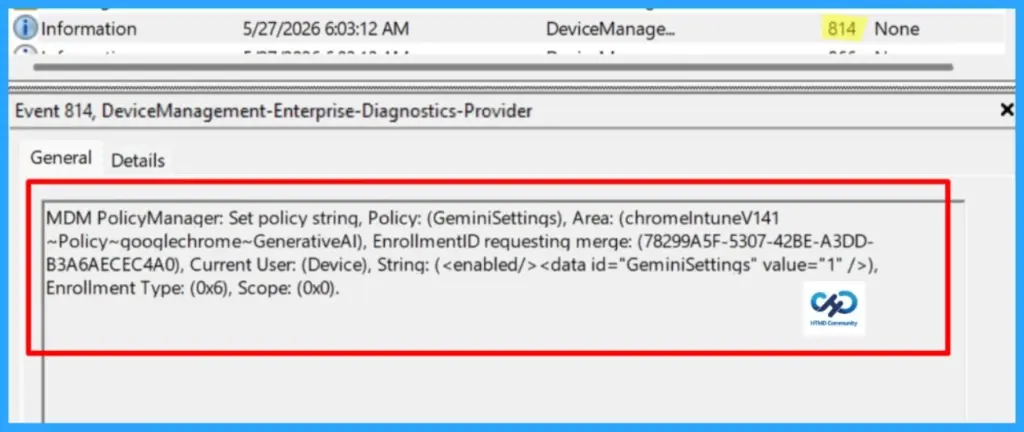
MDM PolicyManager: Set policy string, Policy: (GeminiSettings), Area: (chromeIntuneV141~Policy~googlechrome~GenerativeAI), EnrollmentID requesting merge: (78299A5F-5307-42BE-A3DD-B3A6AECEC4A0), Current User: (Device), String: (<enabled/><data id="GeminiSettings" value="1" />), Enrollment Type: (0x6), Scope: (0x0).I trust that this article will significantly benefit you and your organization. I appreciate your patience in reading this post. I look forward to seeing you in the next post. Keep supporting the HTMD Community.
- Intune Security Baselines Policies for Windows 10 or Windows 11 Deployment Guide
- Intune Security Baseline Microsoft Defender Policy Troubleshooting Tips for Cloud PCs
- Update Security Baselines for Microsoft 365 Apps from Intune
Need Further Assistance or Have Technical Questions?
Join the LinkedIn Page and Telegram group to get the latest step-by-step guides and news updates. Join our Meetup Page to participate in User group meetings. Also, Join the WhatsApp Community to get the latest news on Microsoft Technologies. We are there on Reddit as well.
Author
About the Author: Sujin Nelladath, a Microsoft Graph MVP with over 13 years of experience in Intune device management and Automation solutions, writes and shares his experiences with Microsoft device management technologies, Azure, DevOps, Graph API and PowerShell automation.


Discussion