Skip to content
How to Fix Intune Autopilot Hardware Hash Null-Valued Expression Error

How to Fix Intune Autopilot Hardware Hash Null-Valued Expression Error

Written By Anoop C Nair
Last Updated July 21, 2025
Posted In Intune
SHARE

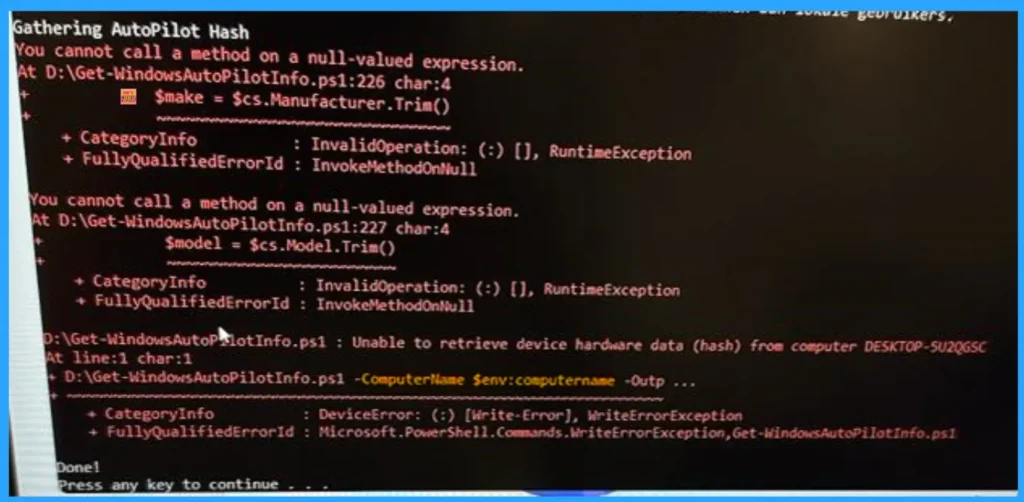
Let’s discuss How to Fix Intune Autopilot Hardware Hash Null-Valued Expression Error. Microsoft Intune users facing an issue with Windows Autopilot. While trying to download the hardware hash for Autopilot via PowerShell some of the users were getting null-valued expression error.

The errors are occurred on random laptops W11P laptops. As you know that, A hardware hash is a unique digital fingerprint generated from a device’s hardware configuration. In Intune, and Autopilot you can use hardware crash.

Hardware Crash is mainly used in Windows Autopilot to identify and register devices for automated provisioning. There are many factors reasons the hardware hash errors. It typically occurred when he script tries to access a property that doesn’t exist.

In this blog post I will help you to get more information about the Intune Autopilot Hardware Hash Error. Also I will share the reasons and workaround of this issue. If you are facing similar issue, this blog post definitely help you.


Patch My PC
How to Fix Intune Autopilot Hardware Hash Null-Valued Expression Error - Fig.1
How to Fix Intune Autopilot Hardware Hash Null-Valued Expression Error – Fig.1

How to Fix Intune Autopilot Hardware Hash Null-Valued Expression Error

Hardware hash basically helps Intune and Autopilot to recognise and enrol devices securely. If any error occurred on Windows Autopilot cannot recognise devices. The following table shows the script that is used by the user.

Script
@ECHO OFF
echo Enabling WinRM
PowerShell -NoProfile -ExecutionPolicy Unrestricted -Command Enable-PSRemoting -SkipNetworkProfileCheck -Force
echo Gathering AutoPilot Hash
PowerShell -NoProfile -ExecutionPolicy Unrestricted -Command %~dp0Get-WindowsAutoPilotInfo.ps1 –ComputerName $env:computername -OutputFile %~dp0compHash.csv -append
echo Done!
pause
How to Fix Intune Autopilot Hardware Hash Null-Valued Expression Error – Table.1
How to Fix Intune Autopilot Hardware Hash Null-Valued Expression Error - Fig.2 - Creds to MS
How to Fix Intune Autopilot Hardware Hash Null-Valued Expression Error – Fig.2 – Creds to MS

Workaround – Remove the Parameter

Many admins are suggesting the workaround to resolve this issue. Mr. deltavictorindialima suggested that, Remove the –ComputerName $env:computername parameter. It probably utilises WMIC which is deprecated in Windows 11.

You can update the PowerShell version to version 3.9 because older versions have compatibility problems. If you are still facing the same issue with Win11, try restarting the computer.
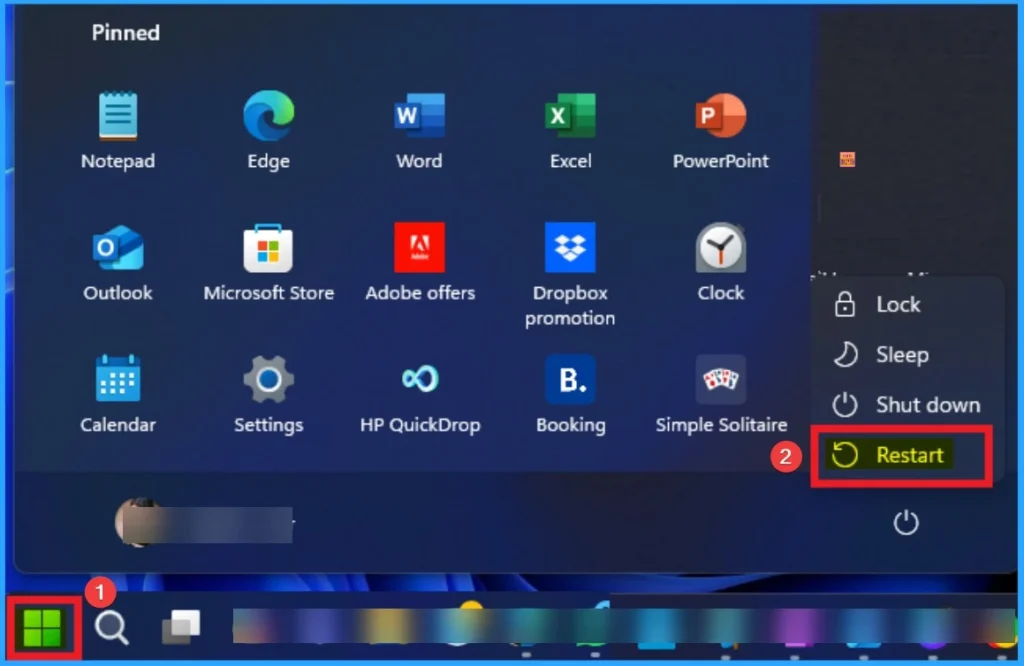
How to Fix Intune Autopilot Hardware Hash Null-Valued Expression Error - Fig.3
How to Fix Intune Autopilot Hardware Hash Null-Valued Expression Error – Fig.3

Need Further Assistance or Have Technical Questions?

Join the LinkedIn Page and Telegram group to get the latest step-by-step guides and news updates. Join our Meetup Page to participate in User group meetings. Also, join the WhatsApp Community to get the latest news on Microsoft Technologies. We are there on Reddit as well.

Author

Anoop C Nair has been Microsoft MVP for 10 consecutive years from 2015 onwards. He is a Workplace Solution Architect with more than 22+ years of experience in Workplace technologies. He is a Blogger, Speaker, and Local User Group Community leader. His primary focus is on Device Management technologies like SCCM and Intune. He writes about technologies like Intune, SCCM, Windows, Cloud PC, Windows, Entra, Microsoft Security, Career, etc.

Written by

Anoop C Nair is Workplace Technology solution architect with 25+ years of experience in global enterprise organizations such as JP Morgan, Capgemini, etc. Microsoft Certified Trainer. Microsoft MVP from 2015 onwards for consecutive 11+ years! He also conducts Intune and modern workplace tech training for enterprise organizations. He is Blogger, Speaker, and Founder of HTMD Community and HTMD Conference. His main focus is on Device Management technologies like Intune, Windows, Cloud PC. He writes about technologies like Intune, SCCM, Windows, Cloud PC, Windows, Entra, Microsoft Security.

Discussion

Join the discussion

Your email address will not be published. Required fields are marked *

Related guides

Intune

Simplify Windows Devices to Run Only the Required Applications using Intune

Key Takeaways Hey, let’s learn about Simplify Windows Devices to Run Only the Required Applications using Intune. This policy lets administrators replace the default windows shell with a custom or lightweight shell. it improves performance by using system resources and is useful for devices that run a dedicated application. If the policy is disabled or […]

AC Anoop C Nair 8 min read
Intune

Enhance macOS Compliance with Custom Security and Compliance Checks to Improve Device Security using Microsoft Intune

Key Takeaways In this post we are discussing about Enhance macOS Compliance with Custom Security and Compliance Checks to Improve Device Security using Microsoft Intune. Microsoft has announced the general availability of Custom Compliance Settings for macOS in Microsoft Intune. The feature helps organizations strengthen security controls while supporting many types of macOS management scenarios. […]

AC Anoop C Nair 4 min read
Intune

Manage Samsung Galaxy Firmware Versions to Improve Security and Compliance using Microsoft Intune

Key Takeaways In this post we are discussing Manage Samsung Galaxy Firmware Versions to Improve Security and Compliance using Microsoft Intune. Microsoft Intune has received a new update that expands firmware management capabilities for Samsung Galaxy devices through Firmware Versionsintegration. This enhancement gives IT administrators more control over firmware and operating system updates, helping them […]

AC Anoop C Nair 4 min read
Intune

MS Intune Adds Windows Registry Data Collection to Device Inventory for Single Values All Key Values and Subkeys

Key Takeaways Microsoft Intune 2607 introduces Windows Registry Data collection in Device Inventory, allowing IT admins to verify actual device configurations without relying on custom discovery or remediation scripts. Using the Properties Catalog, admins can collect registry information through Single Value, All Values Under a Key (Non-Recursive), or Same Value Across Subkeys. MS Intune Adds […]

AC Anoop C Nair 5 min read