






How to Delete Devices from Microsoft Intune
Let’s learn how to Delete Devices from Microsoft Intune. Microsoft Intune is a Device Management solution. Intune can manage Mobile devices, such as desktop computers, and virtual endpoints. Microsoft Intune Allows you to delete devices from your easily.
Deleting Devices is much easier than enrolling devices into Microsoft Intune. Any device can be quickly deleted from Intune. Microsoft Intune only allows authorized users to Delete Devices from Intune. You can remove unwanted devices from Intune.
Admins can manually delete any Policy in your Organization. Microsoft Intune provides device cleanup rules for deleting stale devices. Intune device cleanup rules allow admins to choose between 30 and 270 days to remove inactive device records from Intune Automatically.
When the Admin Delete a Device from Intune, all the records will be removed from the Intune Admin Center. This blog post helps you delete a device from Microsoft Intune.

- How to Delete or Remove Configuration Profiles Policies from Intune
- Delete Windows Autopilot Device from Intune
How to Delete Devices from Microsoft Intune
You can quickly delete any device from your Intune Portal for this open Microsoft Intune Admin Centre. Navigate to Devices and select the All Devices option. Select a device that you want to delete. Here, I chose the Admin’s MacBook Pro device.
- Click on the Selected Device
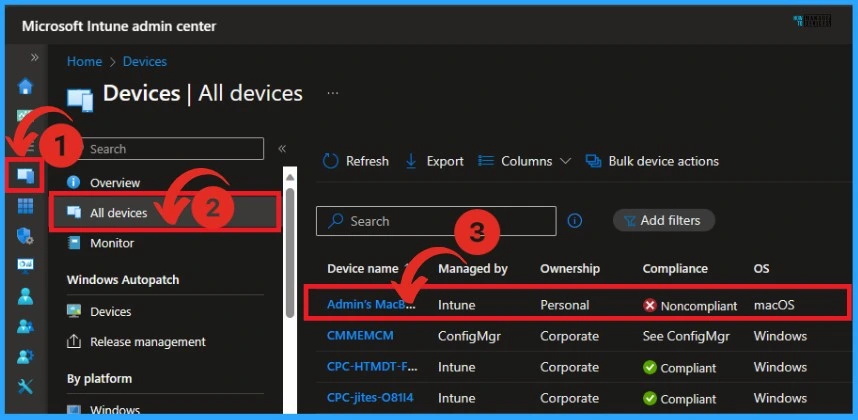
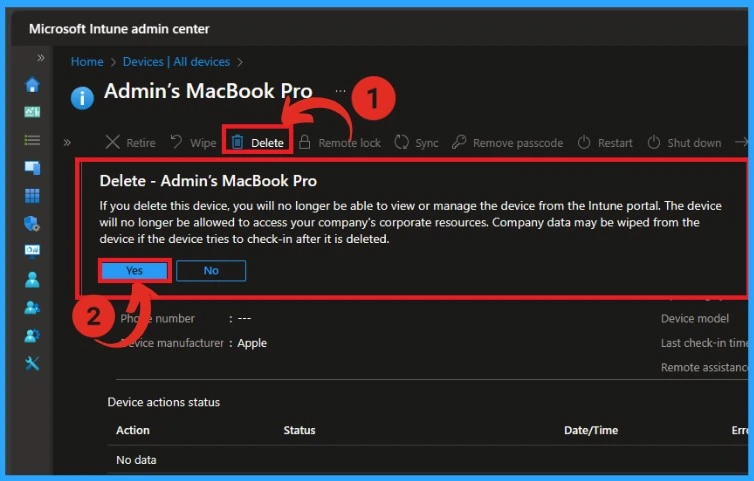
After that, a new window will appear. It shows the details of the enrolled device. Click on the Delete option from the Overview window. Then, a message box will appear.
If you delete this device, you will no longer be able to view or manage the device from the Intune portal. The device will no longer be allowed to access your company’s corporate resources. Company data may be wiped from the device if the device tries to check in after it is deleted.
- Click on Yes to proceed
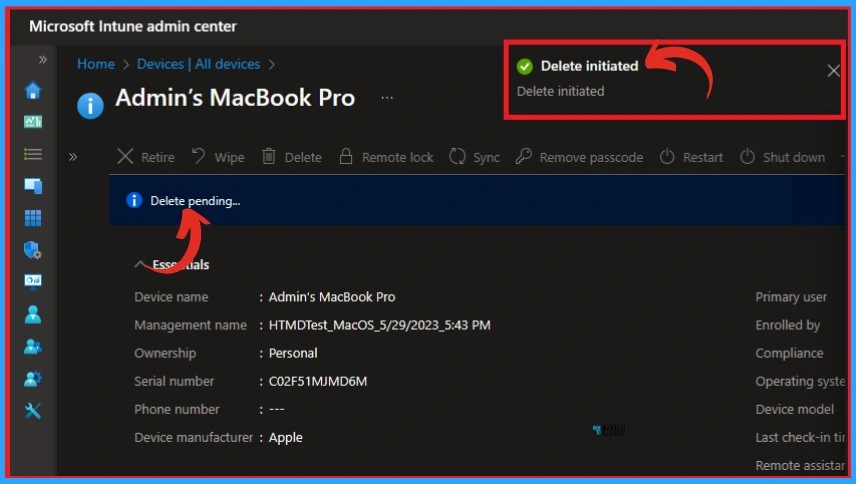
After clicking Yes, you will get a message that Delete was initiated. The Process will take time, and the window shows Delete pending.
- Known Performance Issue with Intune Settings Catalog Policy
- How to Delete or Remove Configuration Profiles Policies from Intune
Automatic Intune Device Cleanup Rules Delete Stale Devices
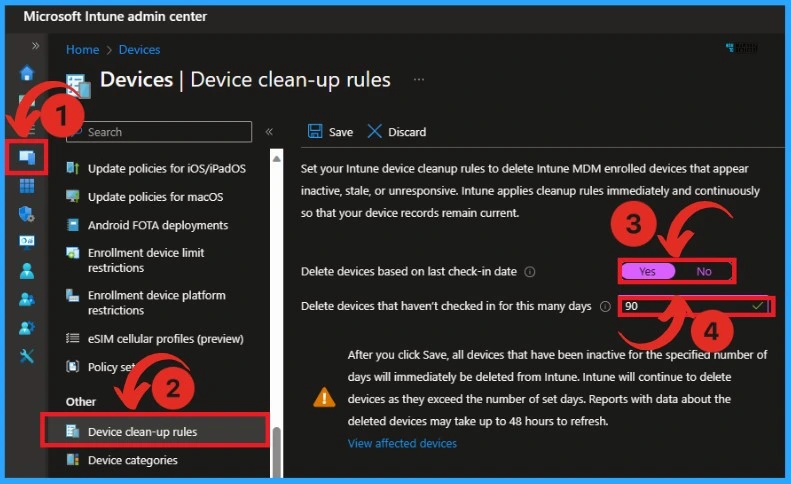
The device clean-up rule automatically deletes the stale devices from Microsoft Intune. There may be some devices that have not been checked for several days you set. You can remove these devices automatically with the Device clean-up rule.
After setting and saving the device clean-up rules, the inactive devices will immediately be deleted from Intune according to the specified number of days.
| Steps in Device clean -up rules |
|---|
| Devices > Device clean-up rules |
| Turn on the Yes option in Delete devices based on last check-in date |
| Set a days in Delete devices that haven’t checked in for this many days (here as 90) |
We are on WhatsApp. To get the latest step-by-step guides and news updates, Join our Channel. Click here – HTMD WhatsApp.
Author
Gopika S Nair is a computer enthusiast. She loves writing on Windows 11 and related technologies. She is here to share quick tips and tricks with Windows 11 or Windows 10 users. She is Post Graduate Diploma Holder in Computer Science.


If I retire a windows 10 device, will the applications(line of business,win32app) get uninstalled from the device?.
If I delete a device and suppose I check-in the device after 90 days will it still retire the device? Is there number of days limit till when retire action can happen?