






Learn How to Deploy PPKG Files Using Intune. Let’s also understand the relevance of the PPKG file deployment in the modern device management world. The PPKG provisioning package works fine with Windows 11 21H2 and Windows 10 operating systems.
Have you heard about PPKG files? They are on-the-fly configuration files that you can send via email. In this post, I will discuss more provisioning package files. I hope this will help you learn how to deploy PPKG files with Intune.
Update 04th Oct 2022: There is a known issue with the PPKG provisioning package Intune deployment with the Windows 11 22H2 operating system.
Provisioning packages (PPKG) don’t work on Windows 11 2022 Update. More details -> Known issue: Provisioning packages don’t work on Windows 11 2022 Update – Microsoft Tech Community

What is PPKG File?
PPKG files are the provisioning package files created by the Windows Imaging and Configuration Designer tool. These PPKG files will be with an extension (*. PPKG). You can apply the provisioning package to Windows 10 devices.
How to Create PPKG Files?
You can create PPKG files using the Windows Imaging and Configuration Designer (WICD) tool. This free tool customizes and configures Windows 10 and is included in Windows ADK.
Benefits of Using PPKG
How to Deploy PPKG Files Using Intune? Are there any benefits of using PPKG files?
- Can it be used on both mobile and desktop devices?
- Simple to apply.
- No network connectivity is required. You can send the PPKG file as an email to the user.
- Deploy PPKG using SCCM.
- Deploy PPKG using Intune ( we will cover this in this post).
Features of WICD Tool
Below are some areas where you can use the Windows Imaging and Configuration Designer (WICD) tool.
- Accounts (Example: Azure AD enrolment, domain join)
- Browser settings
- Certificates
- Applications (add/remove)
- Regional settings
- Edition upgrade
- Policies (example: Wi-Fi, Bluetooth, update, etc.)
- Execute scripts (PowerShell, VBS, etc.)
- Computer naming
- Remove pre-installed software
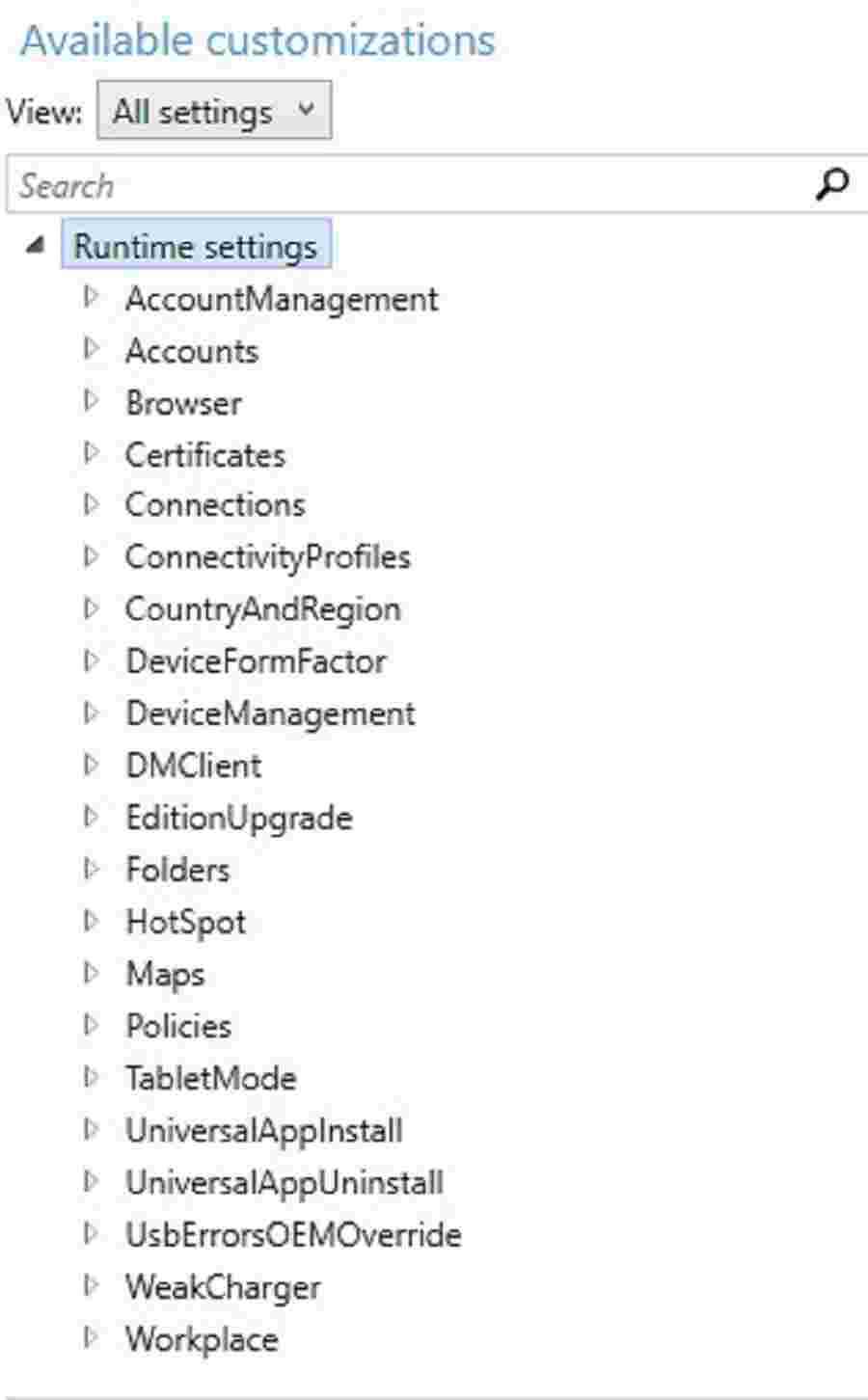
Deploy PPKG Files with Intune
In this post, you will see how to deploy PPKG with Intune. You can use this approach in the Windows Autopilot scenario to apply image customization. For example, I will create PPKG to add a root certificate and disable Bluetooth settings.
High-level Steps Involved – Deploy PPKG Files with Intune
Let’s check the High-level Steps Involved in creating the PPKG files and Deploying PPKG Files with Intune.
- Create PPKG file
- Wrap the PPKG file in Intunewin format
- Create Win32 apps and deploy
Create PPKG – Disabling Bluetooth & Deploy CA Root
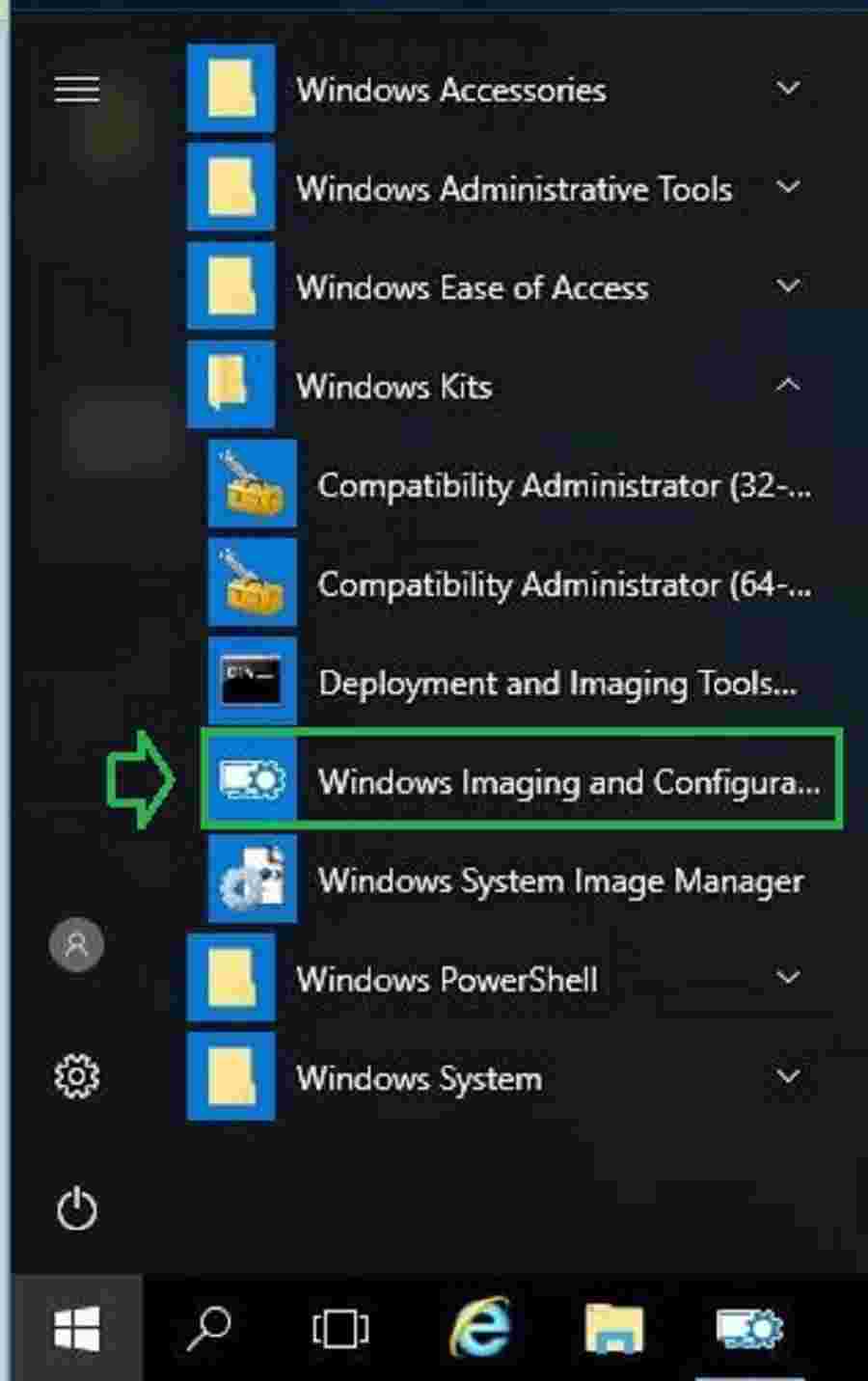
From the Windows 10 Start menu, click on the Windows Imaging and Configuration Designer (WICD) shortcut to create PPKG files.
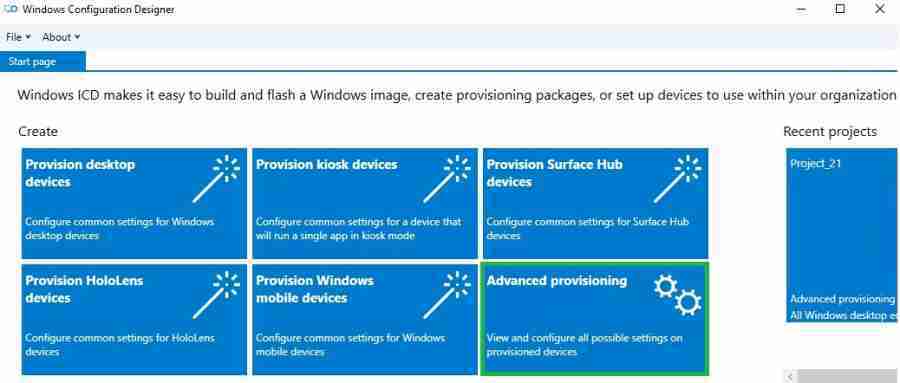
Wizard will provide options for creating a provisioning package. Select Advanced Provisioning.
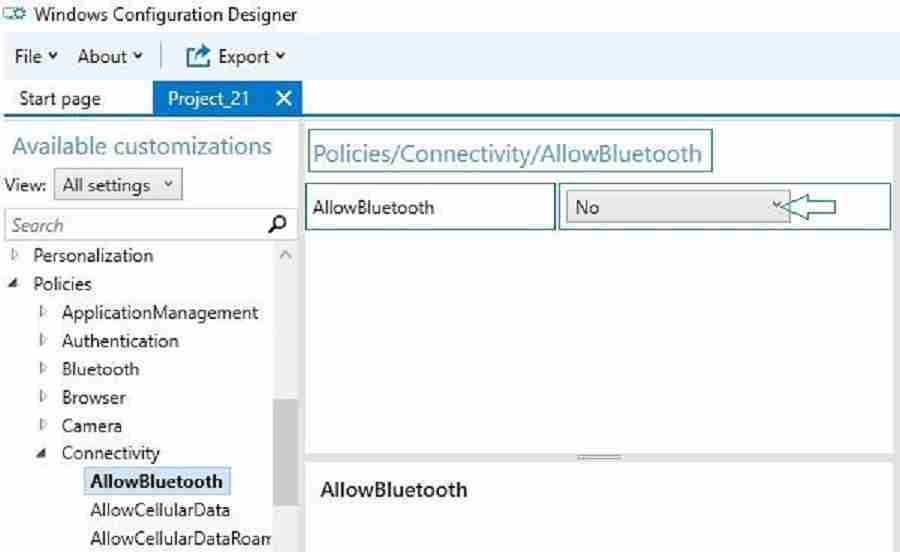
Navigate to the Policies section and disable Bluetooth in the wizard. I have used this setting only as an example. You can configure the required setting based on your requirements.
Next, navigate to the certificate section. Browse and add the root CA.
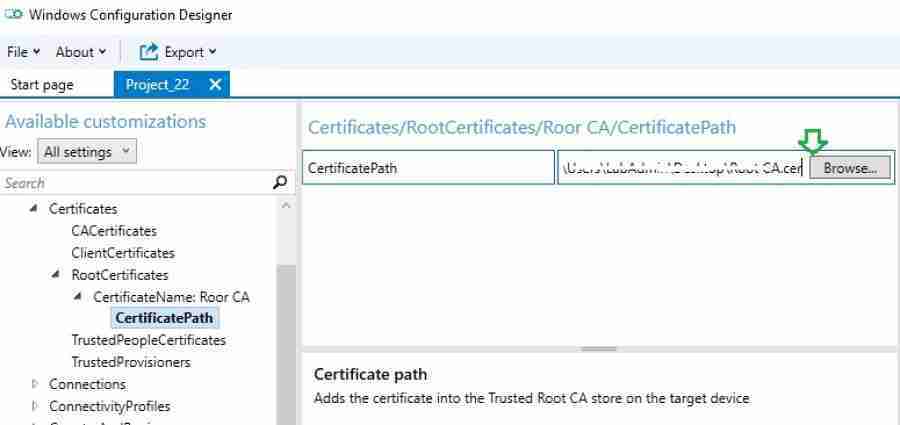
At last, we will export the customizations as a provisioning package (PPKG file).
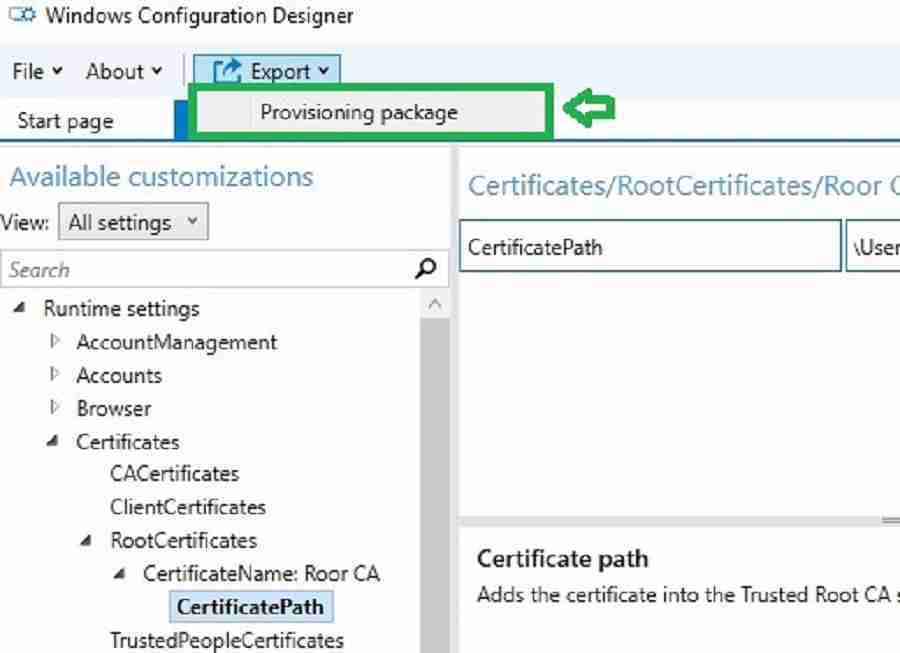
Wrap PPKG file in Intunewin Format and Deploy using Intune
Next, we must wrap the PPKG file using the Win32 App Packaging Tool. The output of the tool will be in Intunewin format. I have another blog explaining how to dress and deploy using Intune.
- Run the IntuneWinAppUtil.exe as administrator.
- Next step, it will ask, “Please specify the source folder” where you save the PPKG file. Specify the source path and hit Enter.
- Please specify the setup file“. Provide the File.ppkg > Enter. For Example, Project_4.ppkg
- Please specify the output folder” where you want to save the intunewin converted file > Enter.
- Next, “Do you want to specify the catalog folder” type N > Enter.
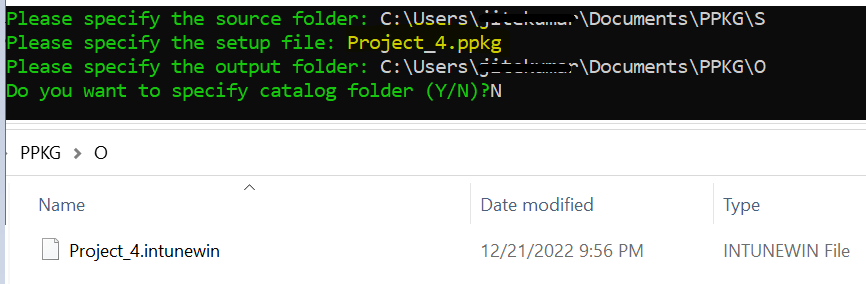
More details about Win32 or. EXE app deployment with Intune is explained in my previous post
Intune Console Actions to Deploy PPKG Files
After wrapping the PPKG file to the intunewin format, you can upload the file to Intune. More details about the steps to upload and create an application with Intune are explained in my previous post.
Please use the below PowerShell command line while configuring in Intune. Below the command line, apply the provisioning package (PPKG) silently.
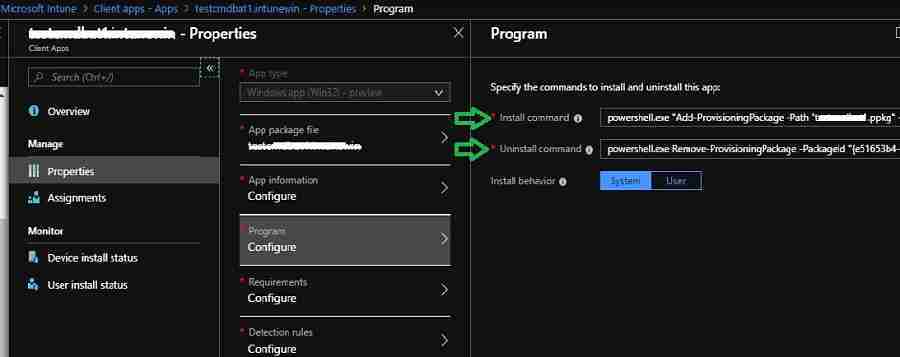
powershell.exe “Add-ProvisioningPackage -Path “XXXXX.ppkg” -ForceInstall -QuietInstall”
powershell.exe Remove-ProvisioningPackage -PackageId “{XXXXX}”
Refer for more details on PPKG install and uninstall command line switches.
Results and Troubleshooting PPKG File Deployment
The best place to check or troubleshoot PPKG deployment is Event Viewer. You can see the PPKG-related events in the event viewer section “Provisioning-Diagnostics-provider.”
More details about Windows MDM Troubleshooting are available.

Applying package ‘Custom.ppkg’ ID: {426c45cf-a045-4cb1-92cf-aa4f69ead9d8}.
You can see the Root certificate configured in PPKG is applied successfully.
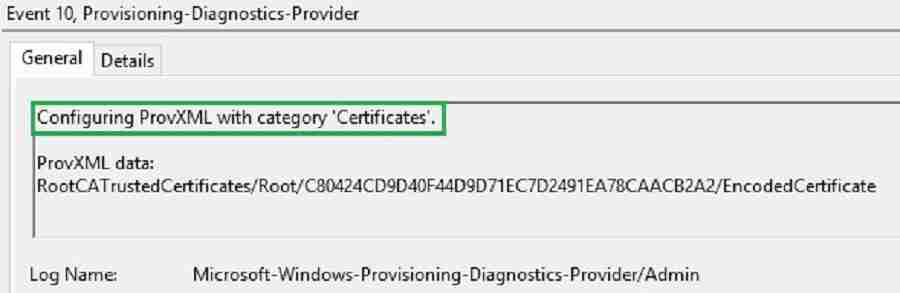
ProvXML category ‘Certificates’ completed successfully. Provisioning succeeded.
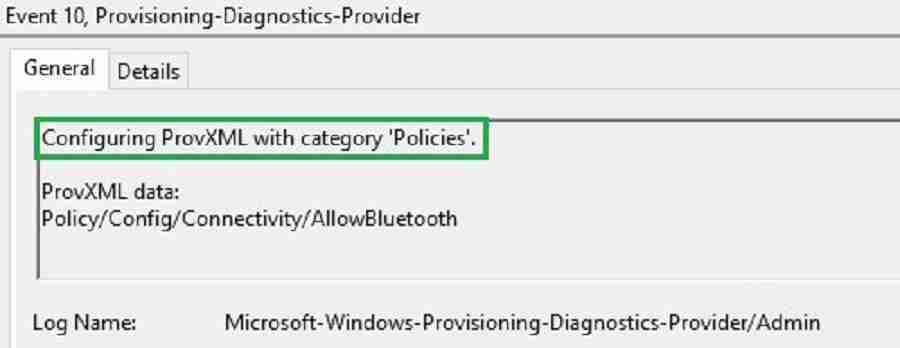
- You can see the policy to turn off BlueTooth is applied by PPKG
Configuring ProvXML with category ‘Policies.’ ProvXML data:Policy/Config/Connectivity/AllowBluetooth
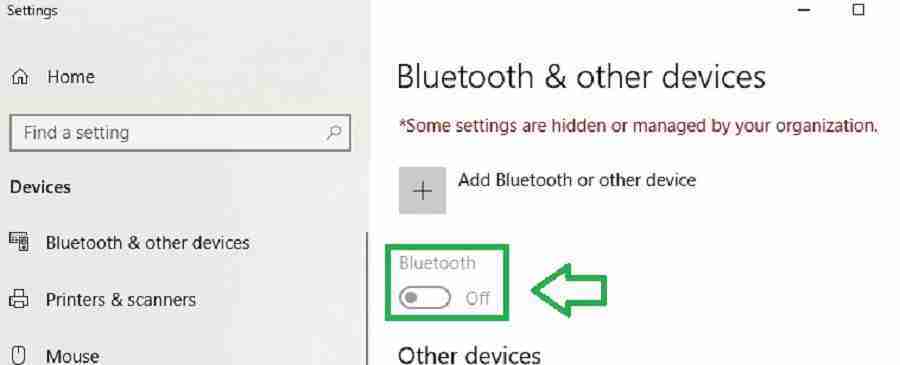
Bluetooth is turned off and disabled successfully. The below screenshot will guide you.
Conclusion – Strategic Approach
Traditionally, Provisioning packages (PPKG) are manually executed by IT admins or users to deploy configuration. However, PPKG is an excellent tool. But we should not rely only on provisioning packages (PPKG). I would try to avoid deploying PPKG files with Intune.
In Modern desktop deployment, Windows Autopilot and Intune are strategic tools that should be used to deploy Win 10 settings, apps, and any image customizations. Intune doesn’t natively support PPKG files as a deployment type.
Hence, we must wrap the provisioning package (PPKG) to the Intunewin format for Intune deployment.
We are on WhatsApp. To get the latest step-by-step guides and news updates, Join our Channel. Click here –HTMD WhatsApp.


Good One Vimal
Hi Vimal,
Do you have any example of application deployment?
StaffDeploy application using PPKG ?
What is the future for PPKG & SPPs? Any inputs?
StaffDon’t rely on them as long term strategy. It’s just there as a workaround
what detection method did you use for the certificate install
How can you know what is the ID of the PPKG you have created ?
https://docs.microsoft.com/en-us/powershell/module/provisioning/get-provisioningpackage?view=windowsserver2022-ps
Get-ProvisioningPackage -PackagePath c:\test\testppkg.ppkg
Hi,
I created a provisioning package to join the MTR devices to AAD and enroll them in MEM. When i run the package on an MTR device, it is joining the device to AAD but not enrolling in MEM. What could be the possible reason for that?
in above example steps are missing to convert ppkg to Intune formate,
can you please illustrate we want to deploy,
when we are converting that package its not converting .
StaffHi Upendra, Once you are done with the PPKG preparation and testing! You need to convert INTUNWIN format for deployment.