





How to Eliminate DPs from your SCCM Infrastructure Configuration Manager
How do you eliminate DPs from your SCCM infrastructure configuration manager? Do you want to Eliminate remote DPs from your SCCM / ConfigMgr infrastructure, or Are you looking to eliminate remote DPs that can indirectly help reduce loads of troubleshooting efforts? Here is the perfect solution for you!!!
Have you heard about Adaptiva OneSite? Adaptiva OneSite helps to eliminate hundreds of DP, PXE, SMP, and other servers, saving up to several millions of dollars on hardware costs and more on indirect costs.
Adaptiva OneSite is award-winning software that Fortune 500 companies use to run SCCM from a single site with no DPs for distribution and no impact on business WAN traffic.
The game-changing OneSite is advancing global IT efficiency by orders of magnitude in organizations from 1,000 to 366,000 clients. A brief video about Adaptiva OneSite is given below.

- Enable SCCM Maintenance Mode for Distribution Point DPs Clients’ Primary Server
- SCCM Audit Status Messages Track Who Deleted Modified Changed Settings
- SCCM Audit Reports Who Initiated CMPivot Query | ConfigMgr
- SCCM Secondary Server Installation Guide | Step by Step | ConfigMgr
- Free SCCM Training 37 Hours of Latest Technical Content Lab Setup
| Index |
|---|
| How to Eliminate DPs from your SCCM Infrastructure Configuration Manager |

How to Eliminate DPs from your SCCM Infrastructure Configuration Manager
Let’s discuss How to Eliminate DPs from your SCCM Infrastructure Configuration Manager. The new Key Features of Adaptiva OneSite are shown in the table below.
More Details about Adaptiva Onesite on the following link:- http://www.adaptiva.com/onesite/
| Features of Adaptiva OneSite |
|---|
| Eliminate your SCCM infrastructure |
| Accelerate content delivery |
| Never bother the network team again |
| Get free, zero-impact storage |
| Perform OSD with serverless PXE and SMP |
Please follow us on the HTMD Community and visit our website HTMD Forum, if you like our content. Suggest improvements, if any, and we love to know which topic you want us to explore next.
- Intune Design Decisions Free Training | Version 1 Starter Kit | Basic
- Free Intune Training 2024 for Device Management Admins
- Top 50+ Latest SCCM Interview Questions and Answers
- Top 75 Latest Intune Interview Questions and Answers
Enable SCCM Maintenance Mode for Distribution Point DPs Clients Primary Server
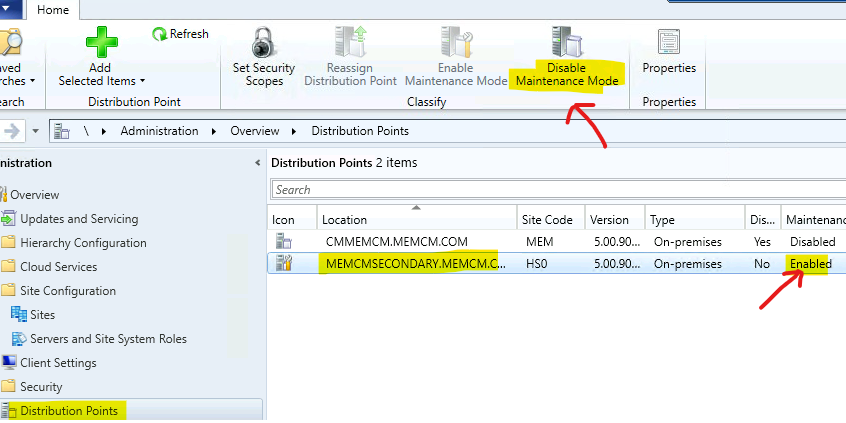
We have a button on how to enable Enable SCCM Maintenance Mode for Distribution Point (a.k.a DP). The disable and enable SCCM maintenance mode is useful for many scenarios.
The maintenance mode is a service window where the admins can perform the maintenance activities. There is another maintenance option available in SCCM called Maintenance Windows. This maintenance mode is for client devices.
Well, there is one more maintenance mode option for SCCM primary servers. This is called service windows and is helpful for avoiding any SCCM in-console updates during production hours.
SCCM Distribution Point maintenance mode is the feature available from the 1902 version of the MEMCM. You can enable maintenance mode for the DP when making hardware changes to the DP server or some DR/BCP activities in the data center.
- SCCM Audit Status Messages Track Who Deleted Modified Changed Settings
- SCCM Audit Reports Who Initiated CMPivot Query | ConfigMgr
- SCCM Secondary Server Installation Guide | Step by Step | ConfigMgr
Resources
Best ConfigMgr Secondary Server Upgrade Step-By-Step Guide | SCCM HTMD
We are on WhatsApp now. To get the latest step-by-step guides, news, and updates, Join our Channel. Click here. HTMD WhatsApp.
Author
Anoop C Nair is Microsoft MVP from 2015 onwards for consecutive 10 years! He is a Workplace Solution Architect with more than 22+ years of experience in Workplace technologies. He is a Blogger, Speaker, and Local User Group Community leader. His main focus is on Device Management technologies like SCCM and Intune. He writes about technologies like Intune, SCCM, Windows, Cloud PC, Windows, Entra, Microsoft Security, Career etc…




Discussion · 1 comment