






How to Enable Bitlocker on HyperV and Handle Error Device Cannot Use a Trusted Platform Module
How to Enable Bitlocker on HyperV and Handle Error Device Cannot Use a Trusted Platform Module? Do you use virtual Windows 10 machines to test the Intune and SCCM policies?
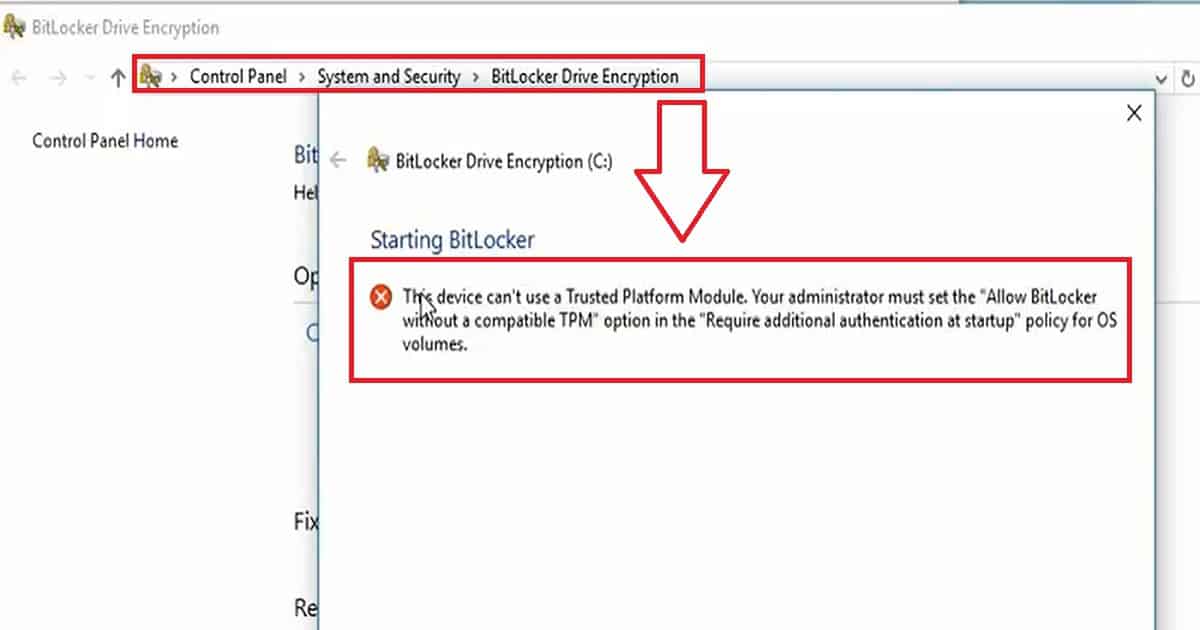
Have you tried to enable BitLocker in a HyperV/VMware virtual machine? Did you ever receive the following error while you tried to enable BitLocker on Windows 10 Virtual Machines?
This Device Can’t Use a Trusted Platform module. Your administrator must set the “Allow Bitlocker without a compatible TPM” option for OS volumes in the “Required additional authentication at startup” policy.
The video below provides a more detailed demonstration. This post helps you show more details about enabling Bitlocker on HyperV and handling error devices that cannot use a trusted platform module.

- How to Enable BitLocker Inventory in SCCM ConfigMgr
- Ability to View BitLocker Recovery Key from Intune Company Portal Website Coming Soon
- Configure RBAC Roles for BitLocker Recovery Key Reader in Azure AD
- Block Hide BitLocker Recovery Key from Users using MS Graph and PowerShell
- Intune Bitlocker Drive Encryption A Deeper Dive To Explore
Table of Contents
How to Enable Bitlocker on Hyper V Windows10 Virtual Machine
The video demonstrates resolving the error message “This Device Can’t Use a Trusted Platform Module. Your administrator must set the ‘Allow BitLocker without a compatible TPM’ option in the ‘Require additional authentication at startup’ policy for OS volumes.”
How to Enable Bitlocker on HyperV and Handle Error Device Cannot Use a Trusted Platform Module
Let’s discuss how to enable Bitlocker on HyperV and handle the error device that cannot use a trusted platform module. The screenshot below shows the error message “This device can’t use a Trusted Platform Module.
Your administrator must set the ‘Allow BitLocker without a compatible TPM‘ option in the ‘Require additional authentication at startup’ policy for OS volumes.”
How to Enable Bitlocker on HyperV
BitLocker will be automatically enabled on modern instant-go devices like Surface Pro 3, Surface Pro 4, etc. However, for other Windows 10 devices, each user needs to enable BitLocker via another method. BitLocker can be enabled using Windows 10 MDM policies, Group Policies, SCCM Policies, etc.
All the above BitLocker enablement process is more or less straightforward. However, enabling BitLocker on Windows 10 virtual machines is not straightforward. When we try to enable BitLocker from “This PC” or “Control Panel.”
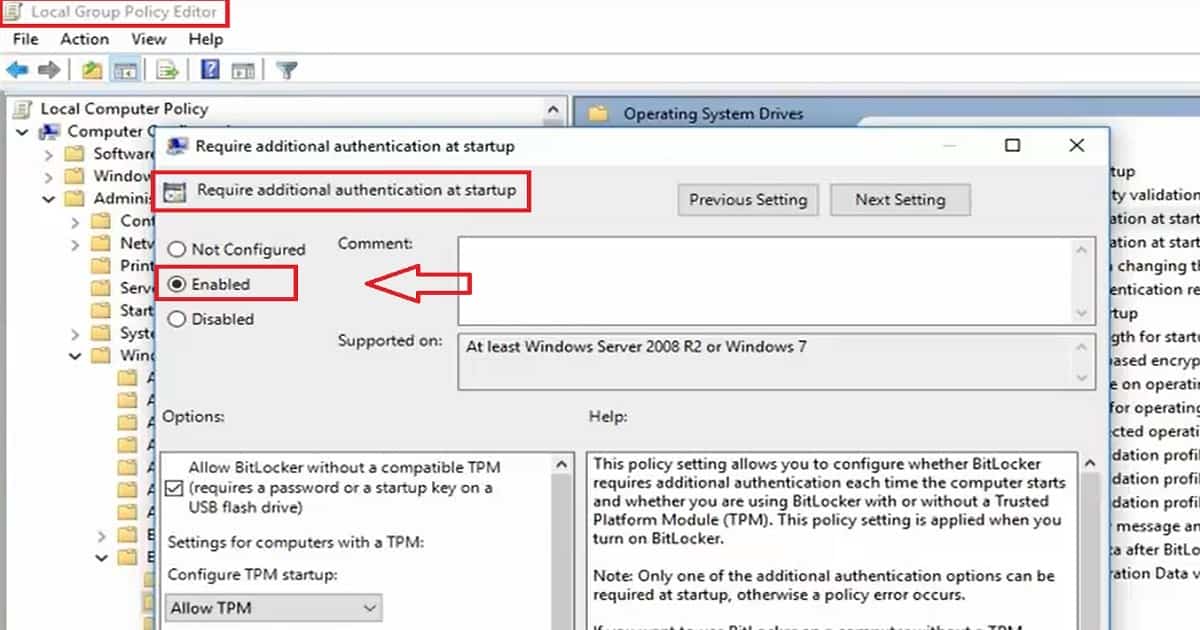
The user needs to enable the following group policy (GPEDIT.MSC) on the Windows 10 VM to eliminate the TPM error while enabling the BitLocker.
| Enabling Group Policy to Resolve TPM Error for BitLocker on Windows 10 VM |
|---|
| Local Computer Policy –> Computer Configuration –> Administrative Template –> Windows Components –> Bitlocker Drive Encryption –> Operating System Drives –> Require additional authentication at startup –> ENABLE |
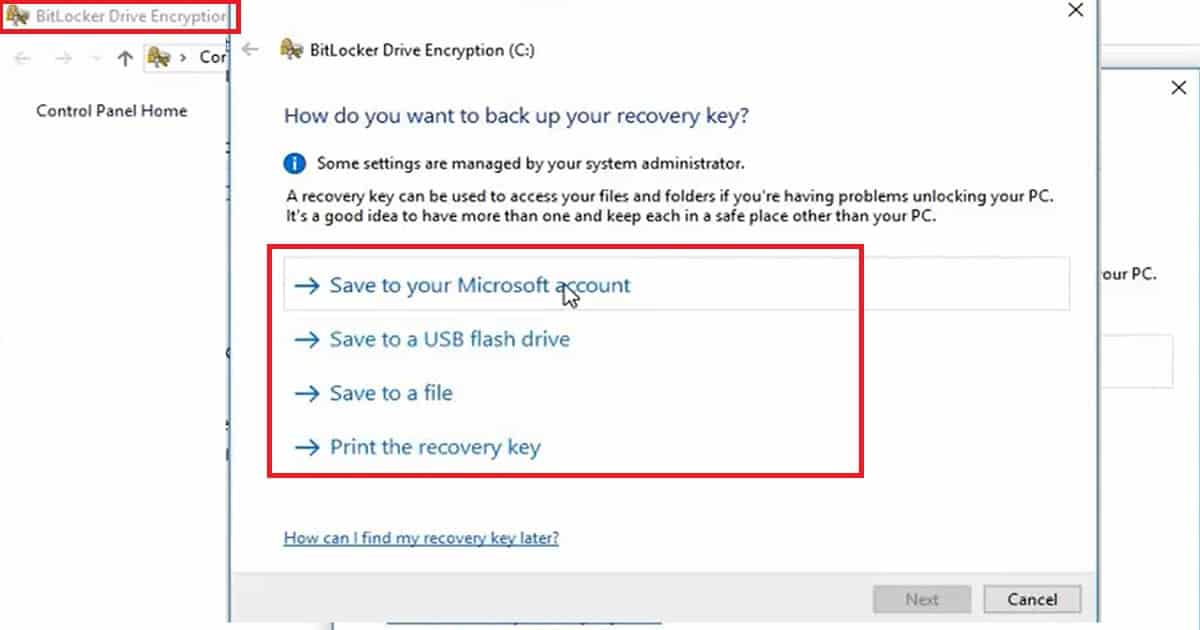
Another important option in the BitLocker enablement process is saving the recovery key. We have four options for saving the BitLocker key: save to your Microsoft accounts, save to a USB flash drive, save to a file, or print the recovery key. How to Enable BitLocker on HyperV and Handle Error Device CanNot Use a Trusted Platform Module.
We are on WhatsApp now. To get the latest step-by-step guides, news, and updates, Join our Channel. Click here. HTMD WhatsApp.
Author
Anoop C Nair is Microsoft MVP! He is a Device Management Admin with more than 20 years of experience (calculation done in 2021) in IT. He is a Blogger, Speaker, and Local User Group HTMD Community leader. His main focus is on Device Management technologies like SCCM 2012, Current Branch, and Intune. He writes about ConfigMgr, Windows 11, Windows 10, Azure AD, Microsoft Intune, Windows 365, AVD, etc.



Discussion