






How to Remove ConfigMgr Package from Multiple DPs at the Same Time | SCCM | Configuration Manager Endpoint
Let’s look at the option(s) to Remove ConfigMgr Package from Multiple DPs at the same time. We received a question in the HTMD forum that triggered this post.
Let’s find out how to remove content from multiple DPs at the same time. I’ve also shared a PowerShell option to remove content from multiple DPs.
In the previous post, I explained the best way to remove package content from a single distribution point. You might also be interested in the features of the Content Library Explorer tool.
The following posts might help you understand related issues to content distribution. Learn about Fixing ConfigMgr DP Issue RPC server is Unavailable Error Code 0x800706ba, Fixing the SCCM SendFiles Failed 0x80070003 Error, and How to ConfigMgr Redistribute Content to the Distribution Point.

Table of Contents
Remove ConfigMgr Package Multiple DPs
The following is one of the best methods to Remove ConfigMgr Package Content from multiple DPs simultaneously. Well, you can also use PowerShell scripts to remove the content from multiple DPs simultaneously.
- Navigate to \Monitoring\Overview\Distribution Status\Content Status
- Use the search bar to find deployment packages such as Applications, Task Sequences, Boot Images, and Software Updates.
- Select one particular package (CMPivot) that you want to remove.
- Right-click and select View Check the View Status option.
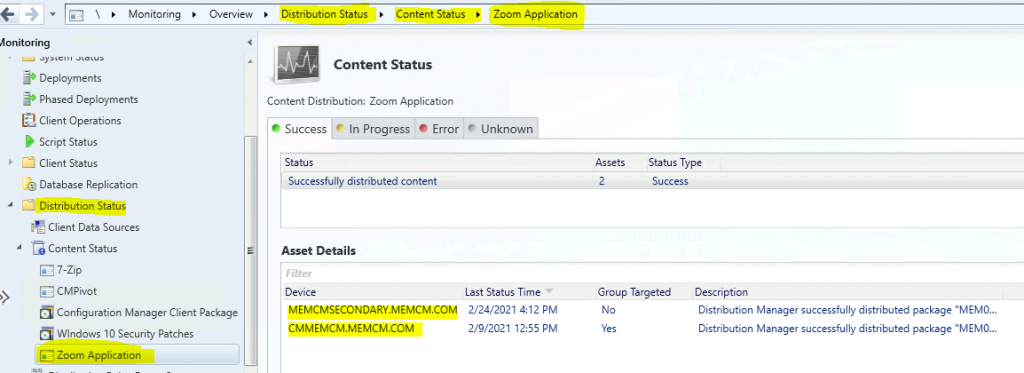
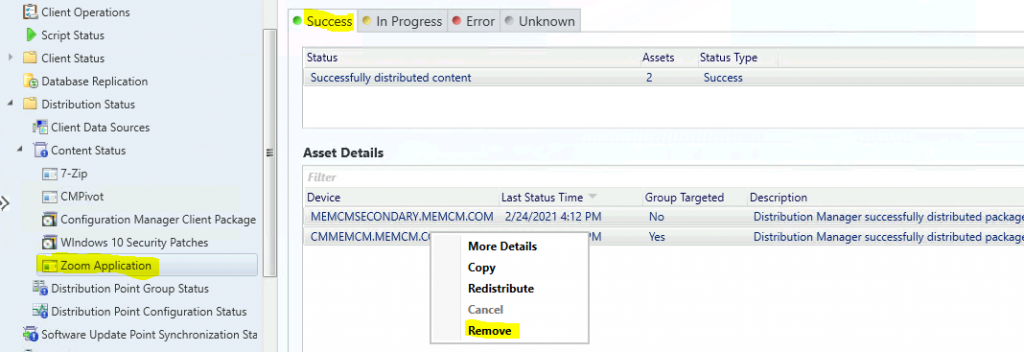
- Select the DPs from where you want to remove the package content.
- Right-click on the DPs and click on Remove.
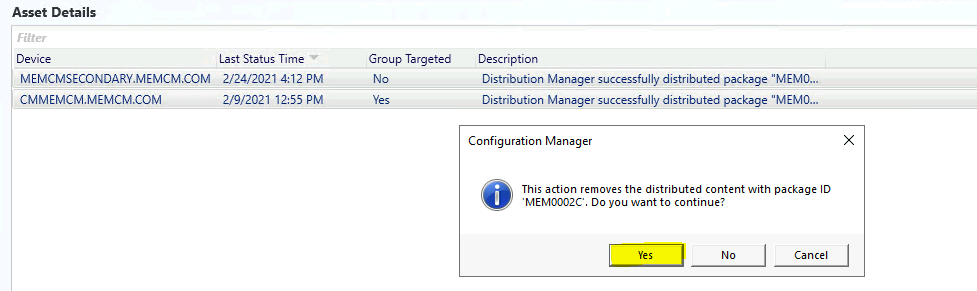
Click Yes on the warning window to initiate the removal of the content.
- The action removes the distributed content with package ID ‘MEM0002C’. Do you want to continue?
- Remove ConfigMgr Package Content from a Distribution Point | Best Method | SCCM | Configuration Manager
- How to Stop progress Package Content Distribution to a DP in SCCM Configuration Manager ConfigMgr
- Learn How to Remove Distribution Point Role DP | SCCM | ConfigMgr
Result
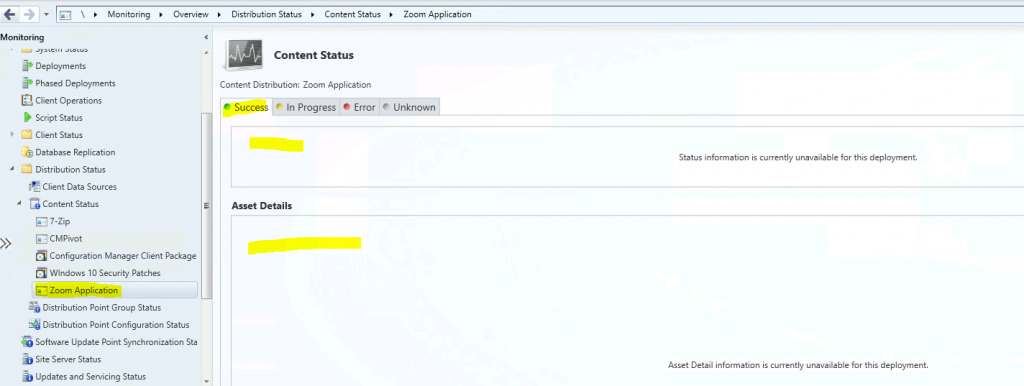
As you can see in the screenshot below, the package is removed from two DPs at the same time.
DistMgr.log – Package Content Removal Process
You can refer to the DistMgr.log (@ primary & secondary server ) snippet to get an overview of the Package removal process. The following log entries might help you troubleshoot and confirm whether the removal worked for you. Let’s look at how to Remove the ConfigMgr Package from Multiple DPs simultaneously. SCCM.
NOTE: Package MEM00023 has been removed from the secondary server DP. Therefore, I have not seen any activity on the primary server DistMgr.log.
- Started package processing thread for package ‘MEM0002C’, thread ID = 0x1698 (5784)
- \?\C:\SMSPKGSIG\MEM0002C.1 could not be located
- GetContentLibLocation – MEMCMSecondary.memcm.com
- Finished GetContentLibLocation – MEMCMSecondary.memcm.com
- GetDPUsableDrives – [“Display=\MEMCMSecondary.memcm.com\”]MSWNET:[“SMS_SITE=HS0”]\MEMCMSecondary.memcm.com\
- Finished GetDPUsableDrives – [“Display=\MEMCMSecondary.memcm.com\”]MSWNET:[“SMS_SITE=HS0”]\MEMCMSecondary.memcm.com\
- Start deleting package MEM0002C from server [“Display=\MEMCMSecondary.memcm.com\”]MSWNET:[“SMS_SITE=HS0”]\MEMCMSecondary.memcm.com…
- Created DP processing thread 5496 for removal of package MEM0002C on server [“Display=\MEMCMSecondary.memcm.com\”]MSWNET:[“SMS_SITE=HS0″]\MEMCMSecondary.memcm.com\
- Waiting for all DP threads to complete for package MEM0002C processing thread.
- Attempting to remove package MEM0002C from distribution point [“Display=\MEMCMSecondary.memcm.com\”]MSWNET:[“SMS_SITE=HS0″]\MEMCMSecondary.memcm.com\
- [“Display=\MEMCMSecondary.memcm.com\”]MSWNET:[“SMS_SITE=HS0”]\MEMCMSecondary.memcm.com\ is NOT a Pull DP
- Successfully removed the package MEM0002C from server [“Display=\MEMCMSecondary.memcm.com\”]MSWNET:[“SMS_SITE=HS0”]\MEMCMSecondary.memcm.com\
- CStateMsgReporter::DeliverMessages – Created state message file: C:\Program Files\Microsoft Configuration Manager\inboxes\auth\statesys.box\incoming\xam513ne.SMX
- Successfully sent state change notification 8ACCAE01-5879-4FCD-B988-C1CD3005B698
- Exiting package processing thread for package MEM0002C.
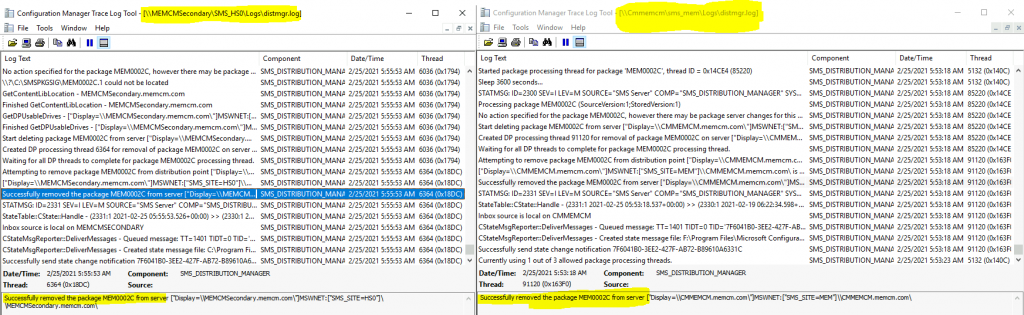
Check the SCCM log files related to DPs. The PkgXferMgr.log file is your best friend for remote DP distribution/package replication issues.
| Logs | Description |
|---|---|
| distmgr.log | Package Application distribution process |
| PkgXferMgr.log | Records the actions of the SMS_Executive component that is responsible for sending content from an SCCM primary site to a remote DP. |
NOTE! – The PkgXferMgr.log is the log file that you need to check to understand how removal works for remote DPs.
PowerShell Script to Remove Package from Multiple DPs
Following the PowerShell script (command) helps to remove SCCM package content from Distribution Points. Ankit shared the following lines of script in the HTMD forum.
- Make sure you have DP names (FQDN) listed inside DPList.csv.
- You might need to execute the policy as per your security requirements. For my lab, I used -> Set-ExecutionPolicy Unrestricted
- Connect via Windows PowerShell ISE from the admin console.
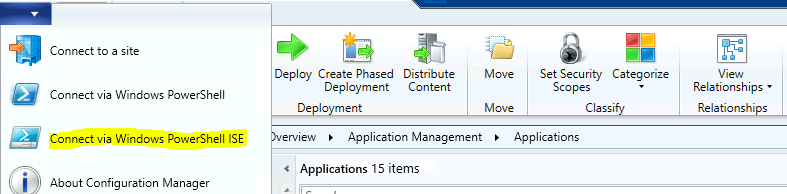
- Run the command from the below section to remove the content from multiple DPs simultaneously.
- Remember to change the application name. Refer to Microsoft doc for other options.
PS MEM:> $csv = import-csv F:\Sources\APPList\DPList.csv
 foreach ($DPName in $csv.DPName) {
 Remove-CMContentDistribution -ApplicationName 'CMPivot' -DistributionPointName $DPName -verbose -force
 }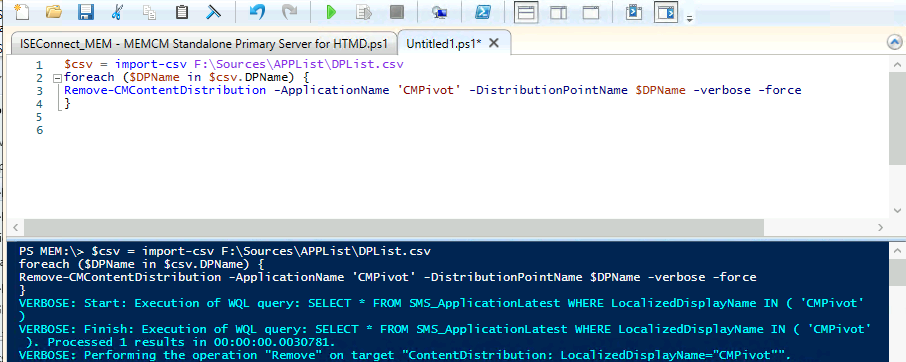
Log Entries of the above command for your reference:
VERBOSE: Start: Execution of WQL query: SELECT * FROM SMS_ApplicationLatest WHERE LocalizedDisplayName IN ( 'CMPivot'
 )
 VERBOSE: Finish: Execution of WQL query: SELECT * FROM SMS_ApplicationLatest WHERE LocalizedDisplayName IN ( 'CMPivot'
  ). Processed 1 results in 00:00:00.0030781.
 VERBOSE: Performing the operation "Remove" on target "ContentDistribution: LocalizedDisplayName="CMPivot"".
 VERBOSE: Start: Execution of WQL query: SELECT * FROM SMS_PackageContentServerInfo WHERE ObjectID IN ( 'SCOPEID_107428
 5A-82C7-474F-B242-1EE20F8C3CE5/APPLICATION_FE609216-3501-432E-B1F9-027B4E8B2766' )
 VERBOSE: Finish: Execution of WQL query: SELECT * FROM SMS_PackageContentServerInfo WHERE ObjectID IN ( 'SCOPEID_10742
 85A-82C7-474F-B242-1EE20F8C3CE5/APPLICATION_FE609216-3501-432E-B1F9-027B4E8B2766' ). Processed 2 results in 00:00:00.0
 257211.
 VERBOSE: Start: Execution of WQL query: SELECT COUNT() FROM SMS_DeploymentType WHERE AppModelName = "ScopeId_1074285A -82C7-474F-B242-1EE20F8C3CE5/Application_fe609216-3501-432e-b1f9-027b4e8b2766" AND Technology IN ("iOS", "Windows8App" , "WinPhone8", "Android", "MobileMsi") VERBOSE: Start: Execution of WQL query: SELECT COUNT() FROM SMS_DeploymentType WHERE AppModelName = "ScopeId_1074285A
 -82C7-474F-B242-1EE20F8C3CE5/Application_fe609216-3501-432e-b1f9-027b4e8b2766" AND Technology NOT IN ("iOS", "WinPhone
 8", "Android")
 VERBOSE: Start: Execution of WQL query: SELECT * FROM SMS_DistributionPointInfo WHERE Name IN ( 'MEMCMSecondary.memcm.
 com' )
 VERBOSE: Finish: Execution of WQL query: SELECT * FROM SMS_DistributionPointInfo WHERE Name IN ( 'MEMCMSecondary.memcm
 .com' ). Processed 1 results in 00:00:00.0001469.
 VERBOSE: Start: Execution of WQL query: Select pkg.* From SMS_ContentPackage As pkg Inner Join SMS_CIContentPackage As
  con On pkg.PackageID = con.PackageID Where con.CI_ID In ('16784472') Or con.CI_ID in (Select ToApplicationCIID From S
 MS_AppDependenceRelation_Flat Where FromApplicationCIID In ('16784472'))
 VERBOSE: Finish: Execution of WQL query: Select pkg.* From SMS_ContentPackage As pkg Inner Join SMS_CIContentPackage A
 s con On pkg.PackageID = con.PackageID Where con.CI_ID In ('16784472') Or con.CI_ID in (Select ToApplicationCIID From
 SMS_AppDependenceRelation_Flat Where FromApplicationCIID In ('16784472')). Processed 1 results in 00:00:00.2005933.
 VERBOSE: Start: Execution of WQL query: Select * From SMS_DistributionPoint Where PackageID In ('MEM00023') And Server
 NALPath = '["Display=\\MEMCMSecondary.memcm.com\"]MSWNET:["SMS_SITE=HS0"]\\MEMCMSecondary.memcm.com\'
 VERBOSE: Delete() object 'SMS_DistributionPoint.PackageID="MEM00023",ServerNALPath="[\"Display=\\MEMCMSecondary.memc
 m.com\\"]MSWNET:[\"SMS_SITE=HS0\"]\\MEMCMSecondary.memcm.com\",SiteCode="HS0"'
 VERBOSE: Finish: Execution of WQL query: Select * From SMS_DistributionPoint Where PackageID In ('MEM00023') And Serve
 rNALPath = '["Display=\\MEMCMSecondary.memcm.com\"]MSWNET:["SMS_SITE=HS0"]\\MEMCMSecondary.memcm.com\'. Processe
 d 1 results in 00:00:00.1381848.
 VERBOSE: Start: Execution of WQL query: SELECT * FROM SMS_ApplicationLatest WHERE LocalizedDisplayName IN ( 'CMPivot'
 )
 VERBOSE: Finish: Execution of WQL query: SELECT * FROM SMS_ApplicationLatest WHERE LocalizedDisplayName IN ( 'CMPivot'
  ). Processed 1 results in 00:00:00.0000604.
 VERBOSE: Performing the operation "Remove" on target "ContentDistribution: LocalizedDisplayName="CMPivot"".
 VERBOSE: Start: Execution of WQL query: SELECT * FROM SMS_PackageContentServerInfo WHERE ObjectID IN ( 'SCOPEID_107428
 5A-82C7-474F-B242-1EE20F8C3CE5/APPLICATION_FE609216-3501-432E-B1F9-027B4E8B2766' )
 VERBOSE: Finish: Execution of WQL query: SELECT * FROM SMS_PackageContentServerInfo WHERE ObjectID IN ( 'SCOPEID_10742
 85A-82C7-474F-B242-1EE20F8C3CE5/APPLICATION_FE609216-3501-432E-B1F9-027B4E8B2766' ). Processed 1 results in 00:00:00.0
 001185.
 VERBOSE: Start: Execution of WQL query: SELECT COUNT() FROM SMS_DeploymentType WHERE AppModelName = "ScopeId_1074285A -82C7-474F-B242-1EE20F8C3CE5/Application_fe609216-3501-432e-b1f9-027b4e8b2766" AND Technology IN ("iOS", "Windows8App" , "WinPhone8", "Android", "MobileMsi") VERBOSE: Start: Execution of WQL query: SELECT COUNT() FROM SMS_DeploymentType WHERE AppModelName = "ScopeId_1074285A
 -82C7-474F-B242-1EE20F8C3CE5/Application_fe609216-3501-432e-b1f9-027b4e8b2766" AND Technology NOT IN ("iOS", "WinPhone
 8", "Android")
 VERBOSE: Start: Execution of WQL query: SELECT * FROM SMS_DistributionPointInfo WHERE Name IN ( 'CMMEMCM.memcm.com' )
 VERBOSE: Finish: Execution of WQL query: SELECT * FROM SMS_DistributionPointInfo WHERE Name IN ( 'CMMEMCM.memcm.com' )
 . Processed 1 results in 00:00:00.0001227.
 VERBOSE: Start: Execution of WQL query: Select pkg.* From SMS_ContentPackage As pkg Inner Join SMS_CIContentPackage As
  con On pkg.PackageID = con.PackageID Where con.CI_ID In ('16784472') Or con.CI_ID in (Select ToApplicationCIID From S
 MS_AppDependenceRelation_Flat Where FromApplicationCIID In ('16784472'))
 VERBOSE: Finish: Execution of WQL query: Select pkg.* From SMS_ContentPackage As pkg Inner Join SMS_CIContentPackage A
 s con On pkg.PackageID = con.PackageID Where con.CI_ID In ('16784472') Or con.CI_ID in (Select ToApplicationCIID From
 SMS_AppDependenceRelation_Flat Where FromApplicationCIID In ('16784472')). Processed 1 results in 00:00:00.0987883.
 VERBOSE: Start: Execution of WQL query: Select * From SMS_DistributionPoint Where PackageID In ('MEM00023') And Server
 NALPath = '["Display=\\CMMEMCM.memcm.com\"]MSWNET:["SMS_SITE=MEM"]\\CMMEMCM.memcm.com\'
 VERBOSE: Delete() object 'SMS_DistributionPoint.PackageID="MEM00023",ServerNALPath="[\"Display=\\CMMEMCM.memcm.com\
 \"]MSWNET:[\"SMS_SITE=MEM\"]\\CMMEMCM.memcm.com\",SiteCode="MEM"'
 VERBOSE: Finish: Execution of WQL query: Select * From SMS_DistributionPoint Where PackageID In ('MEM00023') And Serve
 rNALPath = '["Display=\\CMMEMCM.memcm.com\"]MSWNET:["SMS_SITE=MEM"]\\CMMEMCM.memcm.com\'. Processed 1 results in
  00:00:00.0691612.
Resources
- SCCM Content Housekeeping
- Fix ConfigMgr DP Issue RPC server is Unavailable Error Code 0x800706ba
- Fix SCCM SendFiles Failed 0x80070003 Error
- How to ConfigMgr Redistribute Content to Distribution Point.
We are on WhatsApp now. To get the latest step-by-step guides, news, and updates, Join our Channel. Click here – HTMD WhatsApp
Author
Anoop C Nair has been Microsoft MVP for 10 consecutive years from 2015 onwards. He is a Workplace Solution Architect with more than 22+ years of experience in Workplace technologies. He is a Blogger, Speaker, and Local User Group Community leader. His primary focus is on Device Management technologies like SCCM and Intune. He writes about technologies like Intune, SCCM, Windows, Cloud PC, Windows, Entra, Microsoft Security, Career, etc.




Thank you for useful information