






Windows 10 How to Remove Uninstall Microsoft Store Apps | Best Way to Delete MSI EXE Apps from Windows 10
Windows 10 How to Remove Uninstall Microsoft Store Apps | Best way to Delete MSI EXE Apps from Windows 10. As mentioned in the post “Download Microsoft Office 2016 for Windows 10 TP Users,” I’ve installed the Microsoft Word (preview) application from the Microsoft Store.
However, it’s stopped working, and in Windows 10, the modern Universal applications are NOT listed in Add Remove Programs. So, how do you uninstall or remove Windows 10 modern Microsoft Store Apps from Windows 10 machines? OK, As shown in the following picture, I tried to remove it.
In this post, you will get all the details of the Windows 10 How to Remove Uninstall Microsoft Store Apps | Best way to Delete MSI EXE Apps from Windows 10.
Removing apps from Windows 10 is straightforward whether they’re from the Microsoft Store or installed with MSI or EXE files.

- Add Microsoft Store Apps to Intune using Microsoft Graph API
- Install New Outlook for Windows with Microsoft Store App from Intune
- Best Guide to Install Windows App from New Microsoft Store in Intune
- Guidelines for Installing Microsoft PC Manager from New Microsoft Store in Intune
Uninstall Microsoft Store Apps – Delete MSI EXE Apps from Windows 10
Follow these steps to uninstall Microsoft Store or traditional MSI/EXE apps from Windows 10. Windows 10 Settings apps –> Apps –> Apps and Features.
But the uninstall button didn’t work for me :(. What is next ….. PowerShell?
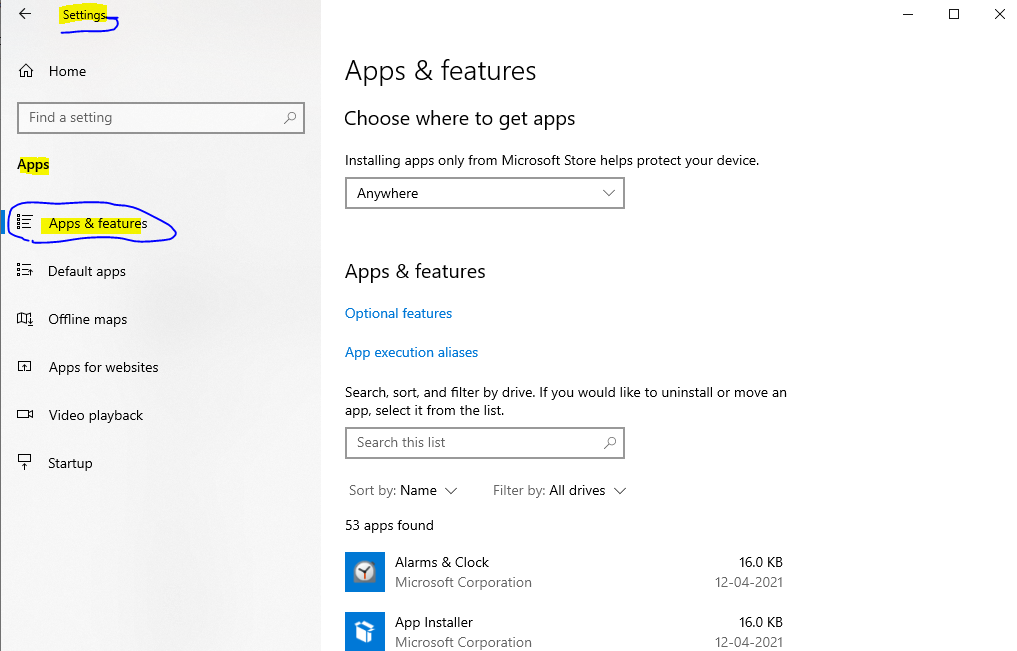
Click on the application you want to delete, uninstall or remove. Click on the Uninstall button.
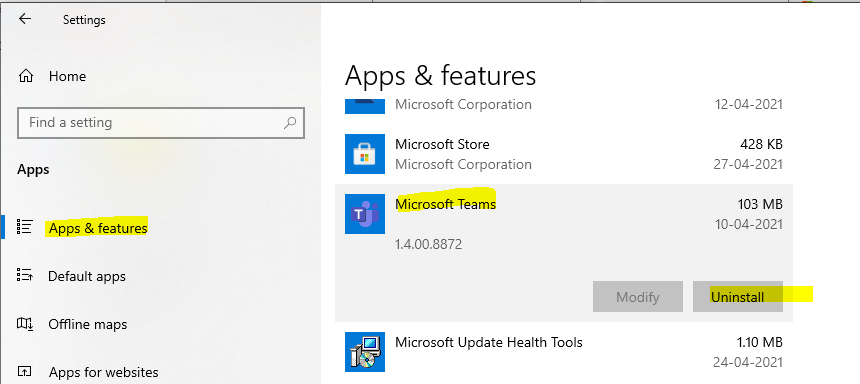
NOTE! Some Windows 10 apps might not have an uninstall button enabled; those are the default apps that come with a Windows 10 fresh install. So, you need to try PowerShe to uninstall those Windows 10 apps.
PowerShell Method – Windows 10 How to Remove Uninstall Microsoft Store Apps | Best Way to Delete MSI EXE Apps from Windows 10?
PowerShell helped me remove or uninstall the modern Universal application Word from my Windows 10 laptop. Remember to run the PowerShell with Administrative access.
The PowerShell CmdLet “Get-AppxPackage” helped me to export all the modern Universal applications installed on Windows 10 machines with “Get-AppxPackage >C:\appDetails.txt“. Also, you can use “Get-AppxPackage -name *Word” to find only word application details from Windows 10 machine.
Name : Microsoft.Office.Word
Publisher : CN=Microsoft Corporation, O=Microsoft Corporation,
 L=Redmond, S=Washington, C=US
Architecture : X64
ResourceId :
Version : 16.0.3601.1023
PackageFullName : Microsoft.Office.Word_16.0.3601.1023_x64__8wekyb3d8bbwe
InstallLocation : C:\Program Files\WindowsApps\Microsoft.Office.Word_16.0.360
 1.1023_x64__8wekyb3d8bbwe
IsFramework : False
PackageFamilyName : Microsoft.Office.Word_8wekyb3d8bbwe
PublisherId : 8wekyb3d8bbwe
IsResourcePackage : False
IsBundle : False
IsDevelopmentMode : False
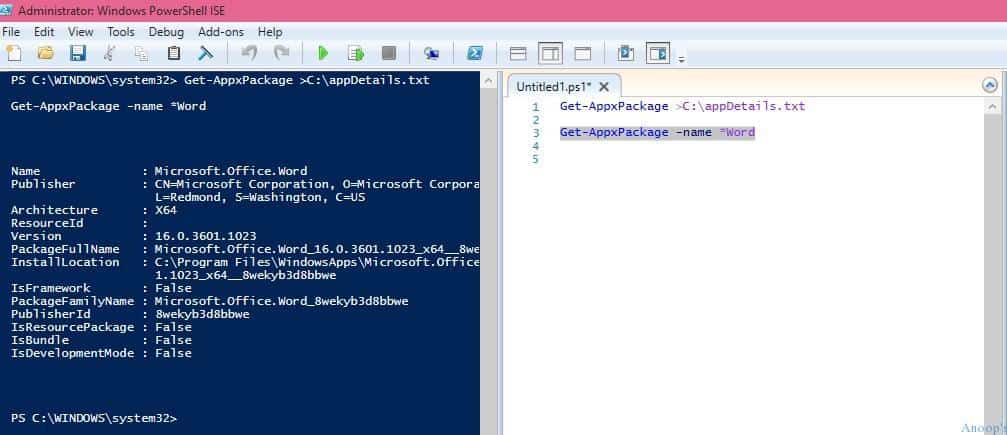
From the above result, you need to note the package’s Full name “PackageFullName: Microsoft.Office.Word_16.0.3601.1023_x64__8wekyb3d8bbwe” This will be used in the PowerShell command to remove or uninstall the Windows 10 Universal Application called Word.
I ran the following command “Remove-AppxPackage -package Microsoft.Office.Word_16.0.3601.1023_x64__8wekyb3d8bbwe” this PowerShell command helped to remove the Word modern Universal application from Windows 10 laptop.

Result – Uninstall Microsoft Store Apps – Delete MSI EXE Apps from Windows 10
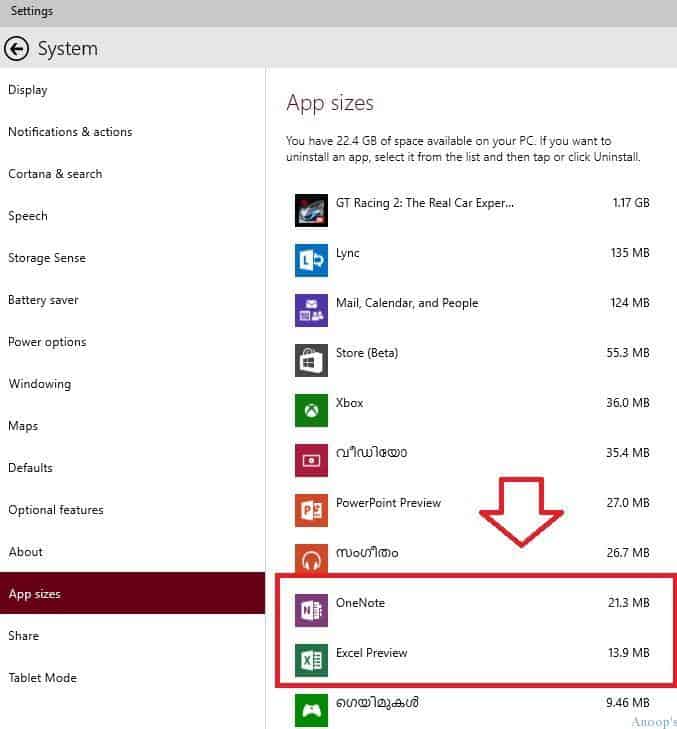
See the command results. The Word application was removed/uninstalled from Windows 10. There is no Windows 10 application called Word in the Settings-System-App Size list!!
Resources
Windows 10 Latest Version Of Client Operating System From Microsoft (anoopcnair.com)
We are on WhatsApp now. To get the latest step-by-step guides, news, and updates, Join our Channel. Click here. HTMD WhatsApp.
Author
Anoop C Nair is Microsoft MVP! He is a Device Management Admin with more than 20 years of experience (calculation done in 2021) in IT. He is a Blogger, Speaker, and Local User Group HTMD Community leader. His main focus is on Device Management technologies like SCCM 2012, Current Branch, and Intune. He writes about ConfigMgr, Windows 11, Windows 10, Azure AD, Microsoft Intune, Windows 365, AVD, etc.



Anoop, i’ve been following you for a while, and you’ve helped me resolve a lot of issues.
I’m having trouble uninstalling baked in apps like onenote and xbox. The powershell commands keep throwing errors like: Remove-AppxPackage : Deployment failed with HRESULT: 0x80073CFA, Removal failed. Please contact your software vendor.
(Exception from HRESULT: 0x80073CFA)
Package Manager aborted the Remove operation because an invalid argument was passed:
Microsoft.Office.OneNote_8wekyb3d8bbwe.
Any suggestions? Thanks.
StaffHi ! – Have you tried
Get-AppxPackage xbox | Remove-AppxPackage
May be you can get more details at http://blogs.itpro.es/octaviordz/2015/08/03/remover-las-aplicaciones-predeterminadas-en-windows-10/
That site was awesome. Helped me get rid of a lot of the other apps I don’t want. But the message I get when I try to remove Xbox is: “C:\Windows\SystemApps\Microsoft.XboxGameCallableUI_cw5n1h2txyewy failed. This app is part of Windows and cannot be
uninstalled on a per-user basis. An administrator can attempt to remove the app from the computer using Turn Windows
Features on or off. However, it may not be possible to uninstall the app.”
It appears windows has decided xbox is too “important’ for a user to remove it.
I’ve made simple powershell script to remove this apps:
$excludeList = “Microsoft.VCLibs.120.00”,
“Microsoft.VCLibs.140.00”,
“Microsoft.NET.Native.Framework.1.0”,
“Microsoft.NET.Native.Runtime.1.0”,
“Microsoft.Appconnector”,
“Microsoft.WindowsStore”,
“Microsoft.Windows.CloudExperienceHost”,
“Microsoft.AAD.BrokerPlugin”,
“Microsoft.AccountsControl”,
“Microsoft.BioEnrollment”,
“Microsoft.LockApp”,
“Microsoft.MicrosoftEdge”,
“Microsoft.Windows.ContentDeliveryManager”,
“Microsoft.Windows.Cortana”,
“Microsoft.Windows.ParentalControls”,
“Microsoft.Windows.ShellExperienceHost”,
“Microsoft.WindowsFeedback”,
“Microsoft.XboxGameCallableUI”,
“Microsoft.XboxIdentityProvider”,
“Windows.ContactSupport”,
“windows.immersivecontrolpanel”,
“Windows.MiracastView”,
“Windows.PrintDialog”,
“Windows.PurchaseDialog”,
“windows.devicesflow”
# packages that cannot be removed + store, here you can add your exceptions
$packages = Get-AppxPackage | Where-Object {$_.Name -notin $excludeList}
foreach ($package in $packages) {
Remove-AppxPackage $package.PackageFullName
}
$provisionedPackages = Get-AppxProvisionedPackage -online | Where-Object {$_.displayName -notin $excludeList}
foreach ($provisionedPackage in $provisionedPackages) {
Remove-AppxProvisionedPackage -online -packageName $provisionedPackage.PackageName
}
I do not like the thought of just accepting that I don’t have control over my own computer any more.