






How to Solve Sysprep Error 0x80073cf2
Let’s discuss how to solve Sysprep Error 0x80073cf2. Microsoft recognized an error in the System Preparation Tool in Audit Mode on Windows 10 22H2 PCs. Audit Mode helps you enable the System Preparation Tool in Windows. Microsoft first recognized this error in Windows 10 non-security Update in November 2023.
The system Preparation Tool faces this critical issue, which has not been resolved. System Preparation (Sysprep) is a tool developed by Microsoft. It is a command-line tool that can be run manually or through a script. It is used to change the Windows Images from generalized to specialized states.
After the November Update release installation or later, some users faced an issue that Windows devices might be unable to complete preparation using the System Preparation Tool (Sysprep.exe). This issue happened due to the status of a Microsoft Edge package.
Microsoft still has a workaround for this issue. If your device faces a Sysprep Error, you can verify if it is affected by this issue with the Mitigation Steps provided by Microsoft. This blog post helps you Solve Sysprep Error 0x80073cf2.

- January Windows 10 Patch KB5034441 Installation Fails with Error 0x80070643
- 2024 January KB5034122 Windows 10 Patches and 0 Zero-Day Vulnerability
What are the Features of System Preparation Tool?
1. Users can completely automate the Setup
2. It is used to prepare an Operating System for disk cloning and restoring via a disk image
3. It helps to configure whether the PC will boot to audit mode
4. Allows you to add answer file (unattended) settings to an existing installation.
How to Solve Sysprep Error 0x80073cf2
The Sysprep error occurred on Windows 10 version 22H2 devices after installing an update released on November 30, 2023. An error message is received when the user runs the System Preparation tool (Sysprep.exe) in Audit mode.
| Error message text in System Preparation Tool (Sysprep.exe) |
|---|
| Sysprep was not able to validate your Windows installation. Review the log file at %WINDIR%\system32\Sysprep\Panther\setupact.log for details. After resolving the issue, use Sysprep to validate your installation again.” |
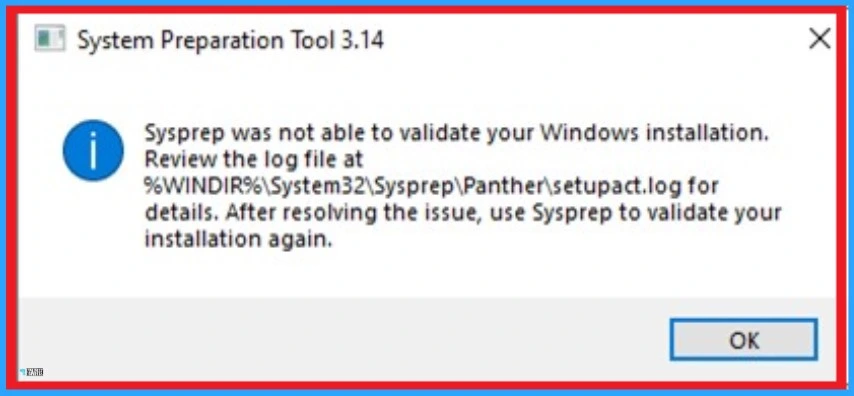
Users can check if the Sysprep error 0x80073cf2 affected their Windows 10 Device by opening the setupact.log file. If you are affected by this issue, you can find an entry with error 0x80073cf2 similar to the following.
SYSPRP Package Microsoft.MicrosoftEdge_44.19041.3636.0_neutral___8wekyb3d8bbwe was installed for use but not provisioned for all users. This package will not function properly in the sysprep SYSPRP Failed to remove apps for the current user: 0x80073cf2
- Windows 10 KB5033372 December 2023 Patch Tuesday | 1 Zero Day Vulnerabilities
- Major Issue Printers Getting Renamed to HP LaserJet M101-M106 in Windows 10 11 and Server OS
Resolve Sysprep Error 0x80073cf2 using PowerShell
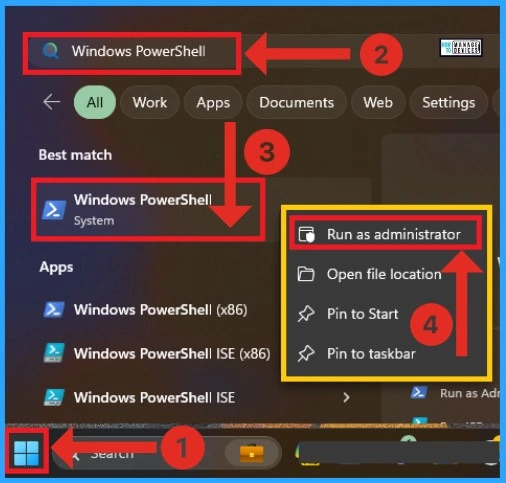
You can easily verify if your Windows 10 Device faces a Sysprep error 0x80073cf2 or resolve this with a command prompt in PowerShell. To resolve this issue, open PowerShell and follow the steps below.
- Click on the Start Menu and Search Windows PowerShell
- Right-click on the Windows Powershell
- Click on the Run as Administrator option from the context menu
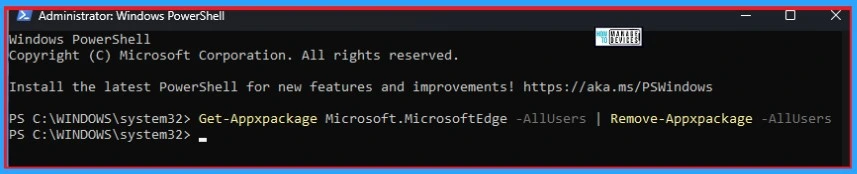
After opening the PowerShell, you can type the command as follows. You can replace the PackageFullName as shown on your log file. Here, I choose Microsoft.MicrosoftEdge as the example. You can run this command as follows.
Note:- Get-Appxpackage Microsoft.MicrosoftEdge -AllUsers | Remove-Appxpackage -AllUsers
After typing this command, press the Enter Key. You can now exit from PowerShell by Typing Exit and pressing the Enter Key. Resume Sysprep steps.
- Open Sysprep under System Cleanup Action, and select Out-of-Box Experience (OOBE)
- Select the Generalize check box
- Under Shutdown Options, select Reboot and then click Ok
- How to Enable or Disable Copilot in Windows 10
- Windows 10 KB5031356 October 2023 Patch Tuesday | 3 Zero Day Vulnerabilities
Reference
KB5034912: Sysprep error 0x80073cf2 after installing the November 30, 2023 update or later for Windows 10, version 22H2 – Microsoft Support
We are on WhatsApp. To get the latest step-by-step guides and news updates, Join our Channel. Click here –HTMD WhatsApp.
Author
Gopika S Nair is a computer enthusiast. She loves writing on Windows 11 and related technologies. She is here to share quick tips and tricks with Windows 11 or Windows 10 users. She is Post Graduate Diploma Holder in Computer Science.



I still show Microsoft.MicrosoftEdge as installed.
Removal Failed. Please contact your software vendor.
Is this because Edge is part of the OS?