






How to use Intune Filter cpuArchitecture Device Property for App and Policy Assignments
Let’s discuss using Intune Filter cpuArchitecture Device Property for App and Policy Assignments. Device filters now support the cpuArchitecture property, allowing organizations to specify processor types such as AMD64, Arm64, and x86 in their device management platforms.
This enhancement enables more control over the app and policy assignments. It ensures that software and settings are only sent to devices with the correct processor type. This feature makes management easier, improves compatibility, and ensures that resources are used efficiently across different devices.
The cpuArchitecture filter device property is a newly introduced feature for managing app and policy assignments on Windows and macOS devices. It allows IT administrators to simplify software deployments, compliance policies, and configuration profiles based on the architecture of a device’s processor.
In this post, you will find all the details about the new device filters that bring cpuArchitecture support for AMD64, Arm64, and x86 processors in Intune. All the details are explained below.


Table of Contents
What is the New cpuArchitecture Filter Device Property?
The new cpuArchitecture filter device property allows you to filter app and policy assignments based on the processor architecture of Windows and macOS devices. You can specify whether assignments should apply to devices with AMD64, Arm64, or x86 processors.
Which Devices Support the cpuArchitecture Filter?
The cpuArchitecture filter is available for Windows and macOS devices.
What Processor Architectures can be Filtered with this Property?
The filter supports processor architectures such as AMD64, Arm64, and x86.
Device Filters Bring cpuArchitecture AMD64 Arm64 x86 in Intune
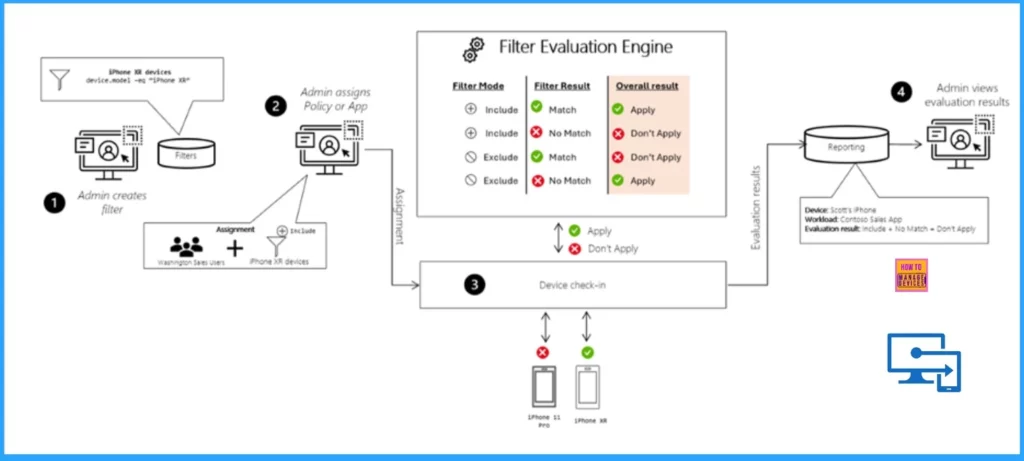
This Device filter feature is beneficial when you have devices with different types of processors, like ARM and x86. It lets you manage and deploy software and settings more accurately, ensuring they are only sent to devices that can use them properly.
Read More – What’s New in Microsoft Intune August 2024 Update
- Enhanced Reporting Multi-Administrative Approval Microsoft Home Page via Intune August 2024 Update
- Microsoft Intune 2407 New Features Early July Update
- Managing Activation Lock on Apple Devices with Intune
- How to Use Intune Assignment Filters Comparison Property gt ge lt le with OS Version
How to Create a Filter
Filters are available for devices enrolled in Intune, which Intune manages, and for apps also managed by Intune. Managed apps are used in mobile application management (MAM) scenarios, where apps are managed on devices not enrolled in Intune.
- Sign in to the Microsoft Intune admin portal
- Tenant administration > Filters > Create
- Managed Devices – These devices are managed by Intune, allowing for comprehensive control and configuration.
- Managed Apps – These are applications that Intune manages, including those deployed to enrolled devices.
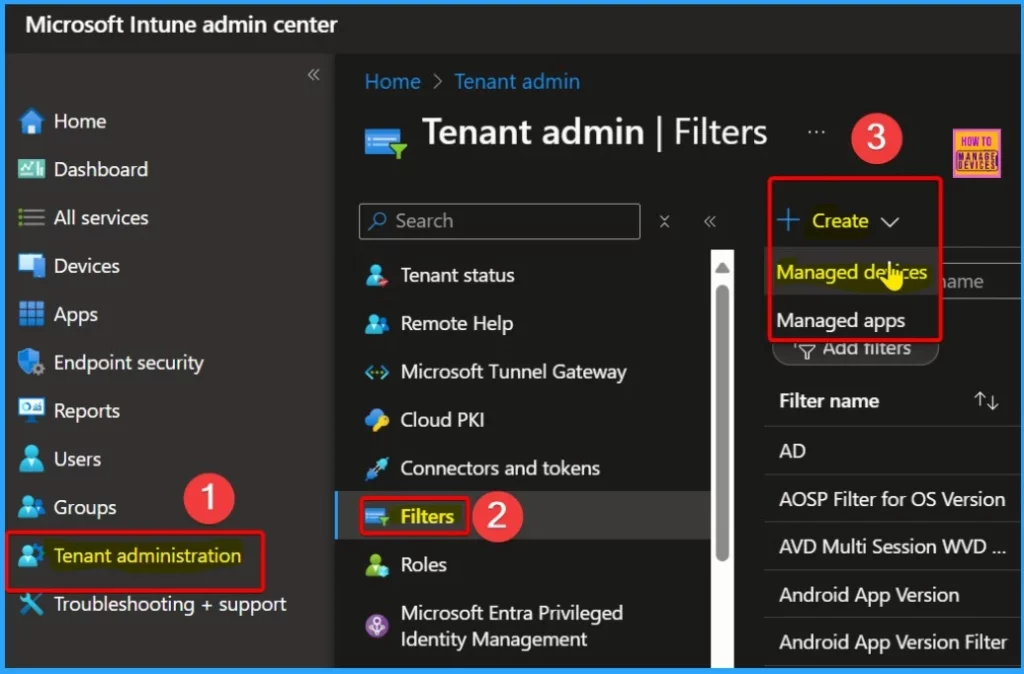
Filters improve flexibility and precision when assigning Intune policies and apps. They help you target managed devices and apps based on specific properties, like device type or version.
You can use filters to include or exclude devices or apps in specific groups according to your criteria. Filters can be customized to match various properties and applied repeatedly to include or exclude items as needed in different scenarios.
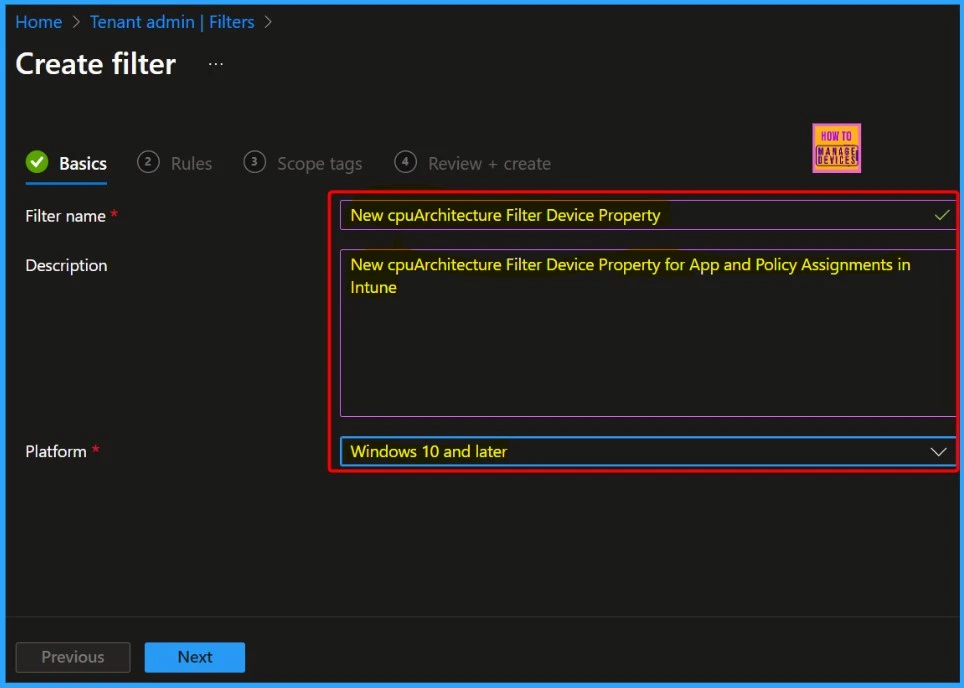
- In the Basic tab, provide the following.
- Filter Name – Enter a descriptive name for the filter.
- Description – Enter a description for the filter.
- Platform – Select your platform.
- Click Next
- Enforce Users to use Intune Approved Apps with App Protection Policies using Conditional Access Policies
- Issue on Minimum PIN Length for Startup in Disk Encryption Policies in Intune
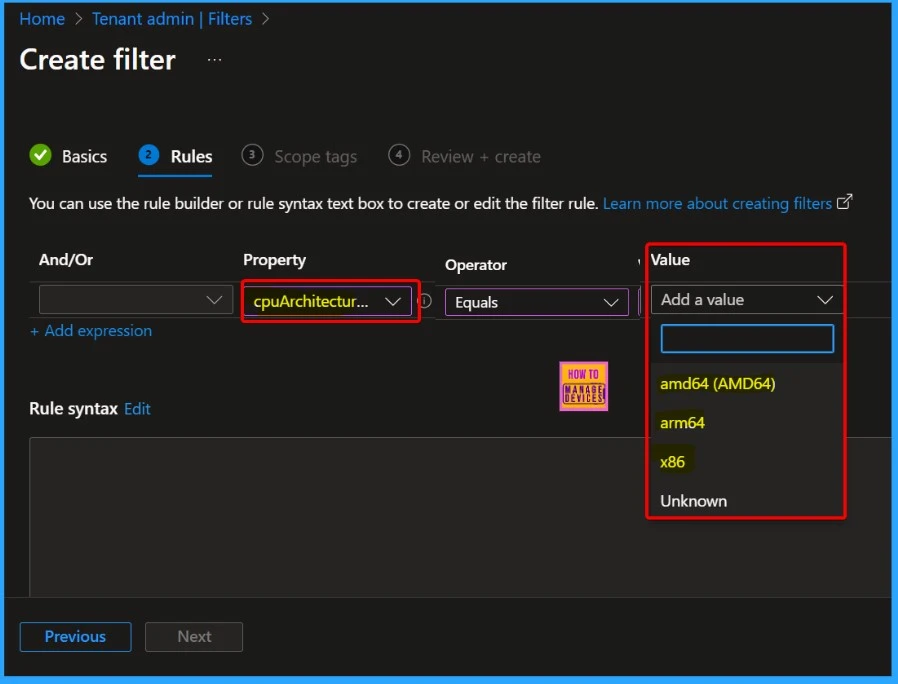
You have two rule creation options in the Rules tab: the Rule Builder and the Rule Syntax. Rule Builder is a user-friendly graphical interface that allows you to create rules by selecting menu options and criteria. It’s designed for ease of use, so you can set up rules without writing code.
Rule Syntax—This method involves writing rules using a specific syntax or language. It offers more flexibility and precision for advanced users who are comfortable with coding and need to create more complex rules than may be possible with the rule builder.
| And/or | Property | Operator | Value |
|---|---|---|---|
| cpuArchitecture | Equals NotEquals In NotIn | amd64 (AMD64) arm64 x86 Unknown |
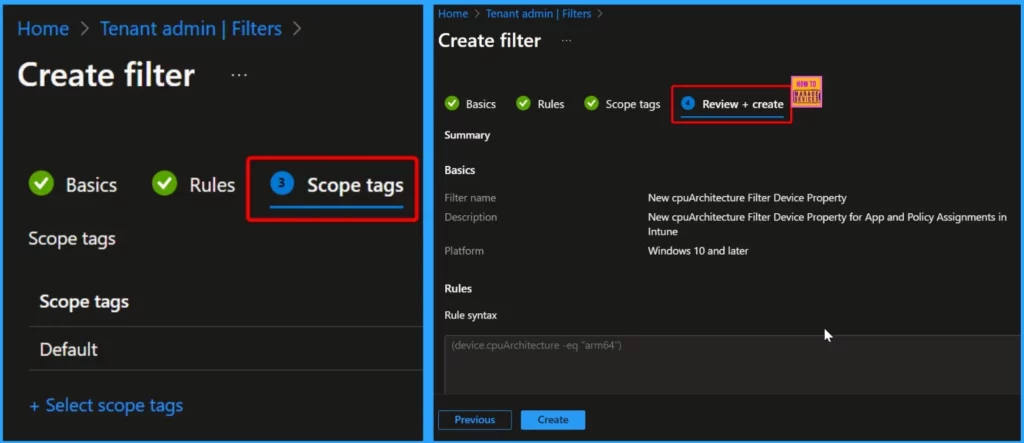
Scope tags (optional) help you assign a tag to limit the profile to specific IT groups. In the Review + Create section, check your settings. When you select Create, your changes are saved, and the filter is created. The new filter will also appear in the list of filters.
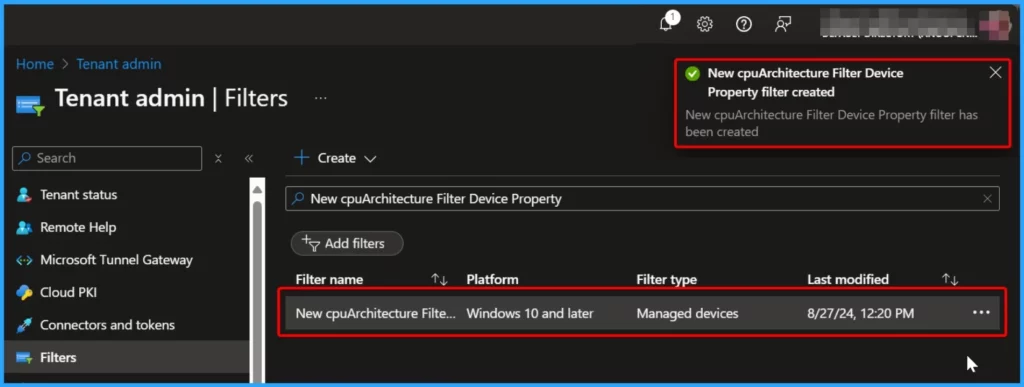
The image below demonstrates that the new cpuArchitecture filter device property for app and policy assignments in Intune has been successfully created.
- Microsoft Added New 160+ Apps on Intune Enterprise App Catalog
- MS Intune Stop Supporting User Enrollment with Company Portal for iOS iPadOS
Device Properties for Managed Device Filter Rules cpuarchitecture
Based on the cpuarchitecture, you can use the following device properties in your managed device filter rules. You can use these properties to filter devices based on their CPU architecture in your Intune-managed device rules.
| cpuArchitecture | Operator Options |
|---|---|
| amd64 – Windows | -eq, -ne, -in, -notIn |
| x86 – Windows | -eq, -ne, -in, -notIn |
| arm64 – Windows | -eq, -ne, -in, -notIn |
| unknown – Windows | -eq, -ne, -in, -notIn |
| x64 – macOS | -eq, -ne, -in, -notIn |
| arm64 – macOS | -eq, -ne, -in, -notIn |
| unknown – macOS | -eq, -ne, -in, -notIn |
We are on WhatsApp now. To get the latest step-by-step guides, news, and updates, Join our Channel. Click here. HTMD WhatsApp.
Author
Anoop C Nair has been Microsoft MVP from 2015 onwards for 10 consecutive years! He is a Workplace Solution Architect with more than 22+ years of experience in Workplace technologies. He is also a Blogger, Speaker, and Local User Group Community leader. His primary focus is on Device Management technologies like SCCM and Intune. He writes about technologies like Intune, SCCM, Windows, Cloud PC, Windows, Entra, Microsoft Security, Career, etc.


Your description of each step is wonderful and extremely helpful, until it comes time to actually build the rules, you show highlighted in Figure 5 several things and I don’t know what I am supposed to do with any of that. Any additional insights would be helpful to get a basic filter setup for devices.