






Learn How to Install Reinstall SCCM Service Connection Point| ConfigMgr
Let’s learn the options for troubleshooting SCCM service connection point issues. Sometimes, reinstalling the SCCM service connection point role is one of the troubleshooting steps to fix download updates and servicing issues.
NOTE! The update stuck in download is a common scenario in enterprise organizations and LAB environments. This issue is mostly caused by a proxy or other internet-related issues.
What is a Service Connection Point? A service connection point connects Configuration Manager to Microsoft cloud services and is used for Microsoft Intune subscription and servicing and to update your Configuration Manager installation.
Table of Contents
Reinstall SCCM Service Connection Point| ConfigMgr
ConfigMgr Updates are not available in my Technical Preview LAB environment. I reinstalled the SCCM Service Connection Point to fix the updates and service download issues.

I have noticed that there are EIGHT Workers in the Service Connection point roles in SCCM. And those threads are:
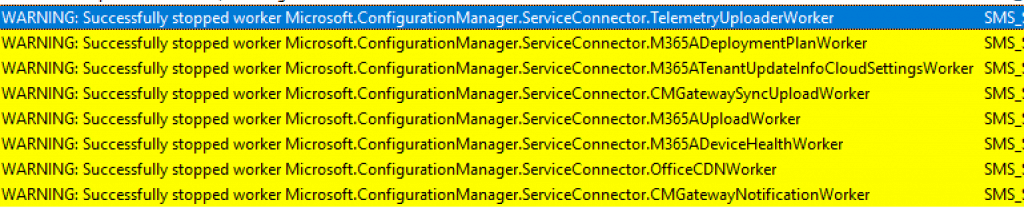
- TelemetryUploaderWorker
- M365AUploadWorker
- M365ADeploymentPlanWorker
- M365ADeviceHealthWorker
- M365ATenantUpdateInfoCloudSettingsWorker
- OfficeCDNWorker
- CMGatewaySyncUploadWorker
- CMGatewayNotificationWorker
Remove Service Connection Point Role
Let’s remove the Service Connection Point role from your SCCM infrastructure. The service connection point connects Microsoft Endpoint Manager ConfigMgr & cloud solutions.
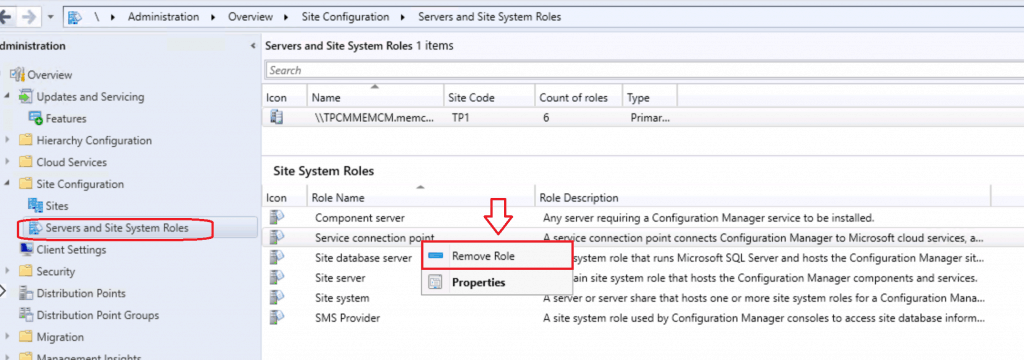
- Navigate – \Administration\Overview\Site Configuration\Servers and Site System Roles
- Right Click on Service Connection Point Role and Select Remove
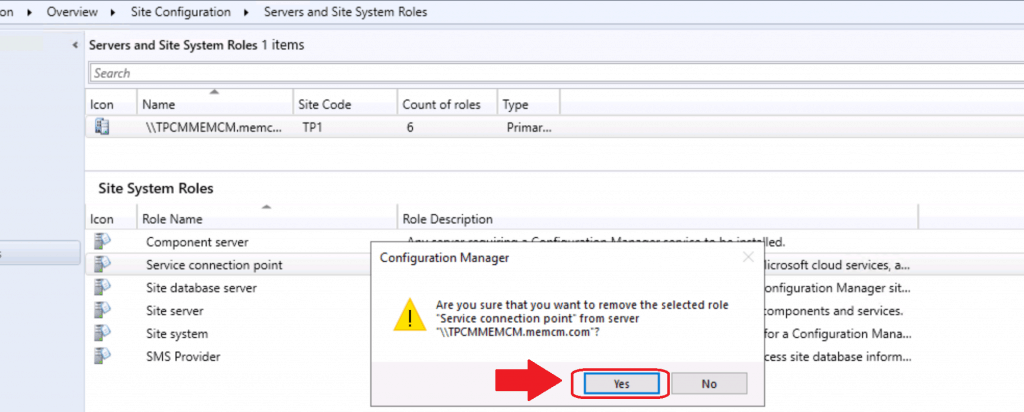
- Click on Yes to confirm the removal of the SCP role from the site system server or CAS or Primary
Click Yes to confirm the removal
Understand the Removal Process via Logs
As you know, SCCM logs are admins’ best friends. Let’s understand how removal is processed using different log files.
compmon.log
More details in compmon.log
Checking components …~
Can not get the current execution state for component SMS_OUTGOING_CONTENT_MANAGER since it is not installed or completed installing.~
Can not get the current execution state for component SMS_SERVICE_CONNECTOR since it is not installed or completed installing.~
Failed to read the required Operations Management component (SMS_AZUREAD_DISCOVERY_AGENT) registry key values on local computer; error = 6 (0x6).~
Failed to read in current property values and refresh the COpsMgmtComponent object; error = 6 (0x6).~
Can not get the current execution state for component SMS_CLOUD_USERSYNC since it is not installed or completed installing.~
Can not get the current execution state for component SMS_DMP_DOWNLOADER since it is not installed or completed installing.~
Can not get the current execution state for component SMS_CLOUDCONNECTION since it is not installed or completed installing.~
Can not get the current execution state for component SMS_DMP_UPLOADER since it is not installed or completed installing.~
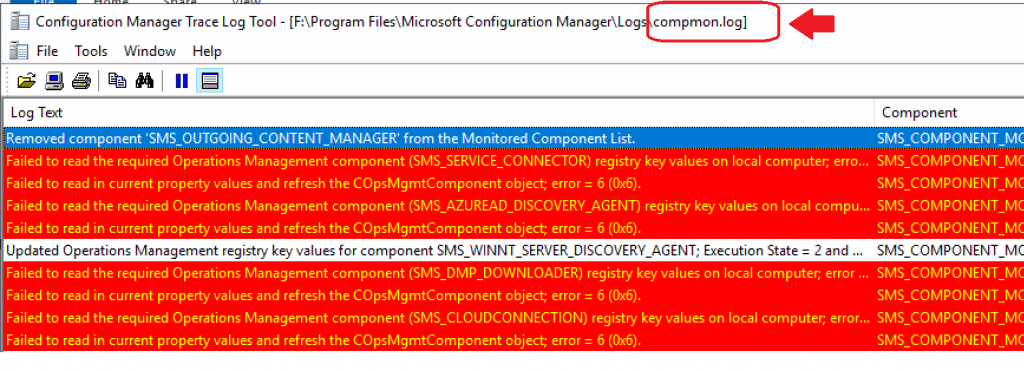
Removed component 'SMS_CLOUD_USERSYNC' from the Monitored Component List.
Removed component 'SMS_DMP_UPLOADER' from the Monitored Component List.
Removed component 'SMS_OUTGOING_CONTENT_MANAGER' from the Monitored Component List
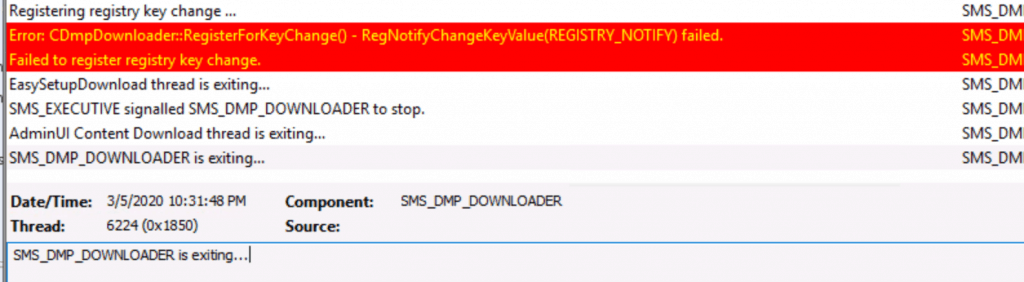
DMPDownloader.log
More Details from DMPDownloader.log
Error: CDmpDownloader::RegisterForKeyChange() - RegNotifyChangeKeyValue(REGISTRY_NOTIFY) failed.
Failed to register registry key change.
EasySetupDownload thread is exiting…
SMS_EXECUTIVE signalled SMS_DMP_DOWNLOADER to stop.
AdminUI Content Download thread is exiting…
SMS_DMP_DOWNLOADER is exiting…
Sitecomp.log
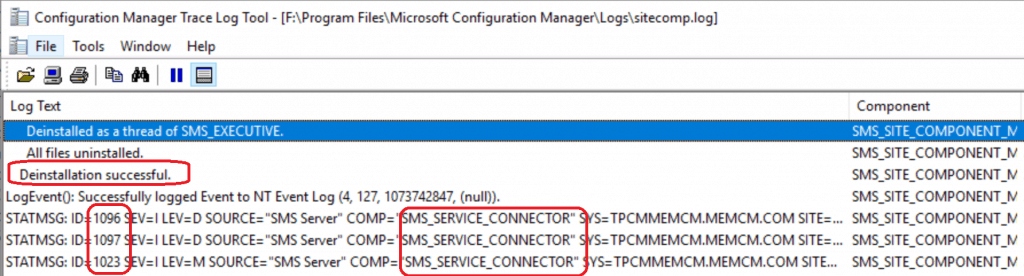
More details Sitecomp.log
Deinstallation successful.
LogEvent(): Successfully logged Event to NT Event Log (4, 126, 1073742847, (null))
.
STATMSG: ID=1096 SEV=I LEV=D SOURCE="SMS Server" COMP="SMS_AZUREAD_DISCOVERY_AGENT"
STATMSG: ID=1097 SEV=I LEV=D SOURCE="SMS Server" COMP="SMS_AZUREAD_DISCOVERY_AGENT"
STATMSG: ID=1023 SEV=I LEV=M SOURCE="SMS Server" COMP="SMS_AZUREAD_DISCOVERY_AGENT"
.
STATMSG: ID=1096 SEV=I LEV=D SOURCE="SMS Server" COMP="SMS_CLOUDCONNECTION"
.
STATMSG: ID=1096 SEV=I LEV=D SOURCE="SMS Server" COMP="SMS_CLOUD_USERSYNC"
.
STATMSG: ID=1096 SEV=I LEV=D SOURCE="SMS Server" COMP="SMS_DMP_DOWNLOADER"
.
STATMSG: ID=1096 SEV=I LEV=D SOURCE="SMS Server" COMP="SMS_DMP_UPLOADER"
.
STATMSG: ID=1096 SEV=I LEV=D SOURCE="SMS Server" COMP="SMS_OUTGOING_CONTENT_MANAGER"
.
STATMSG: ID=1096 SEV=I LEV=D SOURCE="SMS Server" COMP="SMS_SERVICE_CONNECTOR"
SMS_SERVICE_CONNECTOR.log
More details about SMS_SERVICE_CONNECTOR.log!!
The host's stop has been called, shutting down 8 workers
WARNING: Successfully stopped worker Microsoft.ConfigurationManager.ServiceConnector.TelemetryUploaderWorker
WARNING: Successfully stopped worker Microsoft.ConfigurationManager.ServiceConnector.M365AUploadWorker
WARNING: Successfully stopped worker Microsoft.ConfigurationManager.ServiceConnector.M365ADeploymentPlanWorker  WARNING: Successfully stopped worker Microsoft.ConfigurationManager.ServiceConnector.M365ADeviceHealthWorker WARNING: Successfully stopped worker Microsoft.ConfigurationManager.ServiceConnector.M365ATenantUpdateInfoCloudSettingsWorker
WARNING: Successfully stopped worker Microsoft.ConfigurationManager.ServiceConnector.OfficeCDNWorker
WARNING: Successfully stopped worker Microsoft.ConfigurationManager.ServiceConnector.CMGatewaySyncUploadWorker
Successfully shut down the workers.
.
Successfully shut down the workers.
.
End main SMS_SERVICE_CONNECTOR thread
Reinstall SCM Service Connection Point
Let’s reinstall the service connection point to fix the SCCM servicing and update download issues.
NOTE! I restarted the SCCM server after removing the service connection point role to clean up all the leftover configurations.
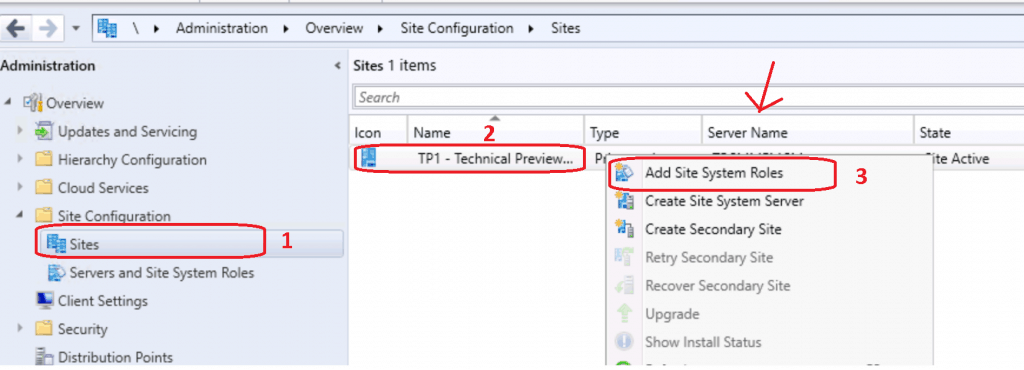
Navigate \Administration\Overview\Site Configuration\Servers and Site System Roles
- Select the Site System server and Right Click on the server – Select Add Site System Roles
- Click NEXT to continue
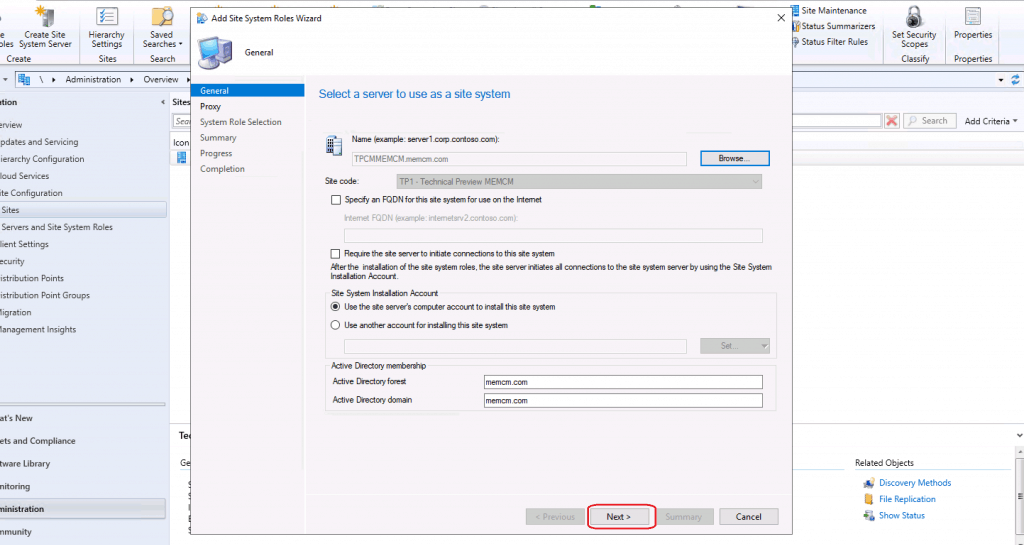
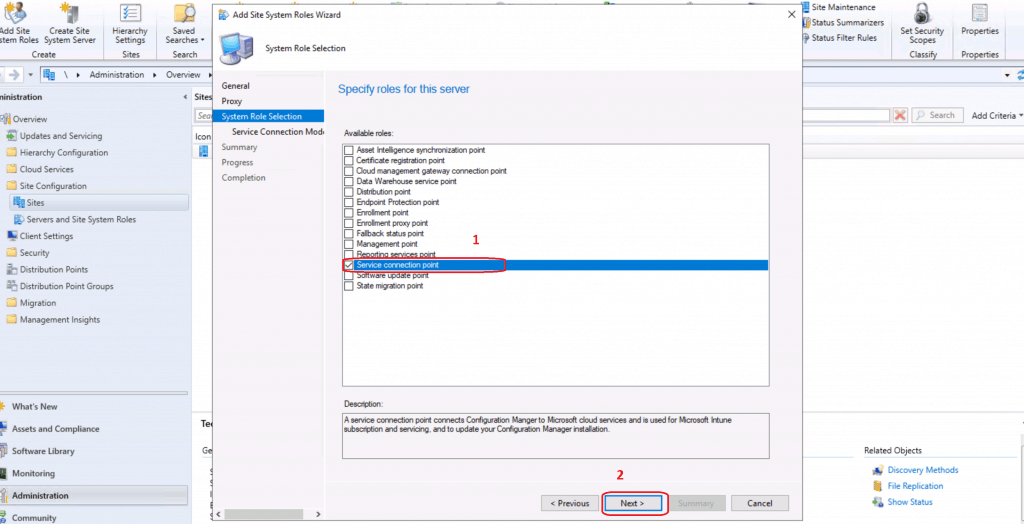
Select Site System Role – Service Connection Point
Click NEXT on the proxy configuration page. Proxy is not required for this Service Connection Point (SCP) role setup.
- Select the Service Connection Point option and click the NEXT button
Online or Offline Options
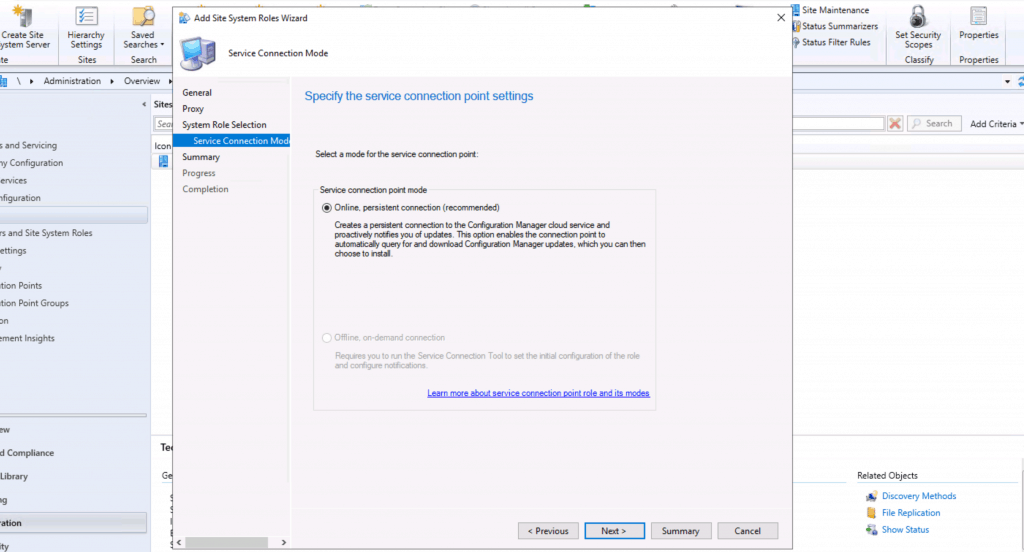
Service Connection points can be online or offline, depending on your security or connectivity baselines. However, when you install a technical preview version of ConfigMgr, the only option is to have an ONLINE server connection point.
NOTE! – More details SCCM Online Service Connection Point Details – 2 Options
Select ONLINE Persistent Connection (Recommended option)
- Click on NEXT to continue
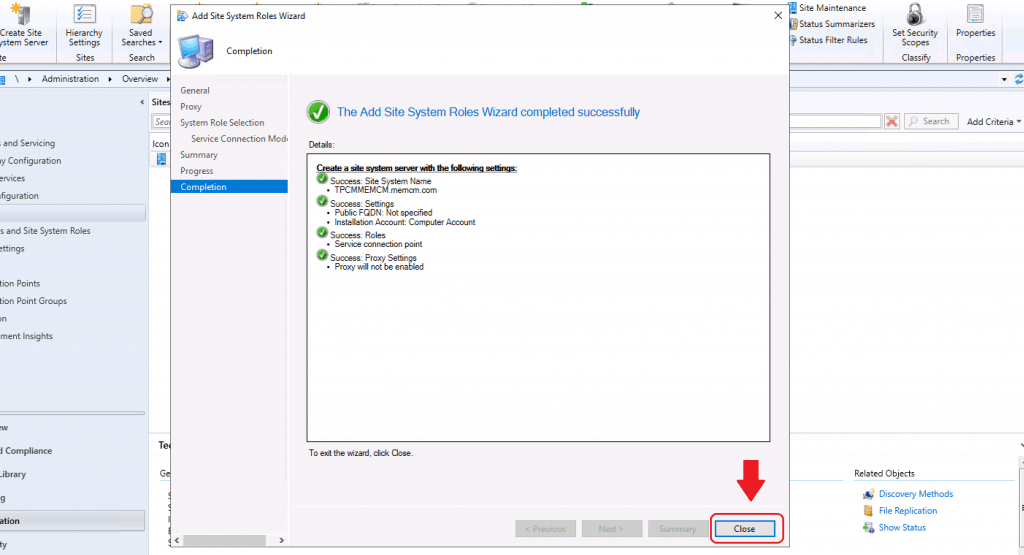
Click NEXT on the confirm setting page
- Click the CLOSE button to finish the confirmation
Check Installation Status
Check SMS_SERVICE_CONNECTOR.log to have more details about the SCP installation progress.
Initializing Task Execution Manager instance as SMS_SERVICE_CONNECTOR
Starting component SMS_SERVICE_CONNECTOR
Component SMS_SERVICE_CONNECTOR started successfully.
Resources
- CM Update Reset Tool Fixes SCCM CB Update Download Issue
- Fix SCCM Updates Stuck in Downloading State
- SCCM Update Prerequisite Check Stuck?
We are on WhatsApp. To get the latest step-by-step guides and news updates, Join our Channel. Click here –HTMD WhatsApp.
Author
Anoop C Nair is Microsoft MVP! He is a Device Management Admin with more than 20 years of experience (calculation done in 2021) in IT. He is a Blogger, Speaker, and Local User Group HTMD Community leader. His main focus is on Device Management technologies like SCCM 2012, Current Branch, and Intune. He writes about ConfigMgr, Windows 11, Windows 10, Azure AD, Microsoft Intune, Windows 365, AVD, etc.




How do you take care of the certificates if your site is PKI and you are moving the SCP off of the site server?