





Intune Adds Inventus OEMConfig App to Enhance Android Enterprise Management
Key Takeaways
- New OEMConfig app support added for Inventus devices
- Enables direct configuration of OEM-specific settings via Intune
- No changes to OEMConfig workflow or core functionality
- Faster access to new device features through OEM app updates
In this post we are discussing the Intune Adds Inventus OEMConfig App to Enhance Android Enterprise Management. Microsoft Intune’s latest update introduces support for a new OEMConfig app from Inventus (com.inventus.oemconfig.gen), expanding its ability to manage a wider range of Android Enterprise devices. With this addition, organizations using Inventus devices can now apply OEM-specific configurations directly through Intune, enabling more control over device settings that are not available in standard policies.
Table of Contents
Intune Adds Inventus OEMConfig App to Enhance Android Enterprise Management
This update doesn’t change how OEMConfig works, but it significantly enhances device compatibility by adding another OEM to the supported ecosystem. By integrating the Inventus OEMConfig app, Microsoft continues to close gaps in device-specific management and ensures IT administrators can access newly introduced OEM features without delays.
- MS Intune Adds Support for Multiple MAM Managed Accounts in Outlook on iOS
- Microsoft Intune Adds Recovery Lock and Admin Password Rotation for macOS
- Microsoft Intune Adds Assignment Filters Support for Apple Declarative Device Management
What is OEMConfig in Intune
OEMConfig allows device manufacturers (OEMs) to deliver their custom device settings through a dedicated app. These apps are published on Managed Google Play and integrated with Intune. Instead of Microsoft building support for each OEM feature, the OEM defines a configuration schema within its app. Intune reads this schema and presents it to administrators, who can then configure and deploy these settings to devices.
- This model reduces delays and ensures that new device capabilities are available as soon as the OEM releases them.
| What’s New | Info |
|---|---|
| The latest update introduces support for: | Inventus OEMConfig app (com.inventus.oemconfig.gen) |
| With this addition, organizations using Inventus Android devices can now: | Apply device-specific configurations through Intune. Use OEM-defined settings not available in standard policies. Benefit from faster updates and feature availability via the OEM app. |
OEMConfig Configuration Designer in Microsoft Intune
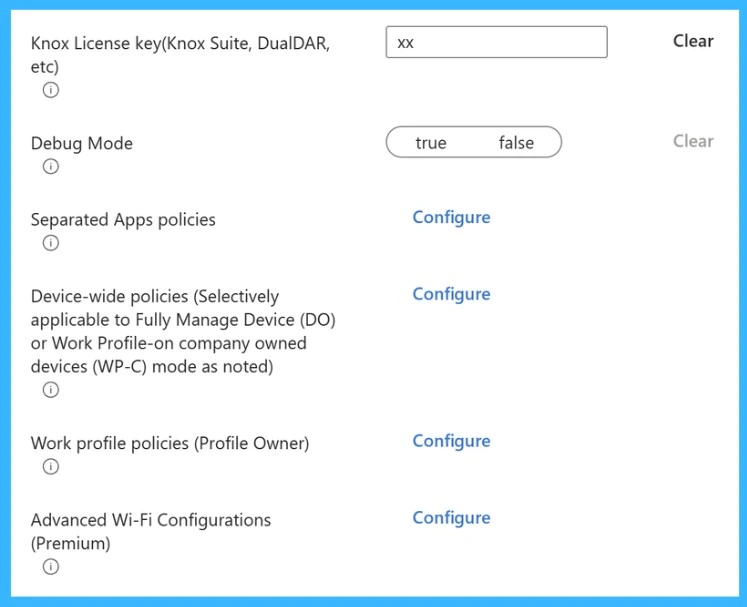
The OEMConfig Configuration Designer in Microsoft Intune, shows how administrators configure Samsung Knox–specific settings within an OEMConfig profile. It includes options like entering a Knox License Key to enable advanced enterprise features, toggling Debug Mode for troubleshooting, and accessing multiple policy groups such as Separated Apps policies, Device-wide policies, Work profile policies, and Advanced Wi-Fi configurations.

- Each section has a “Configure” option, allowing admins to customize detailed OEM-specific settings, demonstrating how Intune presents the manufacturer-defined schema in a structured and manageable way.
Intune Adds Inventus OEMConfig Support
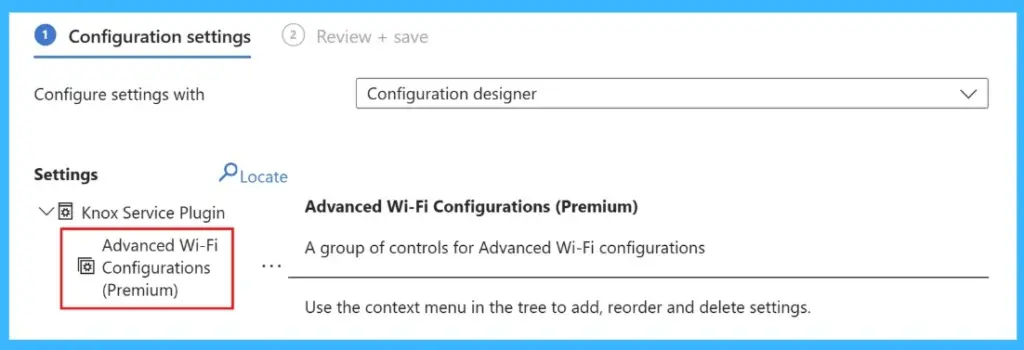
Microsoft Intune now supports the Inventus OEMConfig app (com.inventus.oemconfig.gen), allowing administrators to configure OEM-specific settings for Android Enterprise devices directly through Intune. OEMConfig apps, published by device manufacturers on Google Play, expose schemas that let IT admins create and deploy configuration profiles using either a configuration designer or JSON editor. Profiles are limited to 500 KB, must avoid conflicts across top-level bundles (such as Wi-Fi), and only one policy per device is supported on non-Zebra devices.
Need Further Assistance or Have Technical Questions?
Join the LinkedIn Page and Telegram group to get the latest step-by-step guides and news updates. Join our Meetup Page to participate in User group meetings. Also, join the WhatsApp Community and the Whatsapp channel to get the latest news on Microsoft Technologies. We are there on Reddit as well.
Author
Anoop C Nair is a Workplace Technology solution architect with 25+ years of experience. Microsoft Certified Trainer. Microsoft MVP from 2015 onwards for consecutive 11+ years! He is a blogger, Speaker, and Founder of HTMD Community and HTMD Conference. His main focus is on Device Management technologies like Intune, Windows, and Cloud PC. He writes about technologies like Intune, SCCM, Windows, Cloud PC, Entra, and Microsoft Security.


Discussion