






Intune Administrative Templates Support is Going Away by December 2024
Let’s discuss the Intune Administrative Templates Support is Going Away by December 2024. As you all know, Administrative templates for Windows. Microsoft recently decided to stop continuing the Administrative Templates Configuration Profile for Windows, which will no longer be supported.
It also significantly changed the IT administrator’s managed device configurations. As you all know, administrative templates and Configuration Profiles are essential to Microsoft Intune. With this tool, admins can manage the Windows device system settings.
The end of support for the Administrative Templates Configuration Profile for Windows will be a change for Microsoft Intune. As you know, Microsoft recently announced that the Configuration policy is migrating to the unified setting platform.
After that service release, you cannot create any new Administrator template for Windows devices. These upcoming changes will also support the setting catalog for the latest configurations. This post can look into an overview of the Administrative Templates Configuration Profile for Windows will Not be Supported.

What is Administrative Templates Configuration
Intune Administrative Templates Support is Going Away by December 2024
Above, we discussed an overview of the recent news-related Administrative Templates Configuration Profile for Windows that will not be supported. Mr Arnab Mitra shared thoughts for the admins currently using MS Intune Administrative Templates; you should now switch to using the Settings Catalog to configure new settings.
- Import Custom ADMX Administrative Templates in Intune MEM Portal
- Download Windows 10 Administrative Templates for All Versions
- Disable Saving Passwords in Google Chrome using ADMX Templates Intune
The Out-Dated Way for Creating Administrative Templates
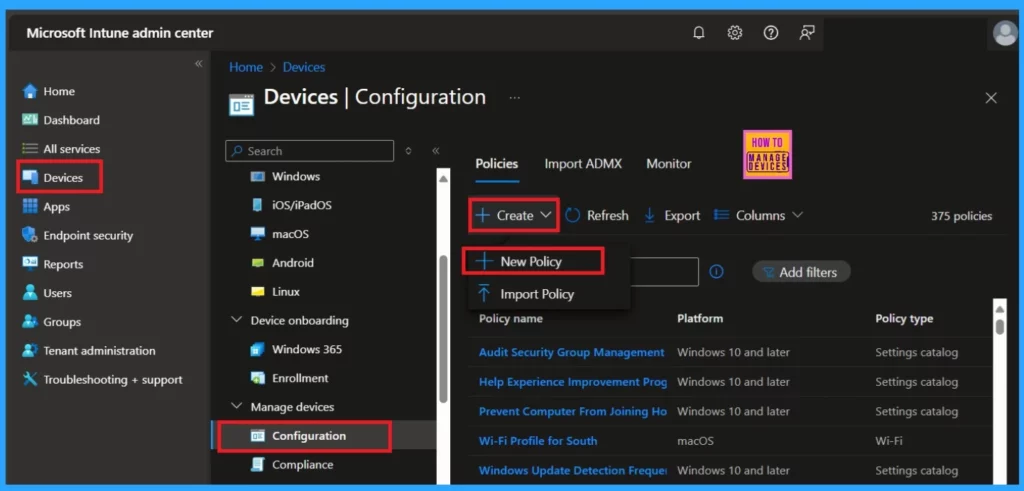
After the service release of December 1224, the configuration policies are Migrating to a unified settings platform. After that, you won’t be able to create new Administrative Templates for Windows devices, especially when you navigate the following path.
- Sign in to the Microsoft Intune Admin Center
- Go to the Device> Configuration> Create> New Policy
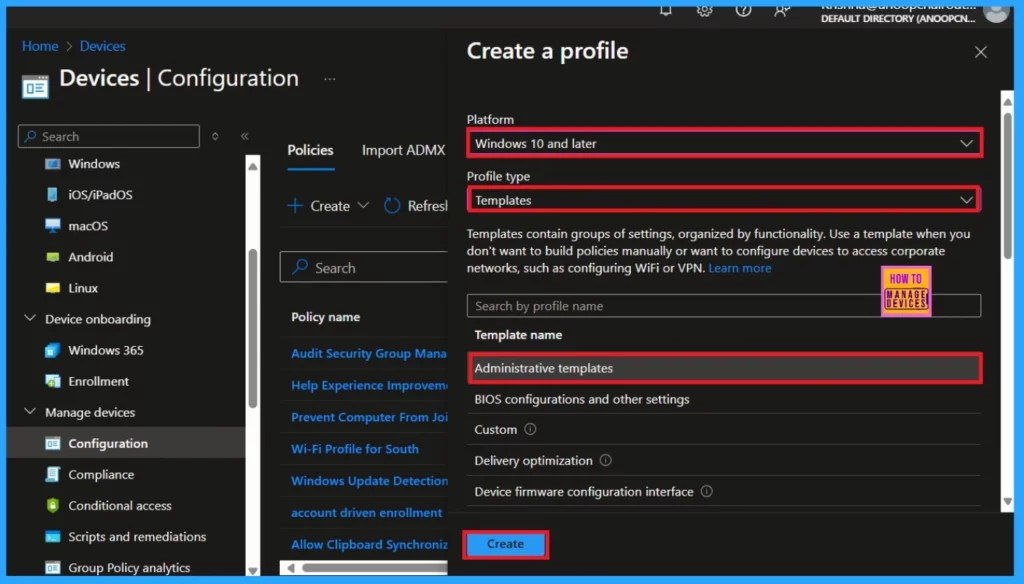
After creating a new policy, Select the Platform as Windows 10 and later the profile type as Templates (Templates contain groups of settings organized by functionality. Use a template when you don’t want to build policies manually).
- Select the Template name as Administrative Templates
| How it Affects the Organization |
|---|
| After the end of support for the Administrative Templates Configuration Profile, we can’t create a new profile for Administrative Templates in the Microsoft Intune Admin centre. However, you don’t need to worry about the existing Administrative Templates, which can still be viewed, updated, and deleted. |
Setting Catalog
Intune Setting Catalog is the new suggestion for users to use instead of Administrative Templates. Microsoft now suggests that the Settings Catalog be used for all new configurations. Setting catalog for the new configuration and preparing for automatic migration of existing templates.
Need Further Assistance or Have Technical Questions?
Join the LinkedIn Page and Telegram group to get the latest step-by-step guides and news updates. Join our Meetup Page to participate in User group meetings. Also, Join the WhatsApp Community to get the latest news on Microsoft Technologies. We are there on Reddit as well.
Author
Anoop C Nair has been Microsoft MVP from 2015 onwards for ten consecutive years! He is a Workplace Solution Architect with more than 22+ years of experience in Workplace technologies. He is also a Blogger, Speaker, and Local User Group Community leader. His primary focus is on Device Management technologies like SCCM and Intune. He writes about technologies like Intune, SCCM, Windows, Cloud PC, Windows, Entra, Microsoft Security, Career, etc.


Does this mean that if I needed to import an ADMX for something. Going forward I should see this under the settings catalogue? Under the currently blank Administrative Templates area? I also used to use the Custom settings feature under templates but if templates is going away I supposed so will the ability to make custom policies?