






How to Fix Intune AI Policy Conflicts that Prevent Third-Party Browser Access
Let’s discuss How to Fix Intune AI Policy Conflicts That Prevent Third-Party Browser Access. Microsoft Intune admins are facing Intune AI Policy Conflicts, which are blocking the access of third-party browsers like Google Chrome or Firefox.
As you know that Microsoft Intune’s AI-driven policy refers to the system’s ability to automatically generate configuration rules based on device usage patterns, compliance requirements, and perceived security risks. This automation is designed to give MDM effectively.
Applying these settings helps to gain organisational goals such as enforcing app restrictions, firewall rules, or browser access controls without requiring manual input for every scenario. When managing Windows 10 or Windows 11 devices, Intune may automatically generate configuration rules based on perceived security or compliance needs.
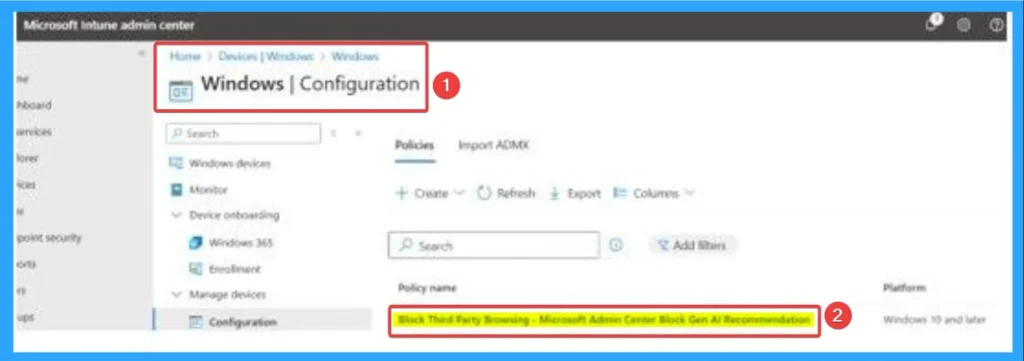
In some cases, this system mistakenly flags third-party browsers like Google Chrome or Firefox as non-compliant or unnecessary. These lead to the creation of a blocking rule under Windows Configuration Policies. This rule prevents these browsers from launching, even though they may be essential for user workflows or organisational flexibility.

Table of Contents
How to Fix Intune AI Policy Conflicts That Prevent Third-Party Browser Access
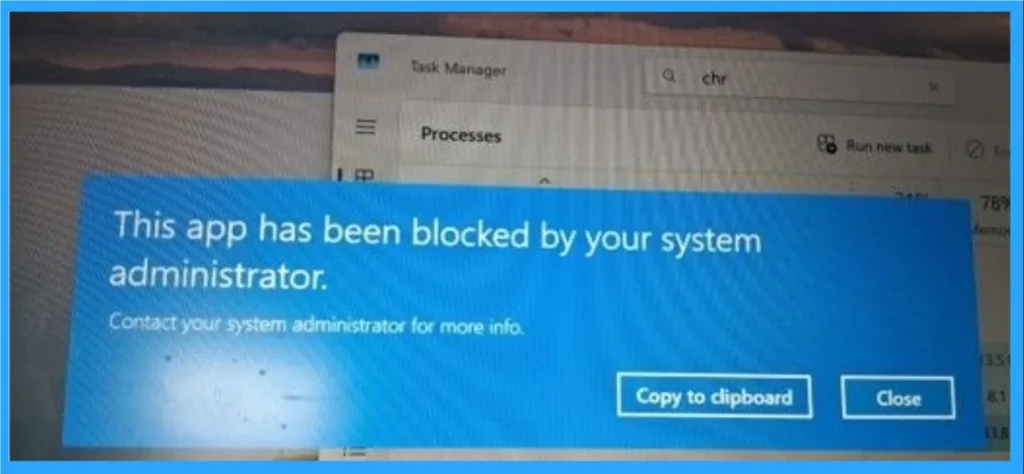
When AI creates a rule that blocks these browsers from opening on Windows 10 or Windows 11 devices managed by Intune, users may suddenly find themselves unable to open Google Chrome or Firefox. As a result, users are unable to do work, especially for people who rely on those browsers for work, research, or accessing specific websites that don’t perform well in Microsoft Edge.
- How to Block Malicious Downloads and Dangerous File Types in Google Chrome with Intune Policy
- How to Fix Intune Error 65000 when Deploying Intune Policy using Settings Catalog
- Fix Error 0x87D30067 and 0x87D300C9 in Brave Installation using Intune
How to Avoid Intune AI Policy Conflicts
Intune admins can easily avoid Intune AI Policy Conflicts by creating a proactive and structured approach to policy management. By creating this, admins can avoid inconveniences that faces by users face due to the blocking of third-party browsers. The table below shows the steps to avoid Intune AI Policy Conflicts.
| Steps | Details |
|---|---|
| Regularly audit auto-generated rules within Intune’s Windows Configuration Policies | This helps catch unintended restrictions before they affect users. |
| Disabling or limiting AI-driven policy automation in environments where precision is critical | While automation can save time, it should be paired with clear governance: define which apps are business-critical, segment policies by user role, and test new rules in pilot groups before full deployment. |
Steps to Troubleshoot and Fix Issue
By following some steps, you can troubleshoot and fix Intune AI Policy Conflicts That Prevent Third-Party Browser Access. First you have to Identify the Root Cause, then Review the Policy Details and Modify or Remove the Rule. The elaborated troubleshooting steps are below.
Identify the Root Cause
- Go to Microsoft Intune Admin Center.
- Navigate to Devices > Configuration Profiles > Windows Configuration Policies.
- Look for any auto-generated rules that restrict or block third-party applications—especially Chrome or Firefox.
Review the Policy Details
Open the suspicious policy and check its assigned apps or restrictions. Confirm if Chrome, Firefox, or other browsers are listed under blocked apps or have launch restrictions.
Modify or Remove the Rule
If the rule was auto-created by Intune’s AI system, you can either deactivate the policy to stop it from applying. Or delete the policy entirely if it’s not needed.
Sync Devices
After making changes, go to Devices > All Devices, select the affected device(s), and click Sync. This ensures the updated policy is applied immediately. Then you can verify the Resolution. If the browser opens successfully, the issue is resolved. Ask the user to relaunch Chrome or Firefox.
Need Further Assistance or Have Technical Questions?
Join the LinkedIn Page and Telegram group to get the step-by-step guides and news updates. Join our Meetup Page to participate in User group meetings. Also, Join the WhatsApp Community to get the latest news on Microsoft Technologies. We are there on Reddit as well.
Author
Anoop C Nair has been Microsoft MVP for 10 consecutive years from 2015 onwards. He is a Workplace Solution Architect with more than 22+ years of experience in Workplace technologies. He is a Blogger, Speaker, and Local User Group Community leader. His primary focus is on Device Management technologies like SCCM and Intune. He writes about technologies like Intune, SCCM, Windows, Cloud PC, Windows, Entra, Microsoft Security, Career, etc.


Discussion