






Intune App Inventory for Android Devices
This post will guide you on how to get Intune App Inventory for Android Enterprise corporate-owned devices. Intune discovered apps is a list of detected apps on the Intune enrolled devices that act as a software inventory for your tenant.
Starting with the Intune 2307 July update, You can now view a report containing all apps found on a device for Android Enterprise corporate-owned scenarios, including system apps.
Intune Discovered apps are separate reports from the app installation reports. For personal devices, Intune never collects information on unmanaged applications. Any app is collected for this report on corporate devices, whether managed or not.
Intune offers a diverse range of supported application types, catering to various platforms and requirements. It includes applications such as Store apps, Microsoft apps, Android enterprise system apps, LOB apps, macOS apps, Windows apps, etc. List Of Supported Intune Application Types.

Several app requirements must be met before apps can be added to Intune and made available. You may find it helpful to assess and understand a few app fundamentals to learn the details of the application name and version.
- Ability To View BitLocker Recovery Key From Intune Company Portal Website Coming Soon
- Microsoft 365 Defender Attack Simulation To Educate Users About Phishing Emails
Intune App Inventory for Android
Let’s follow the steps below to get the application details from Intune Portal, You can be able to locate the discovered apps quickly to get details about application for Android corporate-owned devices.
- Sign in to Microsoft Intune Admin Center https://intune.microsoft.com
- Select Apps > Monitor > Discovered apps.
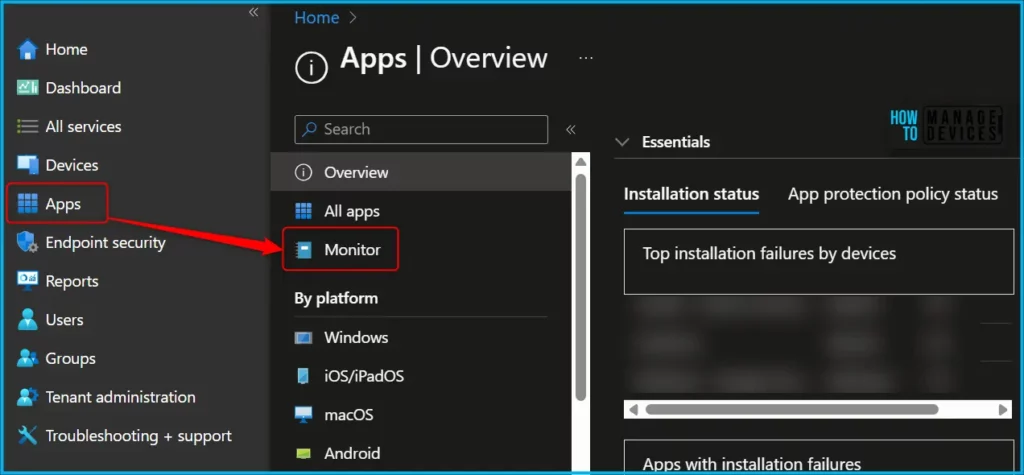
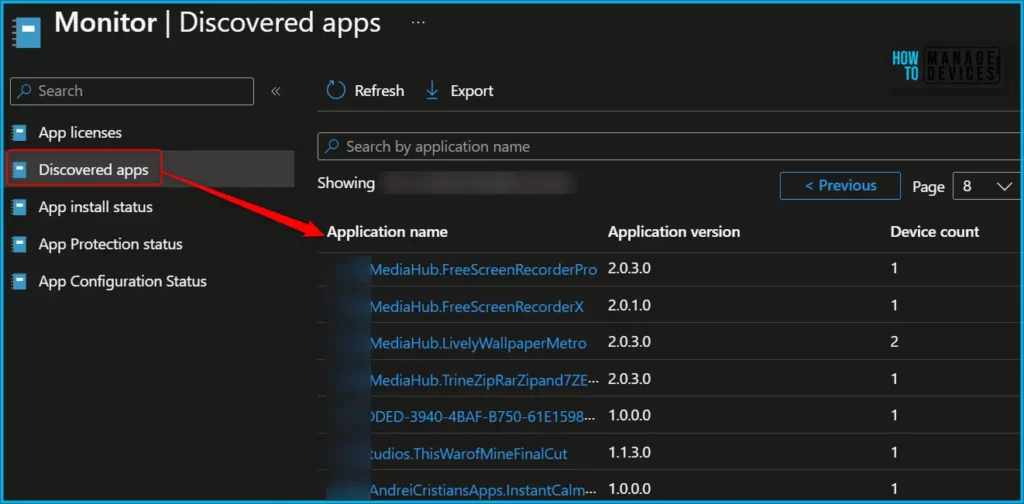
The results include a list of applications, by name, and a field above the list where you can ‘Search by application name’. The report list columns are ‘Application name’, ‘Application version’, ‘Application size’, and ‘Device count’.
Is Intune Software Inventory missing? This could be one of the reasons!
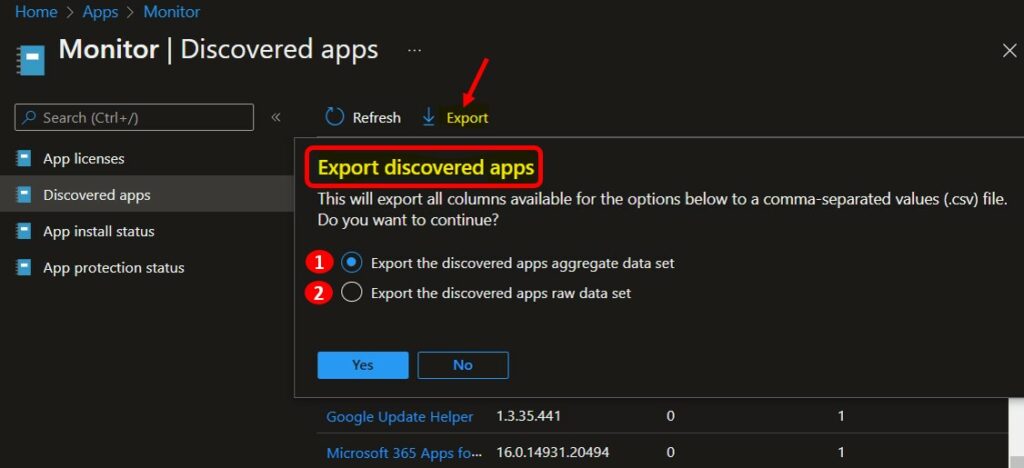
You can export the list of discovered apps to a .csv file by selecting Export from the Discovered apps pane. Click on the Export. The popup will appear with the following available options when exporting all discovered apps, Choose the option and Click Yes, This will export data to a comma-separated values (.csv) file.
- Export the discovered apps aggregate data set – The CSV file only includes the columns you see within the discovered apps.
- ApplicationKey
- ApplicationName
- ApplicationVersion
- DeviceCount
- BundleSize
- ShortVersion
- Export the discovered apps raw data set – The CSV file includes all available inventory data in your report.
- ApplicationKey
- ApplicationName
- ApplicationVersion
- DeviceName
- Platform
- UserName
- DeviceId
- OSDescription
- OSVersion
- ImeiNumber
- EmailAddress
- BundleSize
- ShortVersion
- UserId
A notification will appear automatically in the top right-hand corner with the ” Export is in progress. You can also see the status by selecting the notification icon.
Get Discovered Apps Details from Android Device
Intune also provides a list of discovered apps for each Android device in your tenant. The following steps help you collect app details specific to the device.
- Sign in to the Microsoft Intune admin center https://intune.microsoft.com/.
- Choose Devices > All devices and select the device from the list. For Example, I selected the Android device.
Note: You can also select the Devices by choosing the By platform.
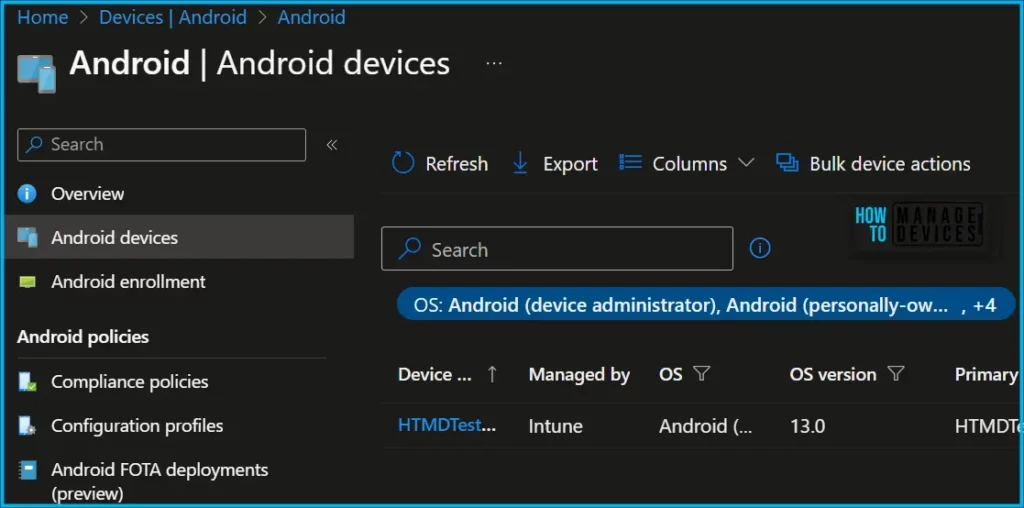
To view detected apps for this device, select Discovered Apps in the Monitor section. Here you can see the Application Name and Application Version for the selected device.
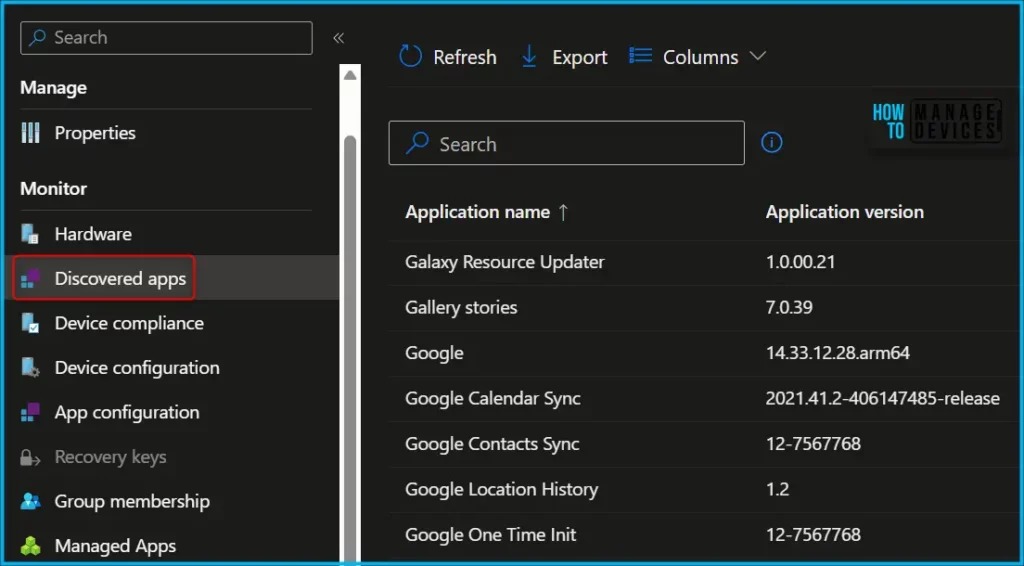
Details of Intune Discovered Apps
The following list provides the app platform type, the apps monitored for personal devices, those monitored for company-owned devices, and the refresh cycle. Here’s how you can manually Sync Android Device With Intune.
| Device Platform | Personally owned devices | Company-owned devices | Refresh cycle |
|---|---|---|---|
| Android device administrator | Only managed apps | All apps installed on the device | Every 7 days from device enrollment |
| Android Enterprise personally owned enrollment | Only managed apps in the work profile | Not applicable | Every 7 days from device enrollment |
| Android Enterprise corporate-owned enrollments | Not applicable | All apps installed on the device | Every 7 days from device enrollment |
| AOSP enrollments | Not applicable | Not yet supported | Not applicable |
Video Guide – Intune App Inventory
In this video, let’s discuss Intune Inventory for Mac, iOS, Android, and Windows platforms. Also, check out the custom Inventory Options for Windows Devices.
Author
About Author – Jitesh, Microsoft MVP, has over six years of working experience in the IT Industry. He writes and shares his experiences related to Microsoft device management technologies and IT Infrastructure management. His primary focus is Windows 10/11 Deployment solution with Configuration Manager, Microsoft Deployment Toolkit (MDT), and Microsoft Intune.



Discussion