






Microsoft Intune App Protection Policies now Support MS Edge Browser OneDrive and Outlook on VisionOS
Microsoft has announced that Intune App Protection Policies now support Microsoft Edge (version 136 or later), OneDrive (version 16.8.4 or later), and Outlook (version 4.2513.0 or later) on Apple visionOS devices. This update helps organisations apply data protection and security rules to Microsoft Edge, OneDrive, and Outlook when used on visionOS devices.
Intune App Protection Policies (APP) are guidelines that protect an organisation’s data within apps. These settings allow you to control how users can access and share company information on their mobile devices, even if those devices aren’t directly managed.
In this post, you will find all the details about Microsoft Intune’s new support for Apple speciality devices, including those that run visionOS. This update means organisations can now use Intune to protect and manage company data on more than just iPhones and iPads.
With this support, IT teams can set up app protection policies, apply settings, and keep data secure on newer Apple devices. It helps businesses stay secure and follow rules while using the latest technology.


Table of Contents
What Apps are Supported by Intune App Protection Policies (APP) on visionOS Devices?
Intune now supports App Protection Policies for Microsoft Edge (v136 or later), OneDrive (v16.8.4 or later), and Outlook (v4.2513.0 or later) on visionOS devices.
How Do I Enable App Protection Policies for these Apps on VisionOS Devices?
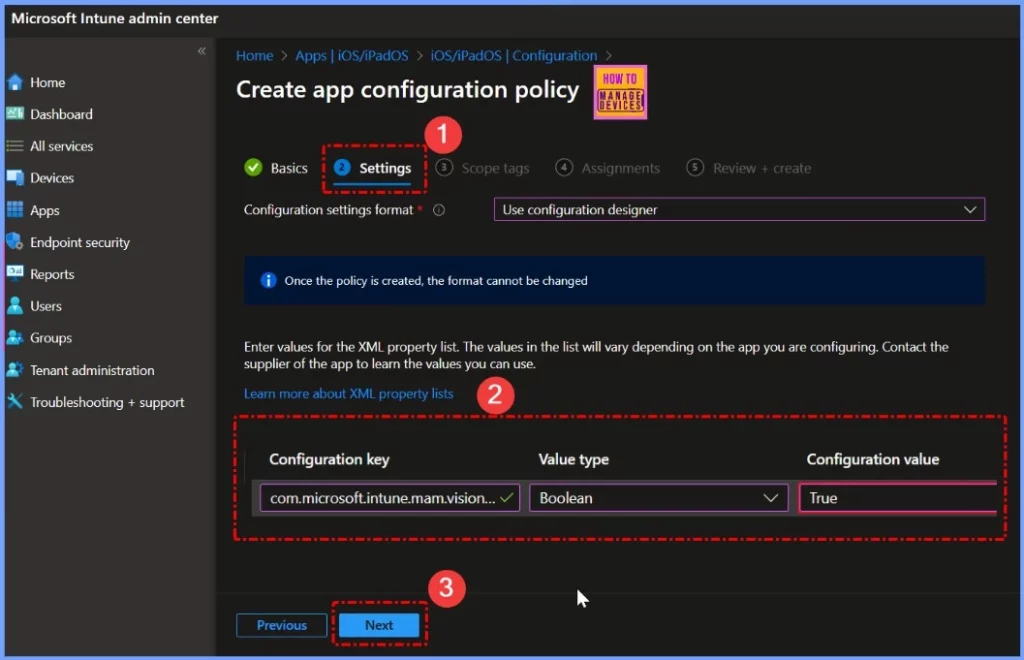
To enable this feature, you must set the configuration setting com.microsoft.intune.mam.visionOSAllowiPadCompatApps to Enabled within your App Configuration Policy.
What Do I Need to Do after Enabling the Configuration Setting?
Once the app configuration policy is assigned, you can create and assign your App Protection Policy specifically for visionOS devices.
Can I Apply App Protection Policies to Devices Running Earlier Versions of these Apps?
No, this feature is available only for Microsoft Edge v136 or later, OneDrive v16.8.4 or later, and Outlook v4.2513.0 or later.
Microsoft Intune App Protection Policies Now Support MS Edge Browser OneDrive and Outlook on VisionOS
This update allows organizations to apply data protection and security rules to important apps like Edge, OneDrive, and Outlook on visionOS devices. To turn on this feature, IT admins need to set com.microsoft.intune.mam.visionOSAllowiPadCompatApps to Enabled in the App Configuration Policy.
After assigning this policy to the right devices, they can create and apply App Protection Policies designed for visionOS. This improvement helps keep company data safe, even on new platforms like visionOS, by expanding Intune’s security features to more devices.
- Sign in to the Microsoft Intune Admin Center.
- Go to Apps > App configuration policies.
- Select + Add to create a new policy or choose an existing policy targeting visionOS (Apple Vision Pro).
- Under Platform, select iOS/iPadOS.
- In the Settings format, choose Use configuration designer or Enter JSON data.
- Add the following key-value pair
- Key: com.microsoft.intune.mam.visionOSAllowiPadCompatApps
- Value type: Boolean
- Value: true
- Assign the policy to the appropriate user or device group.
- Click Create or Save.
| Configuration Key | Value Type | Configuration Value |
|---|---|---|
| com.microsoft.intune.mam.visionOSAllowiPadCompatApps | Boolean | True |
Need Further Assistance or Have Technical Questions?
Join the LinkedIn Page and Telegram group to get the latest step-by-step guides and news updates. Join our Meetup Page to participate in User group meetings. Also, Join the WhatsApp Community to get the latest news on Microsoft Technologies. We are there on Reddit as well.
Author
Anoop C Nair has been Microsoft MVP from 2015 onwards for 10 consecutive years! He is a Workplace Solution Architect with more than 22+ years of experience in Workplace technologies. He is also a Blogger, Speaker, and Local User Group Community leader. His primary focus is on Device Management technologies like SCCM and Intune. He writes about technologies like Intune, SCCM, Windows, Cloud PC, Windows, Entra, Microsoft Security, Career, etc.


Discussion