






Track Who Restarted a Device using Intune Audit Logs
Key Takeaways
- Track remote restart actions to identify who initiated a device restart from the Intune admin center.
- View administrator activity with details such as the user, action, target device, and timestamp.
- Improve security and compliance by maintaining an audit trail of administrative changes and remote actions.
- Audit logging is enabled by default for all Microsoft Intune tenants and cannot be disabled.
- Access is role-based, requiring Global Administrator, Intune Service Administrator, or Intune Audit Data
Intune Audit Logs help administrators track configuration changes, policy updates, assignments, and remote actions performed in the Microsoft Intune admin center. They provide a detailed audit trail that shows who acted, when it occurred, and the target device or object, making them essential for troubleshooting, security investigations, and administrative accountability.
Table of Content
Track Who Restarted a Device using Intune Audit Logs
One of the most useful scenarios is tracking who initiated a remote device restart from the Intune admin center. While the device action status confirms that the restart was executed, the Intune Audit Logs reveal the administrator responsible for the action along with the timestamp and other event details.
- Windows 365 Cloud PC Audit Logs
- Migrate Group Policies GPOs to Intune Settings Catalog policy
- Intune Logs Event IDs IME Logs Details for Windows Client Side Troubleshooting
Intune Audit Logs Track Who Restarted Device
To identify who restarted a device from the Intune admin center, review the Intune Audit Logs. The audit logs record administrative activities, including remote device actions, allowing you to verify which administrator initiated the restart, when it occurred, and the affected device.
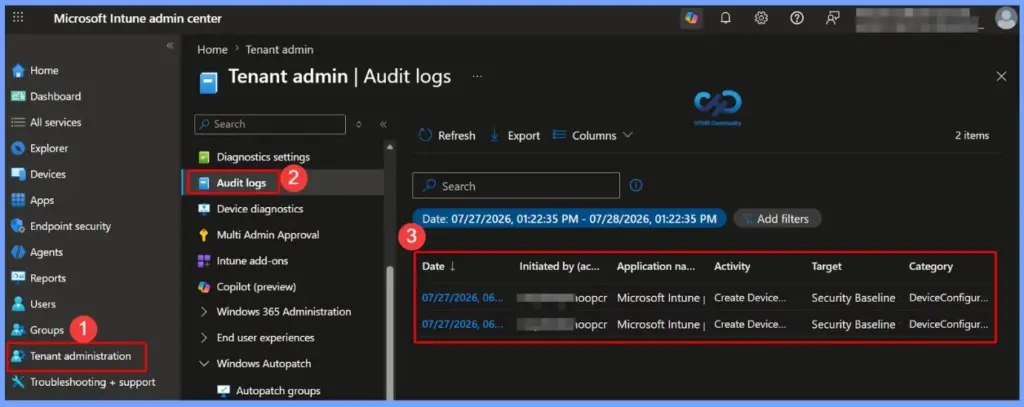
- Sign in to the Microsoft Intune admin center.
- Go to Tenant administration.
- Select Audit logs.
- Use the search or filter options to locate the Restart Device remote action.
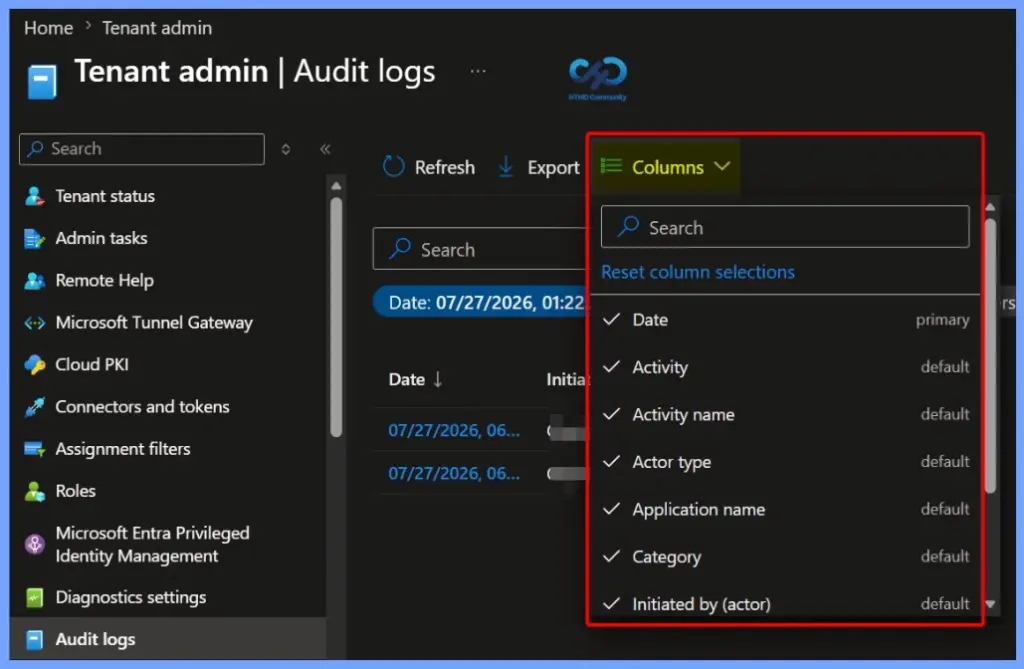
Audit Logs View Using Columns
The Columns option in the Intune Audit Logs page helps you to customize the information displayed in the audit log grid. You can choose which columns to show or hide, making it easier to focus on the details that matter most, such as the activity, actor, category, or application.

| Columns |
|---|
| Date Activity Activity name Actor type Application name Category Initiated by (actor) Operation type Status Target |
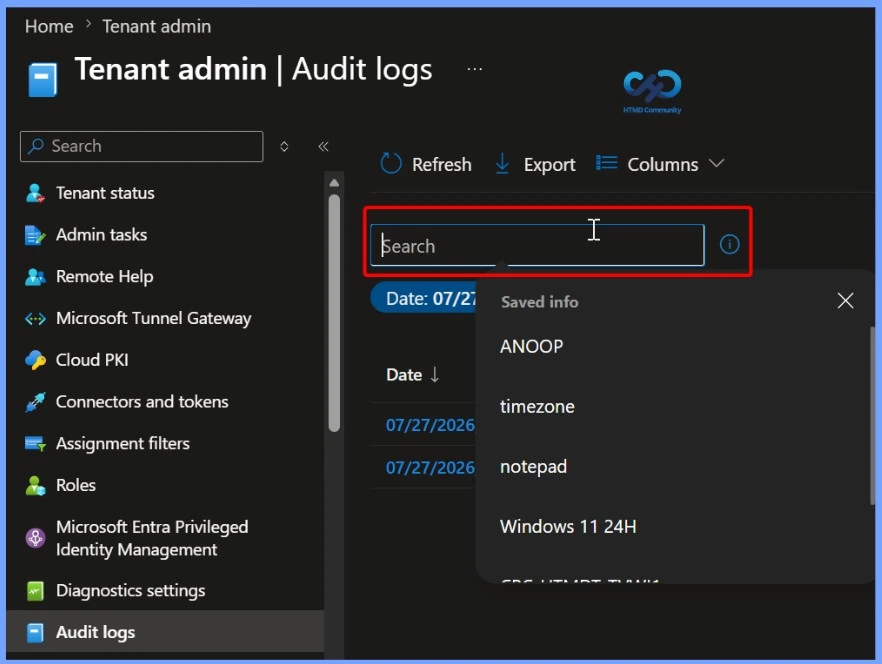
Search Audit Logs to Find Restart Device
The Search box on the Intune Audit Logs page helps you to quickly locate specific administrative activities. You can search using keywords such as the administrator’s name, device name, activity, or other relevant details to filter the audit records. This makes it easier to find Restart Device events and identify who initiated the remote restart, along with the corresponding timestamp and other audit information.
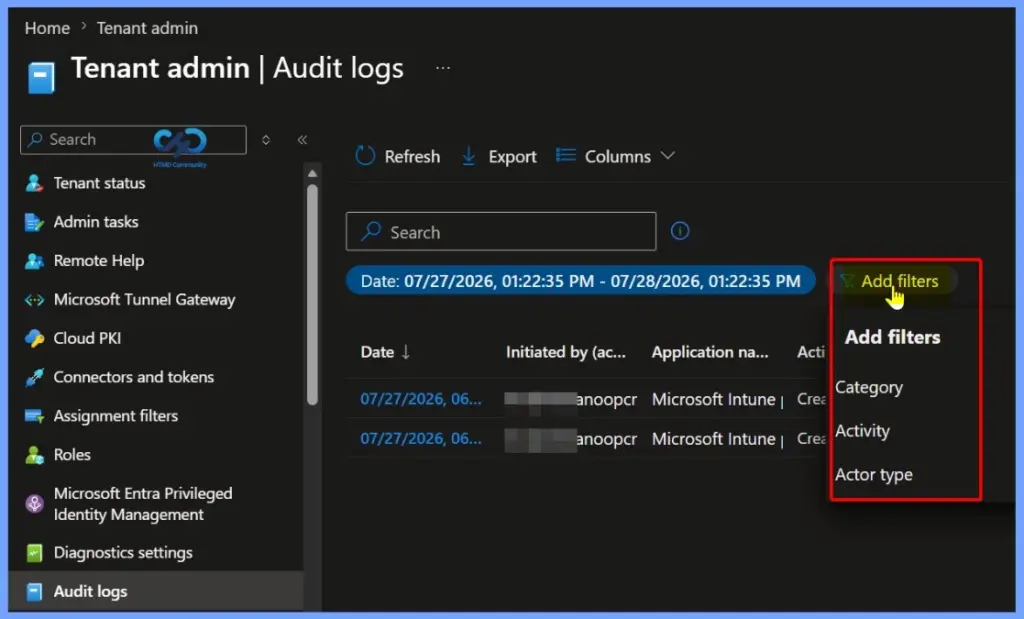
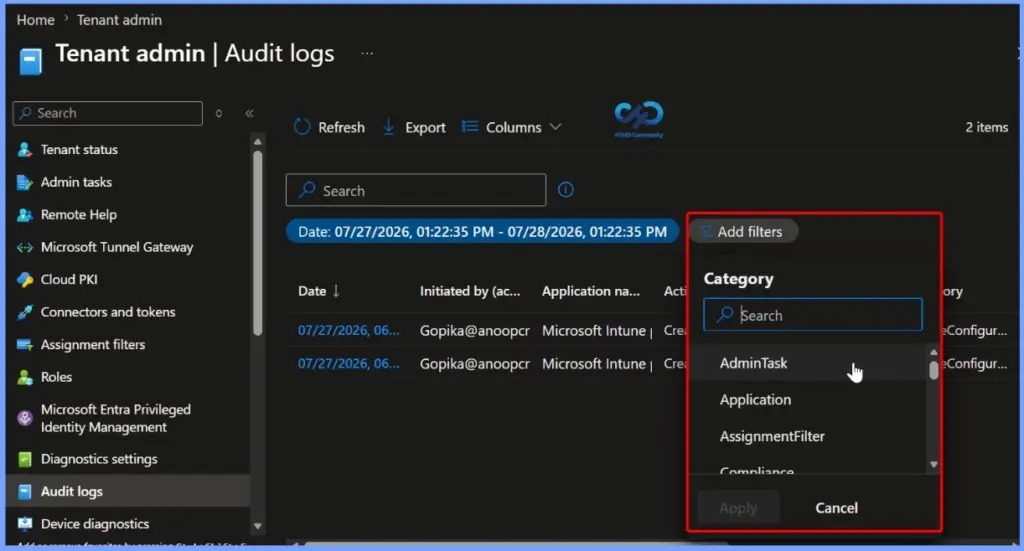
Filter Audit Logs
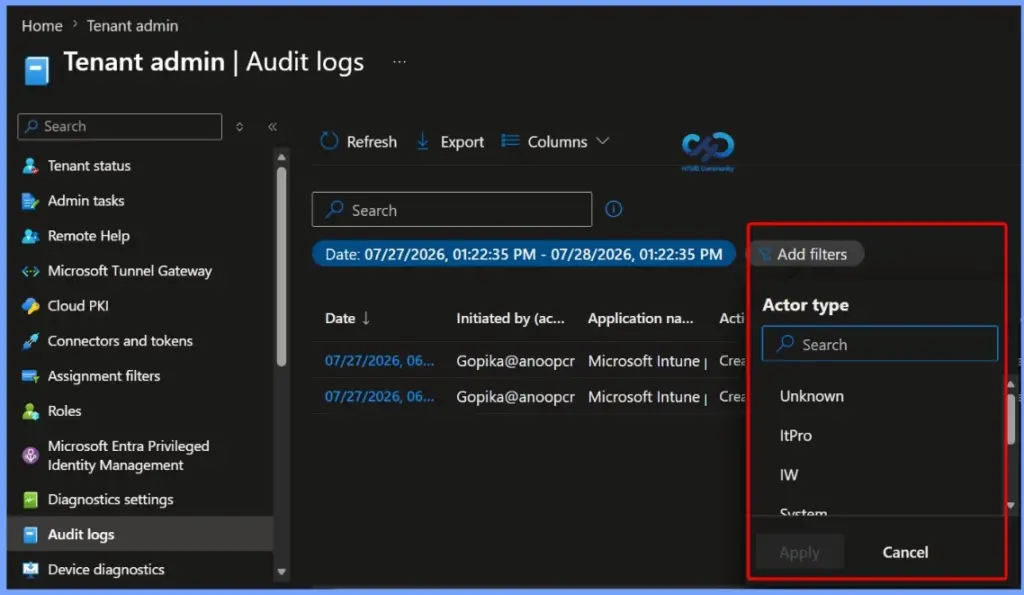
The Add filters option in the Intune Audit Logs page helps you narrow down audit records by applying filters such as Category, Activity, and Actor type. Filtering the audit logs makes it easier to locate specific events, including Restart Device remote actions, without manually reviewing all available entries.
| Filter |
|---|
| Category |
| Activity |
| Actor Type |
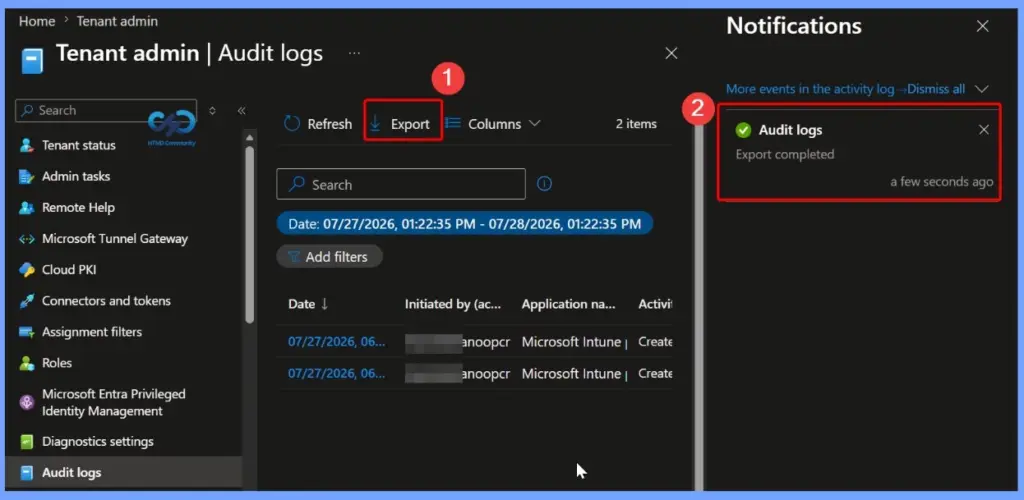
Export Intune Audit Logs
The Export option in the Intune Audit Logs page helps you to download the filtered audit log data for offline review and reporting. After selecting Export, Intune generates the file and displays a notification when the export is complete.
View Activity Details for Audit Log
Select an audit log entry to open the Activity details pane and review comprehensive information about the selected event. The details include the activity name, operation type, status, category, component, timestamp, and the administrator (actor) who acted.
Activity details: Audit log
Activity
Date: Mon, 27 Jul 2026 12:36:40 GMT
Name: Create device configuration assignment 2.0 (beta)
CorrelationID: 4d6f699c-afe4-4916-b127-490b3db43f37
Category: DeviceConfiguration
Component: DeviceConfiguration
Activity Status
Status: Success
Operation Type: Create
Activity Type: Create DeviceManagementConfigurationPolicyAssignment
Initiated By (Actor)
Type: ItPro
Upn: Gopika@anoopcnairoutlook755.onmicrosoft.com
Application: Microsoft Intune portal extension
ApplicationID: 5926fc8e-304e-4f59-8bed-58ca97cc39a4
Scope Tag(s)
Tag(s):
Target(s)
Target
Type: DeviceManagementConfigurationPolicy
Name: Security Baseline for Windows 10 or Windows 11
ObjectID: 85d2abb2-3f28-4d2a-9aec-f0cdf47b6284
Target
Type: DeviceManagementConfigurationPolicyAssignment
Name: <null>
ObjectID: 85d2abb2-3f28-4d2a-9aec-f0cdf47b6284_05e7bef1-de42-40c1-b437-9e8c9f260e9a
Modified Properties
Property: Target.GroupId
New Value: 05e7bef1-de42-40c1-b437-9e8c9f260e9a
Old Value:
Property: Target.Type
New Value: GroupAssignmentTarget
Old Value:
Property: Target.DeviceAndAppManagementAssignmentFilterId
New Value: <null>
Old Value:
Property: Target.DeviceAndAppManagementAssignmentFilterType
New Value: None
Old Value:
Property: Id
New Value: 85d2abb2-3f28-4d2a-9aec-f0cdf47b6284_05e7bef1-de42-40c1-b437-9e8c9f260e9a
Old Value:
Property: Source
New Value: Direct
Old Value:
Property: SourceId
New Value: 85d2abb2-3f28-4d2a-9aec-f0cdf47b6284
Old Value:
Property: DeviceManagementAPIVersion
New Value: 5026-04-28
Old Value: 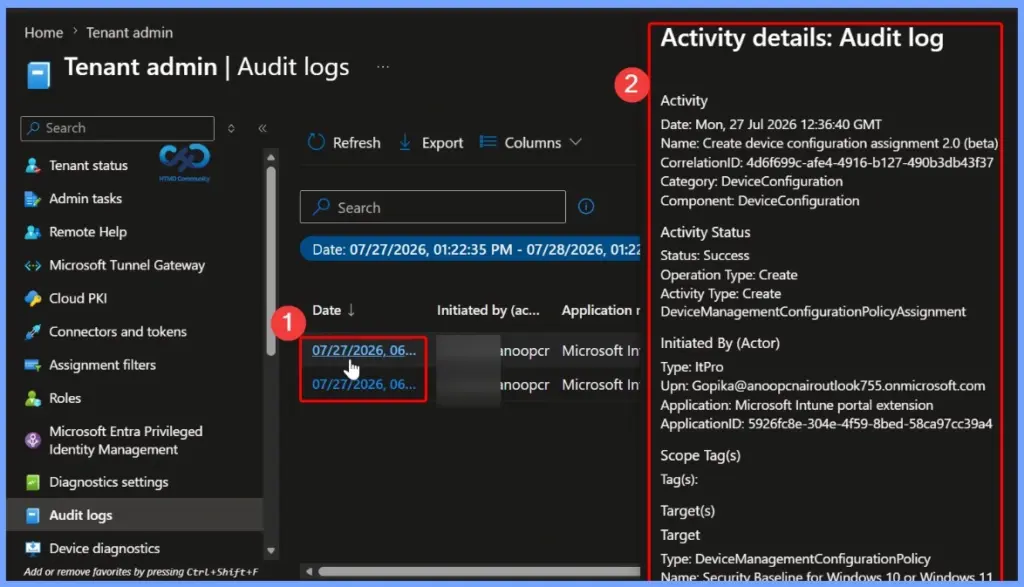
Filter Audit Logs by Category
The Category filter helps you narrow down audit log entries based on the Intune workload where the action occurred. This makes it easier to locate specific administrative events, such as device management actions, application changes, compliance updates, or policy modifications.
- Software updates
- Role
- RemoteHelp
- Other
- Enrollment
- EBookManagement
- DeviceInventory
- DeviceIntentSetting
- GrouppolicyAnalytics
- Deviceintent
- DeviceConfiguration
- Device
- Deployment
- Conditional Access
- Compliance
- Assignment Filter
- Application
- Admin Task
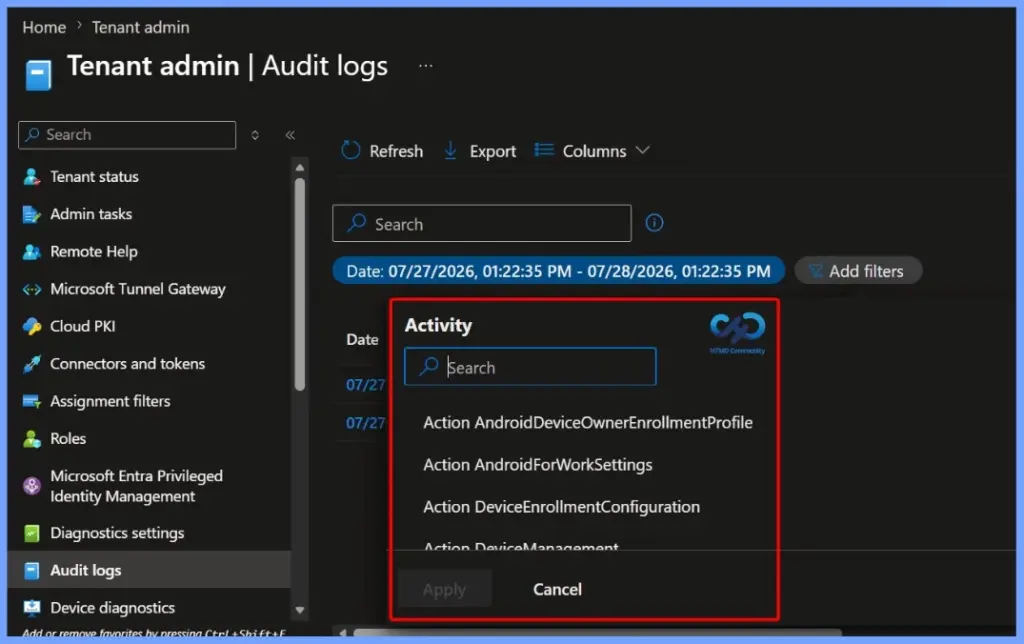
Filter Audit Logs by Activity
The Activity filter allows you to narrow audit log entries based on the specific administrative action performed in Microsoft Intune. You can search for an activity name or select it from the available list to quickly locate related events.
| Filter Audit Logs by Activity |
|---|
| Action AndroidDeviceOwnerEnrollmentProfile Action AndroidForWorkSettings Action DeviceEnrollmentConfiguration Action DeviceManagement AddAppleUserInitiatedEnrollmentProfileAsync AppleUserInitiatedEnrollmentProfile AddWindowsAutopilotDeploymentProfile WindowsAutopilotDeploymentProfile AddWindowsAutopilotDeploymentProfileAssignment WindowsAutopilotDeploymentProfile ApproveElevationRequest PrivilegeManagementElevationRequest AssignUser WindowsAutopilotDeviceIdentity Commit Content MobileApp Create AndroidDeviceOwnerEnrollmentProfile Create AppleEnrollmentProfileAssignment Create ApprovalRequest Create ClientCertificate Create ComplianceManagementPartner Create DeviceAndAppManagementAssignmentFilter Create DeviceAndAppManagementRoleAssignment Create DeviceCategory Create DeviceCompliancePolicy Create DeviceCompliancePolicyAssignment Create DeviceConfiguration Create DeviceConfigurationAssignment Create DeviceEnrollmentConfiguration Create DeviceManagementCompliancePolicy Create DeviceManagementConfigurationPolicy Create DeviceManagementConfigurationPolicyAssignment Create DeviceManagementIntent Create DeviceManagementReusablePolicySetting Create GroupPolicyConfiguration Create GroupPolicyDefinitionValue Create GroupPolicyMigrationReport Create GroupPolicyPresentationValue Create IntuneBrandingProfile Create ManagedDeviceCleanupRule Create ManagedDeviceMobileAppConfiguration Create MobileApp Create MobileAppAssignment Create MobileAppCategory Create MobileAppContentScript Create MobileAppRelationship Create MobileThreatDefenseConnector Create NotificationMessageTemplate Create OperationApprovalPolicy Create RemoteAssistancePartner Create RemoteAssistanceSettings RemoteAssistanceSettings Create RoleDefinition Create RoleScopeTag Create RoleScopeTagAutoAssignment Create TermsAndConditions Create TermsAndConditionsGroupAssignment Create VppToken Create Windows Autopilot Deployment Profile. WindowsAutopilotDeploymentProfile Create WindowsAutopilotDeploymentProfileAssignment Create WindowsDriverUpdateProfile Create WindowsFeatureUpdateProfile Create WindowsQualityUpdatePolicy Create WindowsQualityUpdateProfile Create localized message NotificationMessageTemplate CreateAppProtection ManagedAppPolicy CreateDeviceLogCollectionRequest ManagedDevice CreateDownloadUrl ManagedDevice CreateImportedCorporateDevice ImportedDeviceIdentity CreateImportedWindowsAutopilotDeviceIdentity ImportedWindowsAutopilotDeviceIdentity CreateMultiTokenDepOnboardingSetting DepOnboardingSetting CreateMultiTokenEnrollmentProfile EnrollmentProfile Delete DeviceAndAppManagementAssignmentFilter Delete DeviceAndAppManagementRoleAssignment Delete DeviceCompliancePolicy Delete DeviceCompliancePolicyAssignment Delete DeviceConfiguration Delete DeviceConfigurationAssignment Delete DeviceManagementConfigurationPolicy Delete DeviceManagementConfigurationPolicyAssignment Delete DeviceManagementIntent Delete DeviceManagementReusablePolicySetting Delete GroupPolicyConfiguration Delete GroupPolicyMigrationReport Delete ManagedAppRegistration Delete ManagedDevice Delete MobileApp Delete MobileAppAssignment Delete MobileAppCategory Delete MobileAppContentScript Delete MobileAppRelationship Delete MobileThreatDefenseConnector Delete OperationApprovalPolicy Delete RoleDefinition Delete VppToken Delete WindowsDriverUpdateProfile Delete WindowsFeatureUpdateProfile Delete WindowsQualityUpdatePolicy DeleteAppleEnrollmentProfileAssignment AppleEnrollmentProfileAssignment DeleteApplePushNotificationCertificate ApplePushNotificationCertificate DeleteMultiTokenDepToken DepOnboardingSetting DeleteMultiTokenEnrollmentProfile EnrollmentProfile DeleteMultiTokenImportedAppleDevice ImportedAppleDeviceIdentity DeleteWindowsAutopilotDeploymentProfile WindowsAutopilotDeploymentProfile DeleteWindowsAutopilotDeploymentProfileAssignment WindowsAutopilotDeploymentProfileAssignment DeleteWindowsAutopilotDeviceIdentity WindowsAutopilotDeviceIdentity Demoting DEM user User DenyElevationRequest PrivilegeManagementElevationRequest Get AndroidDeviceOwnerEnrollmentProfile Get DeviceConfiguration GetDecryptedTokenValue AndroidDeviceOwnerEnrollmentProfile ListDecryptedTokenValue AndroidDeviceOwnerEnrollmentProfile MacOS RemoteHelpSession Modify Windows Autopilot Deployment Profile. WindowsAutopilotDeploymentProfile OptInAction DeviceAndAppManagementAssignmentFilter Other ManagedAppPolicy Patch AdminConsent Patch AndroidForWorkSettings Patch DataProcessorServiceForWindowsFeaturesOnboarding Patch DeviceAndAppManagementAssignmentFilter Patch DeviceCompliancePolicy Patch DeviceConfiguration Patch DeviceConfigurationAssignment Patch DeviceEnrollmentConfiguration Patch DeviceManagementConfigurationJustInTimeAssignmentPolicy Patch DeviceManagementConfigurationPolicy Patch DeviceManagementConfigurationPolicyAssignment Patch DeviceManagementIntent Patch DeviceManagementIntentAssignment Patch DeviceManagementReusablePolicySetting Patch DeviceManagementSettings Patch EnrollmentTimeDeviceMembershipTarget Patch ImportedAppleDeviceIdentity Patch IntuneBrandingProfile Patch ManagedDevice Patch MobileApp Patch MobileAppAssignment Patch MobileThreatDefenseConnector Patch NotificationMessageTemplate Patch RoleDefinition Patch VppToken Patch WindowsFeatureUpdateProfile Patch WindowsQualityUpdatePolicy Patch WindowsQualityUpdateProfile PatchApplePushNotificationCertificate ApplePushNotificationCertificate PatchDataSharingConsent DataSharingConsent PatchMultiTokenEnrollmentProfile EnrollmentProfile Patching Device Category Settings DeviceCategory Promote user to DEM Manager Role User PutDataSharingConsent DataSharingConsent RemoveReference MobileApp Rename device ManagedDevice Renew Url MobileApp Request Approved ApprovalRequest Request Cancelled ApprovalRequest Request Deleted ApprovalRequest RotateRecoveryLockPasscode ManagedDevice Search AndroidDeviceOwnerEnrollmentProfile Search CloudCertificationAuthority Send test email NotificationMessageTemplate SetMultiTokenDefaultProfile DepOnboardingSetting SetReference ManagedDevice SetReference MobileApp Status Change ApprovalRequest SyncMultiTokenDEPDevicesProfilesAndAccountDetails DepOnboardingSetting SyncWindowsAutopilotDevices WindowsAutopilotSettings UnassignUser WindowsAutopilotDeviceIdentity Update Assignment DeviceCompliancePolicy Update Assignment ManagedDeviceMobileAppConfiguration Update GroupPolicyConfiguration Update GroupPolicyConfigurationAssignmen Update localized message NotificationMessageTemplate UpdateAppProtection ManagedAppPolicy UpdateAppProtectionMobileAppIdentifierDeployments ManagedAppPolicy UpdateDeviceConfiguration OrganizationalMessageDetail UpdateDevicePrimaryUsers ManagedDevice UpdateDeviceProperties WindowsAutopilotDeviceIdentity UpdateWindowsDriverUpdateProfileAssignmentsAsync WindowsDriverUpdateProfile UpdateWindowsFeatureUpdateProfileAssignmentsAsync WindowsFeatureUpdateProfile UpdateWindowsQualityUpdatePolicyAssignmentsAsync WindowsQualityUpdatePolicy UpdateWindowsQualityUpdateProfileAssignmentsAsync WindowsQualityUpdateProfile UploadMultiTokenDepToken DepOnboardingSetting Windows RemoteHelpSession WipeManagedAppRegistration ManagedAppRegistration assignDeviceHealthScript DeviceHealthScript assignDeviceManagementScript DeviceManagementScript cleanWindowsDevice ManagedDevice createDeviceComplianceScript DeviceComplianceScript createDeviceCustomAttributeShellScript DeviceManagementScript createDeviceHealthScript DeviceHealthScript createDeviceManagementScript DeviceManagementScript createDeviceShellScript DeviceManagementScript createSingleDeviceQuery DeviceManagement decryptcredential ManagedDevice deleteDeviceHealthScript DeviceHealthScript deleteDeviceManagementScript DeviceManagementScript getFileVaultKey ManagedDevice initiateOnDemandProactiveRemediation ManagedDevice locateDevice ManagedDevice patchDeviceCustomAttributeShellScript DeviceManagementScript patchDeviceHealthScript DeviceHealthScript patchDeviceManagementScript DeviceManagementScript pauseConfigurationRefresh ManagedDevice rebootNow ManagedDevice remoteLock ManagedDevice retire ManagedDevice rotateFileVaultKey ManagedDevice rotateLocalAdminPassword ManagedDevice sendCustomNotificationToCompanyPortal DeviceManagement sendCustomNotificationToCompanyPortal ManagedDevice syncDevice ManagedDevice triggerConfigurationManagerAction ManagedDevice updateExclusionSecurityGroups ManagedAppPolicy updateSecurityGroups ManagedAppPolicy windowsDefenderScan ManagedDevice wipe ManagedDevice |
Filter Audit Logs by Actor Type
The Actor type filter helps you narrow audit log entries based on the type of entity that acted Microsoft Intune. This allows you to quickly distinguish whether an activity was initiated by an administrator, system process, or another actor type. Applying this filter makes it easier to investigate administrative actions, such as Restart Device, by focusing only on events generated by the relevant actor.
- Unknown
- ItPro
- IW
- System
- Partner
- Application
- GuestUser
Need Further Assistance or Have Technical Questions?
Join the LinkedIn Page and Telegram group to get the latest step-by-step guides and news updates. Join our Meetup Page to participate in User group meetings. Also, join the WhatsApp Community and the Whatsapp channel to get the latest news on Microsoft Technologies. We are there on Reddit as well.
Author
Jitesh, Microsoft MVP, has over six years of working experience in the IT Industry. He writes and shares his experiences related to Microsoft device management technologies and IT Infrastructure management. His primary focus is Windows 10/11 Deployment solution with Configuration Manager, Microsoft Deployment Toolkit (MDT), and Microsoft Intune.


Discussion