






Intune Automation Collection Community Solution Helps to Build Workflows with PowerShell Scripts and More
Let’s discuss about Intune Automation Collection Community Solution Helps to Build Workflows with PowerShell Scripts and More. Microsoft introduced Intune Automation that helps IT admins to simply various Intune tasks. Intune Automation is a collection of PowerShell scripts.
Intune Automation is designed for Intune admins, and they can access the PowerShell Scripts by searching with different Categories. Using different PowerShell Scripts, admins can easily complete different Intune Tasks.
As you know, PowerShell Scripts allow you to automate, manage, and optimise tasks in Microsoft Intune. PowerShell Scripts allow IT administrators to streamline operations, enforce policies, and improve device management efficiency.
With this Intune Automation, creating a PowerShell script is easier and more accurate. This Tool replaces other automation tools for Intune. In this blog post, I will help you explore Intune Automation and simplify Intune tasks with a PowerShell Script.


Table of Contents
Intune Automation Collection Community Solution Helps to Build Workflows with PowerShell Scripts and More
As mentioned above, Intune Automation is a collection of PowerShell Scripts. All the scripts are grouped by Category. Intune Automation was introduced by Mr. Ugur Koc, Microsoft MVP and Cloud Architect.
All the PowerShell Scripts are ready to run locally or as an Azure Runbook. You can discover the most viewed and downloaded PowerShell scripts. In Intune Automation, you can automate one script at a time. The following table shows the different categories of PowerShell Scripts.
| PowerShell Script Name | Category |
|---|---|
| Device Compliance Report | Device |
| Application Inventory Report | Apps |
| Sync Devices | Operational |
| Cleanup Orphaned Autopilot Devices | Operational |
| Get Stale Intune Devices | Operational |
| Rotate Bitlocker Keys | Security |
| Bitlocker Key Storage Checker | Monitoring |
| Policy Changes Monitor | Monitoring |
| Wipe Devices | Operational |
| Duplicate Application Report | Apps |
| Apple Token Validity Checker | Monitoring |
| Unassigned Policies Monitoring | Monitoring |
- How to Customize Win32 App Installations with PowerShell Scripts in Microsoft Intune
- Easy way to Enable Fast Startup using Intune PowerShell Script
- How to Retrieve PowerShell Scripts from Intune using Microsoft Graph

Uses of Intune Automation PowerShell Script
Intune Automation PowerShell Script has different uses. You can browse the collection, contribute your own scripts, and use it as a foundation for your own workflows. Microsoft is planning on adding a lot more, including Remediation Scripts and shared collection of scripts for MacAdmins.

How to Access Intune Automation PowerShell Scripts
Intune Automation PowerShell Scripts can be easily accessed from the IntuneAutomation.com Website. From this website, you can Search Scripts, browse the collection. There are different scripts available for you. And the best thing is that, it allows your script contribution. Let’s check how to access a Script.
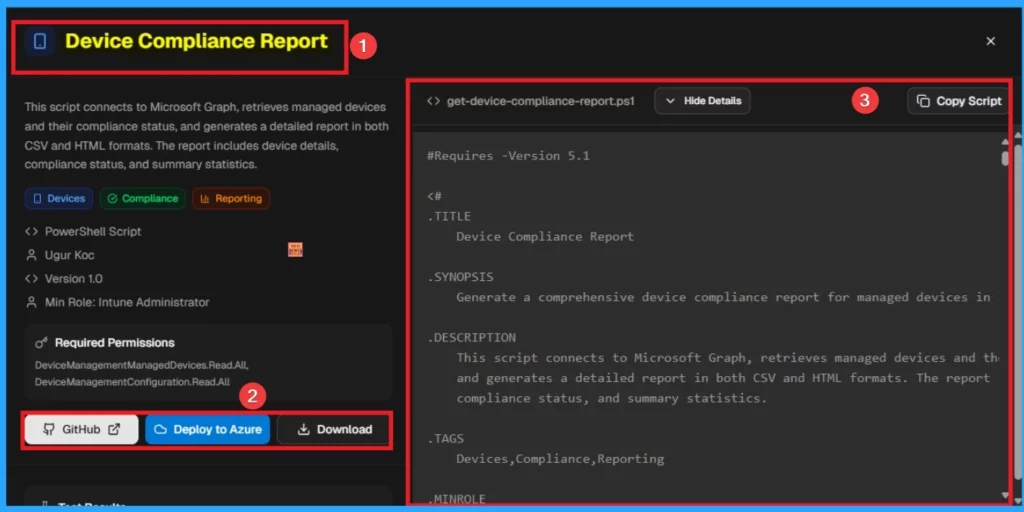
From the Intune Automation Website, I choose the Device Compliance Report script. This script connects to Microsoft Graph, retrieves managed devices and their compliance status, and generates a detailed report in both CSV and HTML formats. Its version is 1.0 and can be opened in GitHub, deployed to Azure and downloaded easily. You can also copy this script.
Need Further Assistance or Have Technical Questions?
Join the LinkedIn Page and Telegram group to get the latest step-by-step guides and news updates. Join our Meetup Page to participate in User group meetings. Also, Join the WhatsApp Community to get the latest news on Microsoft Technologies. We are there on Reddit as well.
Author
Anoop C Nair has been a Microsoft MVP for 10 consecutive years from 2015 onwards. He is a Workplace Solution Architect with more than 22+ years of experience in Workplace technologies. He is a Blogger, Speaker, and Local User Group Community leader. His primary focus is on Device Management technologies like SCCM and Intune. He writes about technologies like Intune, SCCM, Windows, Cloud PC, Windows, Entra, Microsoft Security, Career, etc.


Discussion