






Quick Overview Comparison between Intune Azure and Silverlight Portal
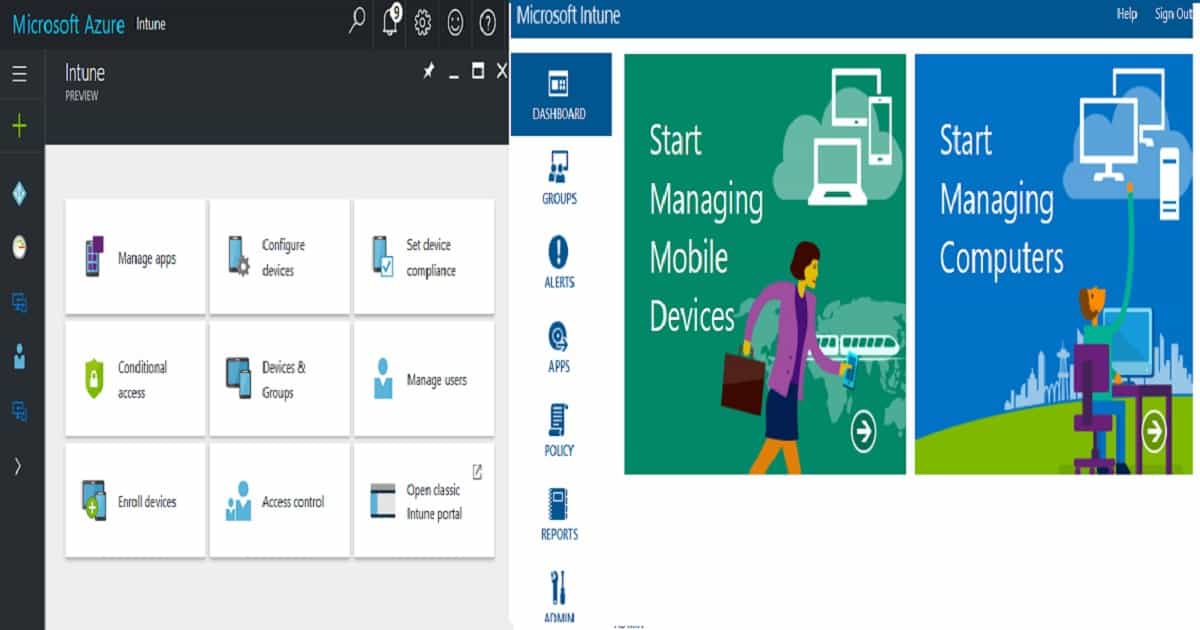
Quick Overview Comparison between Intune Azure and Silverlight Portal? I’m excited to share the comparison video and post about Intune Silverlight and the new Intune in the MEM portal.
There are many new features and many perfect changes. All the new Azure tenants with a new Microsoft EMS subscription can access a preview version of Intune in the MEM portal.
Latest Intune Admin Portal Walkthrough Guide | MEM Admin Center Latest Intune Admin Portal Walkthrough Guide | MEM Admin Center HTMD Blog (anoopcnair.com).
The Intune console’s performance, look, and feel are far better than those of the Intune Silverlight console. Intune in the MEM portal helps us eliminate the duplication of work needed to create Azure AD and Intune groups.

In the new portal, we can directly deploy applications, policies, profiles, etc… to Azure Active Directory Dynamic device groups and user groups. Enrolment restriction rules and RBA for Intune admins are other most exciting features for me within the new portal.
Microsoft recently changed the brand name from MEM (Microsoft Endpoint Manager) to Microsoft Intune. You can also refer to the Top 50 Latest Intune Interview Questions and Answers, and if you are interested, check out the Top 50 Latest SCCM Interview Questions and Answers.
- Latest Intune Admin Portal Walkthrough Guide | Microsoft Intune Admin Center
- 63 Episodes of Free Intune Training Endpoint Manager for Device Management Admins
- How to Troubleshoot Windows 10 Intune MDM Issues
- Intune Managed Application Troubleshooting
- MDM Diagnostics Tool – Tips & Tricks – Windows Autopilot Troubleshooting
Table of Contents
Video Tutorial to know Intune Silverlight Portal Experience
Video tutorial to learn about the Intune Silverlight Portal Experience. The Intune blade in the Azure portal is like a special section where you can manage many things for your devices. It’s part of the Azure portal, where you do all sorts of stuff with your cloud services.
- This Intune blade has many new features and tools to help you manage your devices even better.
Quick Overview Comparison between Intune Azure and Silverlight Portal
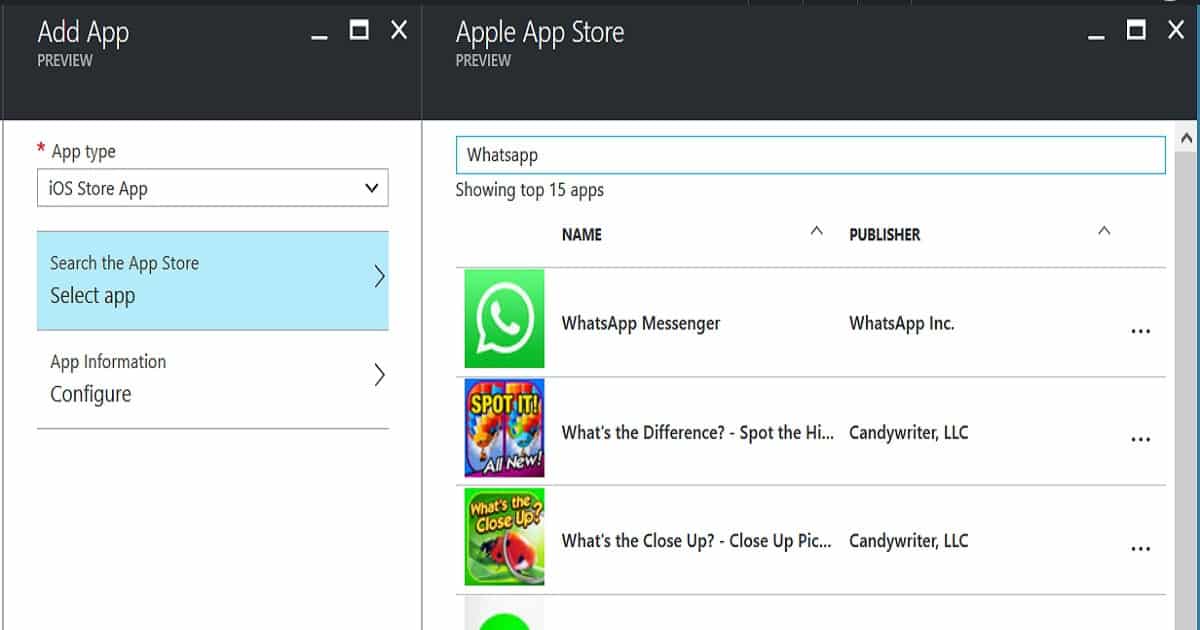
Manage Apps node is where you can create apps from the Android, Apple, and Windows stores. The most exciting feature in Manage Apps is that you can directly search the Apple App Store (Yes, I think for preview, we have only the option to select the US store) and fetch the application from there.
Hence, you don’t need to specify the app’s properties. Deployments in the new MEM portal are called ASSIGNMENTS. You can directly deploy applications to AAD groups. One thing missing in the review version of Intune is an option to upload MSI applications.
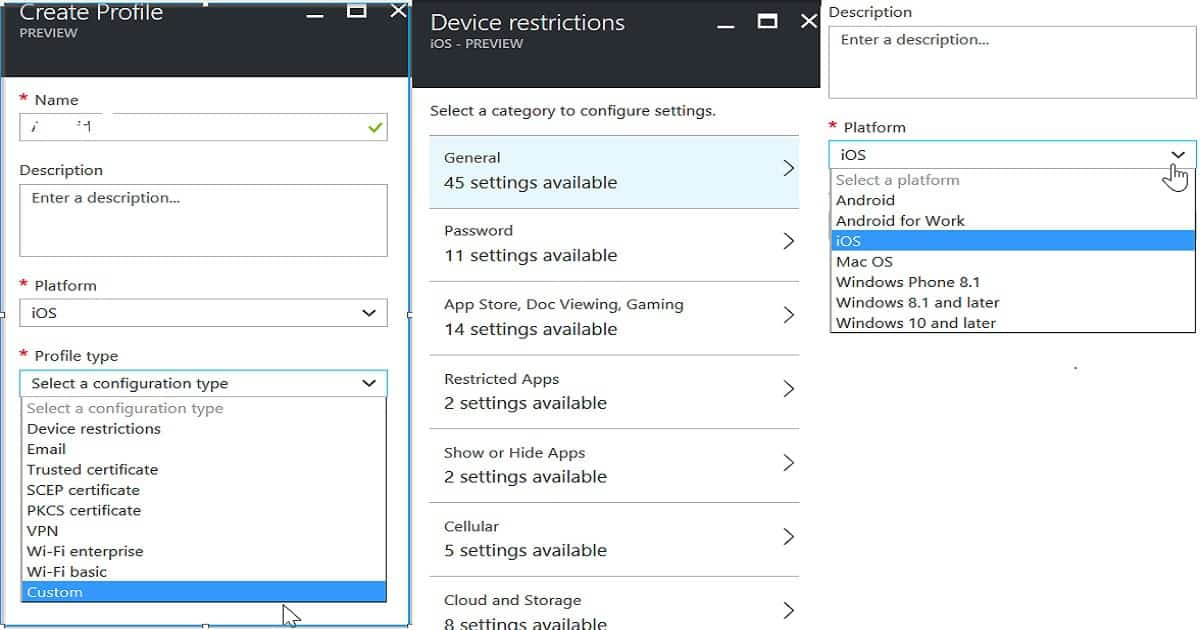
The Configure Device node is in the new Azure console, where you can create configuration policies for iOS, Android for Work, Android, and Windows devices. Configuration policies in the Intune Silverlight portal have built-in generic policies for Windows, iOS, Android, etc. Similarly, the new Intune portal in Azure has built-in profiles.
We have different profile types, such as Device Restriction policies, WiFi profiles, VPN profiles, SCEP deployment profiles, and eMail profiles. Device restriction policies are the built-in configuration policies for specific device platforms.
| Configuration Type |
|---|
| Custom |
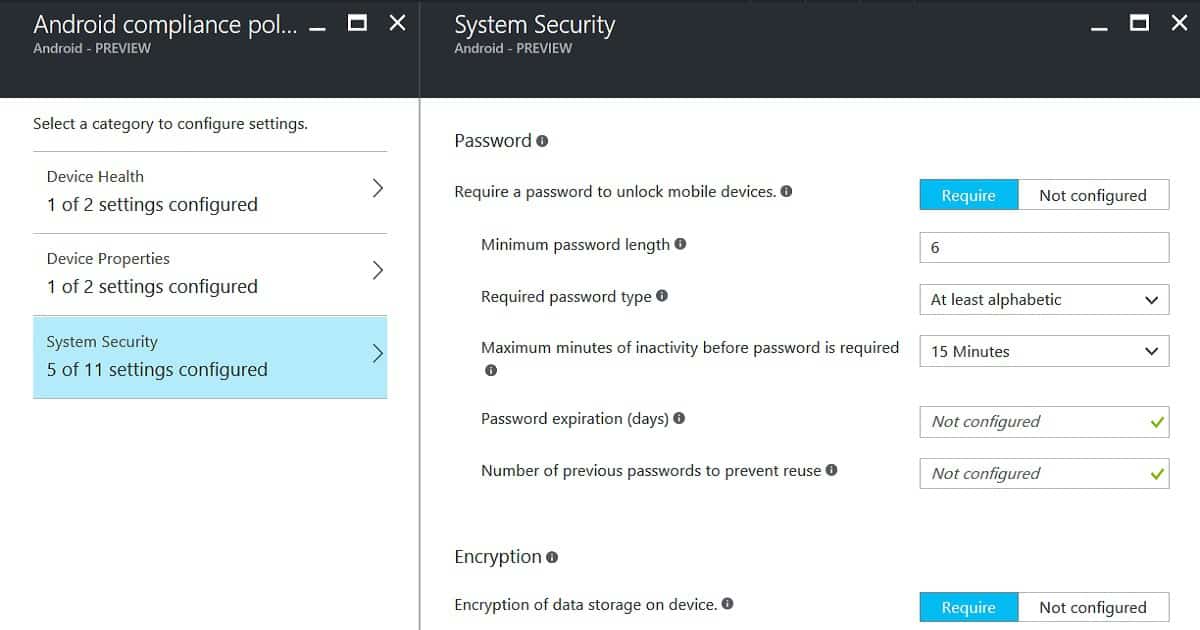
Set device compliance is the node where you can create new, improved compliance policies for all the supported devices like iOS, Android, and Windows. The improvement over the Silverlight Intune portal is that we can select the device platform explicitly in the compliance policies.
Also, depending upon the device platform, separate compliance policies will be applied to different devices (even if a user is targeted to iOS, Android, and Windows compliance policies). Compliance policies are deployed via assignments in the Intune portal.
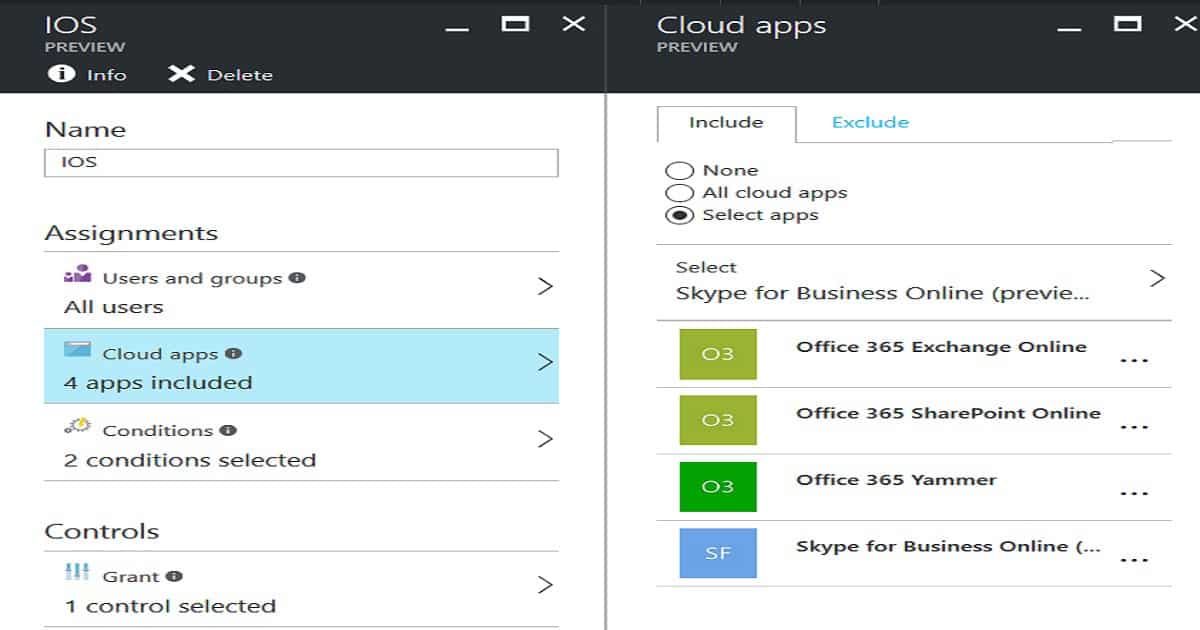
The conditional Access node in the new Intune portal has very few options compared to Intune Silverlight conditional access options. All the device-based conditional access rules have been moved out of Intune and are now part of Azure Active Directory. Device-based conditional access policy has loads of granular options, more conditions, more control options, etc.
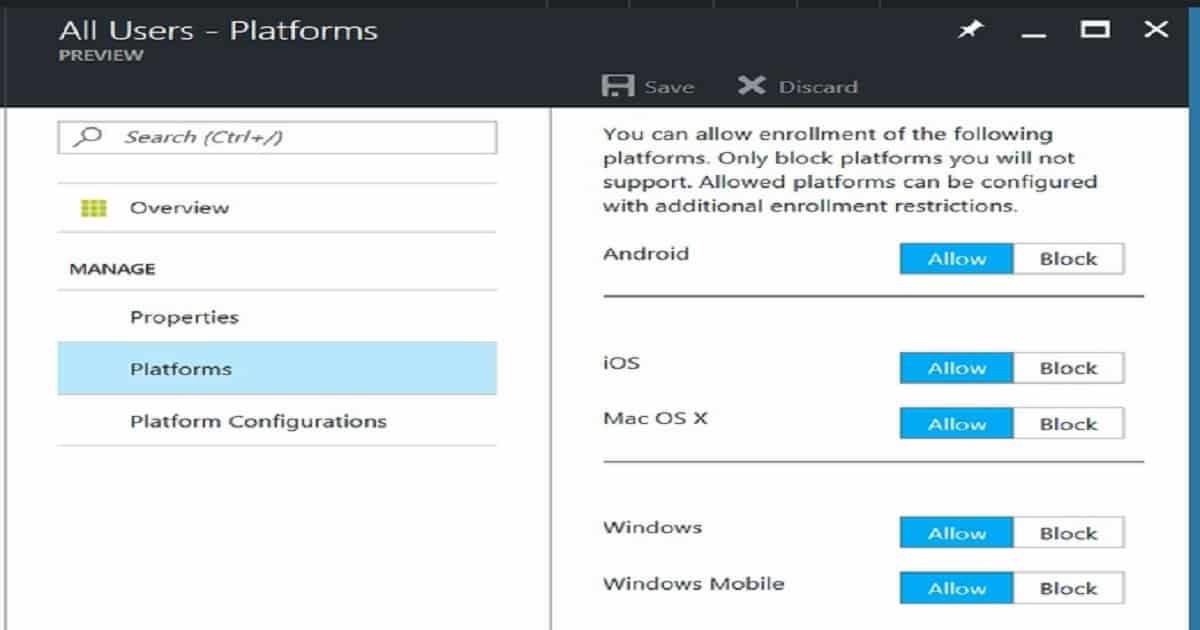
The Enroll Devices node is where you can define enrolment restriction rules. These rules help to prevent devices from enrolling in Intune. The enrolment restriction rule comes before conditional access verification. Within enrolment restriction rules, we can have different types of restrictions, such as Device Type restrictions and Device Limit restrictions.
Device type restriction is where we can select device platforms and platform configurations. The Enroll Devices node is where you can also define/configure Windows Hello for business and check the MDM management authority, Terms and conditions, Corporate device identities, and Apple MDM push certificates.
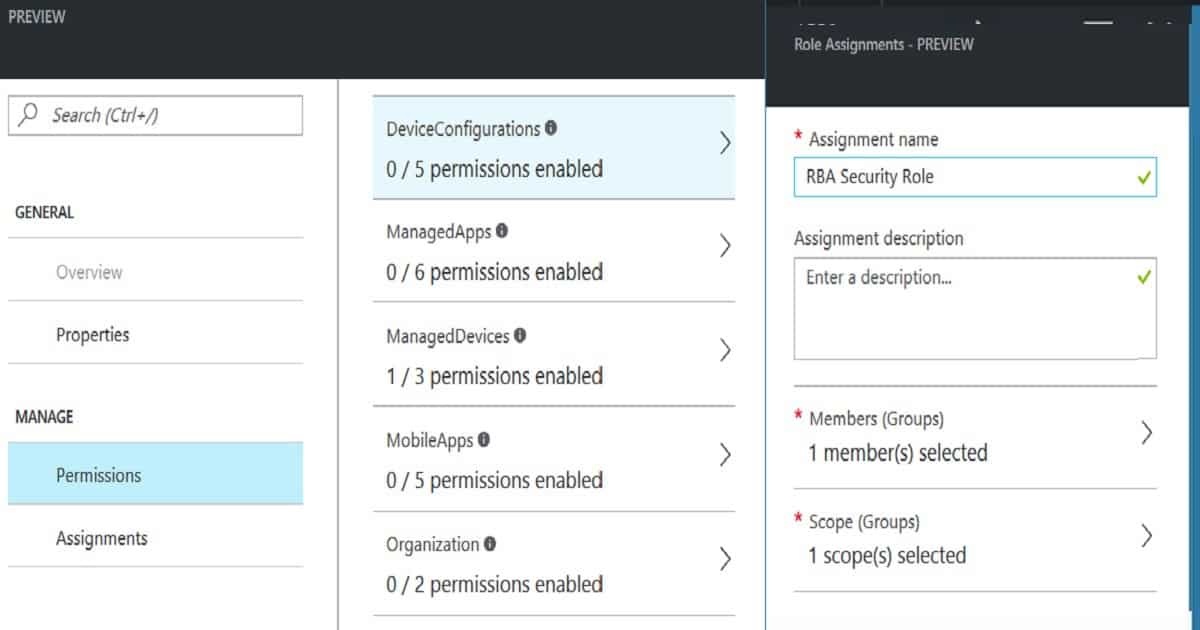
Access control is where we can define custom security permissions for Administrator users. Role-based administrator (RBA) is enabled in the new Intune portal, where you can create your own customized Intune admin roles.
Once you create a security role, you can assign it to a new Member Group and Scope Group. The Intune review portal offers the following permission options: Device Configurations, Managed Apps, Managed Devices, Mobile Apps, Organization, Remote tasks, Roles, Telecom Expenses, and Terms and Conditions.
We are on WhatsApp now. To get the latest step-by-step guides, news, and updates, Join our Channel. Click here. HTMD WhatsApp.
Author
Anoop C Nair is Microsoft MVP! He is a Device Management Admin with more than 20 years of experience (calculation done in 2021) in IT. He is a Blogger, Speaker, and Local User Group HTMD Community leader. His main focus is on Device Management technologies like SCCM 2012, Current Branch, and Intune. He writes about ConfigMgr, Windows 11, Windows 10, Azure AD, Microsoft Intune, Windows 365, AVD, etc.


Discussion