






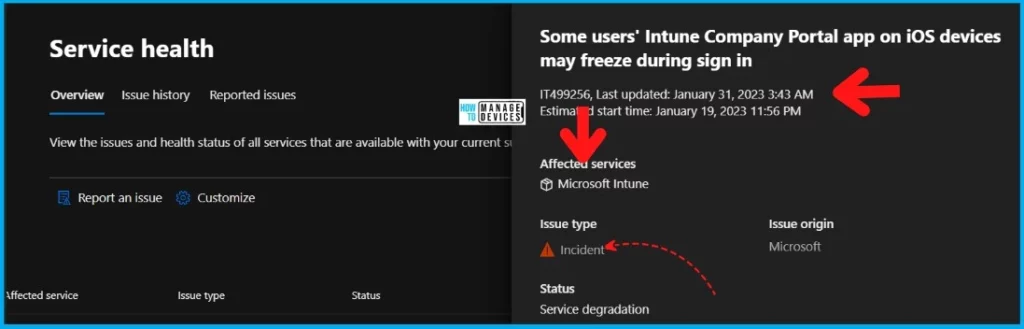
Microsoft is working on Intune Company Portal Freeze Issue on iOS devices during sign-in. The end-user impact is: Users’ Intune Company Portal app on iOS devices may freeze during sign-in.
If you get a similar complaint from iOS users in your organization, the issue is probably with the latest version of the Intune company portal. Earlier, we published a post that end users cannot log in to Intune company portal app when installed on Windows 10 or Windows 11.
Initially, Microsoft reported that users’ Intune Company Portal app on iPads using iOS 16.2 is freezing during sign-in. The initial communication from Microsoft was 2 weeks before with an Intune incident IT499256. This issue is FIXED as per the latest update from Microsoft on Tuesday, February 7, 2023, 12:51 AM (2/6/2023, 7:21 PM UTC).
Microsoft already updated that the latest build of the Company Portal app contained a code issue that is causing the deadlock after users of any iOS version attempt to sign in.

- Intune Company Portal App For Windows 11 Android | Install And Uninstall
- Company Portal using the Offline
Impact: Intune Company Portal Freeze Issue on iOS devices
The impact is on end-users using the iOS 16.2 version of iOS devices. The Microsoft Intune enrollment is impacted on these iOS devices. As the freeze occurs during sign-in, this issue is preventing some users from enrolling devices.
FIX: Intune Company Portal Enrollment Issue on iOS Devices
Microsoft has already identified the root cause for the freezing issue with Intune Company Portal. Microsoft has already developed and is in the process of validating a potential fix to address this issue.
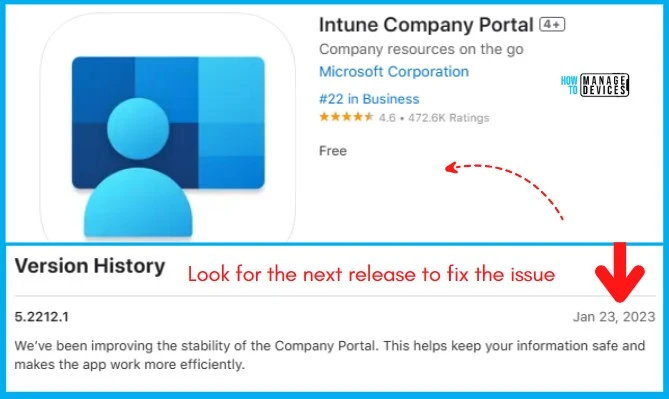
Any user signing into the Intune Company Portal app on iOS devices operating build 5.2212.0 is impacted. The validation process is completed and now waiting for Apple’s approval to update the company portal app in the Apple store.
Root Cause
Intune Company Portal Freezes during enrollment Issue Root cause is explained below. This issue happened after the Intune service update, maybe Intune 2301 version.
A recent service update intended to improve the gathering of device information during sign-in to the Microsoft Intune service contains a code issue resulting in the app hanging upon launch, causing an impact.
| iOS 16.2 Upgrade Issue | Enrollment Issue | OS Version | Impacted Platform | Timing | Intune Advisory | Current Status |
|---|---|---|---|---|---|---|
| Some users’ Intune Company Portal app on iOS devices may freeze during sign in | Between 16th September 16, 2021 (Intune 2207), and August (Intune 2208) | iOS 16.2 | 1. iOS 2. iPadOS | Estimated start time: January 19, 2023, 11:56 PM | Incident – IT499256 | Microsoft is awaiting Apple App Store approval to make the fix available to affected users. |
Issue Closer Note
Final status: Microsoft confirmed that the updated version of the Intune Company Portal app is now available for download via the App Store and determined that this issue is resolved. Affected users may need to manually update their devices to the latest version of the app to experience impact relief.
But there are comments from other users who are still facing even after the updated version of Intune Company portal. But there is no confirmation on this from Microsoft.
Author
HTMD Admin Account to provide news and latest updates on the known issue from Microsoft world. We cover Windows, Intune, Azure, AVD, and Windows 365 news.


hi, is it relatede to 5.2212.1 as well?
StaffThis issue is specific to users with iOS devices operating build 5.2212.0. Until Apple approves the latest version of Intune portal app.
ok, but 5.2212.1 is already approved by Apple; I’ve installed it on IOS 16.3 and still has a freezy intune comp page …
StaffMicrosoft didn’t confirm this in their advisory IT499256
sorry for bother you – but I’d like to have clear info to share with friends – is that 5.2212.1 with fixed code inside or this is something that was prepared before the “freeze issue” occurs?
StaffThis is what that I see in Microsoft Ticket
Title: Some users’ Intune Company Portal app on iOS devices may freeze during sign in
User impact: Users’ Intune Company Portal app on iOS devices may freeze during sign in.
More info: As the freeze occurs during sign in, this issue is preventing some users from enrolling devices. This issue is specific to users with iOS devices operating build 5.2212.0.
Current status: We’re continuing to await Apple’s approval so that the build containing our fix can be published in the App Store.
Scope of impact: Any user signing into the Intune Company Portal app on iOS devices operating build 5.2212.0 may be impacted.
Start time: Friday, December 16, 2022, 7:05 AM (1:35 AM UTC)
Root cause: A recent service update that was intending to improve the gathering of device information during sign in to the Microsoft Intune service contains a code issue which is resulting in the app hanging upon launch, causing impact.
Next update by: Tuesday, February 7, 2023, 5:00 AM (2/6/2023, 11:30 PM UTC)
The issue is still prevalent on iOS 16.3 and Intune Company Portal 5.2212.2 using an iPhone 12. It successfully works on an iPhone SE (2022) also with iOS 16.3. So the issue is with the iPhone 12?
Got it working by ticking Enable Advanced Logging under the Intune Company Portal in Settings on iOS 16.3
How do you update Company Portal if the phone is corporate and under VPP?
@Jean – are you still seeing the same issue? I have an iPhone 12 iOS 16.3.1 and Comp Portal 5.2212.2 is installed using VPP during enrolment. I’ve tried the locked enrolment and also without but after few seconds, the device freezes and cannot do anything other than a force restart.
Hi, we have set up Apple Business Manager with VPP tokens.
The enrollment profile is Company Portal authentication with Single App Mode.
I still have the same problem today with iPadOS 16.3.1 & Company Portal 5.2212.2
When the OOBE is finished (after the screen Welcome to iPad – Get Started), the normal behavior should be the Company Portal automatically opens in Single App Mode, but thats not the case, nothing happens. I can access whatever I want on the iPad, just until there is inactivity and the screen locks.
At that point the iPad becomes unresponsive and freezes (you can’t turn the screen on/off). The only thing you can do is a hard reset, as George mentioned. After the hard reset, you enter your screen passcode and the Company Portal pops up in Single App mode – as it should.
But it is not normal you have to hard reset your device in order to authenticate your device.
So I’m going to log a ticket @ Microsoft support
@Nikkie
Any update on this form MS Side
The problem is still here, iPhone X / iOS 16.4.1 / Company Portal 5.2303.0
I am still experiencing this exact issue. I have a ticket open with Microsoft to help investigate.
iPhone 12 / iOS 16.6.1 / Company Portal 5.2309.0
We have our clients having same issue since last 20 days
Did you ever find a solution Nikkie? Same issue popped up on our side suddenly. Happens consistently on some Ipads and Iphones.
We have this experience with Iphone SE (2 Generation) just when we hit the password the app is hanging and closes and then when you start it again it works fin. First i was thinking that our FW is doing some decrypt but maybe this is not the reason?