






Intune Delete action no longer Retire iOS and Android Devices
Intune delete action no long retire iOS and Android Devices and delete the company data. Microsoft recently updated the documentation to include this change with iOS and Android devices.
So it’s time to make slight changes in your Standard Operating Procedure (SOP) document for iOS and Android devices life cycle management. You can’t just delete the device record from the MEM Admin Center (Intune) portal and assume that the company data will be removed automatically.
There are three remote actions that I’m going to cover in this post. Those are Retire, Wipe, and Delete for iOS and Android Devices. There are Intune cleanup rules to remove the stale device records.
The Intune device clean-up rule doesn’t trigger a wipe or retire. If a removed device checks in before its device certification expires, it will reappear in the MEM Intune portal. Jamf managed devices are excluded from these cleanup rules.

Read More -> Perform Bulk Device Actions – Intune Remote Actions and Azure AD Device Cleanup Options for Stale Device Records.
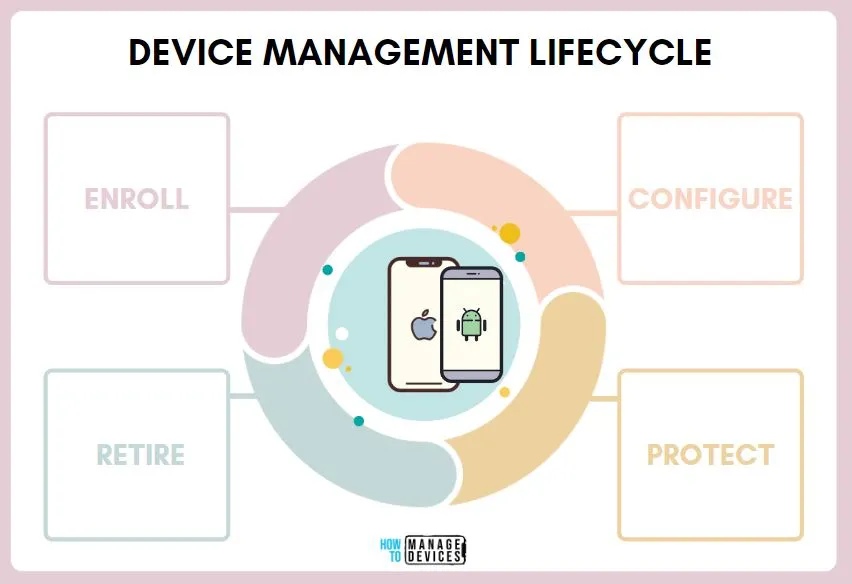
Intune Device Management Lifecycle
Intune helps organizations manage the Device Management Lifecycle. This is important to have operating procedures for all 4 stages of Intune device management lifecycle. Interestingly there, deletion is not so much an important component in the device lifecycle.
- Enroll
- Configure
- Protect
- Retire
It’s very critical to have a process in place to retire the devices that are no longer required. This helps to reduce security risk and many other risk factors in the device management world.
NOTE! – Make sure that the user licenses are NOT removed before completion of WIPE or RETIRE action. Intune license is required for remote actions such as wipe to complete(?) even though I couldn’t find these details in MS documentation.
- Configure iOS Store Apps to Simplify App Management using Microsoft Intune
- Retrieve IOS VPP Managed App ID Publisher Platform Assignment And Last Modified Details Using Intune Copilot Explorer
Intune Delete action no longer Retire iOS and Android Devices
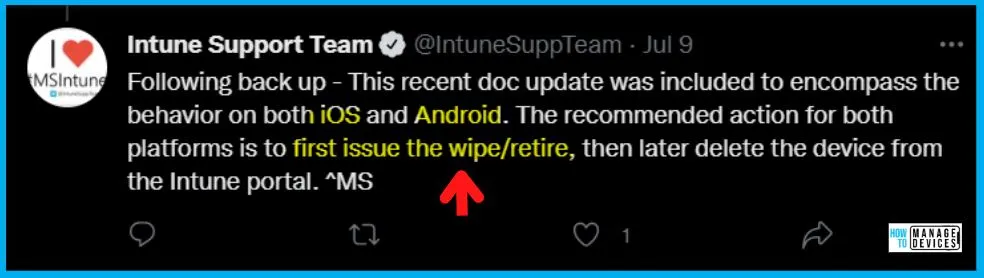
Microsoft Intune support team confirmed on Twitter that Intune Delete action no longer Retire iOS and Android Devices. You must retire/wipe iOS or Android devices before deleting them from Intune or Azure AD port.
You must use the Wipe or Retire actions for all devices before removing them from Azure AD. As per Microsoft, the recommended steps to remove the company data from Intune managed iOS and Android devices are to first issue a wipe or retire action and then delete the device from MEM and Azure AD.
- Retire/Wipe Device
- Delete Device
- Remove Licences from User
- Delete User
Retire Intune Remote Action for iOS or Android Devices
Let’s check more details on the Retire Intune Remote Action for iOS or Android Devices. If you want to remove only the company data from iOS and Android devices, the Retire remote action is the best suited method. I think this would be the best suited option for personal iOS and Android devices.
The retire action won’t delete users personal data from the mobile device. However, the device won’t be able to access corporate resources such as Email, Teams, OneDrive, etc.
NOTE! – Removing company data is not supported for Windows devices joined to Azure AD. This is because of its inability to remove Win32 apps and data deployed to Azure AD Joined Windows devices. The recommendation is to use WIPE action for those types of devices.
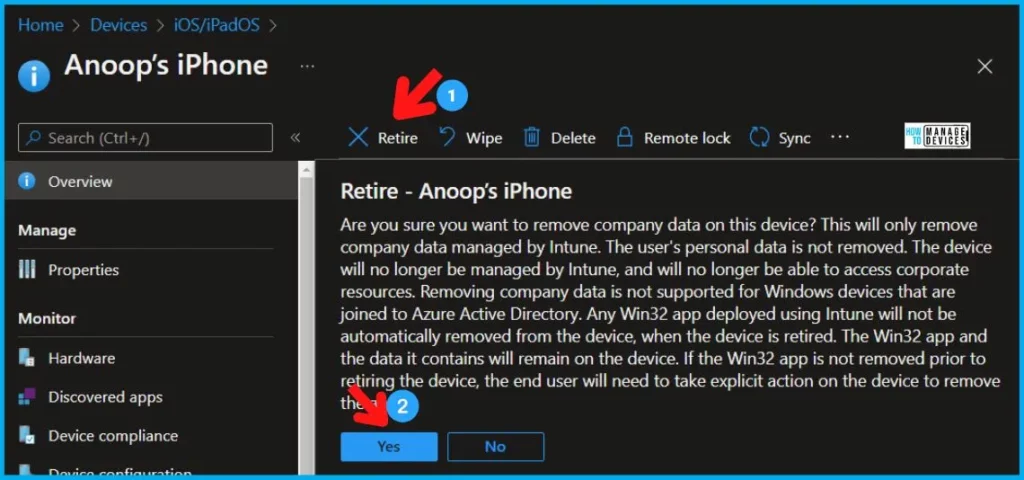
- The search of the iOS or Android device that you want Retire -> Anoop’s iPhone.
- Click on Anoop’s iPhone device record from the search results.
- Once the device properties blade is open, you can see all the available remote actions.
- Click on the RETIRE option to delete the selected device.
- Click Yes on the warning blade to confirm the retirement of the iOS/Android device.
NOTE! – The Azure AD record is not removed as part of the Retire action for iOS and Mac Devices.
Remote Action WIPE for iOS or Android Devices
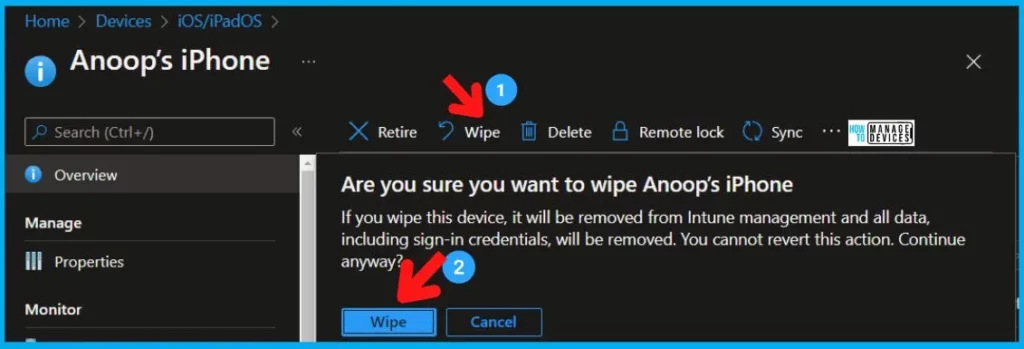
Let’s find out more details on remote Action WIPE for iOS or Android Devices. The device will be removed from Intune management, and all data, including the sign-in credentials, will be removed.
The wipe is useful for resetting the device before you give the device to a new user in case of a company owned and DEP enrolled iOS device. The wipe action can help when the device has been lost or stolen, and you want to delete the data. I recommend testing and confirming device Wipe behaviors for different Intune enrollment methods for Android and iOS devices.
NOTE! – For personally owned Android devices (Android Enterprise Work Profile devices), the Wipe option will be grayed out. Refer to Intune Wipe remote action FAQs for more details on Wipe issues.
- Once the device properties blade is open, you can see all the available remote actions.
- Click on the Wipe option to delete the selected device.
- Click Wipe on the warning blade to confirm the wipe for a supported iOS/Android device.
Intune Remote Action – Delete
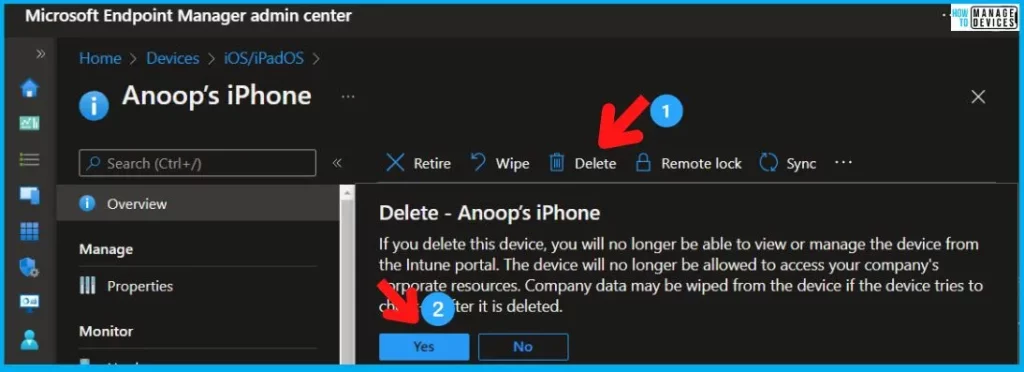
Let’s check the Intune remote action Delete. How to initiate delete action for an iOS or Android device. Sign in to the Microsoft Endpoint Manager admin center (Intune Portal). Select Devices, and then select iOS/iPadOS or Android platform.
- The search of the iOS or Android device that you want delete -> Anoop’s iPhone.
- Click on Anoop’s iPhone device record from the search results.
- Once the device properties blade is open, you can see all the available remote actions.
- Click on the Delete option to delete the selected device.
- Click Yes on the warning blade to confirm the deletion of the iOS/Android device.
If you delete this device, you will no longer be able to view or manage the device from Intune portal. The device will no longer be allowed to access your company’s corporate resources. Company data may be wiped from the device ONLY if the device tries to check in after being deleted.
Author
Anoop is Microsoft MVP! He is a Device Management Admin with more than 21 years of experience (calculation done in 2022) in IT. He is Blogger, Speaker, and Local User Group HTMD Community leader. His main focus is on Device Management technologies like SCCM 2012, Current Branch, and Intune. He writes about ConfigMgr, Windows 11, Windows 10, Azure AD, Microsoft Intune, Windows 365, AVD, etc.


MS modified the documentation again, and as per the MS documentation Delete command also Retires devices.
https://docs.microsoft.com/en-us/mem/intune/remote-actions/devices-wipe#delete-devices-from-the-intune-portal
StaffOk, thank you for the update. Only if the device/user is successfully able to check-in. Isn’t it?
As per my understanding, Retire uses APNS (iOS) or FCM (Android) to force the device check-in and retire the device. The same happens when Delete (+Retire) a device (it uses APNS or FCM to force the device check-in and retire).
So yes, the device has to be able to successfully check-in (not offline) to remove company data.
In my opinion it does not matter if it is a Retire command or a Delete (+Retire) .
Quick Question, I have device enrolled with Intune, however the employee is no more in system and the intune action portal states retire pending. I cant wipe the device as it is grayed out only option is delete. will the delete option factory reset the phone ? or is it just wipe company resoruces?
Thanks
CoolMiller
StaffThe retire command should perform a wipe action as well. This is the why Wipe option is disabled for you.
For supervised devices without user affinity, how to factory reset the ipad device for fresh enrollment to be managed by intune again?
Currently ipad device not visible in all devices intune and only visible in enrollment program token and abm.
Hello,
Our previous admin never renewed our apn and we were unable to manage exisiting iphones or enroll new iphones so we signed up for a new apn. This allowed us to enroll new iphones. We are trying figure out a way to get the previously enrolled uncompliant devices to re-enroll without them being wiped of their data. Since the devices are unable to communicate with the company portal, do we have to retire the devices thus wiping them out? Is this the only way? We have about 60 non compliant devices that are associated with the old apn.