






Fix Intune Enrollment Error Unknown Win32 Error code 0x8018002b | 0xcaa90014
Discuss Fix Intune Enrollment Error Unknown Win32 Error code 0x8018002b | 0xcaa90014. I have seen Intune Enrollment Error Unknown Win32 error codes 0x8018002b and 0xcaa90014 a couple of times in different environments.
Normally this issue is because one or more Intune enrollment prerequisites are not met. But this issue and fix are a bit different and strange.
The Intune group policy is used mainly for AVD (Azure Virtual Desktop) scenarios. Using this group policy to enrol AVD VMs in Microsoft Endpoint Manager(MEM) Intune would be best.
Hopefully, this post will help you understand the importance of patience. It also explains the flow of the Intune MDM enrollment-related event logs. Intune MDM component-related troubleshooting is mainly based on event logs.

Table of Contents
Missing Info Tab?
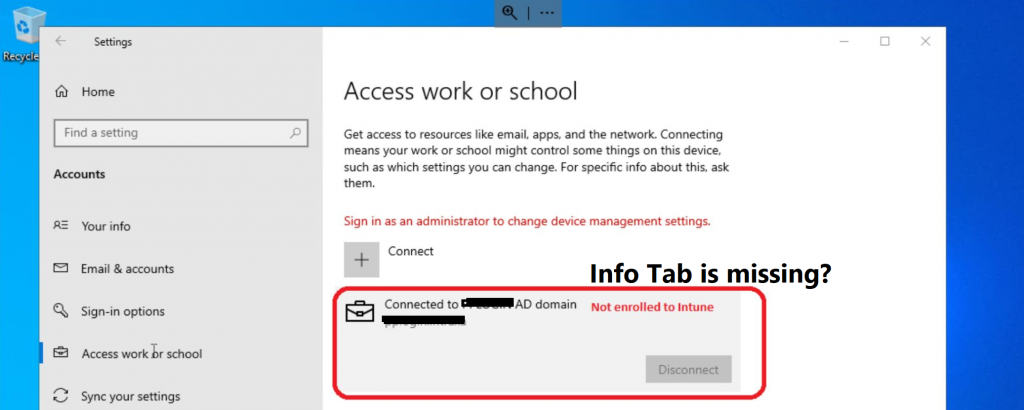
The first step is to confirm whether the Windows 10 device is enrolled in Intune. You can check this from:
- Click on the Start button and type Settings to open the settings page.
- Click on the Accounts option from the settings page.
- Click on the Access Work or School button.
- Check whether you can see any connection box there.
- Click on the connection Box and check whether the INFO button is there.
- If the Info tab is missing from the connection box, this device has not yet been enrolled in Intune.
- Learn How To Collect Windows 10 Diagnostics Information From Intune Portal | Endpoint Manager – HTMD – How To Manage Devices
- Collect Intune Logs From MEM Portal Diagnostic Data HTMD Blog
Intune Enrollment Error Unknown Win32 Error code 0x8018002b | 0xcaa90014
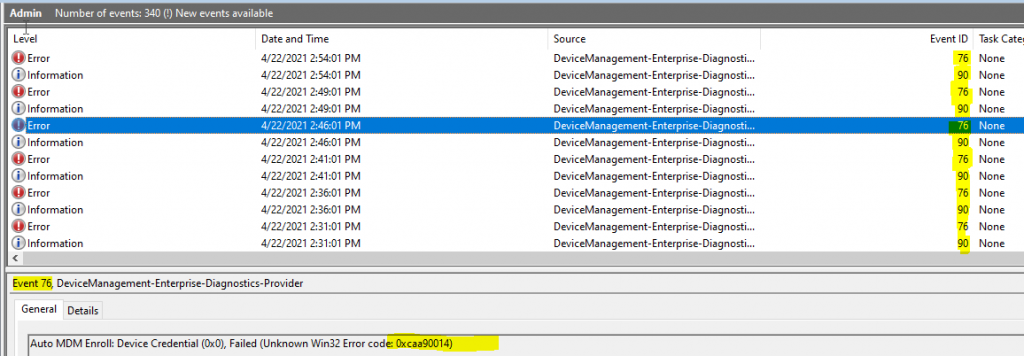
You can get more details about Intune Enrollment Error Unknown Win32 Error code 0x8018002b and 0xcaa90014 from the event logs.
NOTE! – Location of Intune MDM Event Logs > Microsoft-Windows-DeviceManagement-Enterprise-Diagnostics-Provider/Admin
I have seen the following errors in the event log and a blog post related to this error. I don’t think I have the same issue because we don’t sync the password hash to Azure AD using Azure AD Connect.
Event ID 76 Auto MDM Enroll: Device Credential (0x0), Failed (The system tried to delete the JOIN of a drive that is not joined.)
Event ID 90 Auto MDM Enroll Get AAD Token: Device Credential (0x0), Resource Url (NULL), Resource Url 2 (NULL), Status (Unknown Win32 Error code: 0x8018002b)
Event ID 76 Auto MDM Enroll: Device Credential (0x0), Failed (Unknown Win32 Error code: 0x8018002b)
Event ID 76 Auto MDM Enroll: Device Credential (0x0), Failed (Unknown Win32 Error code: 0xcaa90014)
Prerequisite Check
I have reviewed all the Intune Group policy enrollment-related prerequisite checks individually, as explained in the following blog post – Windows 10 Intune Enrollment Using Group Policy | Automatic Enrollment | WVD HTMD Blog (anoopcnair.com).
I also checked the Azure AD portal to see whether the device record was available. It was, as well.
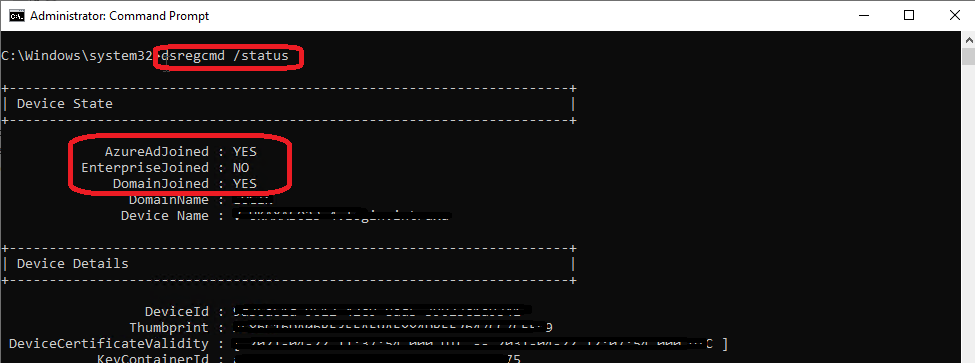
I tried to run and check whether the Hybrid Azure AD joined worked OK or not using the following command-line utility.
- DSREGCMD /STATUS
- The device is successfully joined to Hybrid Azure AD as per the status of the command-line tool.
Windows – Intune Enrollment Process Flow
Well, now I’m stuck. I can’t figure out what I should do next as a troubleshooting step. I tried to check Azure’s health status, and it also looked okay. I wanted to have a tea break to get energized again. Let’s find out what an exciting fix for Intune Enrollment Error Unknown Win32 Error is.
After the tea break, the issue was resolved without any interaction from my side. Also, I’m unaware of any problems related to AAD Connect or ADFS. I know this is something extraordinary. The fix here is to be patient (the cloud is a black box), wait 30-40 minutes, and check again.
If it’s happening regularly in your environment, you need to troubleshoot further to understand why there is a delay with Intune enrollment. I have seen the delay mostly due to network connectivity or firewall issues.
Let’s look into the event logs to understand the Intune enrollment process.

Event IDs 90 and 91 indicate that the Azure AD token authentication with device credentials worked fine before Intune enrollment. It can send the AADRESOURCEURL with tenant ID and user UPN to check whether the user has a valid license and other configurations.
- Event ID 90 – Auto MDM Enroll Get AAD Token: Device Credential (0x0), Resource Url (https://enrollment.manage.microsoft.com/), Resource Url 2 (NULL), Status (The operation completed successfully.)
- Event ID 91 – Auto MDM Enroll Enrollment Information: AadResourceUrl (https://enrollment.manage.microsoft.com/enrollmentserver/discovery.svc), DiscoveryServiceFullUrl (https://enrollment.manage.microsoft.com/), TenantID (386b38hh-yx65-442b-aaOe-3b94ad25a97b), Upn (fooUser@htmd.anoop)
The following event IDs related to Intune Enrollment help understand the Intune (MDM) client-side workflow.
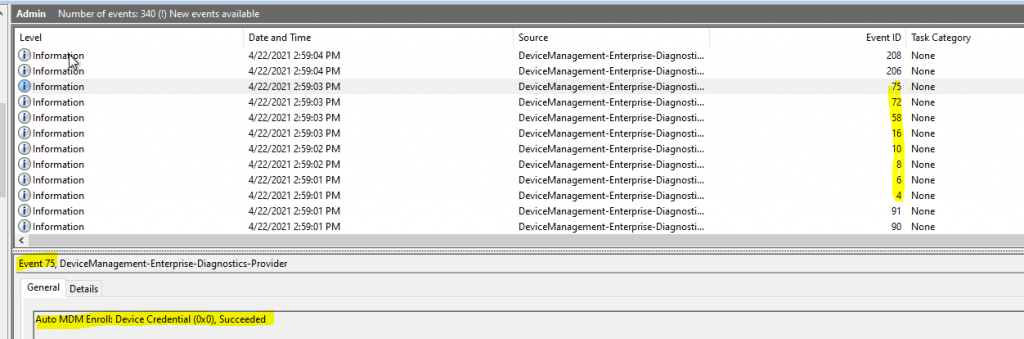
- Event ID 4 – MDM Enroll: Certificate policy request sent successfully.
- Event ID 6 – MDM Enroll: Certificate policy response processed successfully.
- Event ID 8 – MDM Enroll: Certificate enrollment request sent successfully.
- Event ID 10 – MDM Enroll: Certificate enrollment response parsed successfully.
- Event ID 16 – MDM Enroll: OMA-DM client configuration succeeds.
- Event ID 58 – MDM Enroll: Provisioning succeeded.
- Event ID 72 – MDM Enroll: Succeeded
- Event ID 75 – Auto MDM Enroll: Device Credential (0x0), Succeeded
Resources
- Windows 10 Intune Enrollment Using Group Policy | Automatic Enrollment | WVD HTMD Blog (anoopcnair.com)
- Endpoint Manager / Intune AutoJoin different local domain – Microsoft Q&A
- Windows 10 MDM Log Checklist – Ultimate Help Guide – #1 (anoopcnair.com)
We are on WhatsApp. To get the latest step-by-step guides and news updates, Join our Channel. Click here –HTMD WhatsApp.
Author
Anoop C Nair has been Microsoft MVP for 10 consecutive years from 2015 onwards. He is a Workplace Solution Architect with more than 22+ years of experience in Workplace technologies. He is a Blogger, Speaker, and Local User Group Community leader. His primary focus is on Device Management technologies like SCCM and Intune. He writes about technologies like Intune, SCCM, Windows, Cloud PC, Windows, Entra, Microsoft Security, Career, etc.
Discussion · 2 comments
Comments are closed.


What is below to resolve ?Kindly help on this!
MDM Enroll: Server Returned Fault/Code/Subcode/Value=(UserLicense) Fault/Reason/Text=(Failed to issue token: UserValidation).
MDM Enroll: Failed to receive or parse certificate enroll response. Result: (Unknown Win32 Error code: 0x80180018).
MDM Enroll: Server Returned Fault/Code/Subcode/Value=(UserLicense) Fault/Reason/Text=(Failed to issue token: UserValidation).
Failed to get AAD Token for sync session User Token: (Unknown Win32 Error code: 0xcaa2000c) Device Token: (Incorrect function.)
MDM enrollment hasn’t been configured yet on AAD, or the enrollment url isn’t expected.
Co-management is disabled but expected to be enabled.
Thanks
Staffuser has valid license and Azure AD authentication is working fine?