






How to use Intune Enterprise App Catalog Apps in Windows Autopilot
Exciting News! How to use Intune Enterprise App Catalog Apps in Windows Autopilot. Microsoft has introduced an important update with the Intune 2506 release, enhancing the Windows Autopilot experience.
With this update, Enterprise App Catalog apps can now be used as blocking apps during the Autopilot provisioning process. When a company sets up new Windows devices using Windows Autopilot, it usually wants some important apps to be installed before the user starts using the device.
With this update, IT admins can now choose apps from the Enterprise App Catalog and make sure they are installed first before the user sees the desktop and starts working. The Enterprise App Catalog is a collection of prepackaged Win32 applications, specifically designed and maintained by Microsoft to work easily with Microsoft Intune.
It provides IT admins with a reliable and ready-to-use library of commonly used Windows apps, eliminating the need for manual packaging and testing. In this post, you will get complete details about the latest enhancement where Windows Autopilot now supports Enterprise App Catalog apps using Microsoft Intune.


Table of Contents
What is the New Update Introduced in Intune 2506?
With the Intune 2506 release, you can now configure Enterprise App Catalog (EAM) apps as blocking apps in the Enrollment Status Page (ESP) profile during Windows Autopilot provisioning.
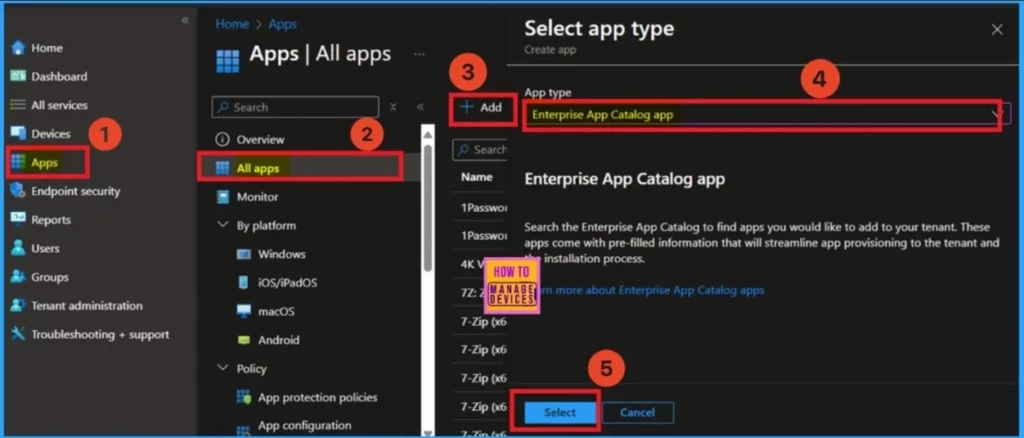
How to use Intune Enterprise App Catalog Apps in Windows Autopilot
The catalog is an ideal solution for organizations looking to quickly and efficiently deploy essential applications. By using the Enterprise App Catalog, admins can save time, reduce deployment errors, and ensure consistent app delivery across all Windows devices managed through Intune.
| What’s New Windows Autopilot | Details |
|---|---|
| Title | Deliver Enterprise App Catalog (EAM) Apps During the Enrollment Status Page |
| Release Date | June 26, 2025 |
| What’s New | Windows Autopilot now supports deploying Enterprise App Catalog apps during provisioning. |
| Platform | Microsoft Intune – Version 2506 |
| Key Capability | EAM apps can now be selected as blocking apps in the Enrollment Status Page (ESP) profile. |
| Purpose | Ensures critical enterprise apps are delivered before the user reaches the desktop. |
| Benefit to IT Admins | Simplifies app deployment and improves device readiness using prepackaged Win32 apps from the catalog. |
| Managed Through | Microsoft Intune Enterprise App Management |
- Next Generation Windows Autopilot Deep Dive Troubleshooting Guide by VImal
- New Capabilities in Windows Autopilot Device Provisioning Real Time Monitoring App and Script Provisioning
- Guide to Configure Windows Autopilot Next Generation Device Preparation Policy with Intune
- How to Set App Defaults using Intune | Export the Default XML File & Encode it in Base64 format
- Best Guide to Deploy New Intune Company Portal App on Windows using Intune
- Easy Guide to Set Feature Updates for Windows 11 as Optional with Intune
- Intune Win32 App Supersedence and Auto App Update Explained
Need Further Assistance or Have Technical Questions?
Join the LinkedIn Page and Telegram group to get the latest step-by-step guides and news updates. Join our Meetup Page to participate in User group meetings. Also, join the WhatsApp Community to get the latest news on Microsoft Technologies. We are there on Reddit as well.
Resources
What’s new in Windows Autopilot | Microsoft Learn
Author
Anoop C Nair has been Microsoft MVP for 10 consecutive years from 2015 onwards. He is a Workplace Solution Architect with more than 22+ years of experience in Workplace technologies. He is a Blogger, Speaker, and Local User Group Community leader. His primary focus is on Device Management technologies like SCCM and Intune. He writes about technologies like Intune, SCCM, Windows, Cloud PC, Windows, Entra, Microsoft Security, Career, etc.


Discussion