






Intune Filter Evaluation Report Options Available For Troubleshooting
- Intune filter evaluation reports in the Intune help troubleshoot issues related to filter-based assignments.
- These evaluation options are especially useful when Intune filters become complex, making it easier to identify targeting problems.
- Filters provide greater flexibility when assigning apps and policies to users or devices.
- Filters allow you to combine group assignments with device characteristics for accurate targeting.
Let’s check the Intune filter evaluation report options available in the Intune portal. The evaluation options can help you troubleshoot filter assignment-related issues. Intune filters can become very complex, and the evaluation options can help identify issues.
This feature makes app and policy assignments in Intune more flexible and precise. As an Intune admin, you can use filters to assign policies based on your own custom conditions instead of relying only on groups. Filters let you target devices or users by specific device characteristics such as OS version, device type, ownership, or other attributes.
By combining a group assignment with device-based filters, you can ensure that policies and apps are applied only to the right devices or users. This helps avoid incorrect assignments, reduces the need to create many groups, and improves overall targeting accuracy.
Intune filter reports are available in the Endpoint Manager (Intune) portal. You have many options to troubleshoot assignment filter issues. Using filters, you can combine a group assignment with the characteristics of a device to achieve the right targeting outcome.

Table of Contents
Intune Filter Evaluation Report Option
This report lists all apps and policies where an assignment filter is used. For each app or policy, you can view which filters are applied and check more detailed information about them. The below list helps you to show more details.
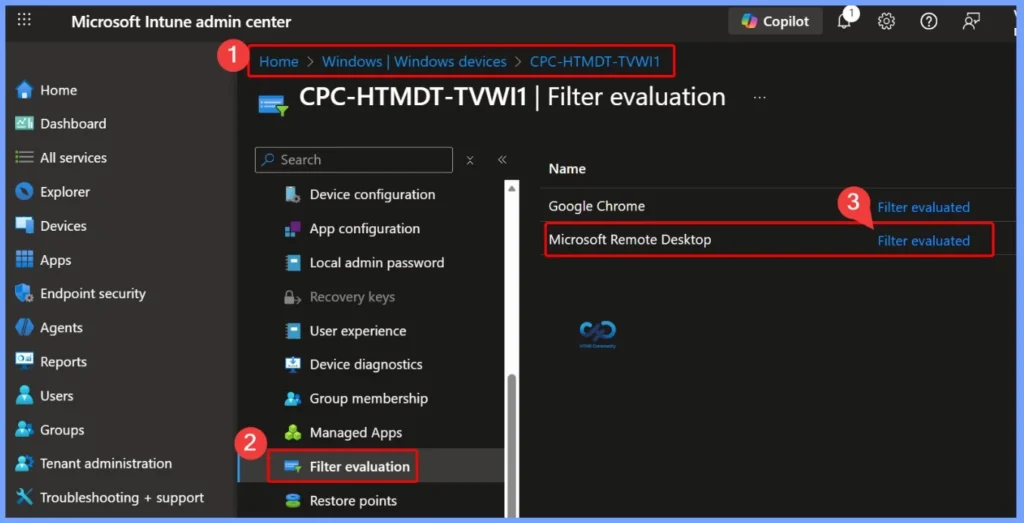
- Sign in to the Endpoint Manager admin center.
- Select Devices > All Devices > Select a device > Filter evaluation
- Under Name, you can see two options: Google Chrome and Microsoft Remote Desktop.
- Here, select the Microsoft Remote Desktop filter evaluation hyperlink.
- Intune Policy Device Assignment Status Report to View Latest Deployment Status for Each Managed Device
- Filter Intune App Policy Assignments Based On Domain Join Type
- How to Use Intune Assignment Filters Comparison Property gt ge lt le with OS Version.
- Set Minimum Encryption Key Size for Bluetooth in Intune via Setting Catalog
Details Available in the Filter Evaluation Report
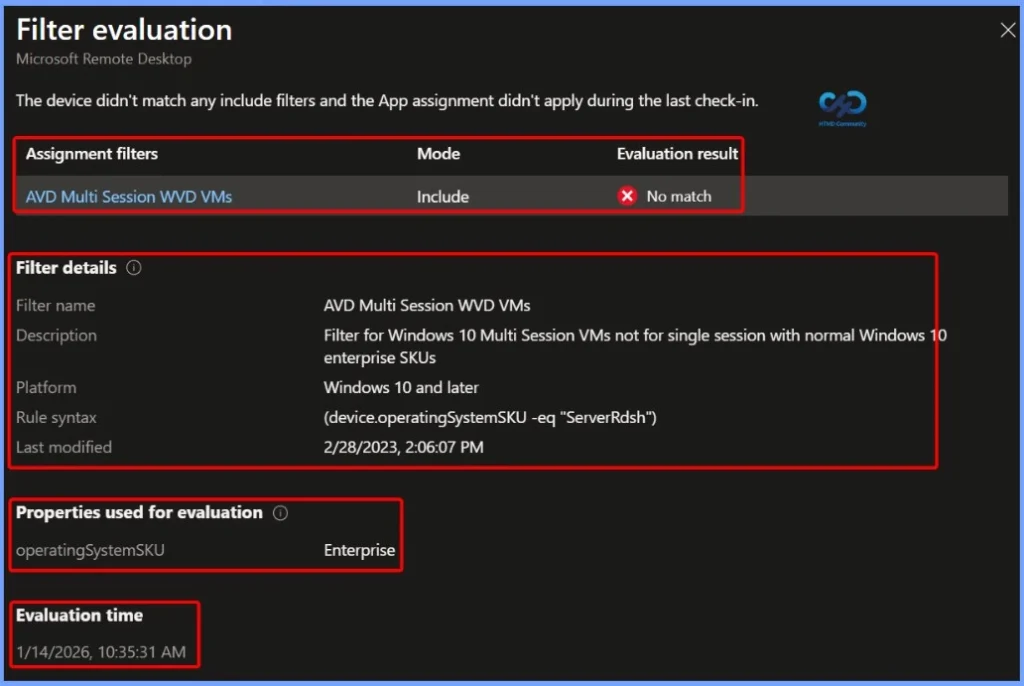
The Filter Evaluation Report allows you to review important information such as the assignment filter name, filter mode (Include or Exclude), and the evaluation result. In this example, the filter is applied to AVD Multi-Session (WVD) VMs with the mode set to Include, and the evaluation result shows No match.
- Filter name – AVD Multi Session WVD VMs
- Description – Filter for Windows 10 Multi Session VMs not for single session with normal Windows 10 enterprise SKUs
- Platform – Windows 10 and later
- Rule syntax – (device.operatingSystemSKU -eq “ServerRdsh”)
- Last modified – 2/28/2023, 2:06:07 PM
- Properties used for evaluation –deviceName – operatingSystemSKU – Enterprise
- Evaluation time – 1/14/2026, 10:35:31 AM
Why Intune Filter Evaluation Reports Appear Blank
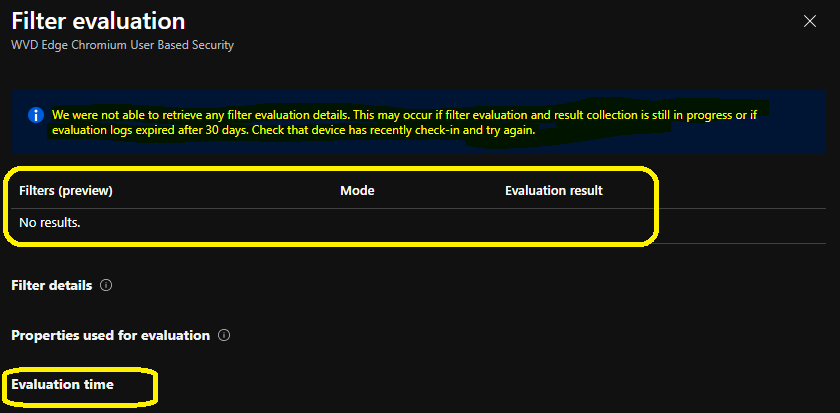
You might see some of the filter evaluation reports as blank. This could be because of several issues. Microsoft explained this in the Endpoint Manager (Intune) portal itself.
We were not able to retrieve any filter evaluation details. This may occur if filter evaluation and result collection are still in progress or evaluation logs expire after 30 days. Check that the device checked in recently and try again.
| Filters |
|---|
| No Results |
Resources
Need Further Assistance or Have Technical Questions?
Join the LinkedIn Page and Telegram group to get the latest step-by-step guides and news updates. Join our Meetup Page to participate in User group meetings. Also, join the WhatsApp Community to get the latest news on Microsoft Technologies. We are there on Reddit as well.
Author
Anoop C Nair has been Microsoft MVP for 10 consecutive years from 2015 onwards. He is a Workplace Solution Architect with more than 22+ years of experience in Workplace technologies. He is a Blogger, Speaker, and Local User Group Community leader. His primary focus is on Device Management technologies like SCCM and Intune. He writes about technologies like Intune, SCCM, Windows, Cloud PC, Windows, Entra, Microsoft Security, Career, etc.


Discussion