






Intune Microsoft Store Repository First Look of Windows Package Manager Integration
Microsoft released the first look of Intune Microsoft Store Repository. This is going to long-awaited Windows Package Manager (WPM) Integration with Intune (aka MEM). With Windows 11 22H2 announcement, Microsoft released a glimpse of WPM integration with Intune.
Microsoft communicated last year that the Windows Package Manager (WPM) would be tightly integrated with store apps via Intune MEM Admin center portal. This integration helps enterprise admins to install, update, and manage apps easily.
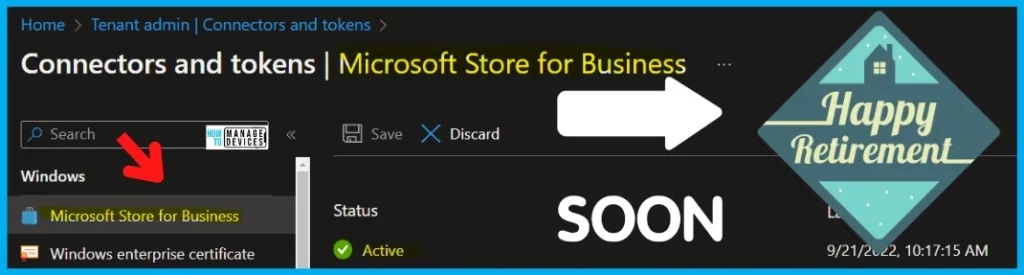
The Windows Package Manager integration announcement was made during the retirement of the Microsoft Store for Business and Education announcement. Microsoft Store for Business retirement was planned for Q1 2023. But Microsoft postponed the date of decommissioning to an undefined date.
Microsoft Store Repository is the new name for Windows Package Manager Repository(?). In a recent blog post, Microsoft mentioned that they are working hard to integrate the Microsoft Store app catalog with Intune.

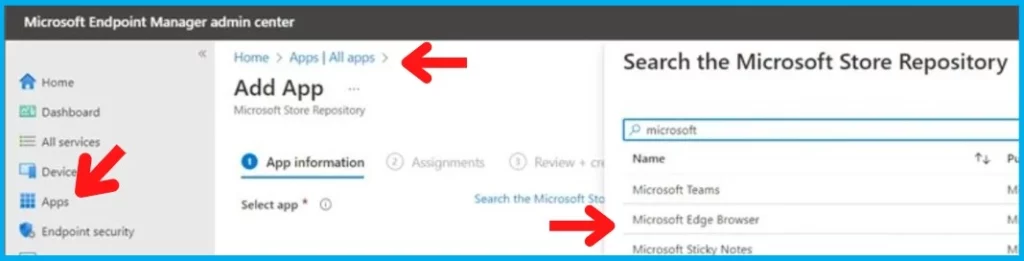
New Microsoft Store App Catalog – Microsoft Store Repository
Microsoft used Microsoft Store App Catalog in one of the blog posts, and in the screenshot, they showed the new Microsoft Store Repository integration with Intune MEM Admin Center portal. We think both points to tight integration with Windows Package Manager Repository.
Windows Package Manager is the new app repository for Windows apps. The new Microsoft Store Repository integration will replace the current Microsoft Store for Business integration with Intune. The following Fig .2 screenshot gives you an early look at the new Microsoft Store Repository integration with Intune (aka MEM)
- MEM | Intune Integration with WPM Repository -> First Look?
- Windows Package Manager = Microsoft Store Repository (?)
- MSfB retirement is on edge!
- What is Microsoft’s Unified Endpoint Management (UEM)
- Windows Terminal Default Command Line in Windows 11
Expected Features with new Microsoft Store Repository Integration with Intune
Let’s check the expected features with the new Microsoft App Store repository integration with Intune. As per the latest Microsoft blog post, the new integrated solution with Windows Package Manager gives more:
- Consumer-like experience for end-users
- All the IT Control
MS mentioned this: “This solution will offer a consumer-like experience for employees with all the IT control you want integrated into Intune, giving you an improved solution over what was available in the Microsoft Store for Business.”
The blog post also discusses richer IT management experience around app deployment, update controls, and the ability to assign or uninstall apps to users or devices easily. So the following are the main features we look forward to with Microsoft Store Repository Integration with Intune.
| Better Integration Experience | Better App Deployment | Better Update Controls | Easy Install | Easy Uninstall |
|---|---|---|---|---|
| 1. MSfB integration experience with Intune was not first class. | 1. MSfB -You must sync each app manually to make it available in Intune. | 1. MSfB – There is no native update control for store apps. | 1. MSfB – Standard install options | 1. MSfB – Standard uninstall options. |
| 2. New Microsoft Store Repository – Better experience in integration. | 2. New Microsoft Store Repository – New apps will automatically be available. | 2. New Microsoft Store Repository – Better control over Store app update deployments from Intune. | 2. New Microsoft Store Repository – Custom Install options including Offline/Online versions of apps. | 2. New Microsoft Store Repository – Custom uninstall options to manage complex scenarios. |

- Windows 11 Factory Reset to Fix Performance Issues
- Intune Feature Update Deployment Policy for Windows 11 22H2 Upgrade
Author
Anoop C Nair is Microsoft MVP! He is a Device Management Admin with more than 20 years of experience (calculation done in 2021) in IT. He is Blogger, Speaker, and Local User Group HTMD Community leader. His main focus is on Device Management technologies like SCCM 2012, Current Branch, and Intune. He writes about ConfigMgr, Windows 11, Windows 10, Azure AD, Microsoft Intune, Windows 365, AVD, etc.


At the rate they’re going, the store is going to be retired before this gets implemented into the Intune UI.
Great article. Can you please indicate if a Win32 content prep’d (.intune file type) regular desktop application be made available in the new store.
StaffYes I think … this is what Joy and I explained in the video – https://youtu.be/5s4DrIeq0a0
Or are you asking something different?
In Winget-CLI you can use by default 2 repos: msstore and winget. Winget repo is the bigger repo, while msstore is very thin (especially on the developer side of tools).
In Intune you can use msstore (called “Microsoft Store app (new)”), but I don’t see any way to search packages from winget repo.
Do you know of any way to use the winget repo from Intune?