





Intune Now Supports visionOS and tvOS with Easier Device Enrollment
Key Takeaways
- visionOS and tvOS are now supported in Intune Plan 2
- Userless enrollment for shared and unattended devices
- Better for large-scale deployments
- Remote device management actions available
- Enrollment-time device grouping
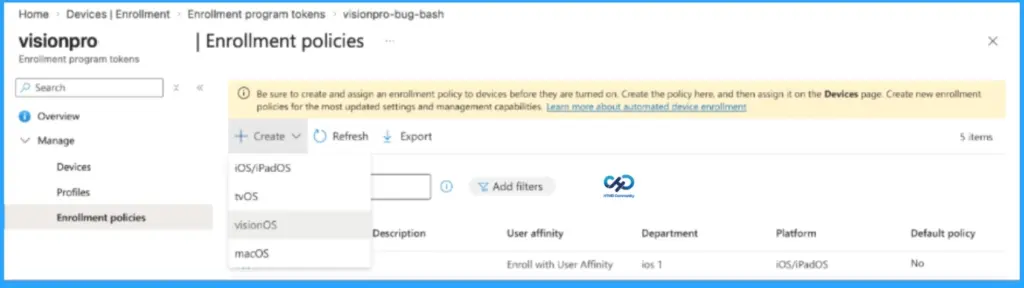
Microsoft Intune has expanded its support to include visionOS and tvOS devices under Intune Plan 2 using Automated Device Enrollment (ADE). The organisations can now set up devices like Apple TVs and Vision Pro headsets automatically without needing a user to sign in.
Table of Content
Intune Now Supports visionOS and tvOS with Easier Device Enrollment
This feature is especially useful for shared or unattended devices used in places like meeting rooms, hospitals, retail stores, or training environments. It is also being extended to government cloud environments and will be included for Microsoft 365 E3 and E5 users from July 1.
The key benefit is userless enrollment, which allows IT admins to deploy and manage devices without linking them to a specific user. Devices can be pre-configured and ready to use right out of the box, saving time and effort. This makes it much easier to handle large-scale deployments where devices are shared by multiple people or used for a specific purpose rather than assigned to individuals.
- Create Intune App Protection Policies for iOS iPadOS
- How to Install Apple iTunes on Windows Machines using Intune Application Model
Manage and Control visionOS and tvOS Devices with Flexible Admin Actions
After enrollment, IT admins can easily manage visionOS and tvOS devices using Microsoft Intune. They can remotely delete, retire, restart, rename, or sync devices, either one by one or in bulk. Admins can also apply settings using custom configuration files and control whether these devices are allowed to enroll in the organization, helping improve security and management.

| Feature | Details |
|---|---|
| Enrollment-time grouping | Saves time by avoiding manual grouping later |
| Automatic policy assignment | Devices get required settings right away |
| Faster device readiness | Reduces delay in making devices ready for users |
| Less manual effort | Simplifies large-scale device management |
| Better consistency | Ensures standard configuration across devices |
Need Further Assistance or Have Technical Questions?
Join the LinkedIn Page and Telegram group to get the latest step-by-step guides and news updates. Join our Meetup Page to participate in User group meetings. Also, join the WhatsApp Community and the Whatsapp channel to get the latest news on Microsoft Technologies. We are there on Reddit as well.
Resource
What’s new in Microsoft Intune – April
Author
Anoop C Nair is a Workplace Technology solution architect with 25+ years of experience. Microsoft Certified Trainer. Microsoft MVP from 2015 onwards for consecutive 11+ years! He is a blogger, Speaker, and Founder of HTMD Community and HTMD Conference. His main focus is on Device Management technologies like Intune, Windows, and Cloud PC. He writes about technologies like Intune, SCCM, Windows, Cloud PC, Entra, and Microsoft Security.


Discussion