






Let’s discuss the Intune Patch Compliance Reports in Detail. These reports provide detailed information about how well your system keeps up with updates, including which updates are installed and which might be missing.
Intune Patch Compliance Reports is the first step in managing your system’s updates. These reports give you many details about what’s happening with your updates. It is a helpful guide that shows you where things are working well and where there might be issues.
Configuring Update Compliance patch management reports through Intune and Log Analytics is a valuable process. The Windows team offers this service, which utilizes Azure to provide comprehensive patch compliance reports for Intune-managed devices.
This post provides all the details about Intune Patch Compliance Reports. Update reporting is essential for managing patch compliance. It offers comprehensive information to monitor updates and identify issues.

- How Intune Device Reported Values Transform Reports And Troubleshooting Made Easier
- New Features in Intune 2401 January Update
- Troubleshoot Patching Issues with Intune Pivot KQL Queries
- Integrate Power BI with Intune and Create Reports using Power BI
What is the Significance of Update Reporting in Managing Patch Compliance?
Update reporting is essential for managing the status of your Windows updates. It helps you to identify and resolve issues to ensure patch compliance.
Intune Patch Compliance Reports in Details
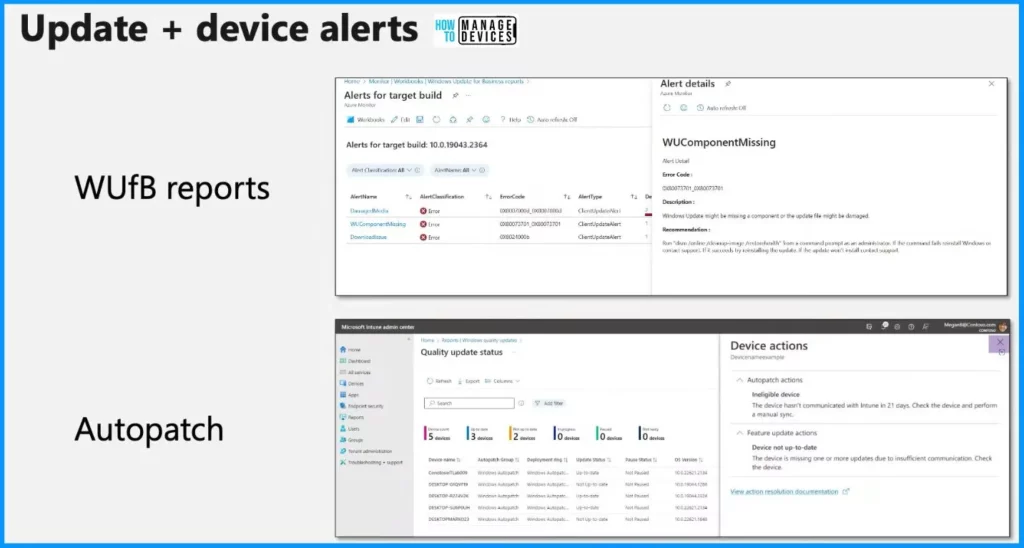
If you use Windows Update for Business reports or an Autopatch customer using reporting in Intune, alerts pop up when updates are faulty. These alerts are divided into two types: Update alerts and Device alerts.
| 2 Types of Alerts |
|---|
| Update Alerts |
| Device Alerts |
Update Alerts
Update alerts are activated during the update process when issues occur. For instance, if the client encounters problems downloading the update package due to a network error, an error code and a detailed description of the problem are generated. Additionally, the system recommends the action that should be taken to address the issue.
Device Alerts
Device alerts occur when a device has a specific issue, such as missing multiple security updates. When a device alert is triggered, recommendations are provided to assist in resolving the particular issue related to the device. These recommendations serve as a practical guide for users to troubleshoot and fix the problem independently.
Warning Alerts
Warning alerts help you give users advance notice about potential issues. Reports visually represent the alerts, allowing you to see clearly which problems require attention.
Log Analytics
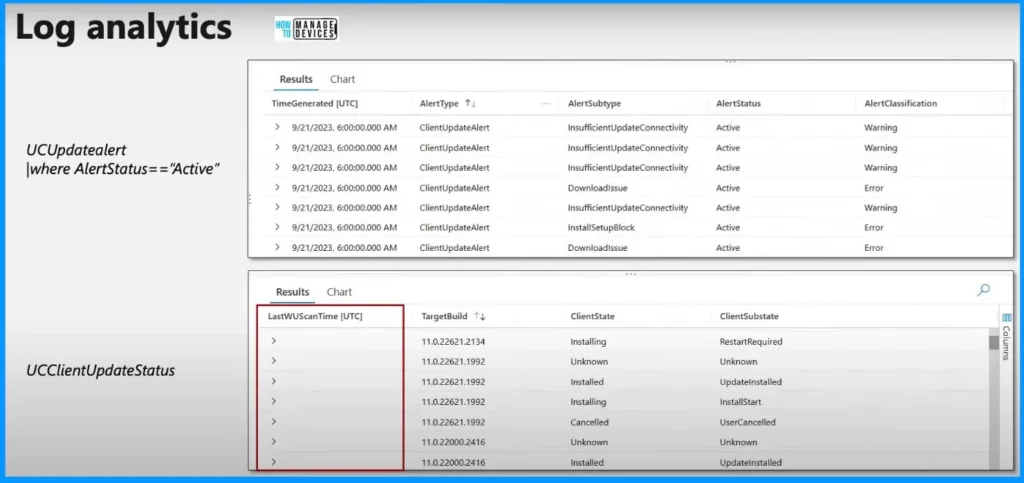
Log analytics helps you query alerts in your environment. You can use the update alert table to get the top active alerts and see how long they have been active. You can export a list of all the devices functioning well and then use PowerShell to carry out specific actions.
- Sometimes, a device may face difficulties in updating because it cannot scan the Windows Update Service. That is why there is a field in the data schema called LastWUScanTime. It indicates the last time the client checked for updates.
- An empty field could mean that the device has not scanned for updates in over 20 days or is not online, indicating that the client cannot connect.
- There is also a field called the ClientState, which helps you to show which device is stuck in the update process.
We are on WhatsApp now. To get the latest step-by-step guides, news, and updates, Join our Channel. Click here. HTMD WhatsApp.
Author
About the Author: Vidya is a computer enthusiast. She is here to share quick tips and tricks with Windows 11 or Windows 10 users. She loves writing about Windows 11 and related technologies. She is also keen to find solutions and write about day-to-day tech problems.


Discussion