Skip to content
Intune Advanced Peer to Peer Content Delivery Solution | Adaptiva OneSite

Intune Advanced Peer to Peer Content Delivery Solution | Adaptiva OneSite

Written By Vidya M A
Last Updated June 17, 2024
Posted In Intune
SHARE

Today, Adaptiva announced a new solution to help organizations move to Modern Device Management. The Adaptiva OneSite Intune Edition provides Advanced Peer to Peer content delivery Solution enterprise network connected to Windows 10 devices. Let’s see more details about the solution.

Have you been trying to work with Delivery Optimization or Connected Cache Servers to deliver the content downloaded from the internet? You know the challenges with those out-of-the-box solutions at this point in time.

Adaptiva OneSite Intune Edition helps an organization utilize all the benefits of Adaptiva OneSite while managing its Windows 10 computers with Intune and Azure AD. Adaptiva OneSite Intune Edition helps to quickly deliver the Win32 content using Adaptiva client and Intune Management Extension components.

You would then be able to deliver patches, updates, and operating systems across a globally distributed enterprise network without hacking around.

Patch My PC

Architecture

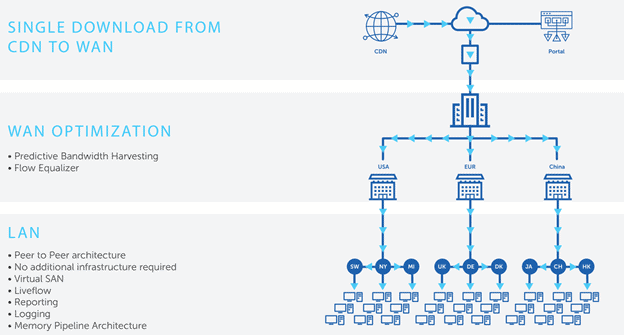
The high-level solution architecture diagram is given below for the Adaptiva OneSite Intune Edition. More details are available in Adaptiva OneSite Intune Edition documentation.

Adaptiva OneSite can be configured to ensure that there is only one download from the cloud to a client in the central office. OneSite can also be configured to allow specific offices to download once from the internet and then share the content locally using Peer to Peer technologies. More details in Adaptive documentation.

  • Azure Storage/CDN + Intune Services
  • Adaptiva OneSite server
  • Peer to Peer clients
Intune Advanced Peer to Peer Content Delivery Solution | Adaptiva OneSite - Fig.1
Intune Advanced Peer to Peer Content Delivery Solution | Adaptiva OneSite – Fig.1

Preparing to Use OneSite Intune Edition

This step prepares for the Adaptiva content library in Azure. To configure OneSite Intune Edition, you need Azure Global admin and Intune admin access.

You can deploy any of the following types of apps as Intune P2P apps and perform peer-to-peer distribution. The Adaptiva OneSite Intune Edition documentation provides more details.

  • Any EXE installer
  • Any MSI installer
  • Any Script-based installer

End-User Experience – Peer to Peer Content Delivery Solution

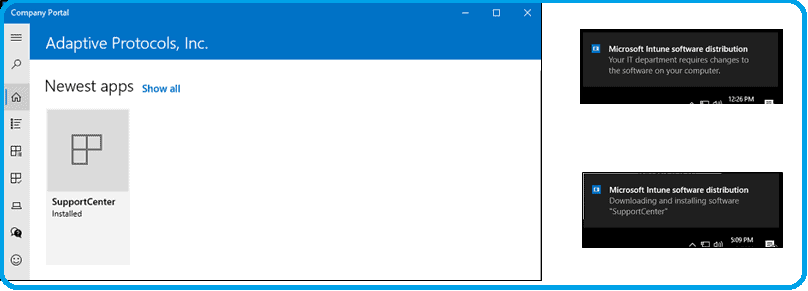
Let’s see the end-user experience with the Adaptiva OneSite Intune Edition advanced peer-to-peer content delivery solution. So, the end-user won’t notice any changes at all.
Advanced Peer to Peer content delivery Solution - Intune
Advanced Peer to Peer content delivery Solution – Intune

Resources

We are on WhatsApp. To get the latest step-by-step guides and news updates, Join our Channel. Click here –HTMD WhatsApp.

Author

Admin

Written by

About Author - Vidya is a computer enthusiast. She is here to share quick tips and tricks with Windows 11 or Windows 10 users. She is also keen to find solutions to day-to-day tech problems and write about them.

Discussion · 1 comment

  1. We have PCs on intranet allowed to get patches directly from Microsoft instead from a DP. The type of files that it’s get download during the patch install is different compare to when download the patch over the DP. Does adaptiva one Site also support this for peer to peer?

Join the discussion

Your email address will not be published. Required fields are marked *

Related guides

Intune

Simplify Windows Devices to Run Only the Required Applications using Intune

Key Takeaways Hey, let’s learn about Simplify Windows Devices to Run Only the Required Applications using Intune. This policy lets administrators replace the default windows shell with a custom or lightweight shell. it improves performance by using system resources and is useful for devices that run a dedicated application. If the policy is disabled or […]

AC Anoop C Nair 8 min read
Intune

Enhance macOS Compliance with Custom Security and Compliance Checks to Improve Device Security using Microsoft Intune

Key Takeaways In this post we are discussing about Enhance macOS Compliance with Custom Security and Compliance Checks to Improve Device Security using Microsoft Intune. Microsoft has announced the general availability of Custom Compliance Settings for macOS in Microsoft Intune. The feature helps organizations strengthen security controls while supporting many types of macOS management scenarios. […]

AC Anoop C Nair 4 min read
Intune

Manage Samsung Galaxy Firmware Versions to Improve Security and Compliance using Microsoft Intune

Key Takeaways In this post we are discussing Manage Samsung Galaxy Firmware Versions to Improve Security and Compliance using Microsoft Intune. Microsoft Intune has received a new update that expands firmware management capabilities for Samsung Galaxy devices through Firmware Versionsintegration. This enhancement gives IT administrators more control over firmware and operating system updates, helping them […]

AC Anoop C Nair 4 min read
Intune

MS Intune Adds Windows Registry Data Collection to Device Inventory for Single Values All Key Values and Subkeys

Key Takeaways Microsoft Intune 2607 introduces Windows Registry Data collection in Device Inventory, allowing IT admins to verify actual device configurations without relying on custom discovery or remediation scripts. Using the Properties Catalog, admins can collect registry information through Single Value, All Values Under a Key (Non-Recursive), or Same Value Across Subkeys. MS Intune Adds […]

AC Anoop C Nair 5 min read