






Intune Proactive Remediation Scripts Vs PowerShell Scripts
Let’s compare the features of Intune proactive remediation scripts and PowerShell scripts. The proactive remediation script helps detect and fix common support issues on a device, while the PowerShell scripts help complete a specific task.
Microsoft program manager II Avi Prasad mentioned the difference between the features of Intune proactive remediation scripts and PowerShell scripts on Twitter. This topic would be useful for many IT admins in modern device management.
Let’s check whether it’s a good idea to combine PowerShell scripts and Proactive remediations to improve the admin experience in the Intune (a.k.a. MEM) portal.
Avi is trying to get more feedback from the community on this topic, so I think it’s a good idea to combine both.

Table of Contents
Video Proactive Remediation Script Package
Let’s discuss Intune Proactive Remediation Script Package and PowerShell Script in this video. Advanced workflow to detect and remediate common issues with the PowerShell script package. Proactive remediations are part of Endpoint analytics.
- Deploy Proactive Remediation Script using Intune | Easy Method
- Best Guide to Create a Local User with Intune Remediation Script
- Manage Intune Tasks with PowerShell Part 1
Intune Proactive Remediation Script
Let’s check what are the important features of the remediation script workflow in Intune. Learn how to start deploying Intune remediation scripts from the following post. Deploy Proactive Remediation Script Using Intune | Easy Method | Microsoft Endpoint Manager.
The script content preview option is available for detection and remediation scripts. The remediation script has logic similar to Configuration Items and Baselines in ConfigMgr.
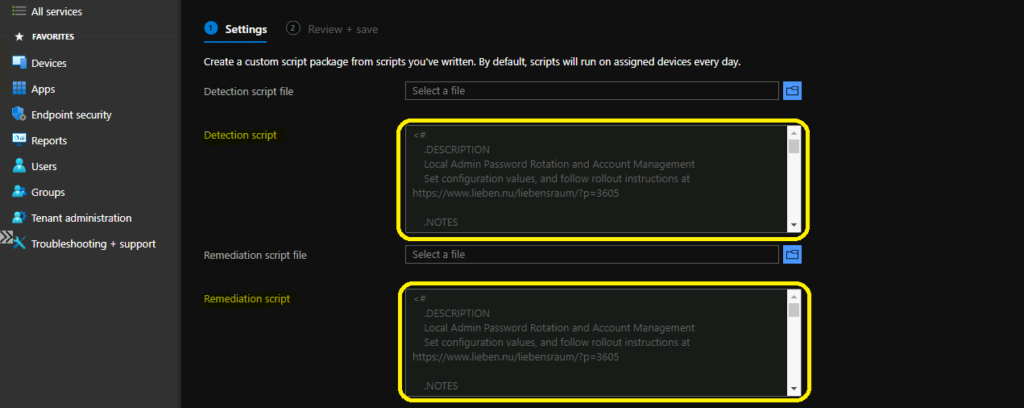
The main difference between the PowerShell and remediation scripts is the scheduling option. I think it would be constructive if Microsoft could include the scheduling options for PowerShell. The following are the scheduling frequency options:
- Once (no-rerun – Similar to PowerShell script).
- Hourly – Rerun the script on customizable hourly intervals.
- Daily – Rerun the script on customizable daily intervals.
NOTE! – Create a schedule for this script to run on devices in the group.
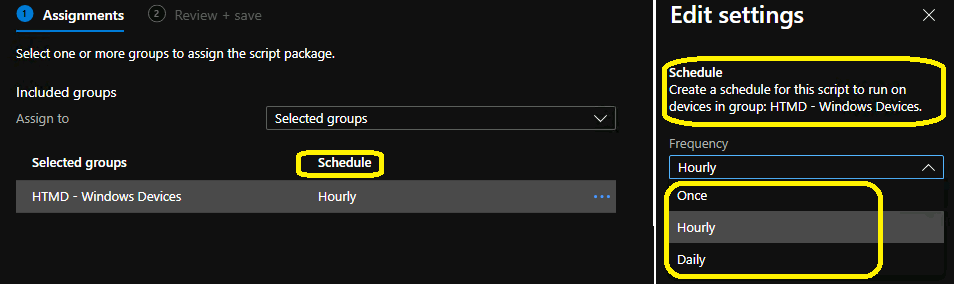
Intune will attempt to run the remediation script at the scheduled time, similar to SCCM. If Intune can’t reach the device, it will try to rerun the script when the device comes back online.
- Time -> 12:00:00 AM.
- Use UTC -> The default value is disabled.

PowerShell Script Options
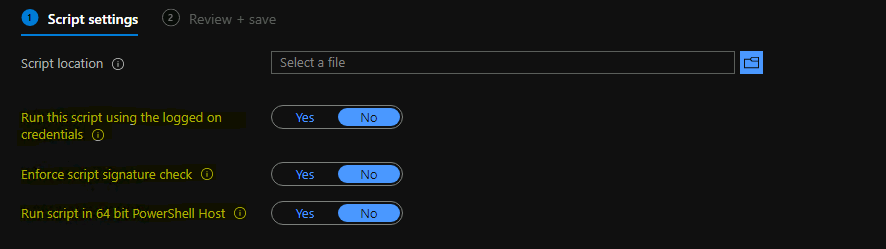
The Intune PowerShell script options are minimal. You can find more details about the Best Way To Deploy Powershell Script Using Intune | Endpoint Manager. The following are three main features of the PowerShell script.
- Run this script using the logged-on credentials.
- Enforce script signature check.
- Run the script in 64-bit PowerShell Host.
Proactive Remediation Scripts Vs PowerShell Scripts
Avi Prasad kindly shared a comparison sheet between proactive remediations vs. Intune PowerShell scripts. Microsoft did some analysis and realized that Proactive Remediations is a superset of the PowerShell scripts feature.
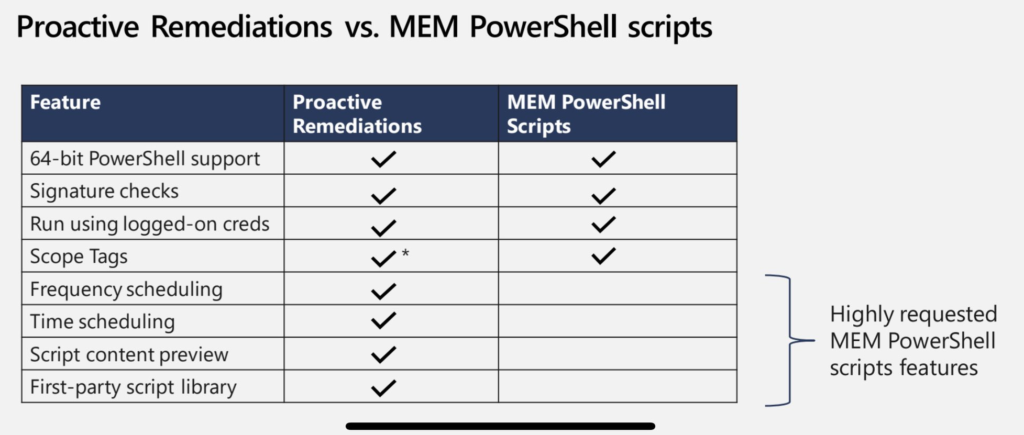
NOTE: Proactive remediation is included only with Microsoft 365 Business Premium licenses. The following are the licenses that include remediation script Enterprise Mobility + Security E3 or higher and Microsoft 365 Enterprise E3 or higher.
| Feature | Proactive Remediations | MEM PowerShell Scripts |
|---|---|---|
| 64-bit PowerShell support | Yes | Yes |
| Signature checks | Yes | Yes |
| Run using logged-on creds | Yes | Yes |
| Scope Tags | Yes? | Yes |
| Frequency Scheduling | Yes | No |
| Time Scheduling | Yes | No |
| Script content preview | Yes | No |
Proactive Remediation Licensing Requirements
As per Microsoft documentation, the Proactive remediation script deployment requires the licensing for Endpoint analytics and also requires users of the devices to have one of the following licenses:
- Windows 10/11 Enterprise E3 or E5 (included in Microsoft 365 F3, E3, or E5)
- Windows 10/11 Education A3 or A5 (included in Microsoft 365 A3 or A5)
- Windows 10/11 Virtual Desktop Access (VDA) per user
Resources
- Intune Logs in Windows PCs Location Details How to Collect Diagnostic Reports
- List of Intune Settings Catalog Policies
We are on WhatsApp. To get the latest step-by-step guides and news updates, Join our Channel. Click here –HTMD WhatsApp.
Author
Anoop C Nair has been Microsoft MVP for 10 consecutive years from 2015 onwards. He is a Workplace Solution Architect with more than 22+ years of experience in Workplace technologies. He is a Blogger, Speaker, and Local User Group Community leader. His primary focus is on Device Management technologies like SCCM and Intune. He writes about technologies like Intune, SCCM, Windows, Cloud PC, Windows, Entra, Microsoft Security, Career, etc.


Hey Anoop,
Thanks for starting the conversation! I think another major difference is the return of status and data, and the ability to report on that.
Thoughts?
-Steve
StaffHey Steve – I know we can use proactive remediation to get the status data and create reports based on that data. I think that is not the native functionality. isn’t it? This functionality is in the script that the community produced ..isn’t it?
Hi Anoop,
To me the differences are
1. The scheduled re-running
2. Having the 2 (detect and remediate) scripts effectively wrapped in a giant If-Then-Else with native reporting and output back to the intune console in the middle.
In that respect strait Intune powershell scripts are like GPO’s… send them out there and hope for the best or roll your own return data and report on it. Where Remediation tells you “how many already had it, how many remediated and failed, how many still pending, etc”. Many times these are all the first questions from management after they tell you to change something.
What would be great is for an expert in our community to write on the usage of write-host, write-output, write-warning, write-error, and various exit codes in these scripts to control the data returned back into the report columns! 😀 That data is hard to find.
Thanks again!
-Steve
Hi!
You write that proactive remediations is included in Microsoft 365 Business Premium, but I can not find any official information to confirm it. Do you have any references?
Thanks!
Dan
Came here looking for the same info as Dan – Do we get this with Microsoft 365 Business Premium?
StaffI’ve not extensively looked for the same information. I got the reference from Microsoft program manager II Avi Prasad via Twitter thread mentioned in the post.
Is there any way to setup disk cleanup/delete old user profile using Proactive Remediation for Windows 10 devices?
hi anoop. if we are using proactive remediation script to collect custom hardware inventory and the script has hardcoded customerId and workspace ID. what are the chances if the device managed by intune, should it fall in wrong hands, the actor would be able to delete the data stored in loganalytics, since he would have customer and workspace ID handy.
If I want a script to run everyday at a scheduled time. Can I just put the script say its just a simple reg add script in the detection script area and it will rerun that reg add script everyday if I dont want to create an actual detection and remediation script?
StaffOr a schedule task but this won’t be under Intune control.
Hi Anoop. I’ve implemented some PR scripts following your pages, but I have a really strange issue and wondered if you could shed some light on it, as it relates to behavioral difference between a regular script and a PR.
When I run this script as a regular user it returns the UPN (which is what I am looking for to pass to another script)
$USERSID = Get-WmiObject -Class win32_computersystem | Select-Object -ExpandProperty Username | ForEach-Object { ([System.Security.Principal.NTAccount]$_).Translate([System.Security.Principal.SecurityIdentifier]).Value }
$regEntryPath=”HKLM:\SOFTWARE\Microsoft\IdentityStore\Cache\” + $USERSID +”\IdentityCache\” + $USERSID
$UPN = (Get-ItemProperty -Path $regEntryPath).Username
write-output $UPN
When I run it as a Proactive remediation (as logged on user) I get an arror saying that the path cannot be found.
Really curious as to whats going in there and why there is a difference ?
I really do not understand why few more good features requires specific licenses 🙂
I see in this article it says: Proactive remediation is included only with Microsoft 365 Business Premium licenses.
Is this new I was always under the impression that you need a M365 E3 or higher to use this functionality.
Do you have a Source where it says you can use it with Microsoft 365 Business Premium?
Regarding licensing, I think it requires the organization to enable Windows license verification. This is unfortunately an E3 or higher feature.
https://learn.microsoft.com/en-us/mem/intune/protect/data-enable-windows-data#windows-license-verification
I think the issue is that Business Premium does support the feature in Intune, but the feature also requires Windows Enterprise on the desktop which is not included in Business Premium.