






Intune Report for AAD Joined Vs Hybrid AAD Joined Devices using KQL Query
Intune Report for AAD Joined Vs Hybrid AAD Joined Devices using KQL Query is the topic for today. You need to enable Intune diagnostics settings to get the details of Azure AD joined Vs Hybrid AAD joined devices.
You can use the KQL query method to get a quick overview of Azure AD joined devices Vs. Hybrid Azure Active Directory joined devices. It’s important to understand how many Intune managed devices are AAD Joined and how many of them are Hybrid Azure AD joined.
Kusto Query Language (KQL) is the query language that retrieves information from the Log Analytics workspace. I have shared some Intune KQL queries to find the details of Software Update (patching).
The KQL queries are also useful to troubleshoot Intune issues such as Enrollment Failure, Autopilot Failures, etc. You can use Update Compliance KQL Queries to Troubleshoot Intune WUfB Patch Deployment.

AAD Joined Vs Hybrid AAD Joined Devices
Windows 10 and Windows 11 support many types of join methods for Intune management. Azure AD Join (AADJ) and Hybrid Azure AD Join are the most commonly used methods in enterprise environments.
Windows 11/10 Azure AD Join manual process is explained. I think AAD joined devices are the best method to manage devices with Azure Active Directory. This method has dependencies on on-prem Active Directory (AD) and legacy authentication methods.
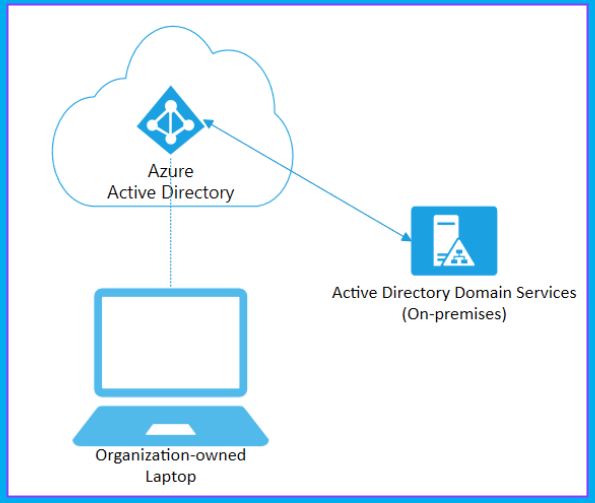
Hybrid Azure AD join is another scenario where Windows 10 or 11 device records will be available in Azure AD and On-Prem Active Directory. This means you can manage devices from both places.
Confirm Intune Diagnostics Settings Data availability in Log Analytics
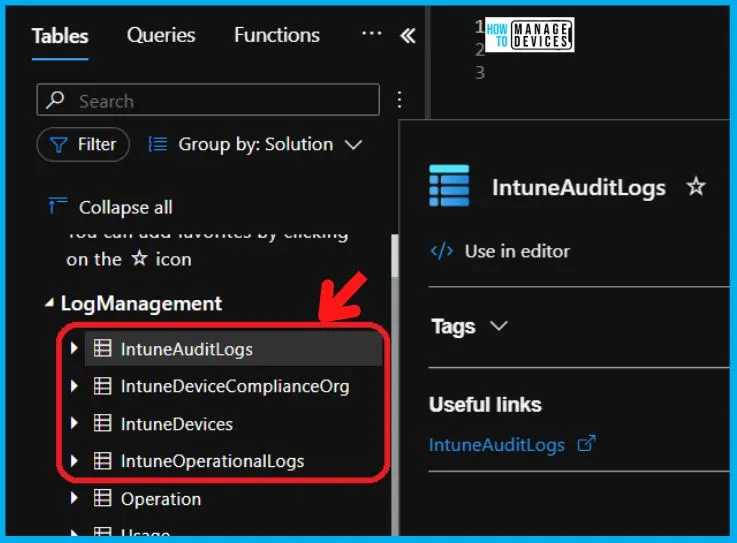
Let’s try to confirm Intune Diagnostics Settings Data availability in Log Analytics. You can log in to the Azure portal, navigate to Log Analytics Workspace, and check for Intune Tables, as shown below.
- IntuneAuditLogs
- IntuneDeviceComplianceOrg
- IntuneDevices
- IntuneOperationalLogs
If the above tables are not present or created in the Azure Log Analytics workspace, then you must ensure that all the points are mentioned in the Intune Diagnostics Setup.
- How to Get Application Version Details From Intune
- Windows Feature Update Device Readiness Intune Report
Intune Report for AAD Joined Vs Hybrid AAD Joined Devices using KQL Query
Let’s check Intune Report for AAD Joined Vs. Hybrid AAD Joined Devices using KQL Query. I can now check and find Join Type details of Devices using Intune Platform Logs using KQL queries. The table that you need to check to retrieve this from IntuneDevices.
First, you need to open the IntuneDiagnosticData workspace (or whatever name you have given to the Log Analytics Workspace). You can use the following steps to open the Log Analytics Workspace.
- Login to Portal.Azure.com -> Search “log analytics workspaces.”
- Open Log Analytics Workspaces Azure Service.
- Open the IntuneDiagnosticData workspace.
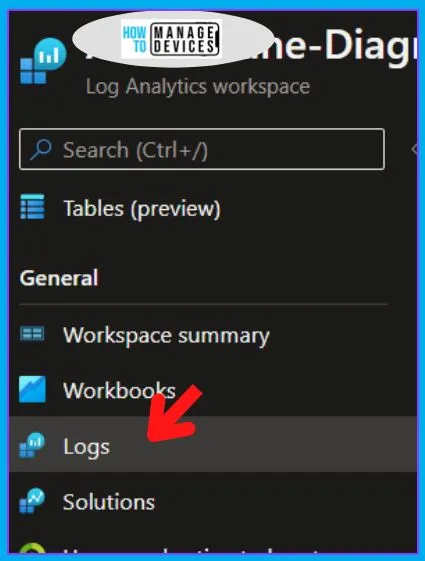
- Navigate to Logs Tab.
- Close the Queries pop blade.
- Check whether the Tables are listed there or not. If the tables are not created, you need to wait until they get populated.
NOTE! – There is a shortcut to open the IntuneDiagnosticData log analytics workspace directly from the MEM Admin portal. -> Navigate to Tenant Admin blade, then to Diagnostics Settings.
Total Number of Intune Managed Hybrid AAD Joined Devices
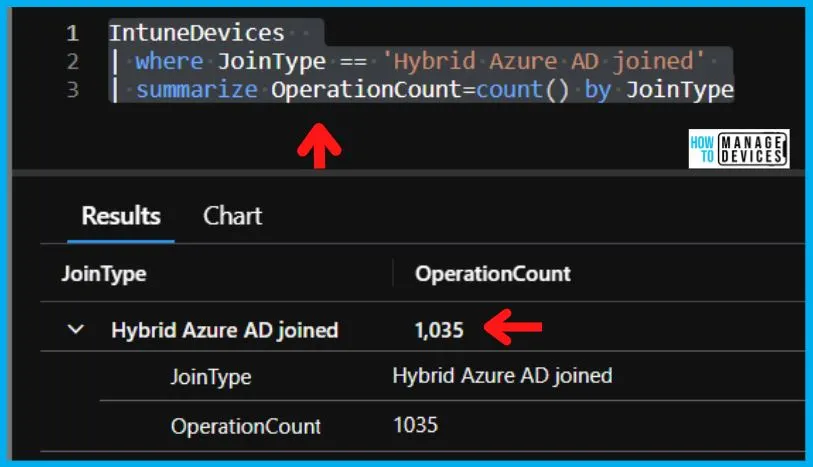
Let’s find the total number of Intune Managed Hybrid AAD Joined Devices. You can use the following KQL query to find these details.
IntuneDevices
| where JoinType == 'Hybrid Azure AD joined'
| summarize OperationCount=count() by JoinType
The following screenshot shows the total number of Hybrid Azure Joined devices managed by Intune.
Intune Managed Hybrid AAD Joined Device Names Users Details Report
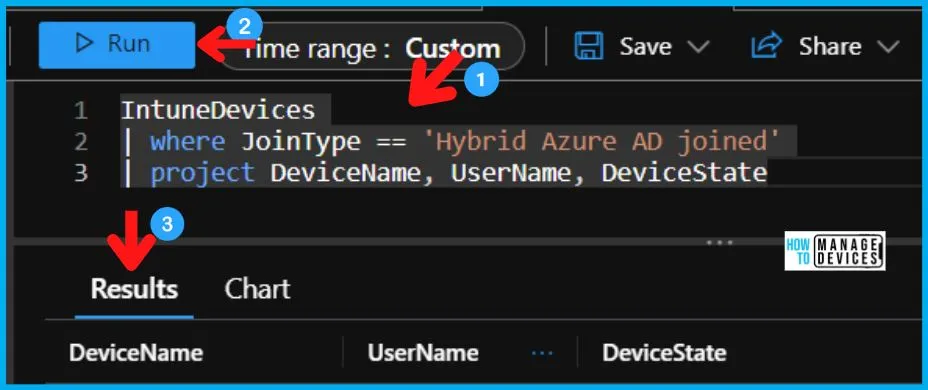
Let’s now find the details of Intune Managed Hybrid AAD Joined Devices Names and Users report. You can use the following KQL query to get this data from Log Analytics Workspace.
IntuneDevices
| where JoinType == 'Hybrid Azure AD joined'
| project DeviceName, UserName, DeviceState
As you can see in the screenshot, it gives all the details such as Device Name, User Name, and Device State for all Hybrid AAD joined Windows 10 or Windows 11 devices.
Total Number of Intune Managed Azure AD Joined Devices
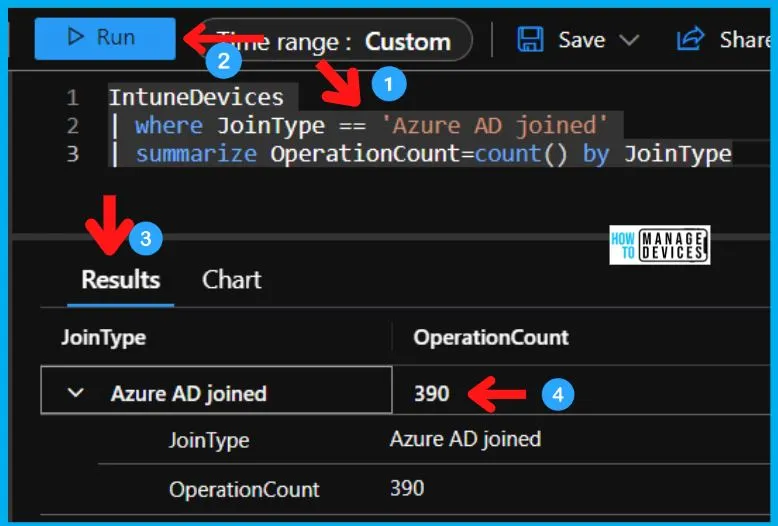
Let’s find the total number of Intune Managed AAD Joined Devices. You can use the following KQL query to find these details.
IntuneDevices
| where JoinType == 'Azure AD joined'
| summarize OperationCount=count() by JoinType
In the following screenshot, you can see the total number of Azure Joined devices managed by Intune.
Intune Managed Azure AD Joined Device Names Users Details Report
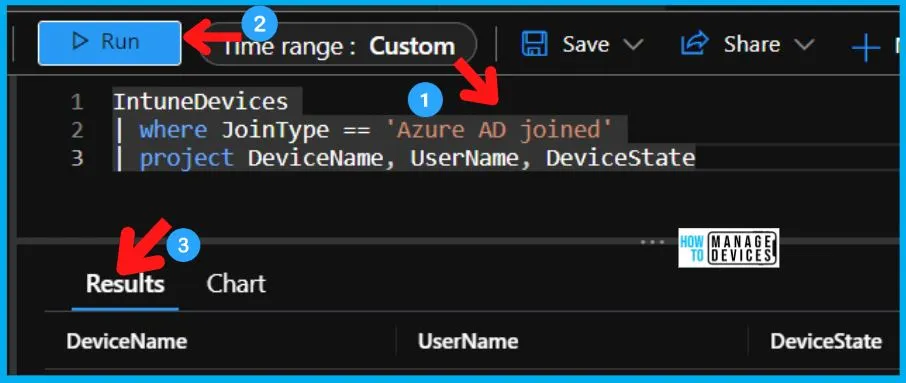
Let’s now find the details of Intune Managed AAD Joined Devices Names and Users report. You can use the following KQL query to get this data from Log Analytics Workspace.
IntuneDevices
| where JoinType == 'Azure AD joined'
| project DeviceName, UserName, DeviceState
As you can see in the screenshot, it gives all the details such as Device Name, User Name, and Device State for all AAD joined Windows 10 or Windows 11 devices.
MEM Admin Center Portal to Retrieve AAD Joined Vs. Hybrid Joined Details
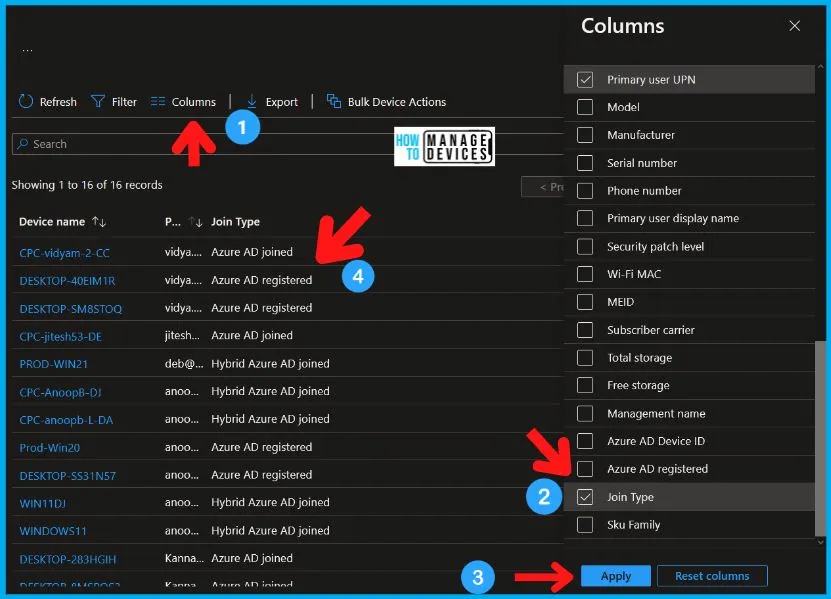
You can also use MEM Admin Center Portal to Retrieve AAD Joined Vs. Hybrid Joined Details. You need to add a column called Join Type to have these details available in MEM Admin Center (aka Intune) portal.
Author
Anoop is Microsoft MVP! He is a Device Management Admin with more than 21 years of experience (calculation done in 2022) in IT. He is Blogger, Speaker, and Local User Group HTMD Community leader. His main focus is on Device Management technologies like SCCM 2012, Current Branch, and Intune. He writes about ConfigMgr, Windows 11, Windows 10, Azure AD, Microsoft Intune, Windows 365, AVD, etc.


Discussion