






Intune Requests to Server are being Throttled Error | GET Request Issues
Let’s discuss about Intune requests to server are being throttled error. You normally get this error on the MEM Admin center portal while loading some of the blades such as devices, etc.
MEM portal uses Intune Graph API GET, Post, Patch, etc. commands in the background to perform Intune admin tasks or activities. You can check the Graph API actions from Microsoft Edge browser developer tools. More details are in the below section.
The Intune Graph Query is the API call used within Microsoft Graph explorer (web interface) to create, remove, change, etc., the information from Intune services. In this post, you will see how Graph API-related issues can cause outages for Intune services such as Requests to Server are being Throttled Error.
One of the examples of the real-world use of Microsoft Graph explorer is explained in the following blog post (Configuring Intune Bitlocker grace period). The grace period scenario described in the blog post can’t be configured through the MEM Admin Center portal.

Intune Requests to Server are being Throttled
If you get a Requests Throttled error on the MEM admin center (Intune) portal. You don’t have to panic because this is probably a Server issue. In 99% of the scenarios, you can’t do anything about this.
You normally get this error when you try to navigate to a node such as devices, apps, etc. I have seen a couple of users report this issue on Twitter.
Twitter users wookietv and Andrew McNaughton reported similar issues with Intune Graph GET requests. Intune Requests to Server are being throttled issue is being an error occurred while GET and Requests are throttled when trying to view devices.
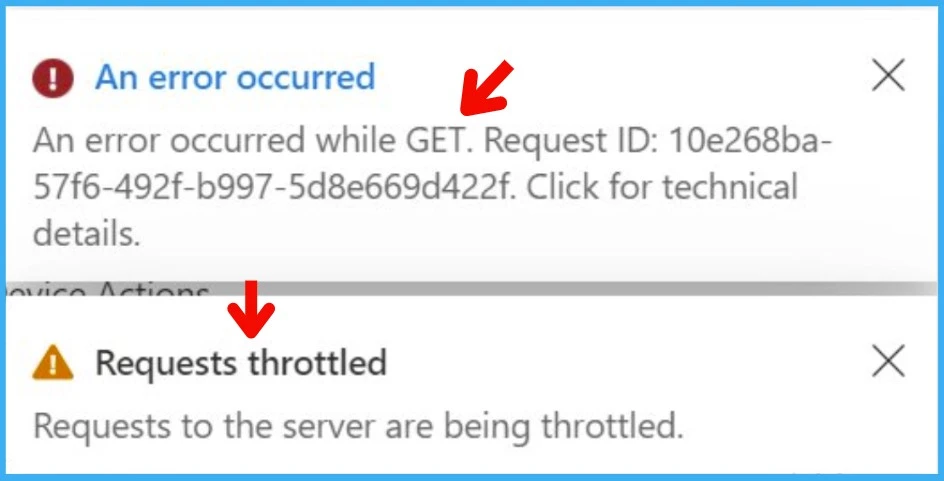
Impact of the Issue
The Intune requests to the server are being throttled error was not impacting all the tenants or all the Intune services around the globe. This was impacting only a few Intune tenants.
It’s important to understand how Microsoft communicates these types of issues with commercial customers. Microsoft won’t announce these types of issues to the public domain. But they use the MEM Admin portal Service health and message center.
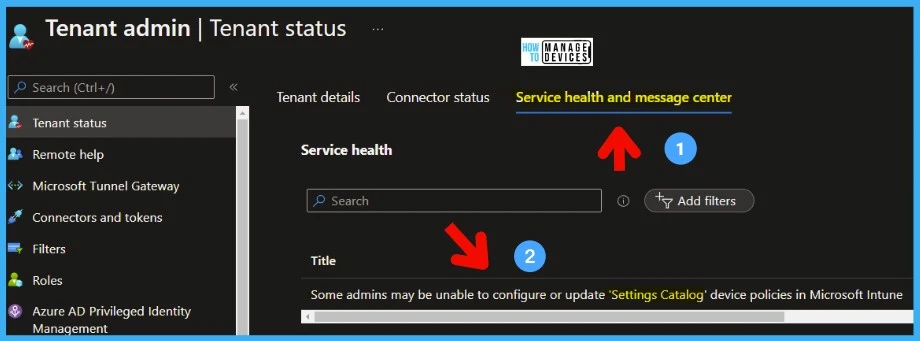
Troubleshooting Intune Service Side Issues
There is nothing much that Intune Admins can troubleshoot when you have access only to the MEM Admin center portal. However, Microsoft’s core cloud services provide some more granularity on the troubleshooting issues if you compare it to some other small SaaS vendors.
You can perform the basic troubleshooting steps to confirm whether this is an issue with your web browser such as (MS Edge, Google Chrome, Firefox, etc.). The following are some of the basic troubleshooting steps that you can try.
- You can open the browser in a private window (Inprivate Window for MS edge or Incognito Window for Chrome, etc.)
- Clear the Browser Cache and check whether that helps or not.
- For MS Edge, use this to clear the cache edge://settings/?search=Cache
- Check with different Intune Tenants in the same region and try to reproduce the issue.
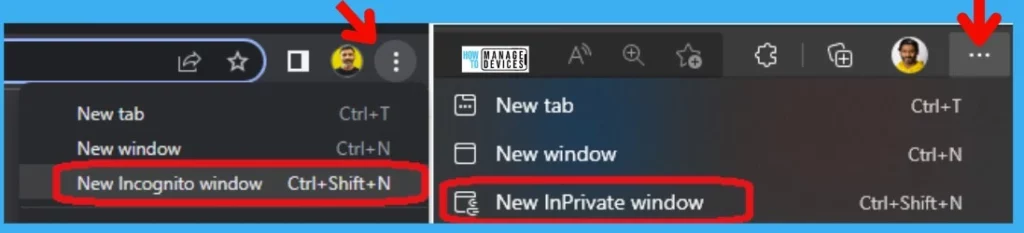
The next level of troubleshooting that you can perform for Intune service issues is using the developer tools in MS Edge (recommended browser). The developer tools in the browser help to understand whether the portal can establish a connection with Microsoft Graph and Intune Graph API services etc.
- Login to the Endpoint.Microsoft.com (MEM Admin Center) portal.
- Press F12 to open Developer Tools, or you can use the Settings -> More Tools -> Developer Tools option.
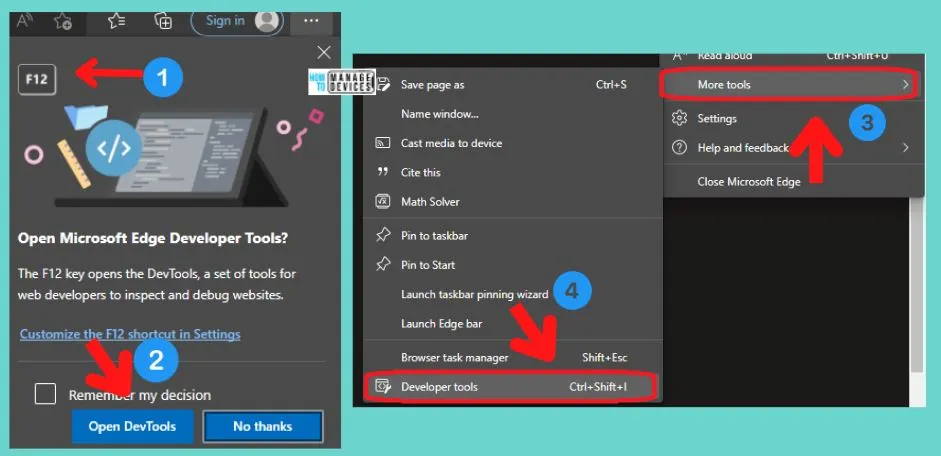
Navigate to the Devices node in the MEM Admin Center portal, and on the right side of the browser, make sure that the Developer Tools -> Network section is opened.
- Make sure you are on the Network tab of developer tools.
- Click on the CLEAR but remove all the existing network traffic details from the tool.
- Check the status code on the STATUS column and ensure that it is 200.
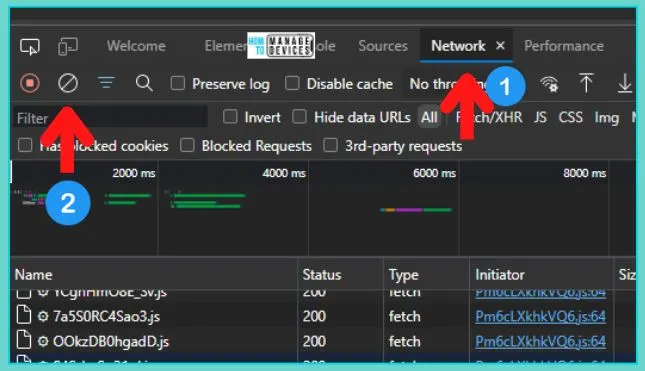
Click on the All Devices node to get the complex Intune Graph API query from developer tools -> Network tab. Follow the steps below to continue.
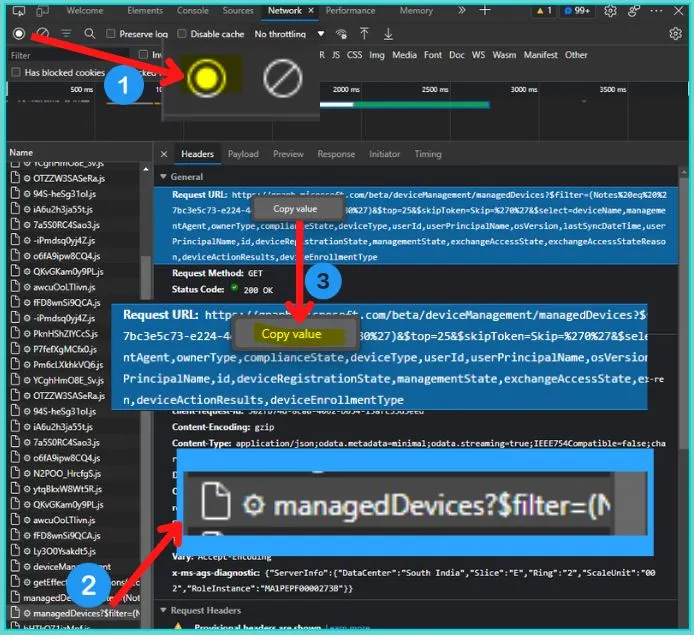
- Click on the STOP button once Devices start showing up in MEM Admin center All Devices node.
- Network traces related to the activity of fetching All Devices will be at the bottom of the network trace page.
- Click on the Entry with manageddevices.
- Look for the Code 200, OK.
The Intune Graph API query copied from the Request URL value is the query that the MEM admin portal used to fetch All Devices details from Intune services.
IMP! – If you see any errors while executing the Intune Graph API queries, this means there is a service level issue, and you can’t do anything apart from waiting for Microsoft to fix it.
Mitigated Issue with Intune Requests Throttled Error | Intune Incident IT408327
Microsoft mitigated Issues with Intune requests throttled errors from the server or service side. Microsoft shared that Intune Incident IT408327 has more details on the issues and the root cause of the issue.
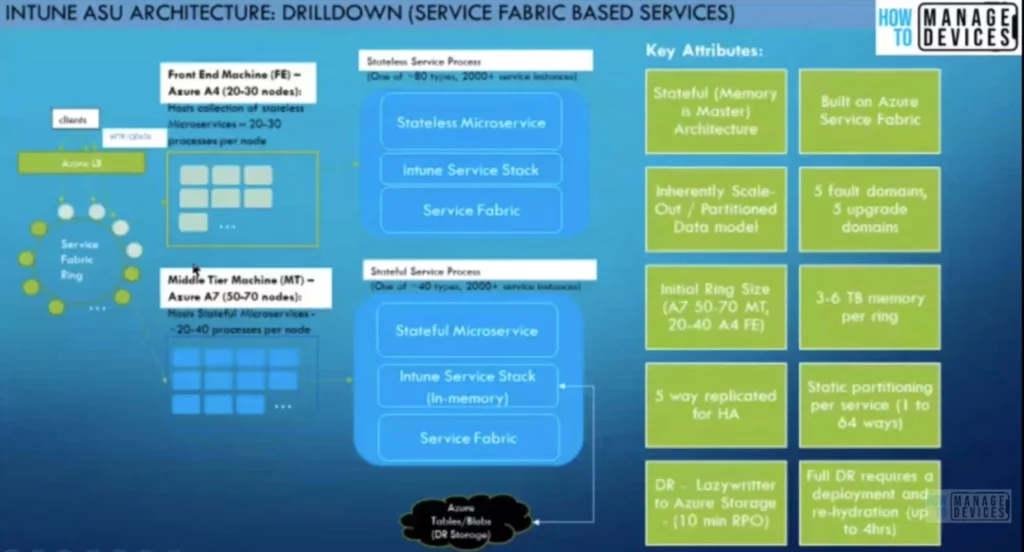
All the impacted tenants will have detailed information including remediation plans about the Intune Requests to Server are being Throttled Error and GET Request Issues. Intune service architecture is cloud native and very complex. You can get some details from the below article.
Resource -> (1) Intune’s Journey to a Highly Scalable Globally Distributed Cloud Service | LinkedIn and HTMD Intune Free Training videos.
Author
Anoop C Nair is Microsoft MVP! He is a Device Management Admin with more than 20 years of experience (calculation done in 2021) in IT. He is Blogger, Speaker, and Local User Group HTMD Community leader. His main focus is on Device Management technologies like SCCM 2012, Current Branch, and Intune. He writes about ConfigMgr, Windows 11, Windows 10, Azure AD, Microsoft Intune, Windows 365, AVD, etc.


Discussion