






Intune Right Click Tools for Application Manager and Copilot for Security Plugin
Hi, today we are discussing an exciting topic: Intune Right Click Tools for Application Manager and Copilot for Security Plugin. In a recent announcement, Recast Software introduced Right Click Tools to the Application Manager for Intune and Copilot for Security Plugin.
After the SCCM, Intune received the best improvement from Recast Software, Introducing Right-Click Tools to the Application Manager. This new enhancement brings the best Intune experience with the right-click tool. Also, Recast gives admins more power to deal with devices more effectively, so we can say that it will increase their overall productivity.
According to the reports, right-click tools now support millions of Endpoints. We can expect this after the integrations. Admins can use all the tools they know directly with the Intune interface. These integrations will create an extraordinary workflow experience.
Likewise, Recast Introduced Copilot for Security Plugin. This AI-powered tool will provide the best user-friendly experience for IT admins to get insights about their needs and quick answers to important security questions. So, we can look at this new announcement quickly in this post.

What We Can Expect from the New Right-Click Tools of Recast Software?
Intune Right Click Tools
Above, we discussed the exciting news of Recast Software Introducing Intune Right Click Tools to the Application Manager and Copilot for the Security Plugin. Recast Software now provides application patching features in the Configuration Manager for Intune.
- The help of the application manager provides access to a large catalogue of over 2,500 third-party applications.
- This feature allows the IT teams to Automate Software Updates
- Streamline operations and Cyber Security Threats
- This application manager is essential for Intune, Microsoft Configuration Manager, or WSUS.
- Overview of Security Copilot with Microsoft Intune
- Gartner Named Microsoft Endpoint Protection Platforms as a Leader in Cybersecurity Innovation 2024
- New Capabilities in Microsoft Copilot for Security
Recast Copilot for Security Plugin
Another release on Recast Copilot for the Security Plugin: this is entirely an AI tool for Microsoft Copilot security. As mentioned above, this plugin will be the best for IT admins to get the insights they need. It collects data from Recast, which will help the admins get quick answers to essential security questions, helping them better protect and manage devices.
Coming Soon!
Recast Software is introducing new tools for Intune, including Right Click Tools, Application Manager, and the Copilot for Security Plugin, which will enhance your experience. Recast Software officially announced the exciting news on their official sites.
- They are co-ordinating a virtual Launch Event to see these tools in action.
- On the October 17th @ 10 a.m CT
- You can register now through the Official site.
| No | What You Can Expect |
|---|---|
| 1 | Ensure Compliance |
| 2 | Gain visibility |
| 3 | Automate Endpoint Management |
| 4 | Configuration Manager |
| 5 | Integrate with Microsoft Solutions |

SCCM Right Click Tools From Recast
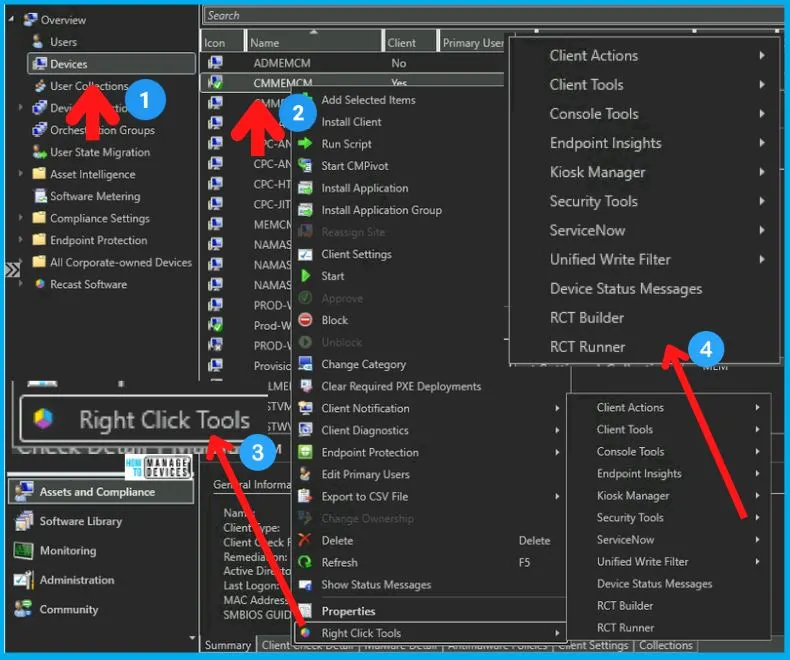
Previously, Recast introduced the free right-click tools to SCCM. This enhancement is a breakthrough for IT admins, enhancing productivity. You can get the right-click options in the admin console, and those options depend on the functionality.
- Below is the screenshot from our post on this SCCM Right Click Tools related.
See More: Free SCCM Right Click Tools Community Console Extension
Join the LinkedIn Page and Telegram group to get the latest step-by-step guides and news updates. Join our Meetup Page to participate in User group meetings. Also, Join the WhatsApp Community to get the latest news on Microsoft Technologies. We are there on Reddit as well.
Author
Anoop C Nair has been Microsoft MVP from 2015 onwards for 10 consecutive years! He is a Workplace Solution Architect with more than 22+ years of experience in Workplace technologies. He is also a Blogger, Speaker, and Local User Group Community leader. His primary focus is on Device Management technologies like SCCM and Intune. He writes about technologies like Intune, SCCM, Windows, Cloud PC, Windows, Entra, Microsoft Security, Career, etc.


Discussion