





New Setting in Intune to Stop Automatic MDM Enrollment when Users Add a Work or School Account on Windows Devices
Key Takeaways
- Microsoft added a new setting in Microsoft Intune to stop automatic MDM enrollment when users add a work or school account on Windows devices.
- Helps prevent personal (BYOD) devices from getting enrolled accidentally.
- Fixes the issue where “Allow my organisation to manage my device” was turned on by default.
- Allows only Microsoft Entra ID registration without full Intune management.
New Setting in Intune to Stop Automatic MDM Enrollment when Users Add a Work or School Account on Windows Devices! Microsoft has added a new setting in Microsoft Intune that gives admins more control over device enrollment. Earlier, when users added their work or school account on a Windows device, the option “Allow my organization to manage my device” was turned on by default. Many users clicked Next without noticing, and their personal device got fully enrolled into Intune. This caused unwanted enrollment, especially in BYOD scenarios.
Table of Content
Intune to Stop Automatic MDM Enrollment when Users Add a Work or School Account on Windows Devices
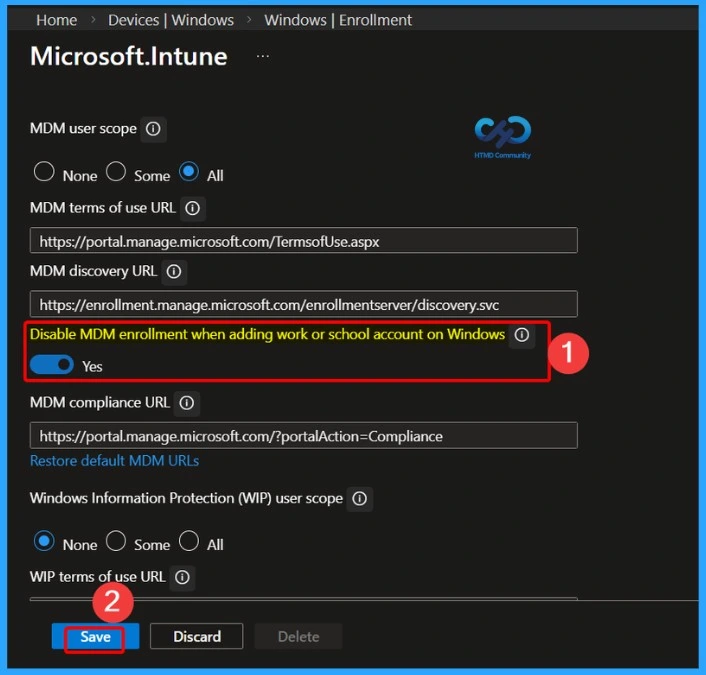
With the new setting, admins can stop automatic MDM enrollment during sign-in. This means users can sign in to Microsoft apps without their personal device being fully managed. Admins can configure this setting from the Intune admin center, PowerShell, or Microsoft Graph API.
- Go to Microsoft Intune Admin Center.
- Select Devices.
- Click on Enrollment.
- Choose Automatic Enrollment.
- Set Disable MDM enrollment when adding work or school account on Windows to Yes.
- This will prevent automatic Intune enrollment during Windows work or school account sign-in.
- MDM Lifecycle Management with Microsoft Intune From Enrollment to Retirement
- Intune Supported Enrollment Methods for Windows iOS Android MacOS Linux ChromeOS
- Learn Intune Beginners Guide MDM MAM MIM
Prevent Automatic Intune MDM Enrollment for Entra-Registered and Workplace Joined Devices
This setting in Microsoft Intune is designed to prevent automatic MDM enrollment for users who are targeted by the auto-enrollment configuration, specifically on Entra-registered or Workplace-joined devices. It mainly affects the “add account” flow when users sign in through apps like Teams, Outlook, or browsers like Edge.
| Automatic Intune MDM Enrollment | Details |
|---|---|
| Purpose | Prevent automatic MDM enrollment for users targeted by auto-enrollment |
| Applies To | Entra registered or Workplace joined devices |
| Affected Flow | “Add account” sign-in through apps like Teams, Outlook, or browsers like Edge |
| Behaviour When Enabled | Behaviour When Enabled |
| Manual Enrollment | Users can still enroll devices manually via Windows Settings if eligible |
| Conditional Access / Compliance | Devices may still get enrolled when accessing resources that require MDM for compliance or conditional access |
Need Further Assistance or Have Technical Questions?
Join the LinkedIn Page and Telegram group to get the latest step-by-step guides and news updates. Join our Meetup Page to participate in User group meetings. Also, join the WhatsApp Community and the Whatsapp channel to get the latest news on Microsoft Technologies. We are there on Reddit as well.

Author
Anoop C Nair has been Microsoft MVP for 10 consecutive years from 2015 onwards. He is a Workplace Solution Architect with more than 22+ years of experience in Workplace technologies. He is a Blogger, Speaker, and Local User Group Community leader. His primary focus is on Device Management technologies like SCCM and Intune. He writes about technologies like Intune, SCCM, Windows, Cloud PC, Windows, Entra, Microsoft Security, Career, etc.


Hi Anoop
Thanks for this information.
I have few queries
1) Is it safe to set mdm user scope as Yes in corporate environment?
2) Restricting the MDM Enrollment from “Prevent Automatic Intune MDM Enrollment for Entra-Registered and Workplace Joined Devices” will impact any application like Outlook, Teams, One drive etc.?