






How to Fix Intune Android App Installation Error 0xC7D14FBB
Hey there, today we are discussing on How to Fix Intune Android App installation Error 0xC7D14FBB. As you all know that managing mobile devices is important for keeping things secure and running smoothly. But sometimes, this issue happens when trying to install apps, especially on Android devices.
The error code 0xC7D14FBB (-942583877) shows up in Microsoft Intune when managing Android devices, especially those using Device Administrator or Samsung KNOX. It means the app could not finish installing because something wrong happens the installing process.
One common problem is the error 0xC7D14FBB, which shows up when an app fails to install. This usually happens if the device restarts while the app is being installed. This usually happens if the device restarts while the app is being installed. It can affect Android devices and those using Samsung KNOX.
This error stops the app from being installed correctly, which can be a problem for IT admins who need to install apps to be on all devices. There are many reasons behind this error, so, in this pot let’s look how this error can be fixed.

Table of Contents
How to Fix Intune Android App installation Error 0xC7D14FBB
Above we discussed a lot of things about the issue happens to the Android device in Intune. MS describe this error as the app installation was canceled because the process was restarted during installation. The main reason for this error is that the device restarted or turned off while the app was still installing.
- After the restart, the app install doesn’t continue, and this will cause of the error 0xC7D14FBB
| Error code (Hex) | Error code (Dec) | Error message/code | Description |
|---|---|---|---|
| 0xC7D14FBB | 942583877 | The app installation was canceled because the process was restarted during installation. | The device was rebooted during the APK installation process, resulting in a canceled installation. This error message is returned for both DA and KNOX devices. Intune presents a notification that users can click to retry. If the app is an available app, the notification can be dismissed. However, if the app is required, it cannot be dismissed. |
- How to Enable MAA Multi Admin Approval to Create or Modify Intune Roles
- How to Fix Greyed Out Locate Device Option for Corporate Android Devices in Intune
- How to Fix Intune Android App Installation Error 0xC7D14FB2
DA Scenario
The error 0xC7D14FBB happens on devices using DA or KNOX because these systems don’t restart the app install if the device reboots. So, if the phone restarts while installing an app, the install stops and the error appeared.

Workarounds –Confirm the Device is Not Rebooting
The first workaround is that we can check the Device is Not Rebooting in the time of app installation. Then Check for any system updates that might cause an automatic reboot. Also, keep the battery charged and turn off battery saver mode to avoid unexpected shutdowns.
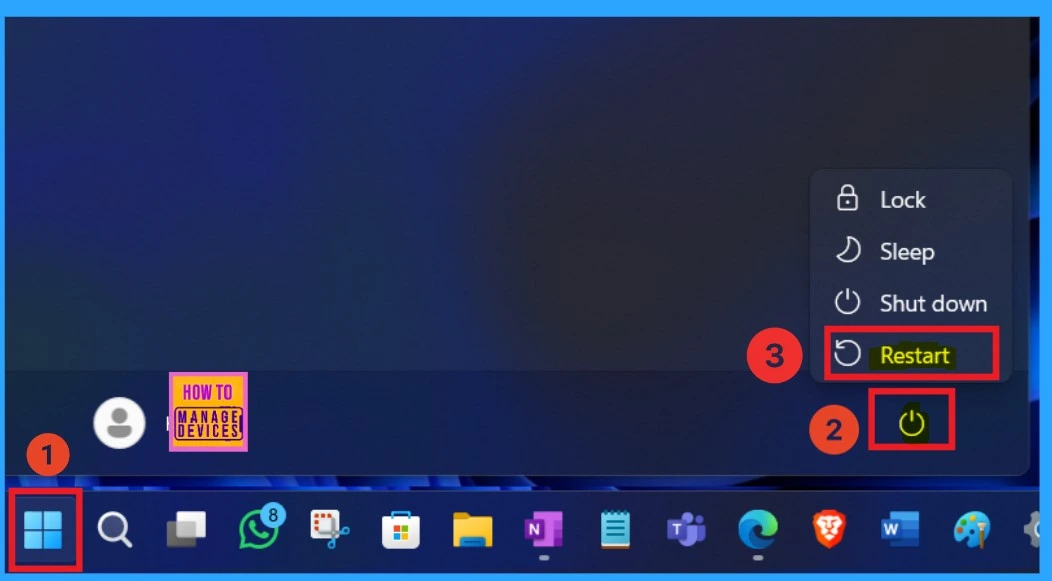
- The below screeshot is from Top 8 Quick Restart Methods for Windows 11 Troubleshooting.
Top 8 Quick Restart Methods for Windows 11 Troubleshooting
Check the App Protection Policies
Make sure there are no settings on the device that are causing restarts or blocking the app install. Maybe this reasons are enough to get the error when the app installation time.
Ensure the Battery Level
To fix the issue, first make sure the device has enough battery because these type of reasons effect the device. Also. Check if the device is restarting on its own because of system or security settings. The battery level shoube always minimum when a installtion is going on otherwise you can plugged the device with charger.
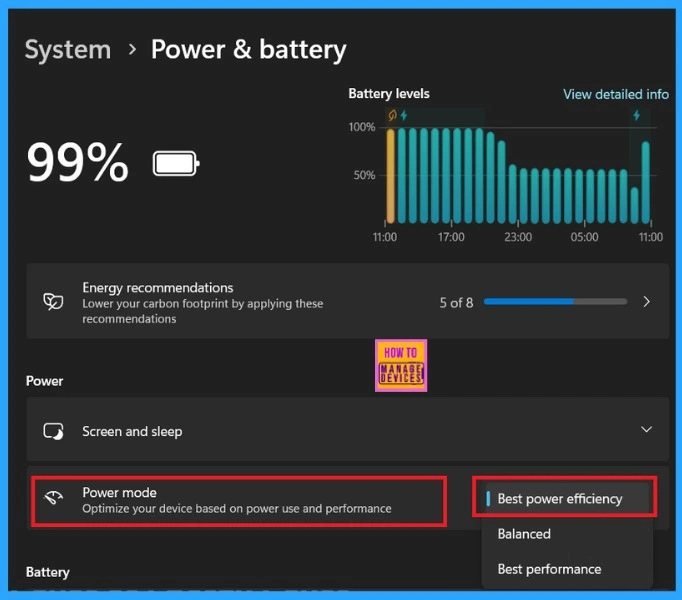
The below screenshot is from our post, Top 14 Tips and Tricks to Extend Laptop Battery Life for Windows Operating System without using ARM. If you want any tips from it you can click on the below link.
See More: Top 14 Tips and Tricks to Extend Laptop Battery Life for Windows Operating System without using ARM
Need Further Assistance or Have Technical Questions?
Join the LinkedIn Page and Telegram group to get the latest step-by-step guides and news updates. Join our Meetup Page to participate in User group meetings. Also, join the WhatsApp Community to get the latest news on Microsoft Technologies. We are there on Reddit as well.
Author
Anoop C Nair has been Microsoft MVP for 10 consecutive years from 2015 onwards. He is a Workplace Solution Architect with more than 22+ years of experience in Workplace technologies. He is a Blogger, Speaker, and Local User Group Community leader. His primary focus is on Device Management technologies like SCCM and Intune. He writes about technologies like Intune, SCCM, Windows, Cloud PC, Windows, Entra, Microsoft Security, Career, etc.




Discussion