






IntuneWinAppUtil.exe Windows 11 Compatibility
Let’s check whether there is any compatibility issue with IntuneWinAppUtil.exe and Windows 11. I have received a comment from one of the users that “IntuneWinAppUtil.exe does not work on Windows 11! Typical Microsoft.”
The IntuneWinAppUtil.exe is Microsoft’s tool to “zip or compress” applications to support Intune Win32 application deployment scenarios. The “Zip or Compress” is not the correct word for defining the functionality of the Microsoft Win32 Content Prep Tool.
Intune Win32 App Troubleshooting Client Side Deep Dive post helps us troubleshoot issues related to the Intune application model. The MDM MSI deployment option is called the Line-Of-Business app, and with this native Windows MDM agent application deployment mechanism, you can only deploy simple MSI apps.
The limitation of Windows MDM forced the Microsoft MEM team to build a Win32 app model. Microsoft introduced an additional agent called Intune Management Extension (IME). This additional agent (IME) is installed automatically to all (almost all) Intune-managed Windows 11 and Windows 10 devices.

What is IntuneWinAppUtil.exe?
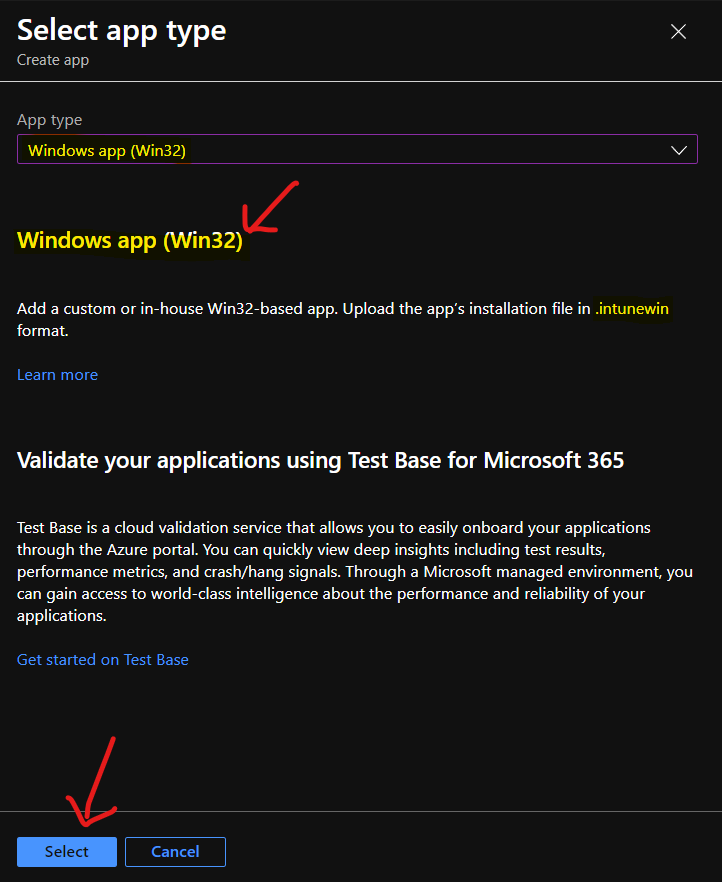
The Windows app (Win32) app type in Intune helps to Add a custom or in-house Win32-based app. You will be able to upload the app’s installation file in .intunewin format.
The IntuneWinAppUtil.exe, Microsoft Win32 Content Prep Tool, helps IT admins convert application source files into “.IntuneWin” format. The Intune Management Extension (IME) agent uses the “.IntuneWin” format files and helps to install MSI, EXE, PowerShell scripts, etc.
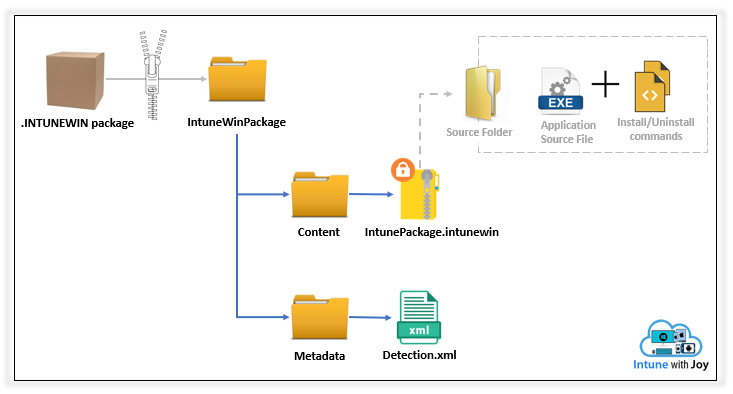
Create Windows App (Win32) using Intune
Once you have created the “.IntuneWin” file, you can use Windows App (Win32) app type in Intune to create and deploy any complex MSI or EXE apps.
You will need to follow the below steps to complete the deployment process. I have explained the Windows App (Win32) deployment process from the MEM Admin center portal in the following post.
- Sign in to the Endpoint.Microsoft.com
- Select Apps – Windows – All apps.
- From the App type drop down menu, select Windows app (Win32).
- Click on the Select button to continue.
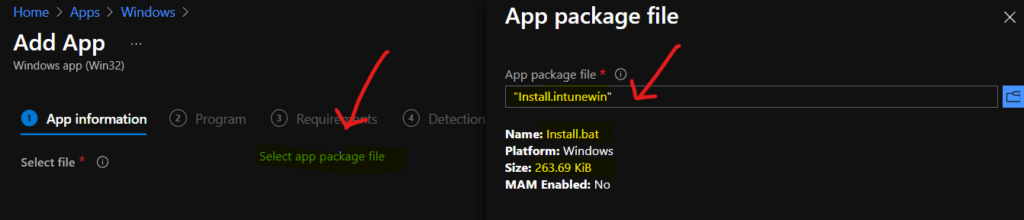
Click on the Select app package file link from the Select file option. You will need to browse through files and use the “.IntuneWin” format file you created using the IntuneWinAppUtil.exe tool.
You will need to go through all the other details to create a Windows App (Win32) from the MEM admin center portal. I have explained this in the video tutorial below. More information about Free Intune training available – 63 Episodes Of Free Intune Training For Device Management Admins HTMD Blog (anoopcnair.com).
IntuneWinAppUtil.exe Windows 11 Compatibility
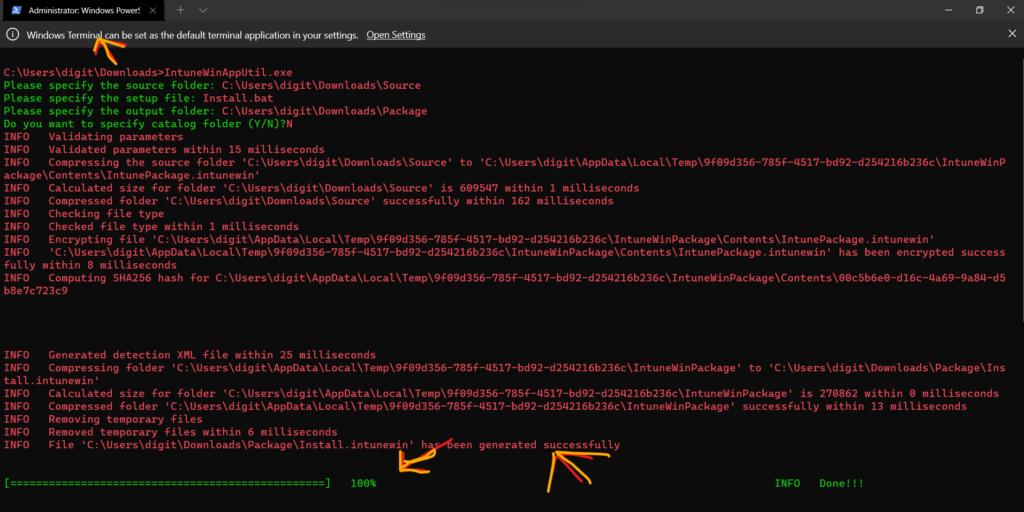
I have tested the IntuneWinAppUtil.exe and Windows 11 Compatibility with the latest Windows 11 insider build (10.0.22494.1000) laptop. I don’t think there is any compatibility issue as per my testing. The IntuneWinAppUtil.exe tool worked just fine!
I did run the tool from Windows 11 Windows Terminal, and it worked just fine. So I don’t know what is the exact issue with IntuneWinAppUtil.exe and Windows 11. Probably, this could be some manual error? Let me know in the comments if you see some compatibility issues with IntuneWinAppUtil.exe and Windows 11.
Author
Anoop is Microsoft MVP! He is a Solution Architect in enterprise client management with more than 20 years of experience (calculation done in 2021) in IT. He is Blogger, Speaker, and Local User Group HTMD Community leader. His main focus is on Device Management technologies like SCCM 2012, Current Branch, and Intune. He writes about ConfigMgr, Windows 11, Windows 10, Azure AD, Microsoft Intune, Windows 365, AVD, etc……………


This is the latest version on GitHub (1.8.3, 142Kb) as referenced by Microsoft:
PS C:\IntuneWinAppUtil> [environment]::OSVersion.Version
Major Minor Build Revision
—– —– —– ——–
10 0 22000 0
PS C:\IntuneWinAppUtil> .\IntuneWinAppUtil.exe
Program ‘IntuneWinAppUtil.exe’ failed to run: The specified executable is not a valid application for this OS
platform.At line:1 char:1
+ .\IntuneWinAppUtil.exe
+ ~~~~~~~~~~~~~~~~~~~~~~.
At line:1 char:1
+ .\IntuneWinAppUtil.exe
+ ~~~~~~~~~~~~~~~~~~~~~~
+ CategoryInfo : ResourceUnavailable: (:) [], ApplicationFailedException
+ FullyQualifiedErrorId : NativeCommandFailed
PS C:\IntuneWinAppUtil> cmd
Microsoft Windows [Version 10.0.22000.258]
(c) Microsoft Corporation. All rights reserved.
C:\IntuneWinAppUtil>IntuneWinAppUtil.exe
This version of C:\IntuneWinAppUtil\IntuneWinAppUtil.exe is not compatible with the version of Windows you’re running. Check your computer’s system information and then contact the software publisher.
StaffI see you are on the production version of Windows 11 and I use the insider build version of Windows 11 10.0.22494.0. I also used the latest version of IntuneWinAppUtil.exe
I have found the issue – the indication was the filesize of the .exe.
When downloading the “Save Link As” option in Edge, it scans the file and prompts to confirm if you want to keep the high-risk file. However, this appears to corrupt the file and increases its size to 143 Kb. When downloading the .exe directly, not the “save link as” option, it downloads as 52Kb and works fine.
So if anyone encounters this issue, re-download the file from GitHub, but do not use the “save Link as” from the top level. Click the link into to IntuneWinAppUtil.exe, and from that page click the “Download” button embedded in the second pane.
I hope this helps anyone else who encounters this issue with Edge and GitHub.
StaffThank you for the details.
I really appreciate your content and hard work. Please can you kindly assist with a solution regarding this ERROR I use to get any time I try to set up the .msi file? The error I get is the setup file you specified can not be accessed even though I am running the IntuneWinAppUtil is run outside the app folder to be deployed. Thank you
Thank You Martin. That solved the problem.
I second the thanks you are worthy of Martin! I had noticed the file size difference as I had an earlier version downloaded a while ago… but hadn’t cast a thought towards the download process causing it – amazeballs =]
Thanks Martin good spot