






Many users report KB5027215 Issue with Windows Hello Popup Message after rebooting and signing back to Windows 10 devices. This is going to create a lot of confusion for end users. IT admins wanted to avoid helpdesk calls because of this unexpected popup window.
This is happening for Windows Hello for Business (WHfB) configured users. As per the Reddit thread, you have a workaround registry fix for this issue. You might need to create a PowerShell script to add a new registry value before installing the June LCU patch (KB5027215) for Windows 10.
The KB has several fixes, one of which is Intune/MDM PublishDfsRoots policy does not apply correctly to a targeted client issue. Task Scheduler related “2147943726: ERROR_LOGON_FAILURE (The user name or password is incorrect).” related issue is fixed with Windows 10 June updates.
We have not seen any reports of Windows Hello for Business with an OOBE screen popup issue for Windows 11 after installing June patches KB5027223 and KB5027231. End users see this Biometric Consent Notice prompt when restarting the device and signing in back.


Video – WHfB issue with June 2023 Patch KB5027215
Let’s understand the WHfB issue with June 2023 Patch KB5027215 from this video. It’s impacting only Windows 10 devices. It’s only applicable to Windows Hello for Business Configured devices.
KB5027215 Issue Windows Hello Popup Message
In Reddit, many admins report KB5027215 Issue with Windows Hello Popup Message. The following is the error users can see in the OOBE style screen. This is going to create confusion among the users.
Choose if You want to Keep Signing in with your face or finger print
Do you want to keep storing your face or fingerprint data on this PC?
Option 1 – Yes, sign in with my face or fingerprint
Keep storing my data so I can sign in to the PC with Windows Hello face or fingerprint recognition
Option 2 – No, change how I sign in
Take me to settings where I can remove sign-in options and delete my data

FIX KB5027215 Issue with Windows Hello Popup Message after signing
Let’s now find out what is the workaround for the issue with the OOBE screen Windows Hello Popup message after the installation of KB5027215 and restart of the Windows 10 PC.
ImKruptos is the user on Reddit who provided the workaround for this issue. This is the registry fix, and you need a registry value to avoid this popup happening again and again. The registry value is given below: BioConsentNoticeShownTime.
You will only see this OOBE style WHfB popup message prompt if you have biometric data stored in the PC. If you don’t want your end users to see this popup, you must create the following registry value.
- Open regedit.exe
- Navigate to HKEY_CURRENT_USER\SOFTWARE\Microsoft\Windows\CurrentVersion\Authentication\WindowsHello\
- Create a REG_BINARY value called BioConsentNoticeShownTime with a HEX value for the timestamp (more details below).
NOTE! The Hex value in that key is a timestamp when you click YES or NO on that OOBE popup screen. You have some tools to convert the current time hexa value. One of them is Unix Hex Timestamp Converter (epochconverter.com).
Another note from the user is that you can’t delete this registry key until Microsoft provides some sort of permanent solution otherwise, the If you delete that key after you have the latest patch and reboot, it will prompt you Windows Hello for Business OOBE style popup screen again.
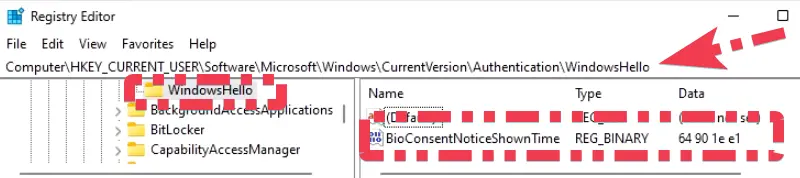
Registry FIX Using SCCM or Intune or GPO
There are different methods to perform registry FIX using SCCM and Intune. The best way is to go with the remediation script in Intune. I will link different blog posts on this topic to give more details on the registry fix options. We need to deploy the above registry fix before installing the KB5027215.
| Method | Documentation |
|---|---|
| SCCM Run a Script | SCCM Run Scripts – Realtime Deployment Options |
| Intune PowerShell Script | Best Way To Deploy Powershell Script Using Intune |
| Intune Remediation Script (recommended) | Deploy Proactive Remediation Script Using Intune |
| GPO (Group Policy Settings) | Navigate to User Configuration – Preferences – Windows Settings – Registry. Select in the context menu: New – Registry Wizard. |
I have not looked into creating an Intune remediation registry script for fixing this issue, but you can get several similar scripts from the community. The following is the Sample script that you can get from the internet!
# Define the timestamp in hexadecimal format - Change this accordingly if you like
$timestampHex = "64901e05"

# Define the registry path
$regPath = "HKCU:\SOFTWARE\Microsoft\Windows\CurrentVersion\Authentication\WindowsHello"

# Create the registry key if it doesn't exist
if (!(Test-Path $regPath)) {
    New-Item -Path $regPath -Force | Out-Null
}

# Convert the hexadecimal timestamp to a byte array
$bytes = [System.Linq.Enumerable]::Range(0, $timestampHex.Length/2) | ForEach-Object { [byte]::Parse($timestampHex.Substring($_*2,2), [System.Globalization.NumberStyles]::HexNumber) }

# Set the BioConsentNoticeShownTime value with the hexadecimal byte array
Set-ItemProperty -Path $regPath -Name "BioConsentNoticeShownTime" -Value $bytes -Type Binary
Author
About Author – Vidya is a computer enthusiast. She is here to share quick tips and tricks with Windows 11 or Windows 10 users. She is also keen to find solutions to day-to-day tech problems and write about them.


this not a fix but a hack
technically, why is MS prompting, there must be a reason for it, so bypassing could cause issues later
maybe just a legal thing, or might be migrating/securing some data
StaffI have explained this part in the video attached to the post https://youtu.be/1e7OH7C-kfA?t=295