





How to Fix KB5077181 Update Triggering Restart Loops & Network Failures in Windows 11
Key Takeaways:
- KB5077181 Update Triggering Restart Loops & Network Failures on Some Windows 11 Systems
- Impact on endpoint management workflows
- How admins can identify, mitigate, and resolve these failures to restore stability
- Ensuring they can act quickly to minimize disruption
Let’s discuss How to Fix KB5077181 Update Triggering Restart Loops & Network Failures in Windows 11. After the release of KB5077181 cumulative update for Windows 11 as part of February security and quality improvements some environments, post-deployment issues are being observed on select devices.
Table of Contents
Table of Contents
How to Fix KB5077181 Update Triggering Restart Loops & Network Failures in Windows 11
After releasing Windows 11 cumulative update with KB5077181 many issues are faced on selected devices. Importantly, not all devices are affected the problems seem configuration-specific. The following table shows Reported Issues.
| Reported Issues |
|---|
| Continuous restart / boot loops |
| Login failures (SENS service errors) |
| Network connectivity issues (Wi-Fi connected but no internet / DHCP failure) |
| Installation failures with error codes 0x800f0983 / 0x800f0991 |
- Windows 11 KB5077181 KB5075941 February 2026 Patch and 6 Zero Day Vulnerabilities and 58 Flaws
- Updated Windows 11 Version Numbers Build Numbers Major Minor Build Rev
- Windows 11 26H1 vs 26H2 Explained Platform Update for New PCs and Feature Update for Everyone
After Effects
Due to Boot Loops & Restart Failures, Devices stuck in continuous reboot cycles, preventing normal operation. Login Failures will increase due to this issue so users unable to sign in due to SENS service errors, blocking access to desktops.
Temporary Workarounds for this Issue
If KB5077181 Update Triggering Restart Loops & Network Failures, you can uninstall this update. For Uninstalling, you can choose 2 methods which are Control Panel or Command Prompt.

Control Panel
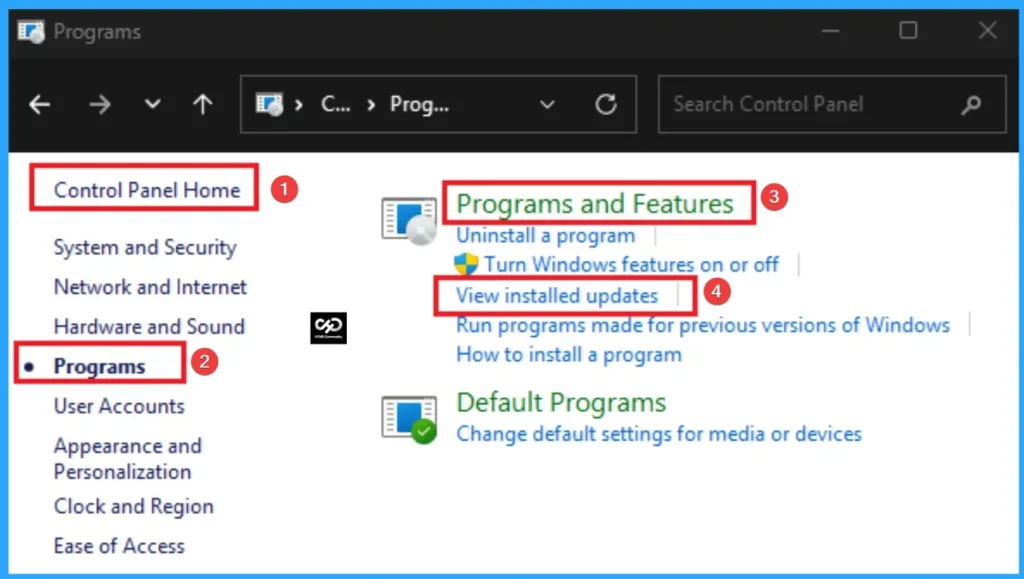
Open the Command Prompt on your Windows 11 Device. Then go to Programs > Programs and Features > View Installed Updates.
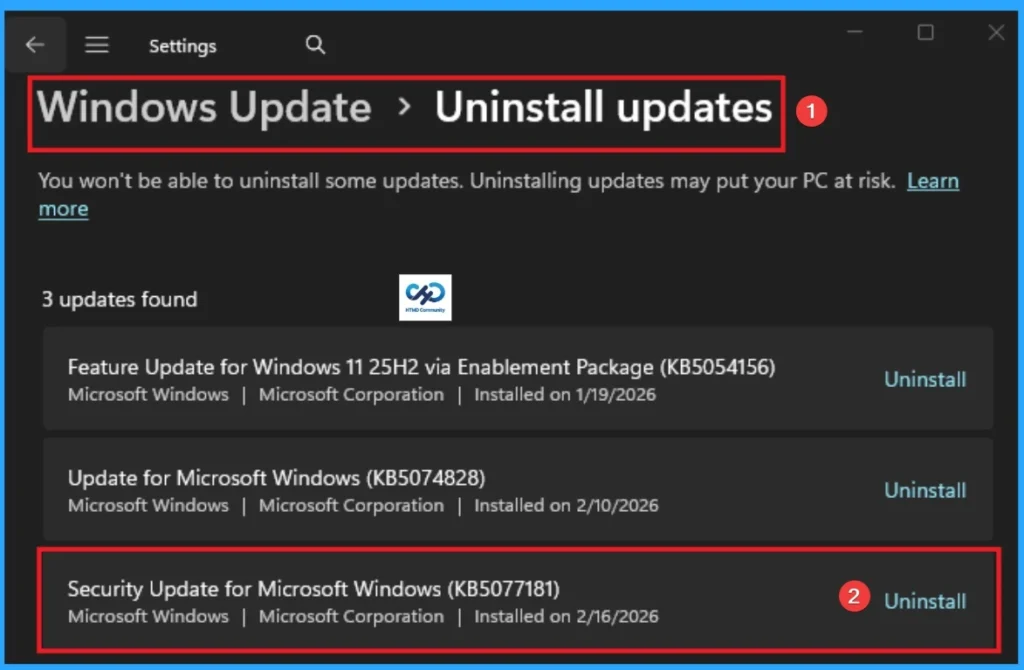
After clicking on the View Installed Updates you will get Windows Update > Uninstall updates on Settings Application. Here you can click uninstall button on the security Update for Microsoft Windows KB5077181.
Commond Prompt
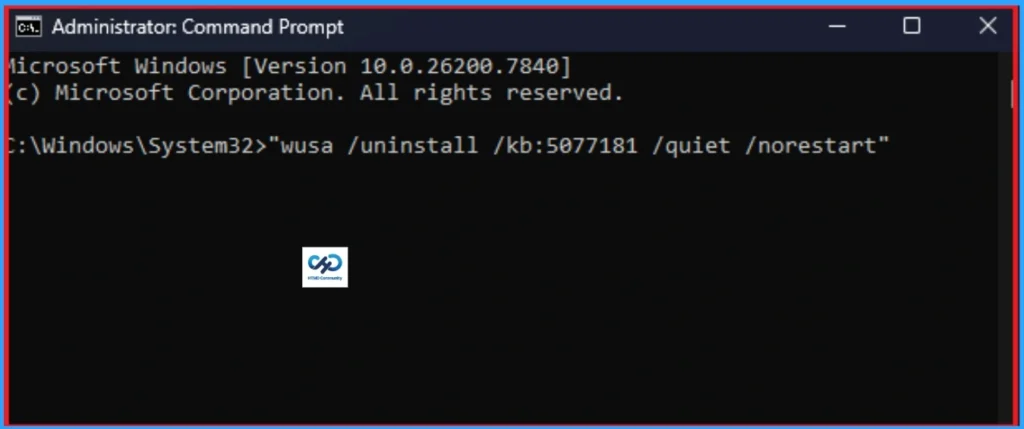
Open the Commond Prompt as Admins. Then, enter the prompt as “wusa /uninstall /kb:5077181 /quiet /norestart”. Reboot the device and temporarily pause updates if required.
Recommendation for IT / Endpoint Teams
Test cumulative updates in pilot groups before broad rollout, Monitor Event Viewer (System & Servicing logs), Keep rollback plan ready in SCCM / Intune environments, Track Microsoft Release Health dashboard for official updates.
Need Further Assistance or Have Technical Questions?
Join the LinkedIn Page and Telegram group to get the step-by-step guides and news updates. Join our Meetup Page to participate in User group meetings. Also, Join the WhatsApp Community and WhatsApp Channel to get the latest news on Microsoft Technologies. We are there on Reddit as well.
Author
Anoop C Nair has been Microsoft MVP for 10 consecutive years from 2015 onwards. He is a Workplace Solution Architect with more than 22+ years of experience in Workplace technologies. He is a Blogger, Speaker, and Local User Group Community leader. His primary focus is on Device Management technologies like SCCM and Intune. He writes about technologies like Intune, SCCM, Windows, Cloud PC, Windows, Entra, Microsoft Security, Career, etc.




Discussion