






Learn How to Minimize End-User Disruption During Win10 Update
Today, I will explain How to Minimize End-User Disruption During a Windows 10 Update. This is the third post in a series about Windows 10 Updates.
Microsoft Managed Desktop is designed to deliver updates predictably while minimizing disruption to end users by avoiding reboots during business hours.
Microsoft Managed Desktop prioritizes seamless device updating while minimizing disruption to end users. Updates are automatically downloaded and installed at a reasonable time determined by the device.
The device restarts are scheduled outside active hours until the deadline is met. By default, active hours are dynamically configured based on device usage patterns, ensuring efficient operation.

Suma SaganeGowda and Steve Diacetis shared this information in the MS Ignite session. More details are below.
| Index |
|---|
| Minimize End-User Disruption During Win10 Update |
| How to Control Windows 10 Offline Time |
| /SkipFinalize |
| /Finalize |
| How to Reduce the Time to Log in Post Update? |
| Session – Minimize End-User Disruption |
- Windows 10 Update Investments Numbers Scale Post 1
- Unified Update Platform Windows 10 UUP Content Streamline Post 2
- Learn How to Minimize End User Disruption During Win10 Update Part 3
One of the critical challenges of the Windows 10 update is downtime for end-users. One of the biggest challenges for the internal IT team is reducing the downtime or offline time for end-users during the upgrade process.
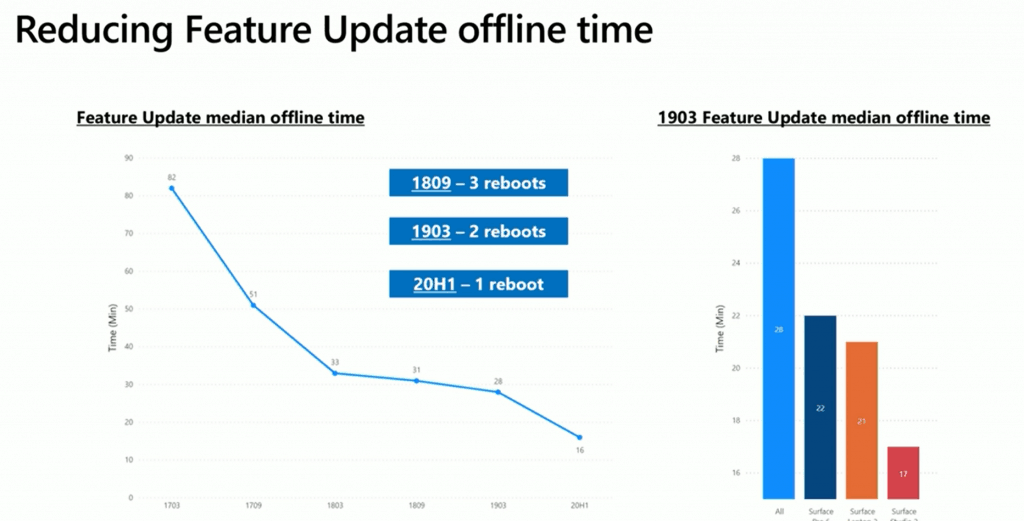
Let’s check Microsoft’s investments in reducing offline time for feature updates. The following chart will give you an overview of how offline time is reduced with each version of the Windows 10 release.
- 1809 3 Reboots
- 1903 2 Reboots
- 20H1 1 Reboot
Minimize End-User Disruption During Win10 Update
The latest versions of the Windows 10 update significantly reduced the offline time of the Windows 10 1903 feature update (check out the graph below ).
- 28 minutes (Average time)
- 22 minutes (Surface Pro 6)
- 21 minutes (Surface Pro Laptop 2)
- 17 minutes (Surface Studio 2)
- 8 minutes (new devices? Surface Laptop 3?)
NOTE! – Update & Shutdown settings will ensure that the Windows 10 device completes the updates and then shuts down the device. Hence reducing/minimizing End User Disruption.
How to Control Windows 10 Offline Time
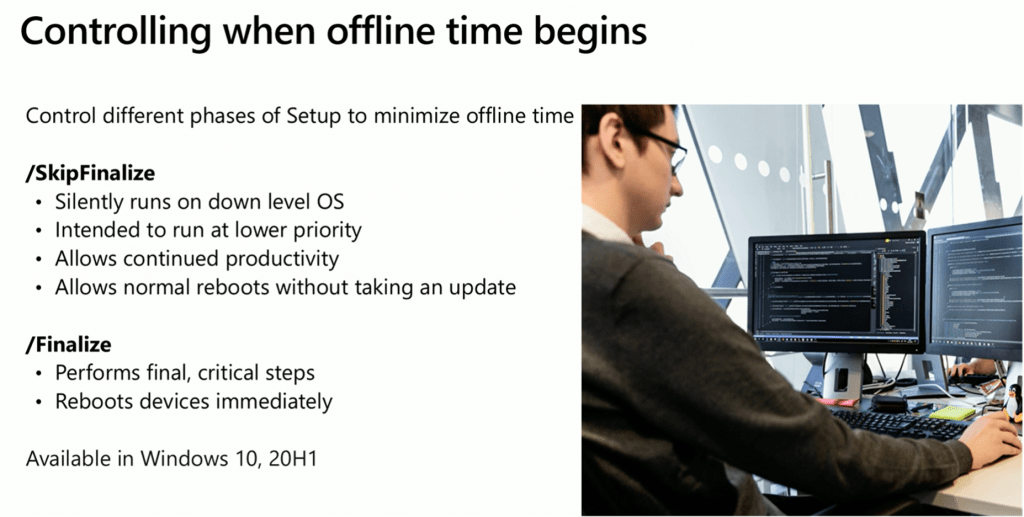
Microsoft provides two switches to stage the update behind the scenes without user interaction.
NOTE! – Control of different phases of setup options is already available with Windows updates.
The following switches will help to minimize end-user disruption during Windows 10 update. These offline time control options will be available in Windows 10 20H1 or later releases.
/SkipFinalize
- Silently runs on downlevel OS
- It intended to run at a lower priority
- Allows continued productivity
- Allows normal reboots without taking an update
/Finalize
- Performs final, critical steps
- Reboots devices immediately
How to Reduce the Time to Log in Post Update?
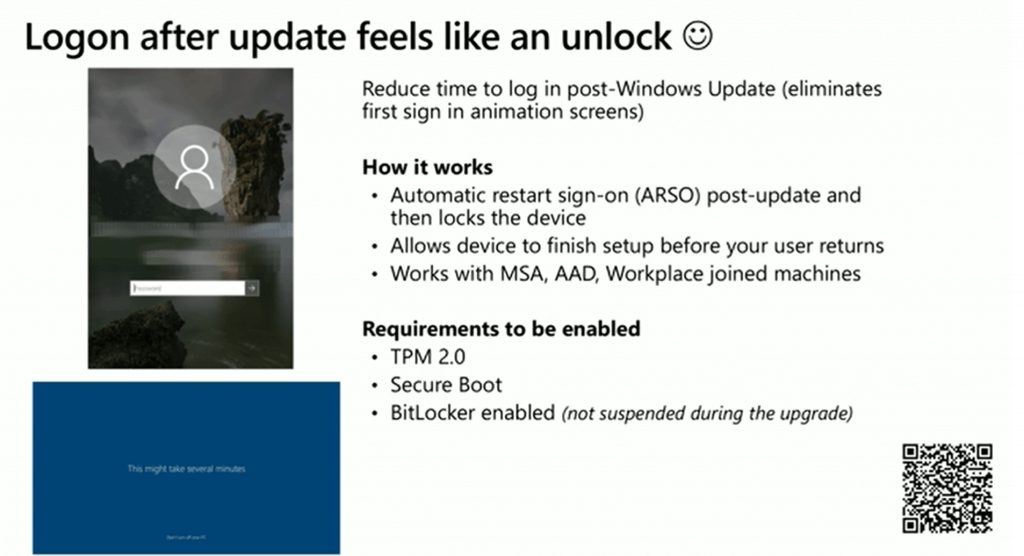
Another issue that end-users face with Windows 10 updates is slow log-on post-upgrade. To minimize end-user disruption during the Windows 10 update, the first sign-in animation screens will be eliminated after the update.
How does the Automatic Restart Sign-on Work? Winlogon automatic restart sign-on (ARSO)
- Automatic restart sign-on (ARSO) post update and then locks the device
- Allows device to finish setup before your user returns
- Works with MSA (Microsoft Account), Azure AD Join account, workplace joined machines
Prerequisite to enable ARSO
- TPM 2.0
- Secure Boot
- BitLocker enabled (not suspended during the upgrade)
Session – Minimize End-User Disruption
Make the Windows update experience smooth and seamless for your IT team and end-users.
Resources
- Windows 10 Bandwidth Management DO Delivery Optimization with LEDBAT in LAN?
- SCCM and Microsoft Connected Cache Integration to Help with Bandwidth Issues
- Microsoft Connected Cache Container Instances in Azure
- Basics of Windows Dynamic Update Explained Update Management
We are on WhatsApp. To get the latest step-by-step guides and news updates, Join our Channel. Click here –HTMD WhatsApp.
Author
Anoop C Nair is Microsoft MVP! He is a Device Management Admin with more than 20 years of experience (calculation done in 2021) in IT. He is a Blogger, Speaker, and Local User Group HTMD Community leader. His primary focus is Device Management technologies like SCCM 2012, Current Branch, and Intune. He writes about ConfigMgr, Windows 11, Windows 10, Azure AD, Microsoft Intune, Windows 365, AVD, etc.




Discussion