





Customise macOS LAPS Password Rotation in MS Intune Beyond 180 Days
Key Takeaways
- Customise Admin Password rotation schedule no longer fixed at 180 days
- Set rotation frequency based on your security and compliance needs
- Supports stronger security with more frequent password changes
- On-demand password rotation is still available anytime
- Helps align macOS device management with Zero Trust practices
- Managed directly through MSIntune macOS LAPS policy settings
Customise macOS LAPS Password Rotation in MS Intune Beyond 180 Days! Earlier, MSIntune macOS LAPS, the local admin password was automatically rotated every 180 days. This was a fixed setting, so administrators did not have the option to change how often the password was updated.
Table of Content
Customise macOS LAPS Password Rotation in MSIntune Beyond 180 Days
Because of this limitation, organizations had to follow the same 180-day rotation schedule, even if their security policies required more frequent password changes. This made it harder to meet strict compliance or security standards.
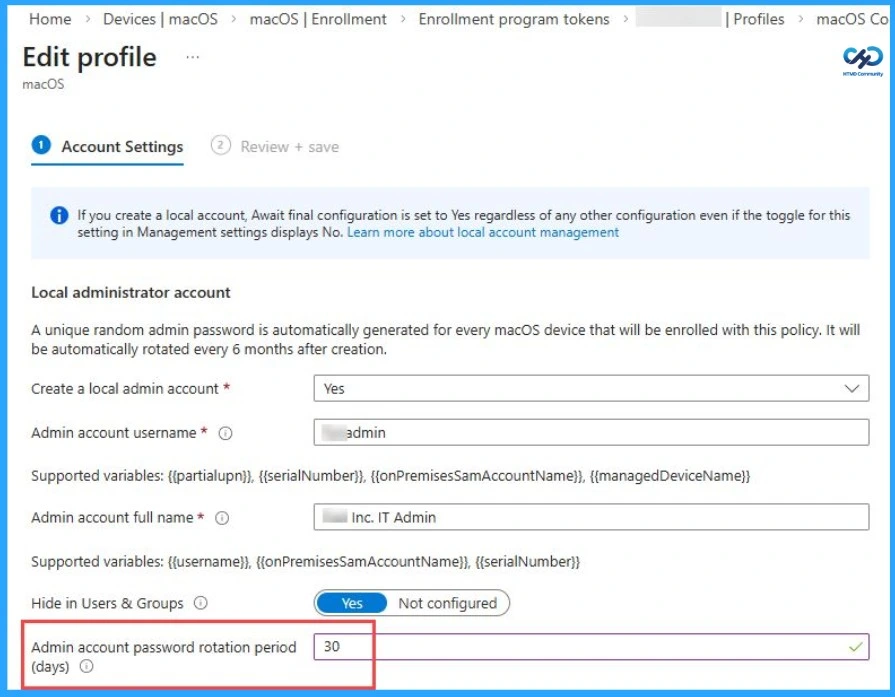
- Admin account password rotation period days – 30
| Scenario | Details |
|---|---|
| Before Update | Fixed at 180 days |
| After Update | 30 days / 60 days / Custom value |
- Windows LAPS Configurations from Azure AD and Intune
- New Automatic Account Management Enable Account settings on Windows LAPS Policy in Intune
- Setup New Windows LAPs Using Intune Policies
- Windows LAPS Role Based Access Controls Using Intune
- Microsoft Intune 2304 April Update Windows LAPS Management
- New Built-in LAPs Client for Windows 11 and 10 | Conflict with Old Version of LAPs
- Azure AD LAPs Group Policy Settings for Windows 11 | Intune Policy for LAPs
- OLD LAPS for Windows 10 11 Privileged Access Management
Enhanced Security and Control with macOS LAPS Update
This update improves security by enabling more frequent password changes and giving better control over privileged (admin) access. It supports modern security practices like Zero Trust, allows administrators to rotate passwords manually whenever needed, and helps organizations meet their security and compliance requirements more effectively.
Need Further Assistance or Have Technical Questions?
Join the LinkedIn Page and Telegram group to get the latest step-by-step guides and news updates. Join our Meetup Page to participate in User group meetings. Also, join the WhatsApp Community and the Whatsapp channel to get the latest news on Microsoft Technologies. We are there on Reddit as well.

Author
Anoop C Nair is a Workplace Technology solution architect with 25+ years of experience. Microsoft Certified Trainer. Microsoft MVP from 2015 onwards for consecutive 11+ years! He is a blogger, Speaker, and Founder of HTMD Community and HTMD Conference. His main focus is on Device Management technologies like Intune, Windows, and Cloud PC. He writes about technologies like Intune, SCCM, Windows, Cloud PC, Entra, and Microsoft Security.


Discussion