






A Quick Look at ManageEngine’s Enhanced Add-on for SCCM
In this post, let’s go ahead and check ManageEngine’s enhanced add-on for SCCM’s current branch. This is the sponsored post by ManageEngine to get more details about the new features of the Patch Connect Plus!
Patch Connect Plus aids in patching with Microsoft SCCM by completely automating third-party application patching. While this is good, we aim to do better.
Apart from third-party application patching, Patch Connect Plus’ Enterprise edition now sports two new features: Application Management and Admin Tools.
Before diving into what these new features offer, let’s examine why your organization needs them.

| Index |
|---|
| Applications vs. Packages |
| Connect Plus Application Management |
| Patch Connect Plus Admin Tools – SCCM Plug-In |
| Trial Version – ManageEngine SCCM |
Applications vs. Packages
SCCM 2012 saw the debut of applications as an alternative to packages. With applications, you can:
- Target particular devices for deployment by setting detection clauses. Creating collections has also become a whole lot easier with applications.
- Supersede existing applications when new versions are updated without redeploying the entire application.
- Applications can be directly executed from the SCCM console, whereas packages must be downloaded on the client machines first and then installed.
- Define dependencies to other software to ensure that all dependent software is installed before installing the intended software.
- Utilize applications for user-based deployments, while packages are more suitable for device-based deployments.
As you can see, applications offer a significant advantage over packages in SCCM, making managing these applications an important part of the patching process.
Connect Plus Application Management
Introducing Patch Connect Plus Application Management and Admin Tools With Patch Connect Plus Application Management, you can Create applications to deploy using SCCM.
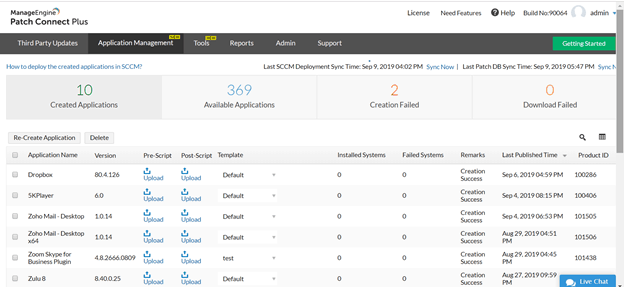
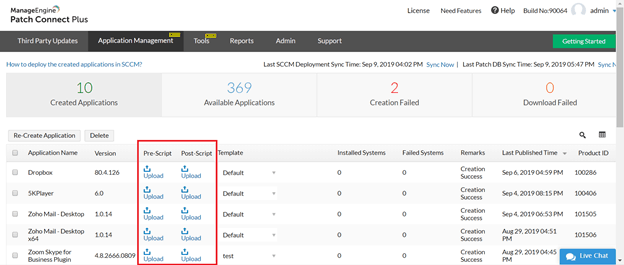
- Customize the deployment of these applications using pre-and post-deployment scripts.
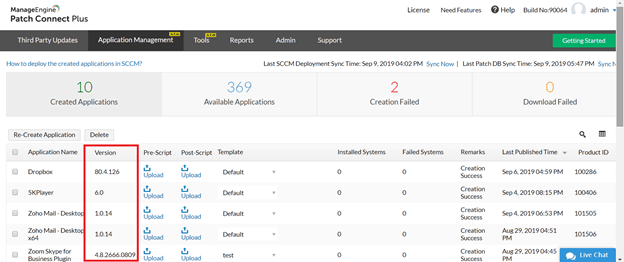
- Detect versions of installed applications on endpoints, and adjust the targets for deployment accordingly.
- Rollback applications based on application supersedence.
- Refine your deployment by filtering targets using Global Settings in SCCM.
Patch Connect Plus thereby ensures hassle-free management of applications.
Patch Connect Plus Admin Tools – SCCM Plug-In
Similarly, you can use Patch Connect Plus’ Admin Tools for enhanced control over the entire patching process by simply downloading and installing the SCCM plug-in that we offer along with our product.
With Admin Tools, you can perform essential tasks, like
- On-demand client operations: Carry out various client-related tasks, like the application development evaluation cycle, hardware and software inventory cycle, and much more, according to users’ wishes.
- Client troubleshooting: Systematically trace and solve problems on the client end.
- System management operations: Perform activities for the enterprise-wide management of systems.
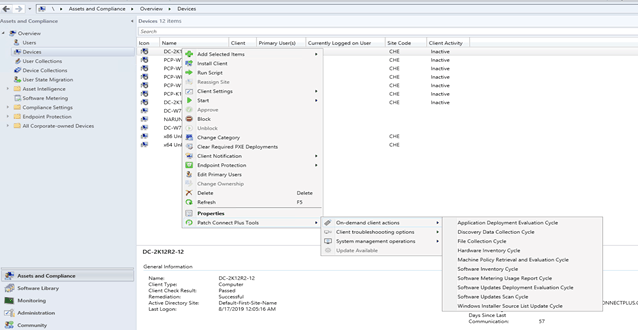
Installing our Patch Connect Plus plug-in makes your SCCM console more organized and clutter-free.
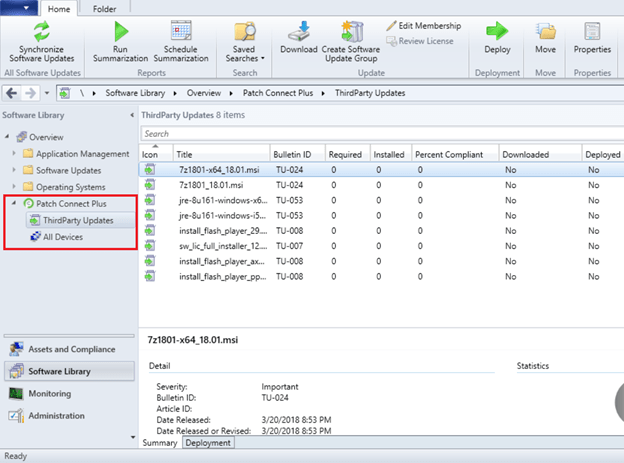
This plug-in lists third-party updates in a separate tab in the SCCM console. Further, you can easily manage various patch management and client-related tasks from the SCCM console through Admin Tools.
Trial Version – ManageEngine SCCM
Application Management and Admin Tools enhance the patching experience with SCCM. Try seamless third-party application patching with Patch Connect Plus’ free, 30-day trial.
Resources
We are on WhatsApp. To get the latest step-by-step guides and news updates, Join our Channel. Click here –HTMD WhatsApp.
Author
Anoop C Nair is Microsoft MVP! He is a Device Management Admin with more than 20 years of experience (calculation done in 2021) in IT. He is a Blogger, Speaker, and Local User Group HTMD Community leader. His main focus is on Device Management technologies like SCCM 2012, Current Branch, and Intune. He writes about ConfigMgr, Windows 11, Windows 10, Azure AD, Microsoft Intune, Windows 365, AVD, etc




Discussion