Skip to content
MECM 1910 Hotfix Rollup Update KB 4537079 Installation Guide

MECM 1910 Hotfix Rollup Update KB 4537079 Installation Guide

Written By Kannan CS
Last Updated July 24, 2024
Posted In SCCM
SHARE

Let’s learn how to install SCCM update hotfix KB 4537079 (1910 Hotfix Rollup update). The Microsoft Endpoint Configuration Manager 1910 rollup update is now available and has many fixes.

It’s highly recommended to install the hotfix on your SCCM infra.

Index
How to Install 1910 Hotfix Rollup Update
Step 2:
Step 3:
Step 4:
Step 5:
Step 6:
Step 7:
Step 1:
Step 2:
Step 3:
How to check the installation Status using the Log File
Post Installation Hotfix Rollup 1910 Update
Results
MECM 1910 Hotfix Rollup Update KB 4537079 Installation Guide – Table.1

NOTE! – SCCM 1910 Known issues are Listed – https://www.anoopcnair.com/configmgr-1910-known-issues-bugs-fixessccm/

Microsoft released Hotfix Rollup Update 4537079 for Microsoft Endpoint Configuration Manager Current Branch, version 1910.

Patch My PC

The below hotfixes are included as part of the rollup update,

  • KB 4535819 Update for Microsoft Endpoint Configuration Manager version 1910, early update ring
  • KB 4538488 Clients immediately upgrade after updating to Configuration Manager’s current branch, version 1910
  • KB 4538166 Client update for Configuration Manager current branch, version 1910
  • KB 4537369 The Delete Aged Discovery Data task incorrectly removes active records in the Configuration Manager

Microsoft Reference Url: https://support.microsoft.com/en-us/help/4537079/update-rollup-for-microsoft-endpoint-configuration-manager-current-bra

Contents of this post
How to Install Hotfix Rollup Update
How to Check the Installation Status
How to check the installation Status using the Log File
Post Installation Hotfix Rollup 1910 Update
Results
MEMCM 1910
MECM 1910 Hotfix Rollup Update KB 4537079 Installation Guide – Table 2

How to Install 1910 Hotfix Rollup Update

To successfully apply this hotfix, you must install Microsoft Endpoint Configuration Manager version 1910 and utilize one of the package GUIDs specified in the “Update Information” section. Also, the private TAP rollup must be applied for members of the Technology Adoption Program (TAP).

Step 1:

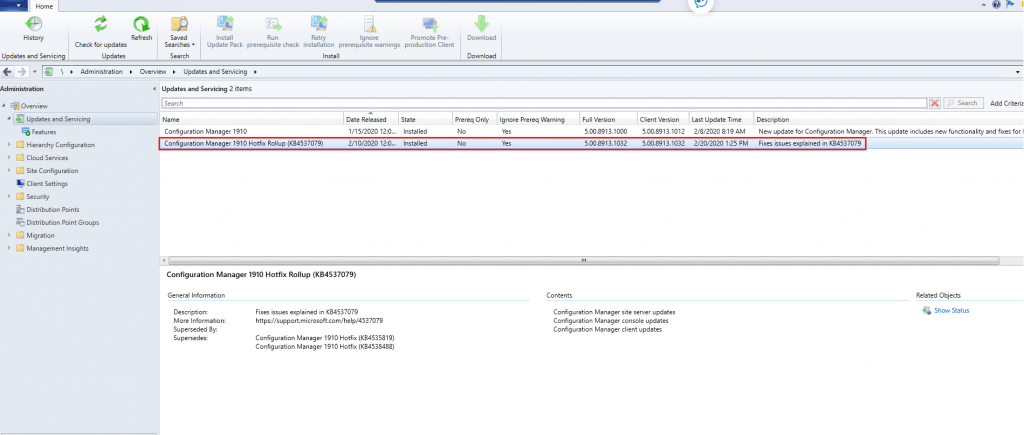
  • Launch the Configuration Manager Console,
  • Select the Administration tab,
  • Expand Overview -> Select Updates and Services
  • The update Configuration Manager Hotfix Rollup (KB4537079) is Ready to install stage

Note: The hotfix already downloads.
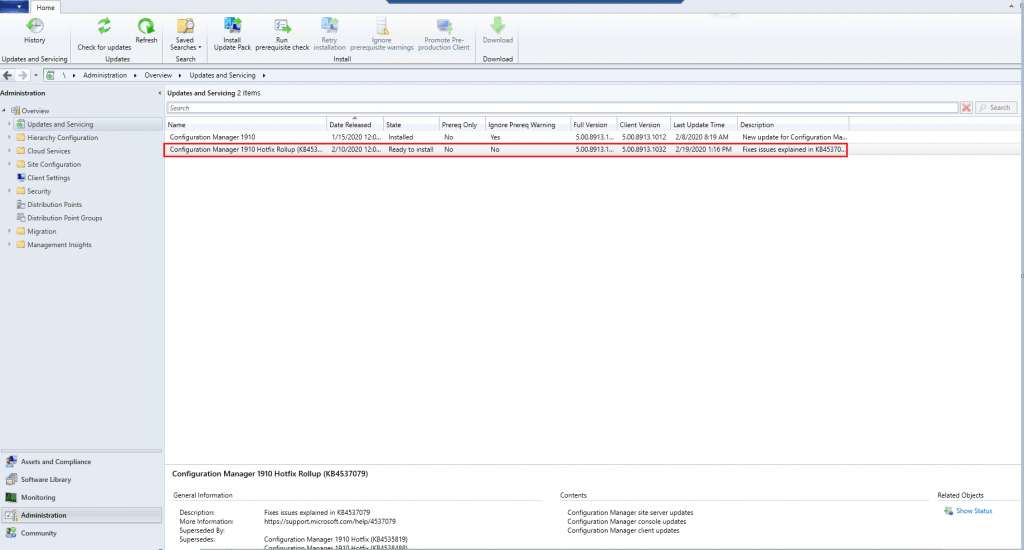
Step 2:

  • Right-click the Configuration Manager Hotfix Rollup (KB4537079) and select Install Update Pack
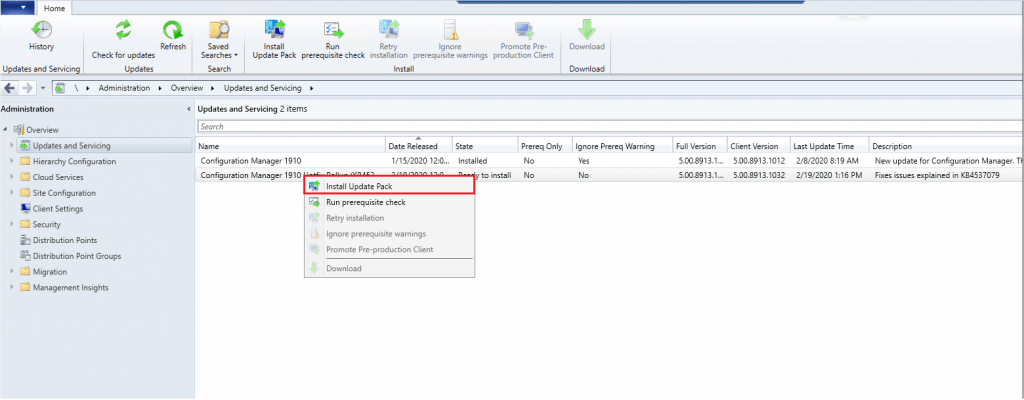
MECM 1910 Hotfix Rollup Update KB 4537079 Installation Guide - Fig.2
MECM 1910 Hotfix Rollup Update KB 4537079 Installation Guide – Fig.2

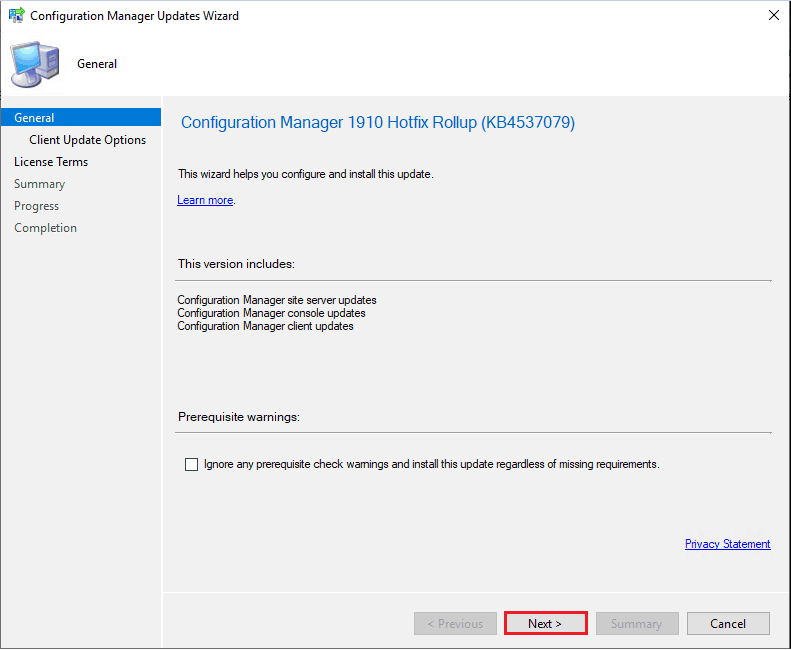
Step 3:

  • In the General Tab, Click Next
MECM 1910 Hotfix Rollup Update KB 4537079 Installation Guide - Fig.3
MECM 1910 Hotfix Rollup Update KB 4537079 Installation Guide – Fig.3

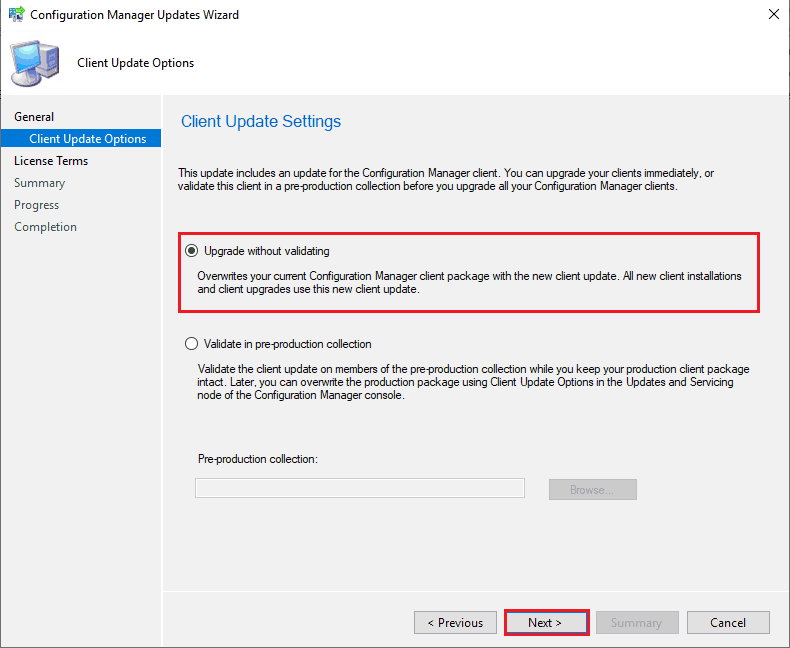
Step 4:

  • In the Client Update Options Tab,
  • Select Upgrade without Validating

Note: Choose the options based on the client environment

  • Click Next
MECM 1910 Hotfix Rollup Update KB 4537079 Installation Guide - Fig.4
MECM 1910 Hotfix Rollup Update KB 4537079 Installation Guide – Fig.4

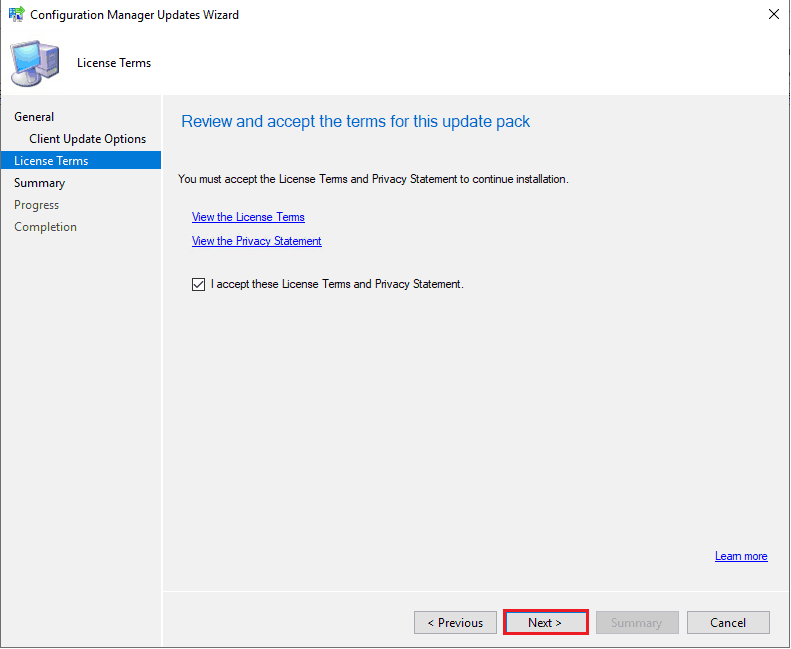
Step 5:

  • In the License Terms Tab,
  • Select I accept these License Terms and Privacy Statement.
  • Click Next
MECM 1910 Hotfix Rollup Update KB 4537079 Installation Guide - Fig.5
MECM 1910 Hotfix Rollup Update KB 4537079 Installation Guide – Fig.5

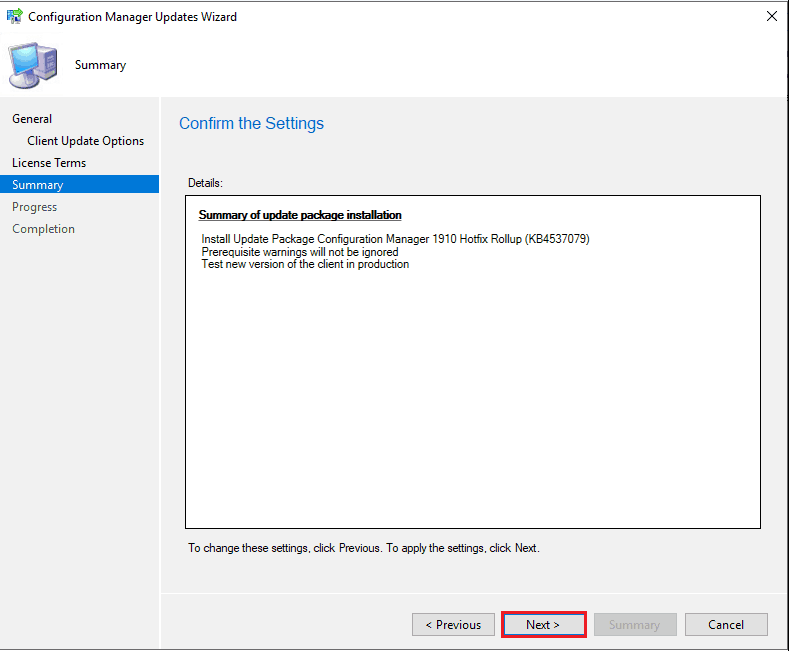
Step 6:

  • In the Summary Tab,
  • Review the summary information.
  • Click Next
MECM 1910 Hotfix Rollup Update KB 4537079 Installation Guide - Fig.6
MECM 1910 Hotfix Rollup Update KB 4537079 Installation Guide – Fig.6

Step 7:

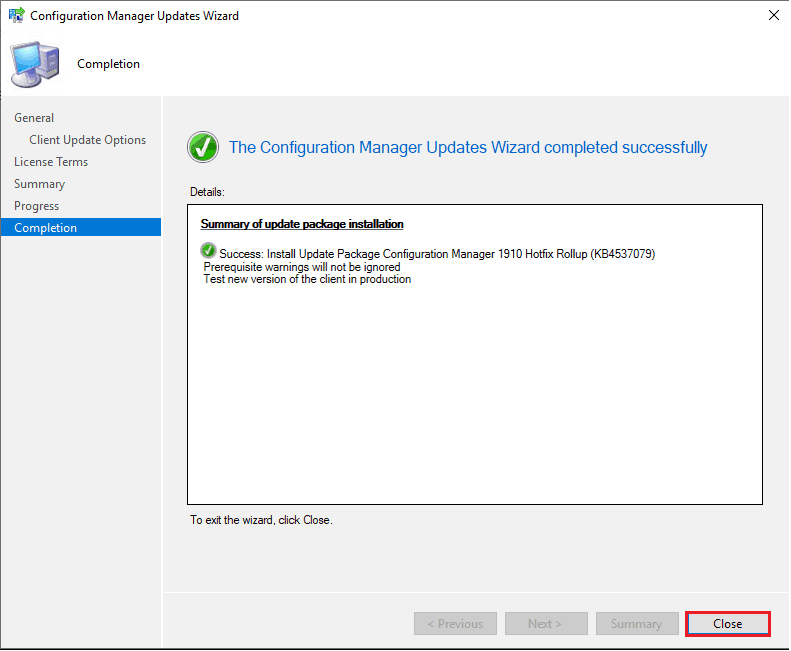
  • In the Completion Tab,
  • Rollup Update installation is initiated.
  • Click Close.
MECM 1910 Hotfix Rollup Update KB 4537079 Installation Guide - Fig.7
MECM 1910 Hotfix Rollup Update KB 4537079 Installation Guide – Fig.7

How to Check the Installation Status

Step 1:

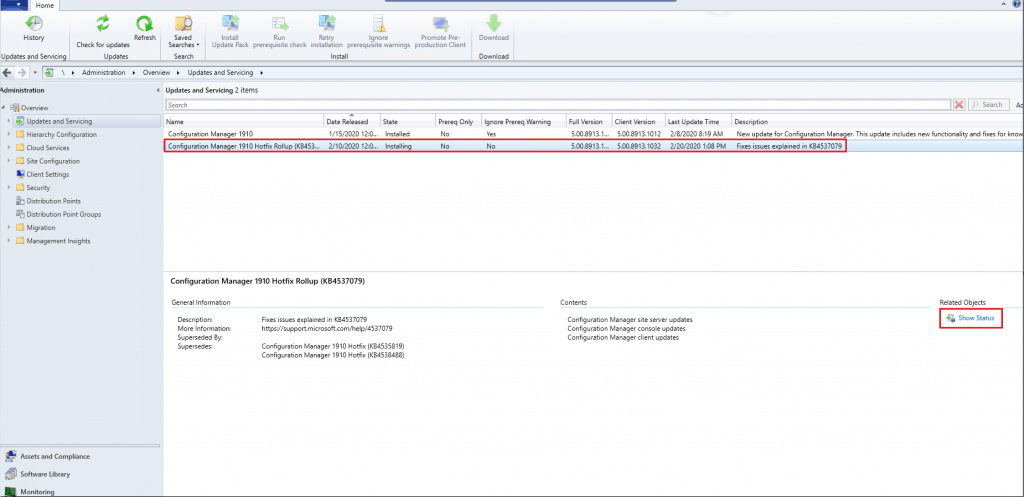
  • Select the Configuration Manager Hotfix Rollup 1910 (KB4537079). The hotfix rollup update is in Installing State
  • Click the Show Status icon
MECM 1910 Hotfix Rollup Update KB 4537079 Installation Guide - Fig.8
MECM 1910 Hotfix Rollup Update KB 4537079 Installation Guide – Fig.8

Step 2:

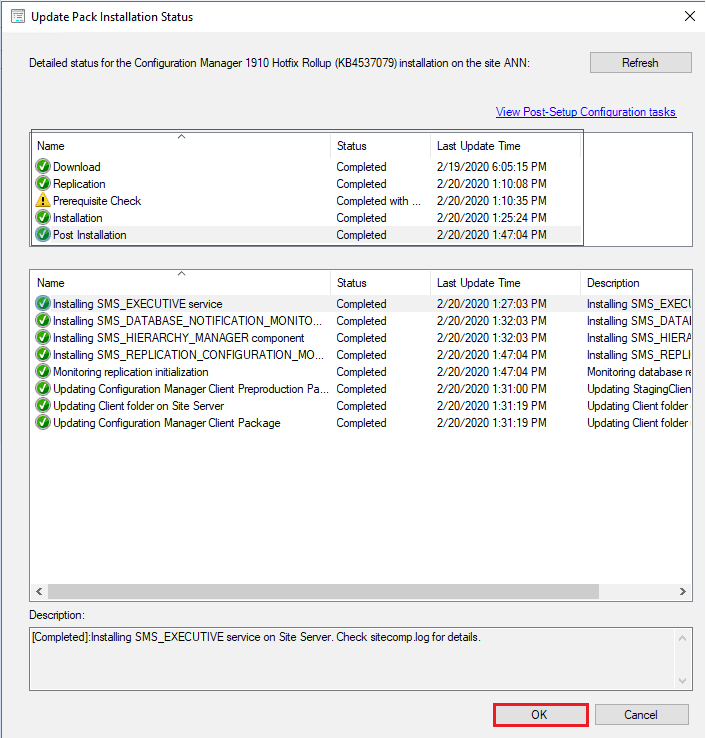
  • In the Update Pack Installation Status window, the step-by-step installation status will be updated
  • Click the Refresh Button frequently to know the installation status.
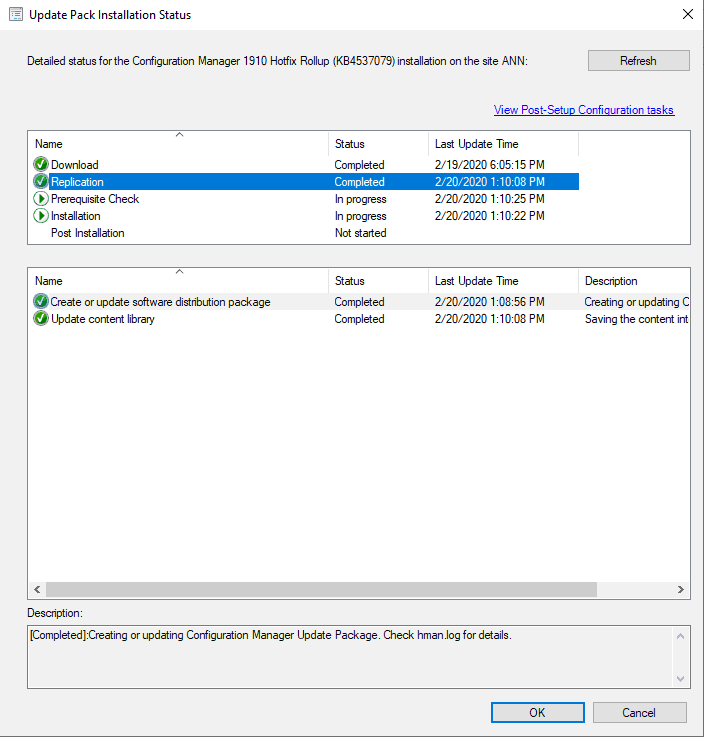
MECM 1910 Hotfix Rollup Update KB 4537079 Installation Guide - Fig.9
MECM 1910 Hotfix Rollup Update KB 4537079 Installation Guide – Fig.9

Step 3:

  • In the Update Pack Installation Status window, the Update was installed successfully.
  • Click OK
MECM 1910 Hotfix Rollup Update KB 4537079 Installation Guide - Fig.10
MECM 1910 Hotfix Rollup Update KB 4537079 Installation Guide – Fig.10

How to check the installation Status using the Log File

  • Logfile folder Location: C:\
  • Prerequisite Log: The log represents the status of the prerequisite
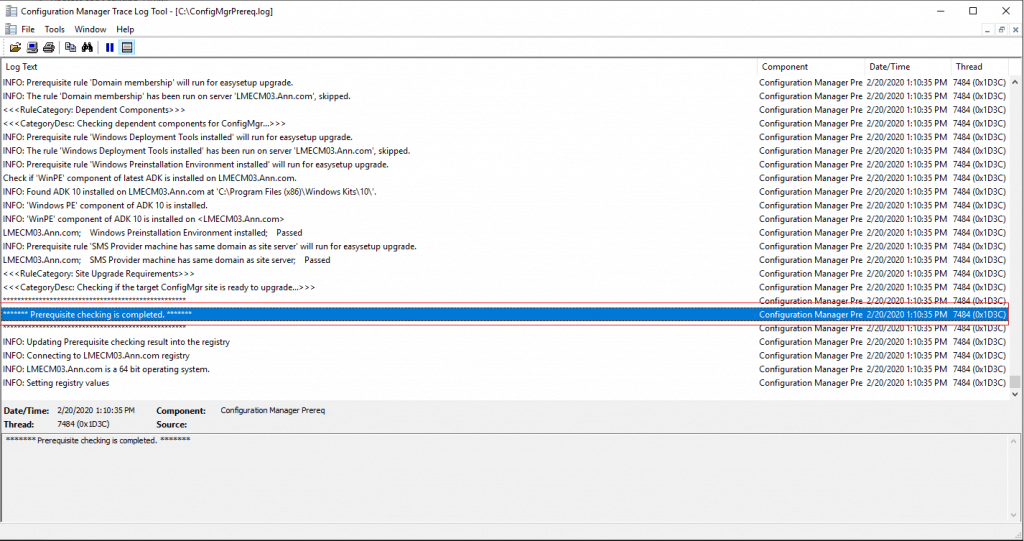
MECM 1910 Hotfix Rollup Update KB 4537079 Installation Guide - Fig.11
MECM 1910 Hotfix Rollup Update KB 4537079 Installation Guide – Fig.11
  • Logfile folder Location: <Drive>\Program Files\Microsoft Configuration Manager\Logs
  • CMUpdate.Log: The log represents the Hotfix rollup update installation & post Installation Status
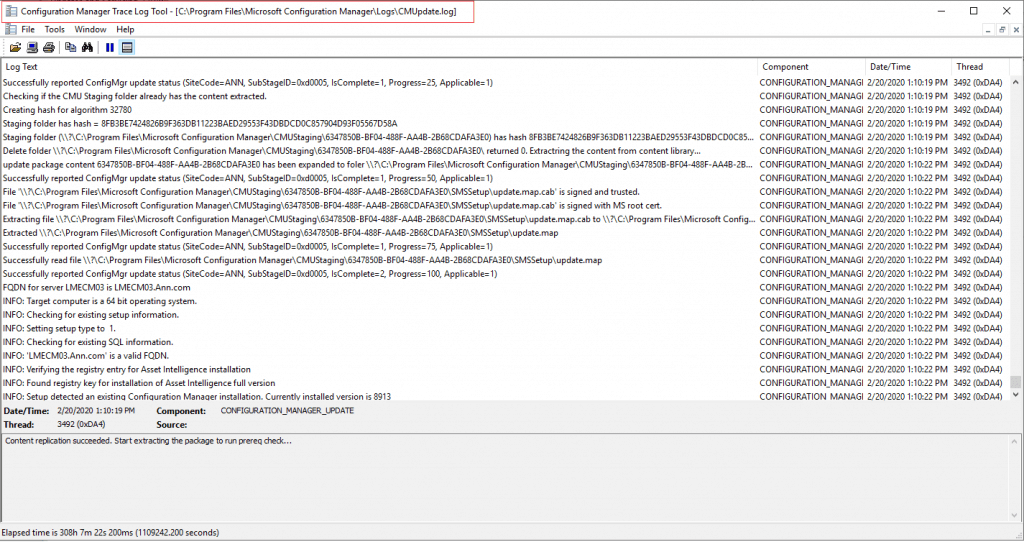
MECM 1910 Hotfix Rollup Update KB 4537079 Installation Guide - Fig.12
MECM 1910 Hotfix Rollup Update KB 4537079 Installation Guide – Fig.12

Post Installation Hotfix Rollup 1910 Update

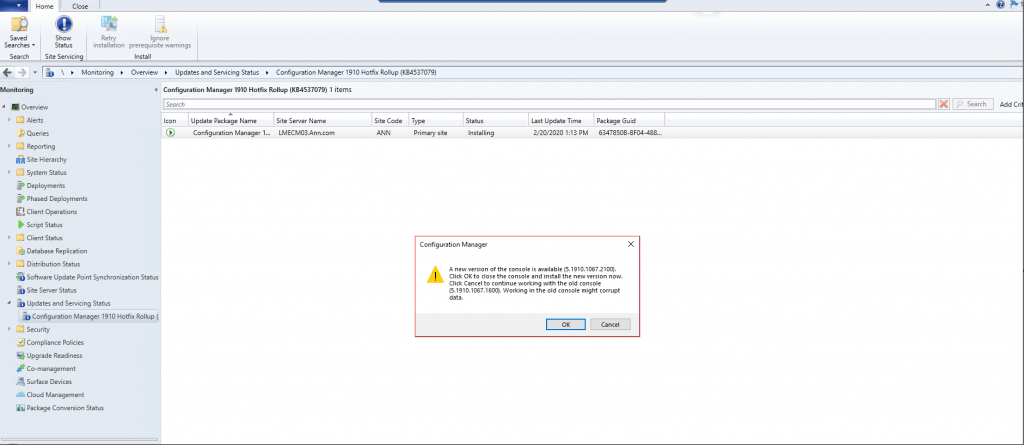
  • The Post-installation of Hotfix, when launching the console, will prompt for an upgrade to the SCCM console Version 5.19101067.1600
  • Click OK
MECM 1910 Hotfix Rollup Update KB 4537079 Installation Guide - Fig.13
MECM 1910 Hotfix Rollup Update KB 4537079 Installation Guide – Fig.13

Results

  • The update is installed successfully
MECM 1910 Hotfix Rollup Update KB 4537079 Installation Guide - Fig.14
MECM 1910 Hotfix Rollup Update KB 4537079 Installation Guide – Fig.14

MEMCM 1910

  • Build –>8913
  • Client and Site Version –> 5.00.8913.1032
  • Console Version– > 5.1910.1067.2100

NOTE – More details https://www.anoopcnair.com/sccm-version-numbers-build-number-client/
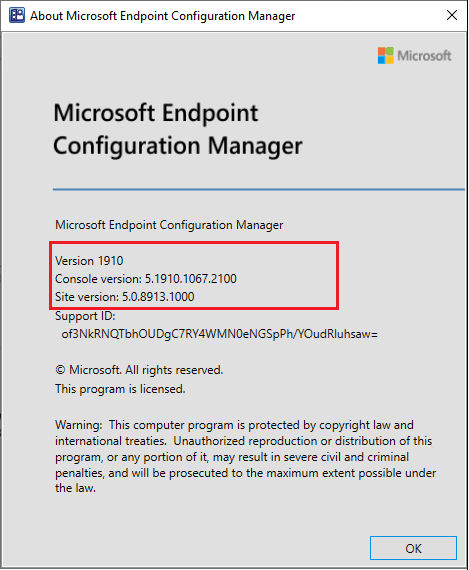
MECM 1910 Hotfix Rollup Update KB 4537079 Installation Guide - Fig.15
MECM 1910 Hotfix Rollup Update KB 4537079 Installation Guide – Fig.15

Resources

We are on WhatsApp. To get the latest step-by-step guides and news updates, Join our Channel. Click here –HTMD WhatsApp.

Author

Kannan is a Technical Architect with more than 15 years of experience in the IT domain. He has worked on various technologies, such as Windows server administration, SCCM, SCOM, and Desktop Engineering. For the last 10 years, he has been working in Microsoft SCCM, with a focus on Configuration Manager and Intune technologies.


Written by

Kannan is a Technical Architect with more than 15 years of experience in the IT domain. He has worked on various technologies like Windows server administration, SCCM, SCOM, Desktop Engineering domains. For the last 10 years, he has been working in Microsoft SCCM with the focus on Configuration Manager and Intune technologies.

Discussion

Join the discussion

Your email address will not be published. Required fields are marked *

Related guides

Intune

Windows 11 KB5101650 KB5099414 July 2026 Patch and 3 Zero Day Vulnerabilities and 570 Flaws

Key Takeaways Windows 11 KB5101650 KB5099414 July 2026 Patch and 3 Zero Day Vulnerabilities and 570 Flaws! In the July 2026 Patch, Microsoft introduced new features designed to improve the overall Windows experience. The update adds enhancements to Windows Update for more flexible update management and introduces Point-in-Time Restore, providing an additional recovery option for […]

AC Anoop C Nair 9 min read
Intune

2026 June KB5094126 KB5093998 Windows 11 Patch | 3 Zero Day Vulnerabilities and 200 Flaws

Key Takeaways 2026 June KB5094126 KB5093998 Windows 11 Patch | 3 Zero Day Vulnerabilities and 200 Flaws! The June 2026 Windows 11 Patch Tuesday update brings several improvements to File Explorer. It adds support for additional archive formats, including UU, CPIO, XAR, and NuGet Packages (NUPKG). The update also preserves View and Sort preferences in […]

AC Anoop C Nair 10 min read
Intune

2026 May KB5089549 KB5087420 Windows 11 Patch | 0 Zero Day Vulnerabilities and 120 Flaws

Key Takeaways The Windows 11 May 2026 Patch KB5089549 KB5087420 Update brings important security fixes, performance improvements, and reliability enhancements across the operating system. The update introduces new features such as Xbox Mode for gaming, File Explorer improvements, enhanced input and sharing experiences, better taskbar and Windows Hello reliability, and additional enterprise management capabilities for […]

AC Anoop C Nair 8 min read
SCCM

ConfigMgr 2603 Introduces New Early Update Enrollment Process

Key Takeaways In this post we are discussing the ConfigMgr 2603 Introduces New Early Update Enrollment Process. Microsoft has officially released Configuration Manager version 2603 to the Early Update Ring, giving organizations an opportunity to test upcoming improvements before the global production rollout. The release is targeted at enterprises running ConfigMgr version 2409 or later […]

AC Anoop C Nair 3 min read