






Microsoft Connected Cache Issue for Enterprise Customers Fixed
Microsoft has fixed issues causing Microsoft Connected Cache (MCC) node discovery on enterprise networks. Microsoft Connected Cache Issue was with the Windows devices that use DHCP Option 235 to discover Microsoft Connected Cache (MCC) nodes in their network, which might be unable to be used.
Microsoft released the July 2024 KB5040525 preview update for Windows 10 to fix an update issue that broke Microsoft Connected Cache (MCC) node discovery on enterprise networks.
This issue occurred after installing the January 2024 non-security update (KB5034203), released on January 23, 2024, or later. Due to this issue, Windows devices will download updates and apps from the public internet, and IT administrators will see increased download traffic on their internet routes.
Do you know what Microsoft Connected Cache (MCC) is? Microsoft Connected Cache (MCC) for Enterprise is a software-only caching solution that delivers Microsoft content within Enterprise. Cache nodes are created in the cloud portal and are configured by applying the client policy using management tools such as Intune.

This issue affected Client, Windows 10, version 21H2, and Windows 10, version 22H2. In this blog post, I will explain the problem and details of the resolution with Microsoft Connected Cache for Enterprise Customers.
- Install ConfigMgr Hotfix KB12819689 Microsoft Connected Cache Update
- Fix Microsoft Connected Cache MCC Server Component Installation Fails Issue | SCCM | ConfigMgr
- Microsoft Connected Cache Container Instances in Azure
- Fix Intune Error Code 80192EE7 the Device Management Enablement Issue on Intune
| Index |
|---|
| Microsoft Connected Cache Issue for Enterprise Customers Fixed |
| 1. Configure Microsoft Connected Cache Endpoint in DOCacheHost |
| 2. Mitigated using Group Policies |
| Resolution |

Microsoft Connected Cache Issue for Enterprise Customers Fixed
Windows home users are unlikely to experience this issue, as Microsoft Connected Cache configured via DHCP option 235 is more commonly used in enterprise environments. If the latest security patches are not applied to the affected systems, you can quickly work around this issue with 2 different options.
| Options | Workaround |
|---|---|
| 1 | Configure Microsoft Connected Cache endpoint in DOCacheHost |
| 2 | Mitigated using Group Policies |
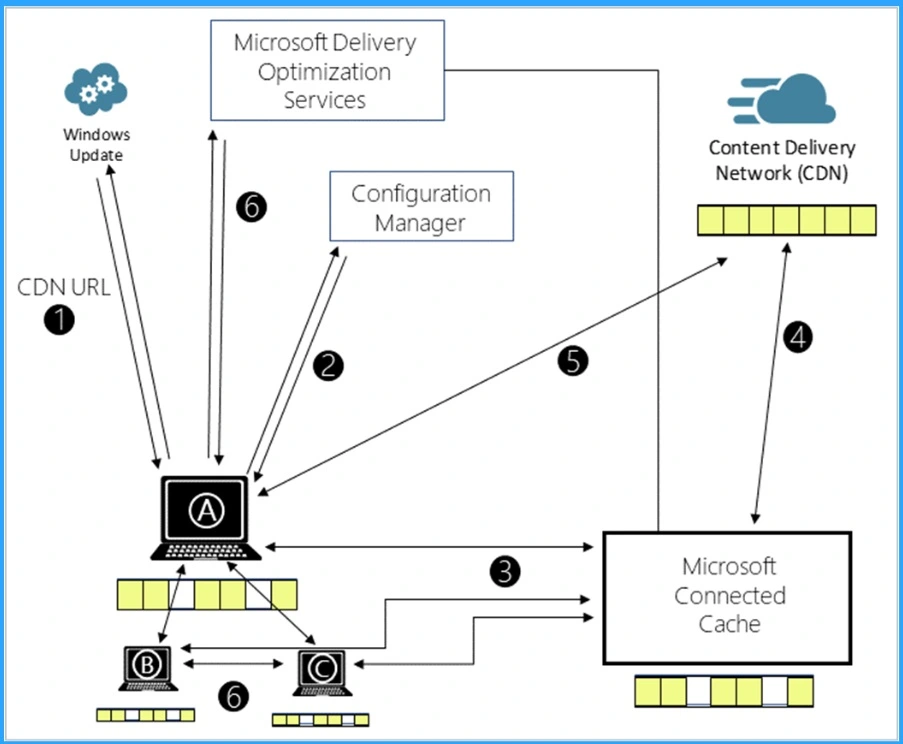
1. Configure Microsoft Connected Cache Endpoint in DOCacheHost
The option 1 explains that you can Configure the Microsoft Connected Cache endpoint in DOCacheHost policy as indicated in the Cache hostname. Additionally, DOCacheHostSource has to be set to 1 or removed as indicated in the Cache hostname source. Note that by default, the DOCacheHost and DOCacheHostSource policies have no value.
2. Mitigated using Group Policies
Some Group Policies are available to work around the issue with Microsoft Connected Cache for Enterprise Customers. It helps to manage and optimize network traffic and content delivery.
- Configure Delivery Optimization: You can use Group Policies to configure delivery optimization. Group policies help manage bandwidth usage by allowing devices to share content, reducing the load on your internet connection.
- Use Windows Update for Business: Configure Windows Update for Business policies to manage how and when updates are delivered.
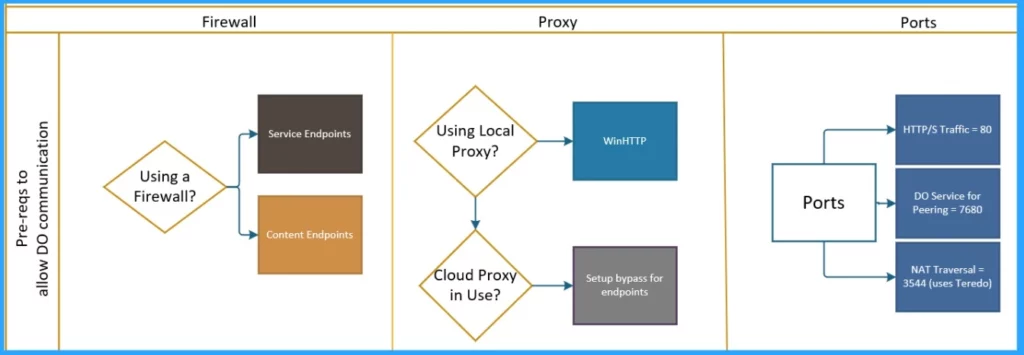
- Fix Windows BSOD Issue caused by Crowdstrike Update Major Impact around the Globe
- Free Generic Windows 10 Product Keys from Microsoft
- Windows 10 21H2 Support is Ending in June
- BitLocker Recovery Boot Issue After July 2024 Security Update
Resolution
Microsoft resolved this issue by releasing Windows updates on July 23, 2024 (KB5040525), and later. We recommend you install the latest security update for your device. It contains important improvements and issue resolutions, including this one.
We are on WhatsApp now. To get the latest step-by-step guides, news, and updates, Join our Channel. Click here. HTMD WhatsApp.
Author
Anoop C Nair has been Microsoft MVP from 2015 onwards for 10 consecutive years! He is a Workplace Solution Architect with more than 22+ years of experience in Workplace technologies. He is also a Blogger, Speaker, and leader of the Local User Group Community. His main focus is on Device Management technologies like SCCM and Intune. He writes about technologies like Intune, SCCM, Windows, Cloud PC, Windows, Entra, Microsoft Security, Career, etc..



Discussion