






Microsoft Shared GPU Powered Windows 365 Cloud PC with NVIDIA RTX vWS Details
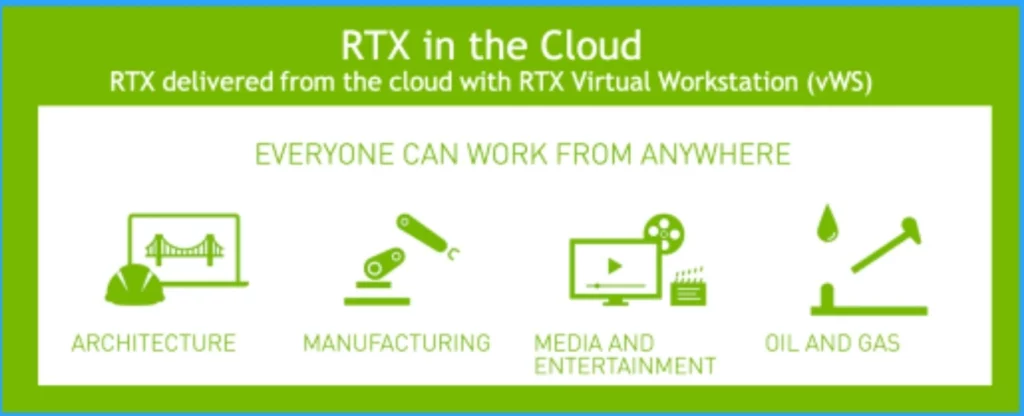
Let’s discuss Microsoft’s shared GPU-Powered Windows 365 Cloud PC with NVIDIA RTX vWS details. Windows 365 Cloud PC now offers an NVIDIA RTX Virtual Workstation (vWS) that helps users improve their graphics-intensive experience.
Do you know what NVIDIA RTX and vWS are? NVIDIA RTX is a professional visual computing platform created by Nvidia, primarily used in workstations for designing complex, large-scale models in architecture, product design, etc.
With this new update, GPU-enabled Cloud PCs enable professionals to access those applications from anywhere and on any device from the cloud. This is already in Preview, and General Availability is coming soon.
Microsoft first announced GPU Powered Windows 365 Cloud PC with NVIDIA RTX vWS at Ignite 2023. In this blog post, I will help you to understand more about Microsoft shared GPU Powered Windows 365 Cloud PC with NVIDIA RTX vWS details.


- Windows 365 Cloud PC Gallery Images Pre-Install New Microsoft Teams
- Windows365 Enterprise Introduces Disk Storage Resizing for Cloud PCs with Step-Up Licenses
- Configure Windows Sandbox vGPU Policy using Intune for Better Graphics Performance or Reduced Attack Surface
Microsoft shared GPU Powered Windows 365 Cloud PC with NVIDIA RTX vWS Details
As I mentioned above, Microsoft shared a GPU-powered Windows 365 Cloud PC with NVIDIA RTX vWS. Nowadays, professional workflows are complex and GPU Powered Windows 365 Cloud PC with NVIDIA RTX vWS.
NVIDIA RTX Technology Details
NVIDIA RTX technology is an important advance in computer graphics that guides new-generation applications. It is transforming the landscape of ray tracing, rasterization, and AI technologies. NVIDIA RTX plays a leading role in the future of cloud technology.
Features of Windows 365 Cloud PC with NVIDIA RTX vWS
NVIDIA GPUs to improve virtual workstations and professional applications delivered from the cloud. With NVIDIA RTX technology, NVIDIA RTX vWS enhances Windows 365 experiences. The following are the features.
| Features of Windows 365 Cloud PC with NVIDIA RTX vWS |
|---|
| It helps to Secure, work-from-anywhere work styles |
| Unified design, simulation, and rendering workflow |
| AI-enhanced applications for design |
| Certified compatibility and peace of mind |
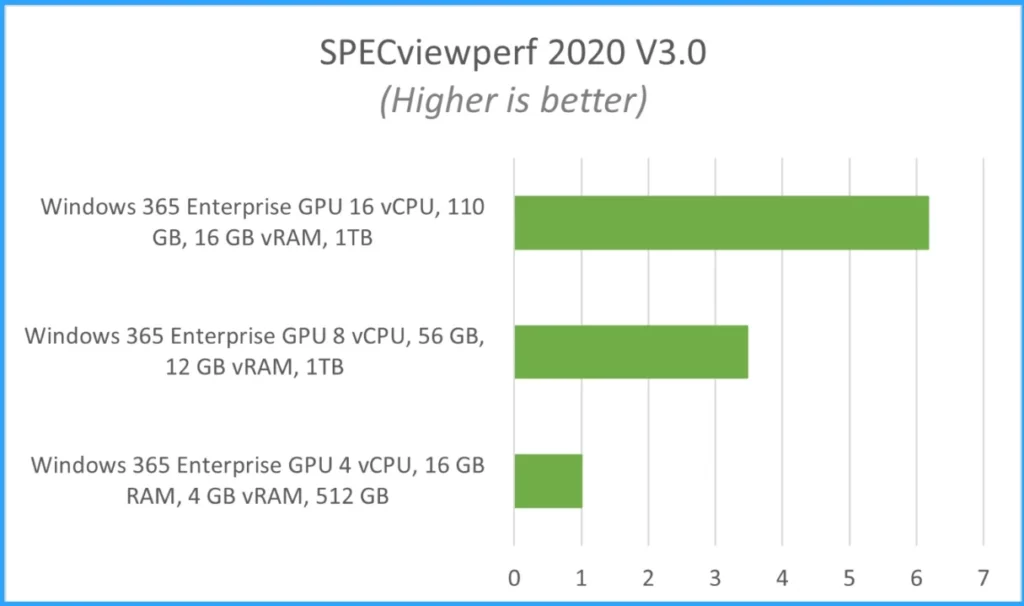
Windows 365 with NVIDIA RTX vWS addresses the needs of users with graphics-intensive workloads. It offers the GPU-enabled configurations such as:
- Windows 365 Enterprise GPU 4 vCPU, 16 GB RAM, 4 GB vRAM, 512 GB
- Windows 365 Enterprise GPU 8 vCPU, 56 GB, 12 GB vRAM, 1TB
- Windows 365 Enterprise GPU 16 vCPU, 110 GB, 16 GB vRAM, 1TB
Performance of GPU-Enabled Configurations
As I mentioned, Windows 365 offers 3 types of GPU-enabled configurations. Each configuration provides a different performance.
- Windows 365 Enterprise GPU 16 vCPU: The Windows 365 Enterprise GPU 16 vCPU, 110 GB, 16 GB vRAM, 1TB is intended for graphics-intensive workloads that demand high performance, require substantial processing power, and have strict latency requirements.
- Windows 365 Enterprise GPU 4 vCPU: Windows 365 Enterprise GPU 4 vCPU, 16 GB RAM, 4 GB vRAM, 512 GB, which is intended for applications that benefit from basic graphic acceleration on one 3840×2160 display or up to two 1920x1080p displays.
- Windows 365 A10 GPU-based Cloud PCs: Windows 365 A10 GPU-based Cloud PCs to an on-premises test where we used a similar server with a virtualized A10 GPU.
- How to Create Cloud PC Maintenance Windows using Microsoft Intune
- Windows 365 Cloud PC 2309 September Service Release New Features Improvements
We are on WhatsApp. To get the latest step-by-step guides and news updates, Join our Channel. Click here –HTMD WhatsApp.
Author
Anoop C Nair is Microsoft MVP! He is a Device Management Admin with more than 20 years of experience (calculation done in 2021) in IT. He is a Blogger, Speaker, and Local User Group HTMD Community leader. His main focus is on Device Management technologies like SCCM 2012, Current Branch, and Intune. He writes about ConfigMgr, Windows 11, Windows 10, Azure AD, Microsoft Intune, Windows 365, AVD, etc.




Discussion