






Microsoft Intune 2407 New Features Early July Update
Let’s discuss Microsoft Intune 2407 New Features Early July Update. Microsoft introduced some innovative features and improvements in the July Service Release of Microsoft Intune. As per the July early update, Intune released 4 new exciting features.
As you know, about Microsoft Intune Service Release? The Intune service updates are released monthly, and new features and improvements are introduced every release. In another blog post, we discussed improvements made to the previous month’s service release 2406. So here, we can check out the early new features of Microsoft Intune Service Release.
Microsoft usually introduces new features to Intune phase-wise. These features are not available for users in the initial stage, and they may be available after a few days or weeks because the rollout is incomplete.
With this early update, Intune brings new features and improvements in Monitoring and Troubleshooting, App management, and Device enrollment. In this blog post, I will help you understand more about Microsoft Intune 2407 New Features Early July Update.


- Turn On Screen Capture Protection in AVD using Intune
- How to Use the New Favorites Menu Option in MS Intune
Microsoft Intune 2407 New Features Early July Update
As mentioned above, we can quickly check Microsoft Intune early July Updates. Microsoft always brings new features and Improvements as per end users feedback related to Microsoft Intune. So, all the features amplify the user experience.
This Microsoft Intune Service Release 2407 allows users to improve their device management and organization productivity.
New Actions for Policies, Profiles, and Apps
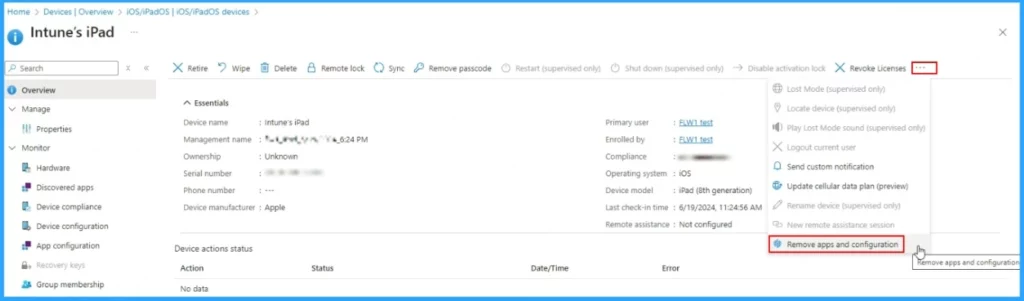
With this update, users can remove and re-apply individual policies, profiles, and apps for iOS/iPadOS devices and Android corporate-owned devices. Intune allows users to apply these actions without changing assignments or group membership. Supported platforms are:
- iOS/iPadOS: Applicable to any iOS or iPadOS Intune managed device.
- Android Enterprise: Applicable to dedicated devices, fully-managed, and corporate-owned work profile devices.
| Supported Items for iOS | Supported Items for Android |
|---|---|
| Custom | Device restrictions |
| Devices features | PKCS certificate |
| Device restrictions | PKCS import certificate |
| SCEP certificate | |
| PKCS certificate | Trusted certificate |
| PKCS import certificate | VPN |
| SCEP certificate | Wi-Fi |
| Trusted certificate | |
| VPN | |
| Wi-Fi |
MAC Address Available from Managed Home Screen App
Exciting News. Mac Address details are now available from the Device Information page of the Managed Home Screen (MHS) app. MHS is the application used for corporate-owned Android Enterprise dedicated devices enrolled via Intune and running in multi-app kiosk mode.
New Configuration Capabilities for Managed Home Screen
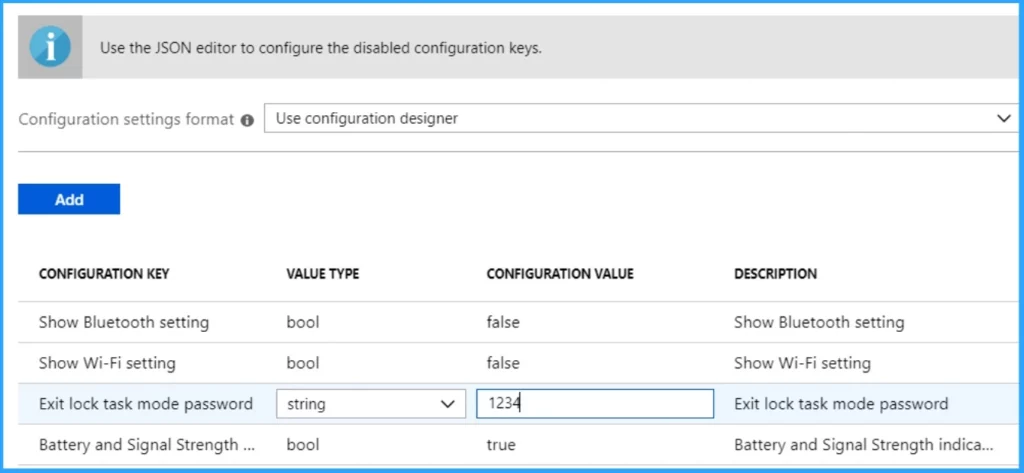
Users can now configure Managed Home Screen (MHS) to enable a virtual app-switcher button that allows them to navigate between apps on their kiosk devices from MHS easily. You can select between a floating or swipe-up app-switcher button.
- The configuration key is virtual_app_switcher_type.
- The possible values are none, float, and swipe_up.

Update for Apple User and Device Enrollments with Company Portal
Microsoft changed the registration process for Apple devices enrolling with the Intune Company Portal. As you know, Previously, Microsoft Entra device registration occurred during enrollment. With this change, registration occurs after enrollment.
These changes are rolling out and will be available to all Microsoft Intune tenants by the end of July. The Company Portal user interface has not been changed.
- For iOS users: Users with notifications enabled will be prompted to return to the Company Portal app for iOS. If they disable notifications, they won’t be alerted but must return to the Company Portal to complete registration.
- For macOS devices: The Company Portal app will detect the installation of the management profile and automatically register the device unless the user closes the app. If they close the app, they must reopen it to complete registration.
Users must complete device registration If you’re using dynamic groups, which rely on device registration to work. Update your user guidance and admin documentation as needed.
If you use Conditional Access (CA) policies, no action is required. When users attempt to sign in to a CA-protected app, they will be prompted to return to the Company Portal to complete registration.
- Microsoft Introduces New Windows Enrollment Attestation Feature in Intune
- Intune and Robopack SaaS Solution for End to End 3rd Party App Lifecycle Management
We are on WhatsApp now. To get the latest step-by-step guides, news, and updates, Join our Channel. Click here. HTMD WhatsApp.
Author
Anoop C Nair is Microsoft MVP! He is a Device Management Admin with more than 20 years of experience (calculation done in 2021) in IT. He is a Blogger, Speaker, and Local User Group HTMD Community leader. His main focus is on Device Management technologies like SCCM 2012, Current Branch, and Intune. He writes about ConfigMgr, Windows 11, Windows 10, Azure AD, Microsoft Intune, Windows 365, AVD, etc.


Discussion