






Microsoft Intune for SCCM Admins Part 1
Let’s explore Microsoft Intune for SCCM Admins Part 1 and its key components. I’m hoping to cover a fair bit about it.
I aimed to become a System Administrator during college because I thought I wouldn’t have to learn anymore. However, I eventually realized that learning is an ongoing process, regardless of your profession. Nowadays, social media and technology news play a significant role, and we should keep ourselves updated with the latest trends and developments.
I don’t want to make this post very long, so I will divide it into multiple posts. I will cover the basics in the first part of Intune for SCCM admins. SCCM is excellent, and it will not die, as per Microsoft. But don’t abandon Intune learning. I strongly recommend going through the Intune learning process.
Microsoft Intune is a cloud-based tool by Microsoft designed to manage user access to company resources and control apps and devices across multiple platforms. Experienced SCCM (Configuration Manager) users are encouraged to transition to Microsoft Intune for future device management needs.

What to Learn Intune? Great Resource Around you!
- LinkedIn Learning Courses for Microsoft Intune
- Learning How to Learn SCCM Intune Azure
- Learn Intune Beginners Guide MDM MAM MIM
- Microsoft Intune for SCCM Admins Part 1
NOTE! – This post is from an SCCM Admin (Windows Device Management) perspective. You might have a different perspective, depending on your job role.
What is Microsoft Intune for SCCM Admins?
Intune can perform most of the SCCM functionalities. According to Microsoft, Intune is built on modern modular cloud components. Intune is a ready-to-use SaaS (Software-As-A-Service) solution from Microsoft for device management. This solution decouples the monolith services from development, deployment, and maintenance perspectives.
Microsoft Intune is a Microsoft Enterprise Mobility Management (EMM) solution. It helps manage all device flavours (Windows, iOS, Android, and macOS) and delivers network and other device management settings.
Microsoft Intune combines Device, Application, Information Protection, Endpoint Protection (antivirus software), Security, and Configuration policy management solutions.
Intune Servers & Management?

Microsoft handles Intune servers and their management. Microsoft Intune is a software-as-a-service (SaaS) solution from Microsoft. The following are some of the useful points with Intune from some of the organizations’ perspectives.
- There is no Server requirement to install Intune (Purchase an EMS or Microsoft 365 license and start using it)—Microsoft manages it.
- Maintenance of servers is not required to update Intune to the latest version, which Microsoft manages.
- Intune Web Console access anytime, anywhere – Managed by Internal IT (Intune Admin)
- Intune admin won’t be able to check and edit Intune Database, unlike SCCM Database, which Microsoft manages.
- Intune Admin doesn’t have the option to go back to the previous Intune version.
- Perform Intune Server-side troubleshooting – Managed by Microsoft
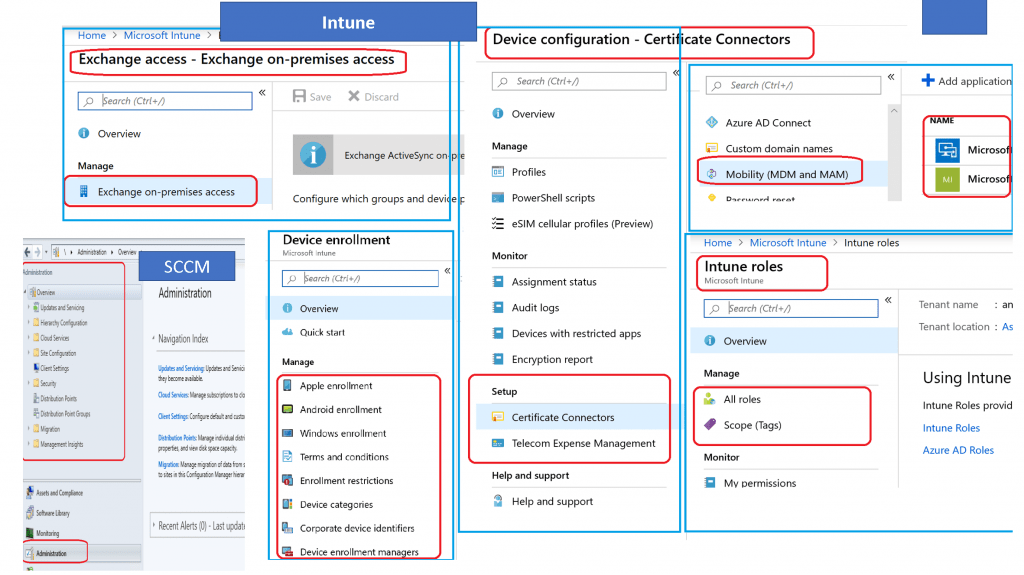
Intune Infra Administration
As I mentioned above, Microsoft manages Intune server infra as this solution is SaaS. As an SCCM admin, all infra-admin tasks are in the Administration workspace. This is the logical view of Microsoft Intune for SCCM Admins.
There are very few or no server admin tasks for Intune admins. However, you might need to install connectors and global policies before starting Intune deployment. Most of these activities are one-time activities. You can just set up Intune and forget.
You might need to configure the following components from an Infra administration perspective.
- Windows Automatic Enrollment Setup (Mobility (MDM and MAM)
- Apple Enrollment Setup
- Android Enrollment Setup
- Certificate Connectors Setup
- TeamViewer Setup
- Device cleanup rules (Optional – Similar to SCCM Maintenance Tasks)
- Windows Autopilot Setup
- Enrollment Restriction Rules Setup
- Intune Roles (RBAC) Setup
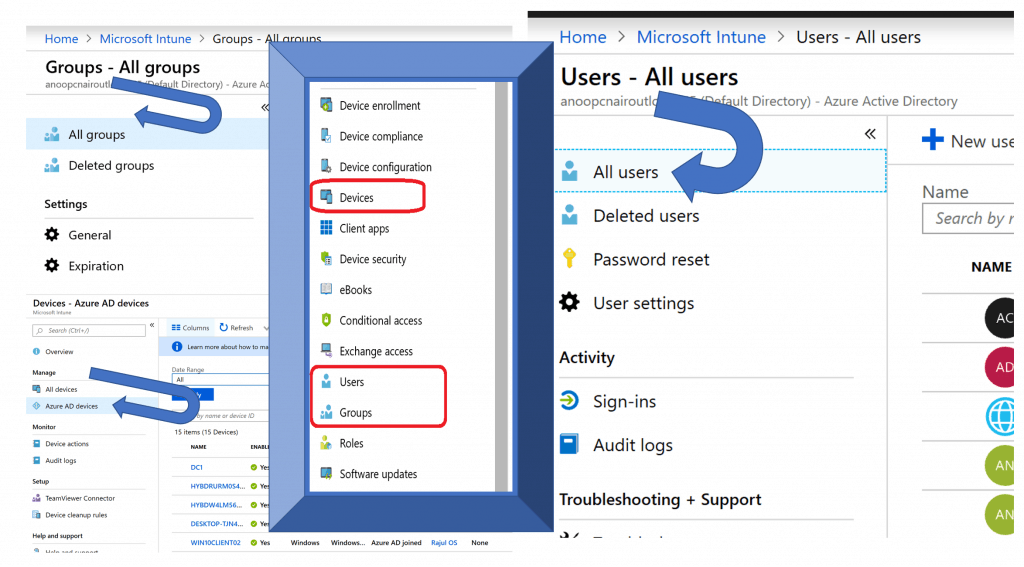
Discovery of User, Groups, & Devices
SCCM can discover the resources from the network (Active Directory, Azure Active AD, or Network Discovery) and install clients on those devices. However, you don’t have to configure this for Intune.
Intune is tightly integrated with Azure Active Directory, and the Intune blade will have all the Device, User, and Group resources available for you to use without making any discovery configurations.
NOTE! – Microsoft Intune Setup steps are explained in HTMD Intune Free Training.
Client Installation & Upgrade
SCCM client installation and enrollment methods are different from Intune enrollment options.
Unlike SCCM, Intune doesn’t have a separate client component. It manages Windows devices using the built-in MDM client agent component of the Windows 10 or Windows 11 Operating System. So, installing the Intune client on Windows 10 devices is unnecessary.
NOTE: Intune supports only Client operating systems. It does NOT support Windows Server Operating systems, so you won’t be able to manage servers with Intune.
NOTE! – Intune Company Portal is an end-user application for Microsoft Intune. This app can be installed as an Intune client component on a Windows 10.
Two main Intune Enrollment Options are explained in the following blog posts. More details are available in my Intune Learning post. Intune enrollment can also be done via Microsoft Autopilot (Windows Autopilot).
- Windows 10 Intune Enrollment Process BYOD Scenario
- Windows 10 Azure AD Join Manual Process – CYOD
- Windows 10 Intune Enrollment with Company Portal
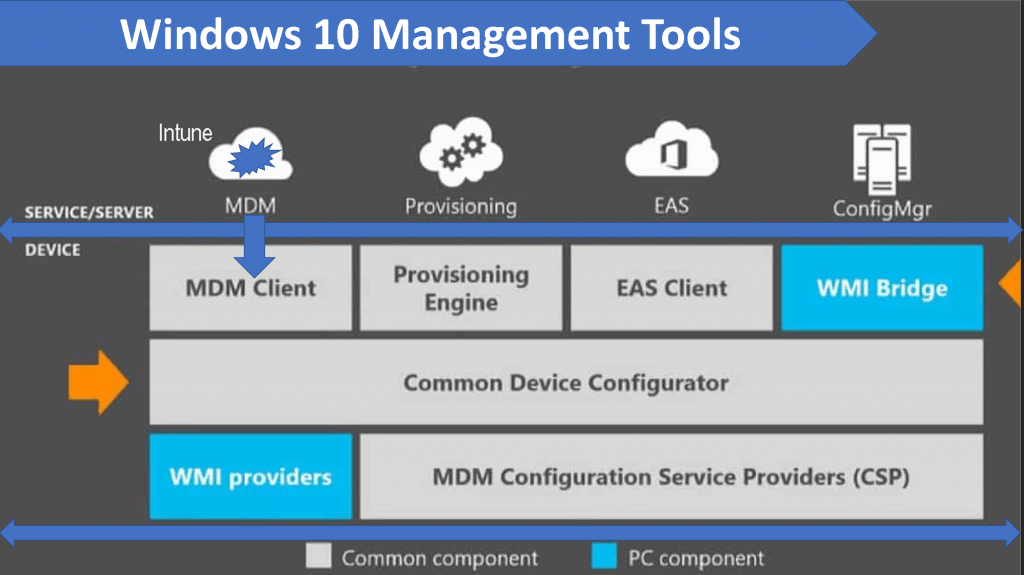
NOTE 1 – No, there is nothing called Intune Client upgrade for Windows devices. Intune is using the Windows 10 MDM component for management. So, the MDM component will get updated with Windows 10 updates.
NOTE 2—Intune also uses the Intune Management Extension agent for Win32 App deployment. The installation and update of this agent are handled automatically in 99% of the scenarios.
Collections & Groups
SCCM collections are used to group the resources that you want to manage. There is no collection concept in Microsoft Intune.
Intune uses Azure AD User & Device groups instead of collections. You can create the following types of groups in Azure AD and deploy applications and policies to them.
- Assigned/Static User AAD Groups
- Assigned/Static Device AAD Groups
- Dynamic User AAD Groups
- Dynamic Device AAD Groups
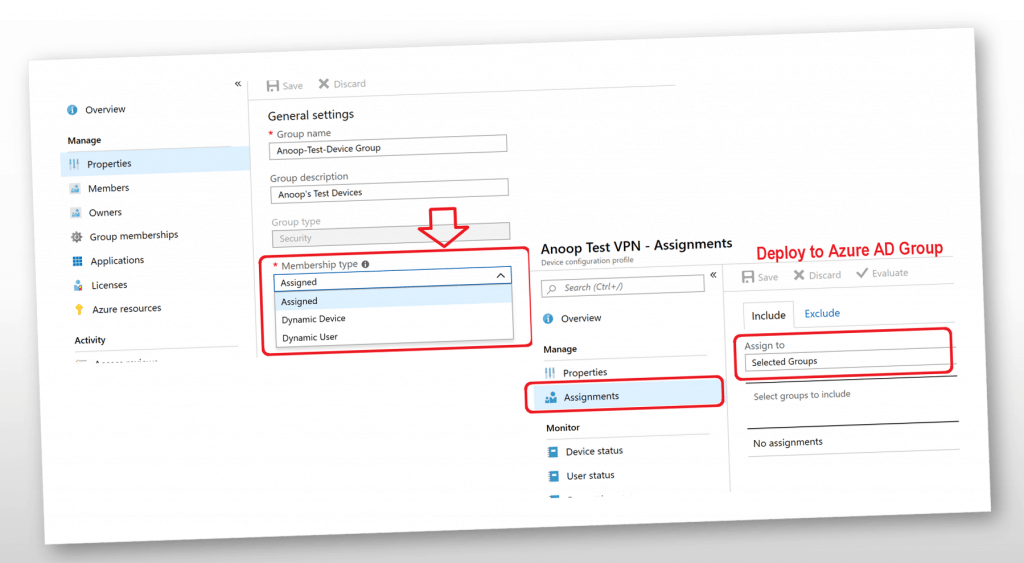
NOTE! – Many years (I feel like) before even Intune had their own separate Intune Groups, and they removed Intune Groups as part of Azure Intune portal migration from the Intune Silverlight portal.
Configuration Items & Compliance Policies
SCCM CI (Configuration Items), Baselines, Compliance Policies, and others are available in Microsoft Intune. The following details would be helpful in Microsoft Intune for the SCCM admin’s context.
In the Intune portal, you can create similar policies (as mentioned above) from Device Compliance, Device Configuration, and Device Security nodes.
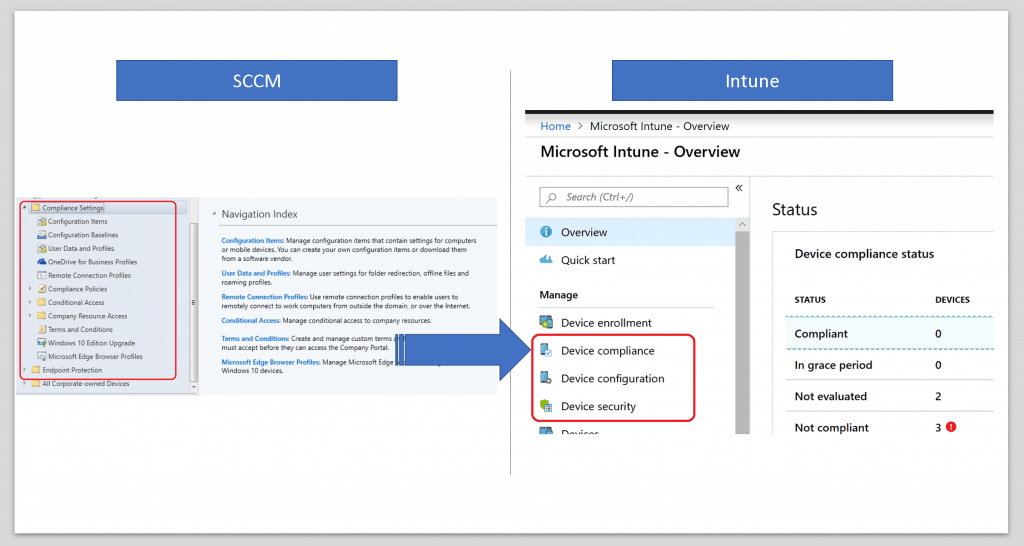
NOTE! – I will continue more settings and details in upcoming posts (Microsoft Intune for SCCM Admins Part 2). So, in this post, I covered the SCCM Administration, Assets & Compliance Workspace.
Resources
We are on WhatsApp. To get the latest step-by-step guides and news updates, Join our Channel. Click here –HTMD WhatsApp.
Author
Anoop C Nair is Microsoft MVP! He is a Device Management Admin with more than 20 years of experience (calculation done in 2021) in IT. He is a Blogger, Speaker, and Local User Group HTMD Community leader. His primary focus is Device Management technologies like SCCM 2012, Current Branch, and Intune. He writes about ConfigMgr, Windows 11, Windows 10, Azure AD, Microsoft Intune, Windows 365, AVD, etc.




Hi. Can I use Microsoft Intune for patching with updates Windows servers that are physical servers non-domain joined ?
StaffYou can not deploy and manage SERVER OSes with Microsoft Intune!!
But SCCM does it? Or there is any software develop by Microsoft that does manage physical non-domain joined Windows servers?
StaffYes SCCM does server patching. But Intune doesn’t support server management. on prem server patching via Azure is one other stuff you can check https://docs.microsoft.com/en-us/azure/automation/automation-update-management
sorry for replying back. i am still in confusion. I know SCCM requires AD integration. so my question is, can I use SCCM (which is part of an AD domain) to do server patching for physical NON-domain servers (servers that belong to WORKGROUP) ?
StaffYes. You can use sccm to patch workgroup or DMZ servers
Is your second part of this in tune story out yet?
StaffIt’s coming out in couple of weeks
Link to Part 2 article:
https://www.anoopcnair.com/microsoft-intune-for-sccm-admins-part-2/
I like to understand the backend flow (at the server level) what will happen when we enroll devices, add applications, create a policy in Intune Console. This is not about Push notification and how complete MDM flow occurs.
I want to know activities that occur only at the server level.